Computer ScienceUnit 114 min read
Networking & Telecommunication: Types, Protocols, Devices & Applications
Unit 1 of Computer Science explains how computers connect globally—network types (LAN, WAN), hardware (routers, switches), protocols (TCP/IP), and real-world uses like internet banking. Learn with diagrams, examples, and exam tips.
TAKEAWAYS:
- Networks connect devices using cables/wireless signals; LAN links nearby computers, WAN spans cities/countries.
- Protocols (like TCP/IP) are rules for data transfer; HTTP sends web pages, FTP transfers files.
- Hardware like routers, switches, and modems direct data; topologies (star, bus) shape network layouts.
- Telecommunication uses satellites, fiber optics, and mobile networks to transmit data globally.
- Advantages: Shared resources, fast communication, remote work; disadvantages: security risks, cost.
- Exam focus: Match devices to functions (e.g., "Which connects LAN to WAN?"), explain protocols, and describe network types.
What is a Network?
A network is a group of computers or devices connected to share resources (like printers or internet) and communicate. Think of it like a highway system where:
- Devices = cars/trucks (computers, phones, servers).
- Cables/wireless signals = roads (Ethernet, Wi-Fi).
- Rules = traffic laws (protocols like TCP/IP).
Types of Networks
Networks are classified by size and scope:
mindmap
  root((Network Types))
    LAN
      "Local Area Network (e.g., school lab, home Wi-Fi)"
      "Covers small area (one building)"
      "Uses Ethernet/Wi-Fi"
    MAN
      "Metropolitan Area Network (e.g., city-wide Wi-Fi)"
      "Covers a city"
      "Uses fiber optics"
    WAN
      "Wide Area Network (e.g., Internet)"
      "Covers countries/continents"
"Uses satellites, undersea cables"Example:
- Your home Wi-Fi is a LAN.
- The internet connecting Nepal to the world is a WAN.
Network Topologies: How Devices Connect
The layout of a network is called its topology. Common types:
| Topology | Diagram | Description | Advantages | Disadvantages |
|---|---|---|---|---|
| Star | mermaid<br>graph TD<br> A[Central Hub]<br> A --> B[PC 1]<br> A --> C[PC 2]<br> A --> D[Printer]<br> |
All devices connect to a central hub (e.g., router). | Easy to manage, add/remove devices. | Hub failure crashes the network. |
| Bus | mermaid<br>graph LR<br> A[Backbone Cable] --> B[PC 1]<br> A --> C[PC 2]<br> A --> D[Printer]<br> |
All devices share a single cable (like a bus route). | Cheap to install. | Cable failure affects all devices. |
| Ring | mermaid<br>graph TD<br> A[PC 1] --> B[PC 2]<br> B --> C[PC 3]<br> C --> A<br> |
Devices form a closed loop; data travels in one direction. | Equal access, no collisions. | One device failure breaks the ring. |
| Mesh | mermaid<br>graph TD<br> A[PC 1] --> B[PC 2]<br> A --> C[PC 3]<br> B --> C<br> |
Every device connects to every other device (or nearby devices). | Highly reliable, fast. | Expensive, complex setup. |
Worked Example: Which topology would you use for a school lab where adding/removing computers often? Answer: Star topology because it’s easy to manage and add devices without disrupting others.
Network Hardware: The Building Blocks
Devices that help networks function:
| Device | Function | Example | figure |
|---|---|---|---|
| Hub | Sends data to all connected devices (no intelligence). | Old Ethernet hubs. | figure<br>{"type":"network","nodes":["Hub","PC1","PC2","PC3"],"edges":[["Hub","PC1"],["Hub","PC2"],["Hub","PC3"]],"caption":"Hub broadcasts to all devices."} |
| Switch | Sends data only to the intended device (smart hub). | Modern routers/switches. | figure<br>{"type":"network","nodes":["Switch","PC1","PC2","Server"],"edges":[["Switch","PC1"],["Switch","Server"]],"caption":"Switch directs data to PC1 only."} |
| Router | Connects different networks (e.g., LAN to WAN) and routes data. | Home Wi-Fi router. | figure<br>{"type":"network","nodes":["LAN","Router","WAN"],"edges":[["LAN","Router"],["Router","WAN"]],"caption":"Router connects LAN to the internet (WAN)."} |
| Modem | Converts digital signals (computer) to analog signals (phone line/cable). | Provided by ISPs (e.g., NTC, Worldlink). | figure<br>{"type":"layers","layers":["Computer (Digital)","Modem","Phone Line (Analog)"],"arrow":"Signal conversion","caption":"Modem’s role in data transmission."} |
| Repeater | Boosts weak signals over long distances. | Used in long Ethernet cables. | figure<br>{"type":"network","nodes":["PC A","Repeater","PC B"],"edges":[["PC A","Repeater"],["Repeater","PC B"]],"caption":"Repeater extends signal range."} |
Key Idea:
- Hub = Dumb broadcaster (like a megaphone).
- Switch = Smart director (like a traffic cop).
- Router = Postman (sends letters to the right city).
Network Protocols: Rules for Communication
Protocols are rules that ensure devices communicate correctly. Key protocols:
| Protocol | Full Name | Purpose | Example Use Case |
|---|---|---|---|
| TCP/IP | Transmission Control Protocol/Internet Protocol | Ensures data is reliably delivered (like a tracked parcel). | Internet communication. |
| HTTP/HTTPS | HyperText Transfer Protocol | Transfers web pages (HTTP) or secure web pages (HTTPS). | Loading Google.com. |
| FTP | File Transfer Protocol | Uploads/downloads files between computers. | Downloading software from a server. |
| SMTP | Simple Mail Transfer Protocol | Sends emails from server to server. | Sending an email to Gmail. |
| DNS | Domain Name System | Converts website names (e.g., google.com) to IP addresses. |
Typing "facebook.com" loads the site. |
How TCP/IP Works (Simplified):
- Data is split into packets (like letters in an envelope).
- Packets travel independently (some may take different routes).
- The destination reassembles packets in the correct order.
Worked Example: Why does a webpage sometimes load slowly? Answer:
- Packets may take different routes (some faster, some slower).
- Network congestion (too many users) delays packets.
- DNS lookup (converting
youtube.comto an IP) adds time.
Telecommunication: Sending Data Over Distance
Telecommunication uses media (physical paths) and technologies to transmit data:
| Medium | Type | Description | Speed | Example |
|---|---|---|---|---|
| Twisted Pair | Wired | Copper wires twisted to reduce interference. | Medium | Phone lines, Ethernet (Cat5/Cat6). |
| Coaxial Cable | Wired | Thick copper core + shielding (used for TV/cable internet). | High | Cable TV, old Ethernet. |
| Fiber Optic | Wired | Thin glass fibers carrying light pulses (fastest). | Very High | Undersea cables, ISP backbones. |
| Microwave | Wireless | Uses radio waves (line-of-sight, like satellite dishes). | High | Long-distance phone calls. |
| Satellite | Wireless | Signals bounce off satellites in space. | Medium-High | Global TV, GPS. |
| Wi-Fi | Wireless | Uses radio waves (short range, e.g., home network). | Medium | Home Wi-Fi routers. |
| Bluetooth | Wireless | Short-range personal area network (PAN). | Low | Headphones, keyboards. |
Visual Comparison:
Worked Example: Which medium would you use to connect two cities 500 km apart? Answer: Fiber optic cables (fastest and most reliable for long distances) or microwave towers (if laying cables is difficult).
Applications of Networking and Telecommunication
Internet Banking:
- Uses HTTPS (secure protocol) to transfer money.
- Routers and fiber optics ensure fast, secure transactions.
Video Conferencing (Zoom/Google Meet):
- Uses Wi-Fi/satellite for wireless transmission.
- Protocols: RTP (Real-time Transport Protocol) for audio/video.
Online Education (e.g., SWAYAM, Khan Academy):
- LAN/WAN connects students to servers.
- DNS resolves website names.
Emergency Services (Police, Ambulance):
- Microwave/satellite ensures communication even in remote areas.
Advantages and Disadvantages of Networking
mindmap
  root((Networking: Pros & Cons))
    Advantages
      "Share resources (printers, internet)"
      "Fast communication (emails, calls)"
      "Remote work (access files from anywhere)"
      "Cost-effective (shared hardware/software)"
    Disadvantages
      "Security risks (hacking, viruses)"
      "High initial cost (hardware, setup)"
      "Dependence on service providers (ISP downtime)"
      "Complexity (requires IT support)"
Common Networking Problems and Solutions
| Problem | Cause | Solution |
|---|---|---|
| No Internet Connection | Faulty router/modem. | Restart devices, check cables. |
| Slow Speed | Too many devices, weak signal. | Use Wi-Fi extender, upgrade to fiber. |
| Unable to Access Shared Printer | Incorrect IP address. | Check network settings, reconnect. |
| Viruses Spread Across Network | Infected device. | Install antivirus, update firewall. |
Exam Tip: How to Score Full Marks
Diagrams Are Key:
- Draw topologies (star, bus) and network devices (router, switch) in exams.
- Label all parts (e.g., "Central Hub" in star topology).
Match the Device to the Function:
- Router = Connects LAN to WAN.
- Switch = Directs data to specific devices.
- Modem = Converts digital to analog signals.
Protocol Shortcuts:
- HTTP/HTTPS = Web pages.
- FTP = File transfer.
- SMTP = Email sending.
Compare Networks:
- LAN = Small area (home/school).
- WAN = Large area (internet).
- MAN = City-wide (e.g., municipal Wi-Fi).
Real-World Applications:
- Link networking to banking, education, or emergency services in answers.
SEE-Style Questions and Answers
Short Answer (2 marks)
Q1: Differentiate between LAN and WAN. Answer:
| Feature | LAN | WAN |
|---|---|---|
| Area | Small (home, school) | Large (cities, countries) |
| Coverage | One building | Multiple countries |
| Speed | Faster | Slower |
| Example | Home Wi-Fi | Internet |
Q2: What is the role of a router? Answer: A router connects different networks (e.g., your home LAN to the internet WAN) and routes data packets to their destination using IP addresses.
Long Answer (5 marks)
Q3: Explain the star topology with a diagram. What are its advantages and disadvantages? Answer: Diagram:
Explanation:
- All devices connect to a central hub (e.g., router).
- If one device fails, others remain connected.
Advantages:
- Easy to add/remove devices.
- Centralized management (hub controls all traffic).
- Low collision risk (data doesn’t interfere).
Disadvantages:
- Hub failure crashes the entire network.
- More cabling needed compared to bus topology.
Practical (3 marks)
Q4: Identify the devices labeled A, B, and C in the following network setup:
[PC] --(A)--> [Device] --(B)--> [Internet] --(C)--> [Remote Server]
Answer:
- A: Network Cable (Ethernet) or Wi-Fi Signal.
- B: Router (connects LAN to WAN).
- C: Modem (converts digital signals for the internet) or Fiber Optic Cable (transmits data over long distances).
Summary Checklist
Before the exam, ensure you can: ✅ Define LAN, WAN, MAN and give examples. ✅ Draw and explain star, bus, ring, and mesh topologies. ✅ Identify hub, switch, router, modem and their functions. ✅ Explain TCP/IP, HTTP, FTP, SMTP, DNS protocols. ✅ Compare wired (twisted pair, fiber) vs. wireless (Wi-Fi, satellite) media. ✅ Describe two real-world applications of networking (e.g., banking, education). ✅ List advantages/disadvantages of networking.
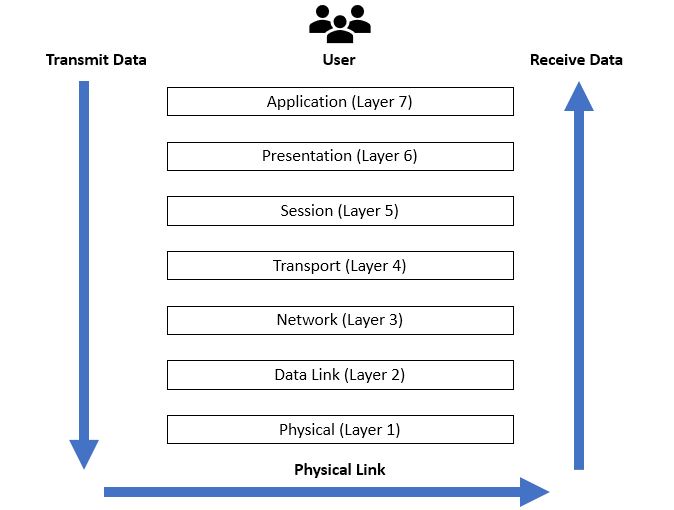 The OSI model has 7 layers, but TCP/IP uses 4 (Application, Transport, Internet, Network Access). (Image: Ardika6879, CC BY-SA 4.0, via Wikimedia Commons)
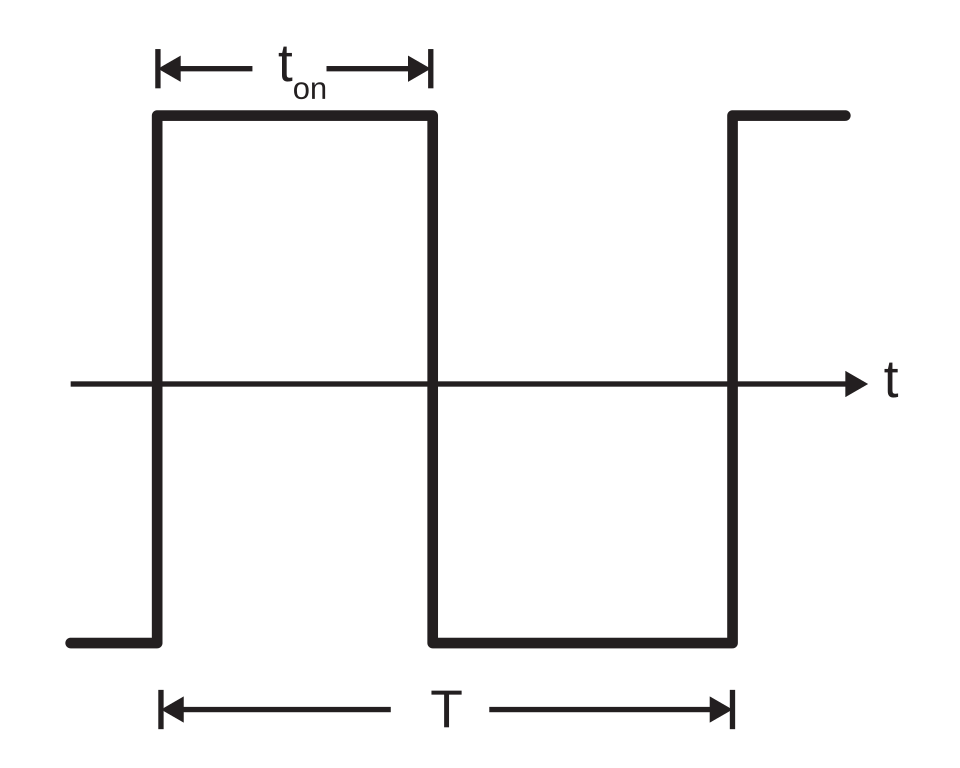 Fiber optics use light pulses for ultra-fast data transmission. (Image: Offaperry, CC BY-SA 4.0, via Wikimedia Commons)
Based on the NEB Class 10 syllabus for Computer Science (Computer), unit 1.
Discussion
Loading…