Computer ScienceUnit 68 min read
Algorithms & Flowcharts: Logic, Steps & Design
Unit 6 of Computer Science teaches how to break problems into logical steps (algorithms) and represent them visually (flowcharts), with real-world examples, symbols, and NEB-style questions to master exam skills.
TAKEAWAYS:
- An algorithm is a step-by-step problem-solving method with clear inputs, outputs, and finite steps.
- Flowcharts use standardized symbols (oval, rectangle, diamond) to show logic visually.
- Pseudocode is a mix of English and code to write algorithms before programming.
- Decision-making in flowcharts uses diamond shapes with yes/no paths.
- Loops (repetition) are shown with arrows returning to earlier steps.
- NEB exams test designing flowcharts, identifying errors, and matching symbols to logic.
What is an Algorithm?
An algorithm is a set of clear, finite steps to solve a problem or perform a task. It must:
- Have a defined start and end.
- Use input(s) (e.g., numbers, text).
- Produce output(s) (e.g., results, decisions).
- Follow logical steps (no guesswork).
Why learn algorithms?
- Computers only understand step-by-step instructions.
- Helps in programming (e.g., C, Python).
- Used in daily tasks (e.g., making tea, following a recipe).
Example: Algorithm to "Make a Cup of Tea"
- Start
- Boil water in a kettle.
- Put a tea bag in a cup.
- Pour hot water into the cup.
- Wait for 3 minutes.
- Remove the tea bag.
- Add sugar/milk (if needed).
- End
Visual: Algorithm Steps
flowchart TD
    A["Start"] --> B["Boil water"]
    B --> C["Put tea bag in cup"]
    C --> D["Pour hot water"]
    D --> E["Wait 3 mins"]
    E --> F["Remove tea bag"]
    F --> G["Add sugar/milk"]
    G --> H["End"]
Types of Algorithms
Algorithms can be classified based on their purpose:
| Type | Description | Example |
|---|---|---|
| Sequential | Steps execute one after another. | Making tea (above). |
| Selection | Chooses steps based on conditions. | "If it’s raining, take an umbrella." |
| Iteration | Repeats steps until a condition is met. | "Keep stirring until sugar dissolves." |
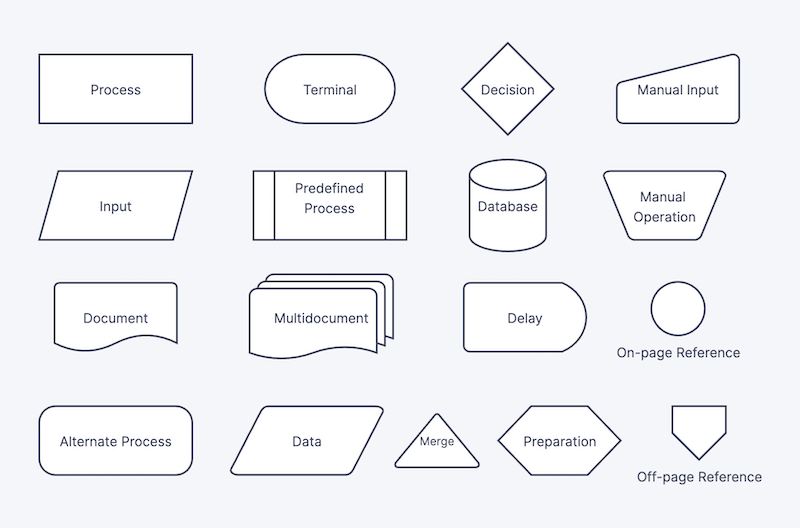 Standard flowchart symbols for start, process, decision, and end (Image: Hautit, CC BY-SA 4.0, via Wikimedia Commons)
Writing Algorithms: Pseudocode
Pseudocode is a mix of English and code to write algorithms before programming. It is easy to read and convert to real code.
Example: Pseudocode for "Find the Largest of 3 Numbers"
START
Input three numbers: A, B, C
IF A > B THEN
    IF A > C THEN
        Largest = A
    ELSE
        Largest = C
    ENDIF
ELSE
    IF B > C THEN
        Largest = B
    ELSE
        Largest = C
    ENDIF
ENDIF
Output "The largest number is: Largest"
END
Visual: Pseudocode Flow
flowchart TD
    A["Start"] --> B["Input A, B, C"]
    B --> C{"Is A > B?"}
    C -->|"Yes"| D{"Is A > C?"}
    C -->|"No"| E{"Is B > C?"}
    D -->|"Yes"| F["Largest = A"]
    D -->|"No"| G["Largest = C"]
    E -->|"Yes"| F
    E -->|"No"| G
    F --> H["Output Largest"]
    G --> H
    H --> I["End"]
Flowcharts: Drawing Logic Visually
A flowchart is a graphical representation of an algorithm using standard symbols:
| Symbol | Name | Purpose | Example |
|---|---|---|---|
| Oval | Terminator | Start/End of the flowchart. | "Start", "End" |
| Rectangle | Process | Actions (e.g., calculations). | "Add 2 numbers" |
| Diamond | Decision | Yes/No questions. | "Is A > B?" |
| Parallelogram | Input/Output | Data going in/out. | "Input X", "Print result" |
| Arrow | Flow | Direction of steps. | Connects symbols. |
Standard symbols for start, process, decision, and input/output (Image: Hautit, CC BY-SA 4.0, via Wikimedia Commons)
Designing a Flowchart: Step-by-Step
Let’s design a flowchart for: "Check if a number is even or odd."
Steps:
- Start
- Input a number (
N). - Divide
Nby 2. Is the remainder0?- Yes → "Even"
- No → "Odd"
- End
Flowchart:
flowchart TD
    A["Start"] --> B["Input N"]
    B --> C["Divide N by 2"]
    C --> D{"Remainder = 0?"}
    D -->|"Yes"| E["Even"]
    D -->|"No"| F["Odd"]
    E --> G["End"]
    F --> G
Common Mistakes in Flowcharts
- Missing Start/End: Always use ovals for start/end.
- Incorrect Arrows: Arrows must show logical flow (no crossing unless necessary).
- Unclear Decisions: Diamonds must have only two paths (Yes/No).
- No Input/Output: Always show where data enters/exits.
Advantages and Disadvantages of Flowcharts
| Advantages | Disadvantages |
|---|---|
| Easy to understand and debug. | Can become complex for large programs. |
| Helps visualize logic before coding. | Requires time to draw neatly. |
| Useful for team projects. | Limited to simple logic (not all programming features). |
Flowchart vs. Pseudocode
| Feature | Flowchart | Pseudocode |
|---|---|---|
| Format | Visual (symbols + arrows). | Text-based (English + code). |
| Readability | Good for quick understanding. | Better for detailed steps. |
| Use Case | Best for simple logic. | Better for complex algorithms. |
| Conversion | Can be converted to code. | Easier to write code directly. |
Solved Example: NEB-Style Question
Question: Draw a flowchart to find the sum of the first 10 natural numbers.
Solution:
- Start
- Initialize
sum = 0andi = 1. - Add
itosum. - Increment
iby 1 (i = i + 1). - Is
i ≤ 10?- Yes → Repeat from step 3.
- No → Output
sum.
- End
Flowchart:
flowchart TD
    A["Start"] --> B["sum = 0, i = 1"]
    B --> C["sum = sum + i"]
    C --> D["i = i + 1"]
    D --> E{"Is i ≤ 10?"}
    E -->|"Yes"| C
    E -->|"No"| F["Output sum"]
    F --> G["End"]
NEB Board-Style Questions (Practice)
Short Answer:
- What is the difference between a process and a decision symbol in a flowchart?
Design:
- Draw a flowchart to check if a student passes (pass mark: 40). Input: marks.
Identify Errors:
- The following flowchart has a mistake. Correct it:
(Hint: Where should the "End" go?)Start → Input X → Is X > 10? → (Yes → End) → (No → Output "Small")
- The following flowchart has a mistake. Correct it:
Pseudocode:
- Write pseudocode to find the factorial of a number N.
Match the Symbols:
- Match the following symbols to their names:
- Oval, Rectangle, Diamond, Parallelogram.
- Match the following symbols to their names:
Exam Tip: How to Score Full Marks
Flowcharts:
- Use standard symbols (no creativity).
- Label all arrows clearly.
- Show start/end ovals.
- For decisions, always have two paths (Yes/No).
Pseudocode:
- Use clear English (no programming language).
- Indent IF-ELSE blocks for readability.
- Show all steps, including input/output.
Common Errors to Avoid:
- Forgetting to initialize variables (e.g.,
sum = 0). - Incorrect loops (e.g., infinite loops).
- Unclear decisions (e.g., "Is A big?" → specify "A > 10?").
- Forgetting to initialize variables (e.g.,
Time Management:
- Spend 2-3 minutes planning the flowchart before drawing.
- For pseudocode, write steps in order first, then refine.
Final Note: Algorithms and flowcharts are the foundation of programming. Master them, and you’ll ace NEB exams and write better code! Practice designing flowcharts for daily tasks (e.g., "How to pack a bag for school"). Happy learning! 🚀
Based on the NEB +2 Management syllabus for Computer Science (Comp), unit 6.
Discussion
Loading…