Computer ScienceUnit 910 min read
HTML & CSS: Structure, Styling, and Web Page Basics
Unit 9 of Computer Science introduces how to build web pages using HTML (structure) and CSS (style), including tags, attributes, selectors, and basic layouts. Learn with visuals, examples, and NEB-style questions to ace your exam.
TAKEAWAYS:
- HTML defines the structure of a webpage using tags like
<html>,<head>, and<body>. - CSS controls appearance (colors, fonts, spacing) using selectors like
p {color: red;}. - Attributes (e.g.,
href,src) add extra info to HTML tags. - Common tags (
<h1>,<img>,<a>,<table>) build interactive pages. - CSS properties (
margin,padding,background) refine design. - NEB exams test basic syntax, tag usage, and simple styling—practice writing code!
1. Introduction to Web Technology
Web technology is the software and protocols used to create and display web pages. The two key languages are:
- HTML (HyperText Markup Language): Defines the content and structure of a webpage.
- CSS (Cascading Style Sheets): Controls the look and feel (colors, fonts, layouts).
Why are they used together? HTML gives a webpage its skeleton, while CSS adds beauty and style.
2. HTML Basics
HTML is a markup language—it uses tags to define elements on a webpage.
Key HTML Tags
| Tag | Purpose | Example |
|---|---|---|
<html> |
Root element of an HTML page | <html>...</html> |
<head> |
Contains meta-info (title, links) | <head><title>My Page</title></head> |
<body> |
Holds visible content | <body>Hello World!</body> |
<h1> to <h6> |
Headings (h1 = largest) | <h1>Heading 1</h1> |
<p> |
Paragraph text | <p>This is a paragraph.</p> |
<a> |
Hyperlink (clickable link) | <a href="https://example.com">Click me</a> |
<img> |
Image (requires src attribute) |
<img src="image.jpg" alt="A picture"> |
<table> |
Creates a table | <table><tr><td>Data</td></tr></table> |
Example: A Simple HTML Page
<!DOCTYPE html>
<html>
<head>
    <title>My First Page</title>
</head>
<body>
    <h1>Welcome to My Website</h1>
    <p>This is a <strong>paragraph</strong> with <em>bold</em> and <i>italic</i> text.</p>
    <img src="logo.png" alt="Company Logo">
</body>
</html>
What does this do?
- Displays a webpage with:
- A title ("My First Page") in the browser tab.
- A heading ("Welcome to My Website").
- A paragraph with bold and italic text.
- An image named
logo.png.
3. HTML Attributes
Attributes provide extra information inside HTML tags. Common Attributes:
| Attribute | Used in Tag | Purpose | Example |
|---|---|---|---|
href |
<a> |
Link destination URL | <a href="page.html">Link</a> |
src |
<img> |
Image file path | <img src="photo.jpg"> |
alt |
<img> |
Alternative text (for accessibility) | <img src="logo.png" alt="Logo"> |
width |
<img>, <table> |
Sets width in pixels | <img src="logo.png" width="100"> |
style |
Any tag | Inline CSS styling | <p style="color: blue;">Blue text</p> |
Example: Link with Attributes
<a href="https://www.neb.gov.np" target="_blank" title="Visit NEB">NEB Official Site</a>
href: Link URL.target="_blank": Opens in a new tab.title: Tooltip text on hover.
4. CSS Basics
CSS makes web pages look good by styling HTML elements.
How CSS Works
CSS uses selectors to target HTML elements and properties to define styles.
Example CSS Rules:
/* Select all paragraphs and make them red */
p {
    color: red;
}

/* Select only the first heading and make it blue */
h1 {
    color: blue;
}

/* Select an element with a specific class */
.highlight {
    background-color: yellow;
}
How to Link CSS to HTML?
- Internal CSS (inside
<head>):<head> <style> body { background-color: lightgray; } </style> </head> - External CSS (separate
.cssfile, better for large sites):<head> <link rel="stylesheet" href="styles.css"> </head>
5. Common CSS Properties
| Property | Purpose | Example |
|---|---|---|
color |
Text color | p { color: green; } |
background-color |
Background color | body { background-color: #f0f0f0; } |
font-family |
Text font | h1 { font-family: Arial; } |
margin |
Space outside an element | div { margin: 20px; } |
padding |
Space inside an element | p { padding: 10px; } |
text-align |
Aligns text (left, center, right) | p { text-align: center; } |
Example: Styling a Button
.button {
    background-color: #4CAF50; /* Green */
    color: white;
    padding: 10px 20px;
    border: none;
    border-radius: 5px;
}
HTML to use it:
<button class="button">Click Me</button>
6. HTML & CSS Together: A Complete Example
HTML (index.html):
<!DOCTYPE html>
<html>
<head>
    <title>My Styled Page</title>
    <link rel="stylesheet" href="styles.css">
</head>
<body>
    <h1 class="main-heading">Welcome!</h1>
    <p class="intro">This is a styled paragraph.</p>
    <button class="button">Submit</button>
</body>
</html>
CSS (styles.css):
.main-heading {
    color: #2c3e50;
    text-align: center;
}

.intro {
    font-family: Times New Roman;
    font-size: 16px;
}

.button {
    background-color: #3498db;
    color: white;
    padding: 10px 15px;
    border: none;
    border-radius: 5px;
}
Result:
- A centered blue heading.
- A styled paragraph.
- A blue button.
7. Common HTML & CSS Mistakes
| Mistake | Fix |
|---|---|
Forgetting to close tags (<p>) |
Always use </p>, </div>, etc. |
| Using inline CSS too much | Prefer external CSS for better organization. |
Not setting alt in <img> |
Always add alt for accessibility. |
| Incorrect indentation | Use 2-4 spaces for readability. |
Missing DOCTYPE declaration |
Always start with <!DOCTYPE html>. |
8. NEB Exam Tips
Memorize Basic Tags
- Know
<html>,<head>,<body>,<h1>to<h6>,<p>,<a>,<img>,<table>. - NEB often asks: Write HTML for a simple webpage with headings, paragraphs, and a link.
- Know
Understand Attributes
- Focus on
href,src,alt,width,style. - Example Question:
"Write HTML code to display an image named
flag.jpgwith a width of 200px and alternative text 'Nepal Flag'."
- Focus on
CSS Selectors & Properties
- Know
color,background-color,font-family,margin,padding. - Example Question:
"Write CSS to make all
<h2>headings red and centered."
- Know
Practice Writing Code
- NEB exams may ask for short code snippets (e.g., a table, a styled button).
- Example: "Create an HTML table with 2 rows and 3 columns."
Avoid Common Errors
- NEB deducts marks for:
- Unclosed tags (
<p>Textwithout</p>). - Wrong attribute names (
hrfinstead ofhref). - Missing
DOCTYPE.
- Unclosed tags (
- NEB deducts marks for:
9. NEB-Style Practice Questions
Short Answer (1 mark each)
- What is the purpose of the
<head>tag in HTML? - Write the HTML code to create a hyperlink to
https://www.example.comwith the text "Visit Example". - What CSS property is used to change the background color of an element?
Programming (3-5 marks)
Write HTML code to create a webpage with:
- A heading "My First Webpage".
- A paragraph with your name.
- An image named
profile.jpgwith width 150px and alternative text "My Photo".
Write CSS to:
- Make all
<p>elements have a blue color. - Center-align all
<h1>headings. - Add a 10px padding to all
<div>elements.
- Make all
True/False (1 mark each)
- The
<title>tag is used to display text in the webpage body. (False) - The
srcattribute is used in the<a>tag to define a link. (False,hrefis used in<a>.) - CSS can be added to HTML using the
<style>tag inside<head>. (True)
10. Summary Table: HTML vs. CSS
| Feature | HTML | CSS |
|---|---|---|
| Purpose | Defines structure (content, headings, links) | Defines style (colors, fonts, layouts) |
| Example | <h1>Title</h1>, <a href="...">Link</a> |
h1 { color: red; }, p { font-size: 14px; } |
| Where Used | Inside <body> (and <head> for meta) |
Inside <style> tags or external .css file |
| Key Tags/Selectors | <html>, <head>, <body>, <p>, <a> |
p, h1, .class, #id |
| Attributes | href, src, alt, width |
None (uses properties like color, margin) |
11. Final Checklist Before Exam
✅ Can you write a basic HTML structure (<!DOCTYPE>, <html>, <head>, <body>)?
✅ Do you know 5 common HTML tags (<h1>, <p>, <a>, <img>, <table>)?
✅ Can you link CSS to HTML (internal & external)?
✅ Do you remember 3 CSS properties (color, background-color, font-family)?
✅ Can you debug common errors (missing tags, wrong attributes)?
 A visual representation of HTML5 structure. (Image: W3C, CC BY 3.0, via Wikimedia Commons)
 The CSS3 logo showing styling capabilities. (Image: daPhyre (File:CSS3 and HTML5 logos and wordmarks.svg) Elfi (, CC BY 3.0, via Wikimedia Commons)
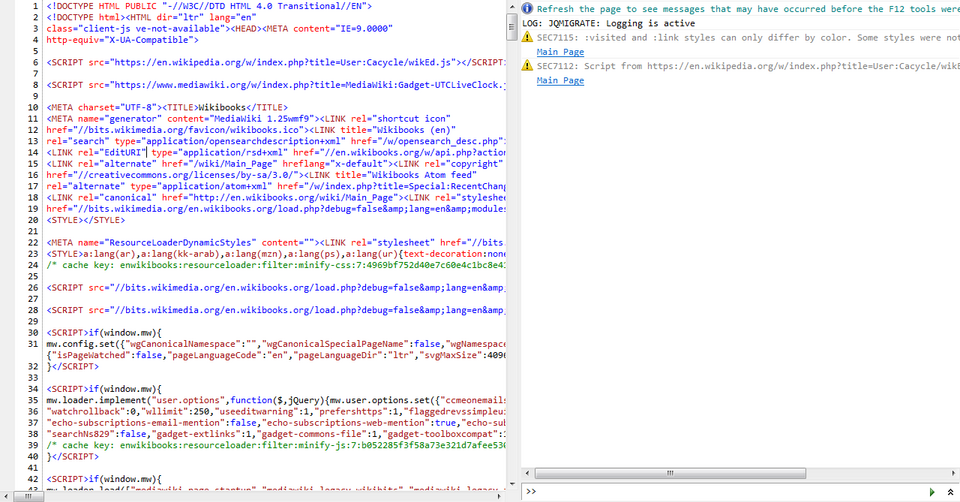 How CSS is applied in real-time (Inspect Element). (Image: Leaderboard, CC BY-SA 4.0, via Wikimedia Commons)
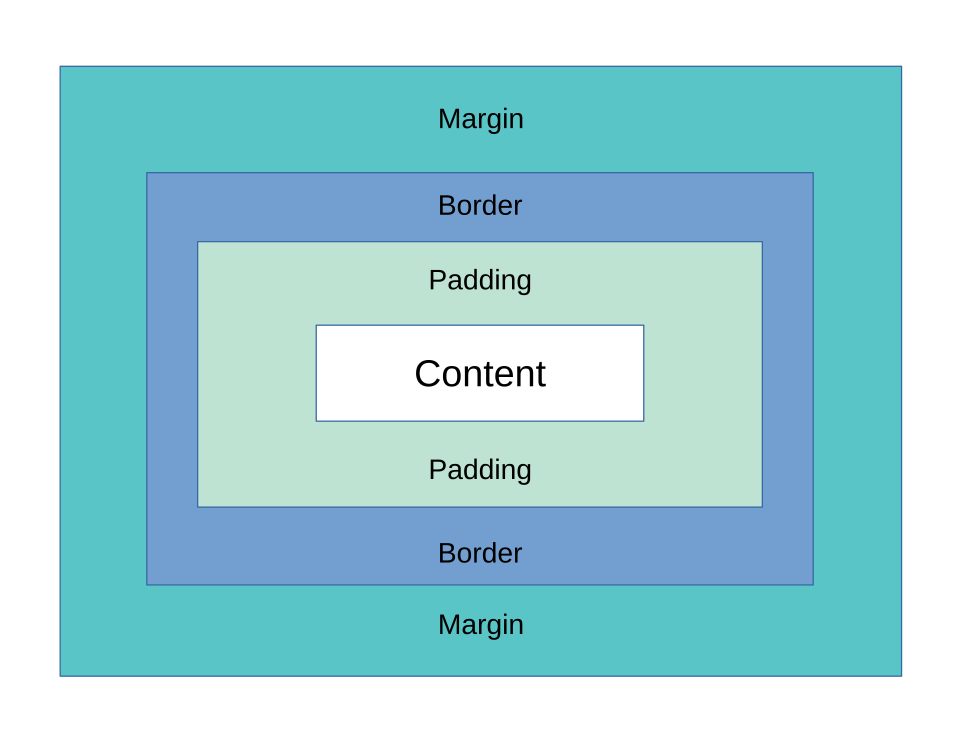 The CSS Box Model (content, padding, border, margin) with a visual example. (Image: Charles Calvert, CC BY-SA 4.0, via Wikimedia Commons)
Mermaid Diagram: HTML-CSS Relationship
flowchart TD
    A["HTML"] -->|"Defines Structure"| B["Webpage Content"]
    C["CSS"] -->|"Defines Style"| B
    B --> D["Browser Renders"]
    D --> E["Visible Webpage"]
    A -->|"Uses Tags"| F["<html>, <head>, <body>, etc."]
    C -->|"Uses Selectors"| G["p, h1, .class, etc."]
Based on the NEB +2 Management syllabus for Computer Science (Comp), unit 9.
Discussion
Loading…