Computer and IT ApplicationsUnit 811 min read
Internet & Email: Protocols, Services, Security & Business Use
Unit 8 of Computer and IT Applications explores how the internet works (TCP/IP, DNS, HTTP/HTTPS), email systems (SMTP, POP3, IMAP), web services, cybersecurity risks (phishing, malware), and real-world applications in Nepali businesses (eSewa, Ncell, NEPSE) and global platforms (Google, WhatsApp).
TAKEAWAYS:
- The TCP/IP model (4 layers) explains how data travels across networks via packets, with IP addressing (IPv4/IPv6) and ports routing traffic.
- DNS translates human-readable domain names (e.g.,
esewa.com.np) into IP addresses (e.g.,103.105.192.123) using a hierarchical system of root, TLD, and authoritative servers. - Email protocols (SMTP for sending, POP3/IMAP for receiving) rely on MUA, MTA, and MDA components, with headers storing metadata like sender, recipient, and timestamps.
- HTTP/HTTPS govern web communication: HTTP uses request methods (GET, POST, PUT, DELETE) and status codes (200, 404, 500), while HTTPS adds encryption via TLS/SSL certificates.
- Cybersecurity threats (phishing, malware, DDoS) target businesses like Ncell (SIM swapping attacks) and NEPSE (fake trading apps), requiring firewalls, encryption, and user training.
- Real-world applications: eSewa uses HTTPS for secure payments, WhatsApp relies on end-to-end encryption (Signal Protocol), and NTC manages routing via BGP (Border Gateway Protocol).
1. The Internet: How Data Travels
The internet is a global network of networks connecting devices using standardized protocols. At its core, the TCP/IP model (not OSI) defines how data is packaged, addressed, and transmitted.
TCP/IP Model vs. OSI Model
While the OSI model is a theoretical 7-layer framework, the TCP/IP model (used in practice) has 4 layers:
flowchart TD
    A["Application Layer\n(HTTP, FTP, SMTP, DNS)"] --> B["Transport Layer\n(TCP, UDP)"]
    B --> C["Internet Layer\n(IP, ICMP, Routing)"]
C --> D["Network Access Layer\n(Ethernet, Wi-Fi, PPP)"]| Layer | TCP/IP Protocol | Function | Example |
|---|---|---|---|
| Application | HTTP, SMTP, FTP, DNS | Provides network services to applications | Loading a webpage (HTTP) |
| Transport | TCP, UDP | Ensures data delivery (TCP: reliable; UDP: fast but unreliable) | Video streaming (UDP) |
| Internet | IP, ICMP, ARP | Routes packets using IP addresses | Sending an email (IP) |
| Network Access | Ethernet, Wi-Fi, PPP | Transmits data over physical media | Connecting to Wi-Fi (Wi-Fi) |
How Data Travels: Packet Journey
- Application Layer: Data (e.g., an email) is segmented into chunks.
- Transport Layer: TCP adds port numbers (e.g.,
25for SMTP) and ensures delivery; UDP skips reliability checks. - Internet Layer: IP adds source/destination IP addresses (e.g.,
192.168.1.1to103.105.192.123). - Network Access Layer: Data is framed for the physical medium (e.g., Ethernet frame with MAC addresses).
Worked Example: Loading esewa.com.np
- Your device checks its DNS cache → no entry.
- It queries a recursive DNS resolver (e.g., NTC’s DNS server).
- The resolver asks the root DNS server → refers to
.npTLD server. - The
.npserver directs to eSewa’s authoritative DNS server → returns IP103.105.192.123. - Your device sends an HTTP GET request to
103.105.192.123:80(port80for HTTP). - eSewa’s server responds with the webpage (HTML, CSS, JS) over TCP.
2. Domain Name System (DNS): The Internet’s Phonebook
DNS translates human-readable domain names (e.g., khalti.com) into IP addresses (e.g., 52.77.208.14). Without DNS, you’d have to remember 103.105.192.123 for eSewa!
DNS Hierarchy
DNS Record Types
| Type | Purpose | Example |
|---|---|---|
| A | Maps domain to IPv4 address | esewa.com.np → 103.105.192.123 |
| AAAA | Maps domain to IPv6 address | google.com → 2607:f8b0:4009:80e::200e |
| MX | Specifies mail server | khalti.com → mail.khalti.com |
| CNAME | Alias for another domain | www.esewa.com.np → esewa.com.np |
| TXT | Text records (e.g., SPF for email) | v=spf1 include:_spf.google.com ~all |
Real-World Example: Ncell’s DNS
- When you visit
ncell.com.np, your ISP’s DNS resolver queries:- Root →
.npTLD → Ncell’s authoritative DNS. - Ncell’s DNS returns
103.105.192.124.
- Root →
- Why it matters: If Ncell’s DNS fails, users can’t access their website (e.g., during a DDoS attack).
3. Email Systems: How Messages Travel
Email relies on three key protocols:
- SMTP (Simple Mail Transfer Protocol): Sends emails between servers (port
25). - POP3/IMAP: Retrieves emails from the server (POP3 downloads and deletes; IMAP syncs).
- MIME: Encapsulates attachments (text, images, PDFs) in email format.
Email Components
flowchart LR
  A["User A (MUA: Outlook/Gmail)"] -->|"SMTP"| B["Mail Server A (MTA: Gmail SMTP)"]
  B -->|"SMTP"| C["Mail Server B (MTA: Ncell SMTP)"]
  C -->|"SMTP"| D["User B (MUA: WhatsApp Email)"]
  D -->|"POP3/IMAP"| C
Email transmission flow with protocol labels
Email Header Example (Gmail to Ncell)
From: user@gmail.com
To: customer@ncell.com.np
Subject: Your Mobile Bill
Date: Mon, 1 Oct 2023 10:00:00 +0545
Message-ID: <abc123@gmail.com>
MIME-Version: 1.0
Content-Type: multipart/mixed
- Headers contain metadata (sender, timestamps, routing info).
- Body includes the message and attachments (encoded via MIME).
Worked Example: Sending an Email via Ncell
- You compose an email in Ncell’s webmail (MUA).
- Ncell’s SMTP server (
smtp.ncell.com.np) receives it. - SMTP server checks MX records for the recipient (
@gmail.com). - Gmail’s SMTP server (
smtp.gmail.com) receives and stores it. - You check Gmail (MUA) → email appears in your inbox.
4. Web Protocols: HTTP and HTTPS
HTTP (Hypertext Transfer Protocol) enables communication between browsers and servers. HTTPS adds security via TLS/SSL encryption.
HTTP Request Methods
| Method | Purpose | Example |
|---|---|---|
| GET | Retrieve data | Load daraz.com.np/products |
| POST | Send data to server | Submit a login form |
| PUT | Update a resource | Edit a product on Daraz |
| DELETE | Remove a resource | Delete an order from NEPSE |
HTTP Status Codes
| Code | Meaning | Example |
|---|---|---|
| 200 | OK | Page loaded successfully |
| 301 | Moved Permanently | old.esewa.com → esewa.com |
| 404 | Not Found | ncell.com.np/nonexistent |
| 500 | Server Error | NEPSE website crash during trading |
HTTPS: Secure Communication
- Uses TLS/SSL certificates (issued by CAs like Let’s Encrypt).
- Encrypts data with symmetric (AES) + asymmetric (RSA) keys.
- Real-World Use:
- eSewa: HTTPS ensures payment data (card numbers) isn’t stolen.
- NEPSE: HTTPS protects trading accounts from MITM attacks.
5. Cybersecurity Threats and Protections
Businesses like Ncell, eSewa, and NEPSE face cyber threats daily. Common attacks and defenses:
| Threat | How It Works | Example in Nepal | Protection |
|---|---|---|---|
| Phishing | Fake emails/websites to steal credentials | Ncell SMS: “Your SIM is blocked. Click here.” | SPF/DKIM/DMARC (email auth) |
| Malware | Viruses/trojans infect systems | Fake NEPSE trading app steals login | Antivirus, sandboxing |
| DDoS | Overloads servers with traffic | Ncell website down during peak hours | CDNs (Cloudflare), rate limiting |
| MITM (Man-in-Middle) | Intercepts unencrypted data | Public Wi-Fi eavesdropping on Khalti | HTTPS, VPNs |
| SQL Injection | Exploits databases via malicious input | Fake login form on Daraz | Parameterized queries |
Real-World Case: Ncell SIM Swapping
- Attackers trick Ncell customer service into transferring a user’s number to a new SIM.
- How it works:
- Hacker calls Ncell support, claiming to be the victim.
- Support verifies “account details” (often via fake ID).
- Hacker gets the SIM → accesses WhatsApp, email, and banking.
- Prevention: Ncell now requires biometric verification for SIM transfers.
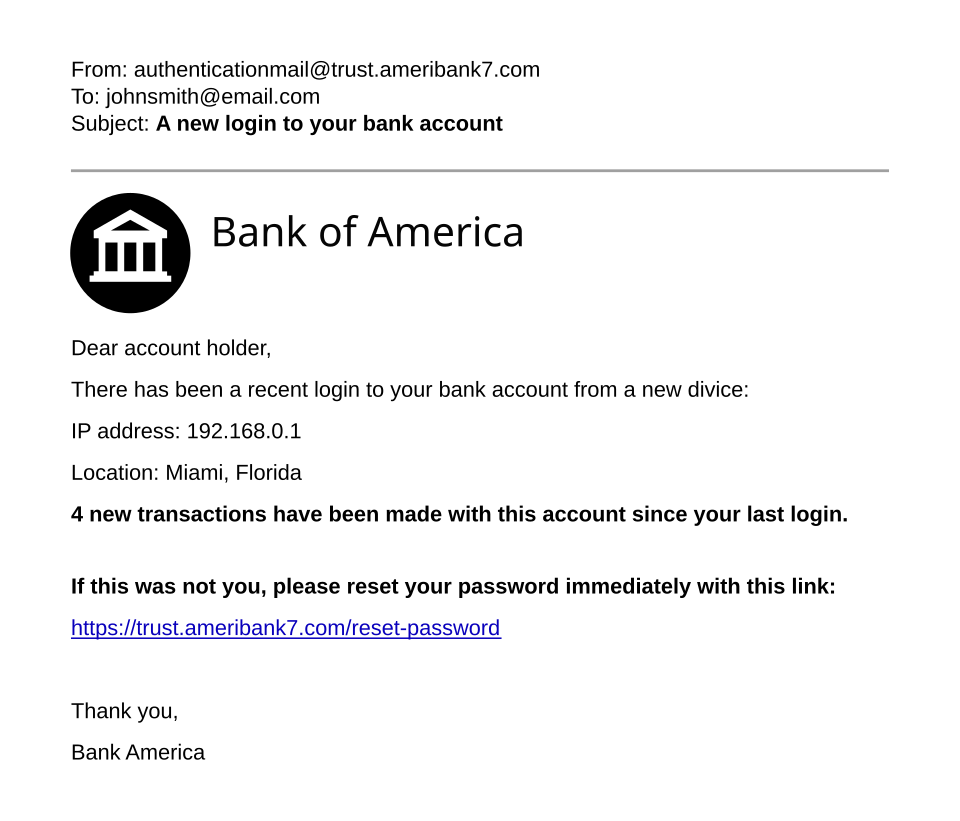 Fake NEPSE login page with red flags (Image: Original template by User:Isochrone, amended by User:Belbury, CC BY 4.0, via Wikimedia Commons)
6. Internet in Business: Case Studies
Case 1: eSewa (Online Payments)
- Protocols Used:
- HTTPS (TLS 1.3) for secure transactions.
- PCI-DSS compliance (encrypts card data).
- DNS: Uses Cloudflare for DDoS protection.
- Email: SPF/DKIM to prevent phishing (e.g., fake “payment failed” emails).
Case 2: Ncell (Mobile Services)
- Protocols:
- BGP (Border Gateway Protocol): Routes traffic between ISPs.
- SIP (Session Initiation Protocol): For VoIP calls.
- Threat: SIM swapping → Ncell now uses AI-based fraud detection.
Case 3: NEPSE (Stock Trading)
- Protocols:
- HTTPS for trading accounts.
- WebSockets for real-time stock updates.
- Risk: Fake trading apps stealing credentials → NEPSE mandates 2FA.
Exam Tip
- Diagrams Are Key: Draw the TCP/IP model, DNS hierarchy, or email flow in exams. Label every layer/protocol.
- Compare Protocols: Know the differences between:
- TCP vs. UDP (reliability vs. speed).
- POP3 vs. IMAP (download vs. sync).
- HTTP vs. HTTPS (security).
- Real-World Applications: Expect questions like:
- “How does eSewa ensure secure payments?” → Answer: HTTPS + PCI-DSS.
- “Why might Ncell’s website go down?” → Answer: DDoS attack on DNS.
- Security Threats: Memorize phishing, malware, DDoS, MITM and their protections.
- Worked Examples: Practice tracing a packet from your device to
ncell.com.np(include DNS, TCP handshake, HTTP request).
Final Note: The internet is built on standards (TCP/IP, DNS, HTTP) and security (HTTPS, encryption). Businesses like eSewa and Ncell rely on these to operate safely. Master the layers, protocols, and real-world use cases—this unit is 20% of your exam!
Based on the PU BBA (PU) syllabus for Computer and IT Applications, unit 8.
Discussion
Loading…