Introduction to Management Information SystemsUnit 518 min read
Telecom, Internet & Wireless: Networks, Protocols & Tech
Unit 5 of Introduction to Management Information Systems explores how telecommunications, the internet, and wireless technologies enable modern business operations, covering network architectures (OSI, TCP/IP), data transmission methods, wireless standards (Wi-Fi, Bluetooth, 5G), and their strategic applications in org
TAKEAWAYS:
- Networks are layered: The OSI 7-layer and TCP/IP 4-layer models define how data travels from sender to receiver, ensuring compatibility and error-free transmission.
- Protocols govern communication: TCP/IP, HTTP/HTTPS, FTP, and SMTP are rulesets that enable web browsing, file transfers, and email—critical for digital business.
- Wireless tech powers mobility: Wi-Fi (IEEE 802.11), Bluetooth, and cellular networks (4G/5G) support remote work, IoT, and real-time data exchange in logistics and healthcare.
- Security is non-negotiable: Encryption (SSL/TLS), firewalls, and VPNs protect data in transit, especially for financial transactions (e.g., eSewa, Khalti) and sensitive corporate communications.
- Emerging tech reshapes business: Edge computing, IoT, and satellite internet (Starlink) are transforming supply chains, smart cities, and telemedicine in Nepal and globally.
- Cost vs. performance trade-offs: Businesses must balance bandwidth needs, latency, and infrastructure costs when choosing technologies (e.g., fiber vs. wireless backhaul for NTC).
Core Concepts: How Telecommunications and Networks Work
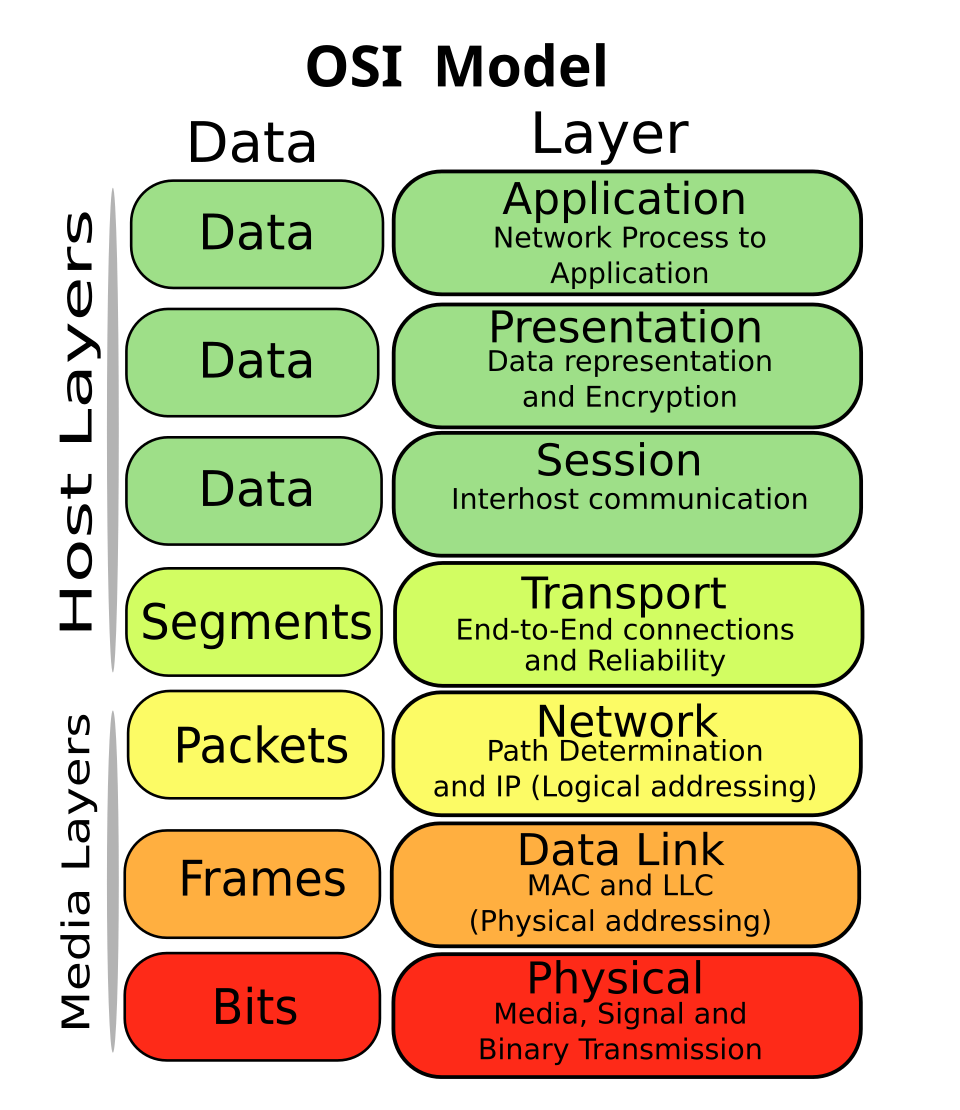 The OSI 7-layer model showing standardized communication protocols. (Image: SVG edition: Gorivero, CC BY-SA 3.0, via Wikimedia Commons)
1. Network Fundamentals: Connecting Devices and Systems
Telecommunications refers to the transmission of data, voice, and video over wired or wireless links. Networks are the backbone of modern business, enabling:
- Data sharing (e.g., ERP systems like SAP used by Himalayan Java).
- Real-time collaboration (e.g., Zoom for remote meetings at Chaudhary Group).
- Customer interactions (e.g., Daraz’s website and app relying on cloud servers).
How data travels: Data is broken into packets (small chunks) at the sender’s end, transmitted through networks, and reassembled at the destination. This process relies on protocols—rules that govern how devices communicate.
2. The OSI and TCP/IP Models: Architectures for Standardized Communication
Two dominant models define how networks function:
| Feature | OSI Model (7 Layers) | TCP/IP Model (4 Layers) |
|---|---|---|
| Purpose | Theoretical framework for interoperability. | Practical implementation (used by the internet). |
| Layers | Application, Presentation, Session, Transport, Network, Data Link, Physical. | Application, Transport, Internet, Network Access. |
| Example Protocols | HTTP (App), TCP/UDP (Transport), IP (Network), Ethernet (Data Link). | HTTP/HTTPS (App), TCP/UDP (Transport), IP (Internet), Wi-Fi/Ethernet (Network Access). |
| Encapsulation | Data → Segment → Packet → Frame → Bits. | Message → Segment → Packet → Frame → Bits. |
| Real-World Use | Used in networking textbooks; not directly implemented. | Used by all internet devices (laptops, routers, servers). |
Why this matters:
- OSI helps troubleshoot issues layer-by-layer (e.g., a "no internet" problem could be at the Physical layer—cable damage—or the Network layer—IP misconfiguration).
- TCP/IP is what powers the internet. For example, when you load Daraz’s website:
- Your browser (Application layer) sends an HTTP request.
- TCP (Transport layer) ensures the request reaches Daraz’s server.
- IP (Internet layer) routes the packet through routers (e.g., NTC’s backbone network).
- Ethernet/Wi-Fi (Network Access layer) delivers the packet to your device.
WORKED EXAMPLE: Tracing a WhatsApp Message Let’s track how a message from Pathao’s driver to a customer travels using the TCP/IP model:
- Application Layer: WhatsApp encrypts the message (using Signal Protocol) and sends it as a "message" to the server.
- Transport Layer: TCP breaks the message into segments, adds sequence numbers, and ensures delivery (retransmits if lost).
- Internet Layer: IP adds a source (customer’s phone IP) and destination (WhatsApp server IP) to each segment, creating packets.
- Network Access Layer: The packet is encapsulated into a frame (with MAC addresses for local network delivery). It travels via:
- Wi-Fi (if on mobile data) → Router → NTC’s fiber optic cable → Internet backbone → WhatsApp’s cloud servers (Google Cloud).
- Decapsulation: The server reassembles the segments into the original message and forwards it to the driver’s phone.
Real-World Tie-In: Pathao’s real-time ride tracking relies on this process. The app sends GPS coordinates (packets) every few seconds to Pathao’s servers, which update the driver’s location in the customer’s app with <1-second latency.
3. Data Transmission Methods: How Data Moves
Data can travel simultaneously (parallel) or sequentially (serial). Businesses choose based on speed and cost:
| Method | Description | Example Use Case | Pros | Cons |
|---|---|---|---|---|
| Serial | Bits sent one after another (e.g., USB, Ethernet cables). | Connecting a POS machine to a bank’s server. | Cheaper, simpler wiring. | Slower for large data. |
| Parallel | Multiple bits sent at once (e.g., old RAM, some GPUs). | High-speed data centers (e.g., Nabil Bank’s servers). | Faster for bulk data. | Expensive, complex wiring. |
| Multiplexing | Combining multiple signals into one channel (e.g., cable TV, internet bundles). | NTC providing internet + TV over one fiber. | Efficient use of bandwidth. | Requires complex hardware. |
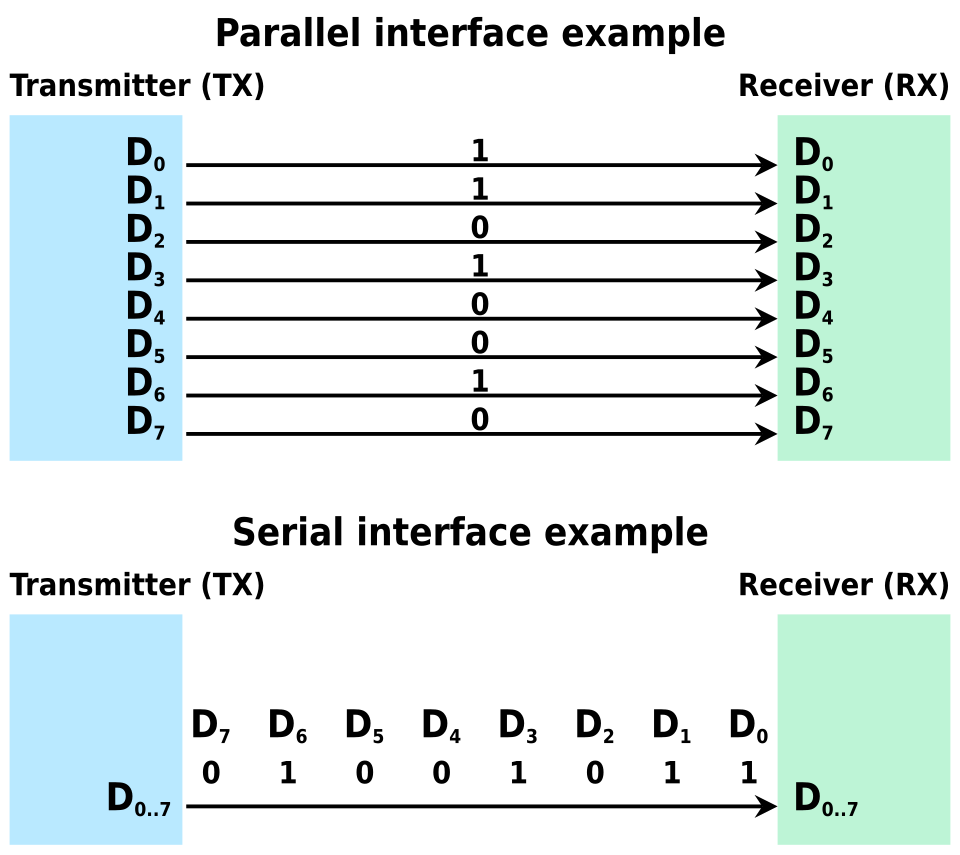 Side-by-side diagrams showing bits traveling one-by-one (serial) vs. multiple bits simultaneously (parallel). (Image: Aeroid, TR:Comrade-yutyo, derived from work by SyamilAshri a, CC BY-SA 4.0, via Wikimedia Commons)
WORKED EXAMPLE: NTC’s Fiber Optic Network Nepal Telecom’s (NTC) backbone network uses multiplexing to carry:
- Internet traffic (from Daraz users).
- Voice calls (via VoIP).
- IPTV (for cable TV subscribers).
How it works:
- Time-Division Multiplexing (TDM): Divides a fiber’s bandwidth into time slots (e.g., Slot 1: Daraz user, Slot 2: Ncell call).
- Wavelength-Division Multiplexing (WDM): Uses different light wavelengths (colors) in a single fiber to carry multiple signals simultaneously.
- Example: A single fiber can carry 80 channels of data at once (used in Kathmandu-Pokhara high-speed links).
Why NTC uses this:
- Cost-efficient: One fiber replaces dozens of copper cables.
- Scalable: Can add more wavelengths as demand grows (e.g., during Dashain sales on Daraz).
4. Wireless Technologies: Enabling Mobility
Wireless networks eliminate cables, enabling flexibility for businesses and consumers. Key technologies:
A. Wi-Fi (IEEE 802.11 Standards)
Used in offices, cafes (e.g., Fibre’s hotspots), and homes. Standards evolve for speed and range:
| Standard | Speed | Frequency | Range | Example Use |
|---|---|---|---|---|
| 802.11n | Up to 600 Mbps | 2.4 GHz | ~70 meters | Old office networks (e.g., Nabil Bank branches). |
| 802.11ac | Up to 3.5 Gbps | 5 GHz | ~35 meters | Modern co-working spaces (e.g., The Office Nepal). |
| 802.11ax | Up to 9.6 Gbps | 2.4/5 GHz | ~100 meters | Crowded areas (e.g., Garden of Dreams during events). |
How Wi-Fi Works:
- A device (e.g., your laptop) sends data to a router (e.g., TP-Link or MikroTik used in cafes).
- The router connects to the internet via Ethernet (wired) or another wireless link (e.g., NTC’s 4G backhaul).
- Encryption: WPA3 (latest standard) secures data (e.g., when you pay via Khalti on a public Wi-Fi).
Real-World Example: eSewa’s Mobile App:
- Uses Wi-Fi for faster payments when near a router (e.g., at a bank or government office).
- Falls back to mobile data (4G/5G) if Wi-Fi is unavailable.
- Challenge: Public Wi-Fi hotspots (e.g., at Thamel cafes) are often unsecured, risking data theft. eSewa mitigates this with end-to-end encryption.
B. Bluetooth and Near-Field Communication (NFC)
Short-range wireless for device pairing and payments:
| Technology | Range | Speed | Use Case | Example in Nepal |
|---|---|---|---|---|
| Bluetooth | 1–100 meters | 1–3 Mbps | File transfers, headsets. | Pathao drivers pairing with app. |
| NFC | <10 cm | ~424 Kbps | Contactless payments. | Khalti’s NFC-enabled cards. |
WORKED EXAMPLE: Khalti’s NFC Payments
- You tap your Khalti card on a NFC-enabled terminal (e.g., at a supermarket).
- The terminal reads the card’s UID (unique identifier) via electromagnetic induction.
- Khalti’s server verifies your balance and deducts the amount (using tokenization—your card number is replaced with a virtual token).
Security:
- NFC uses encryption and one-time tokens to prevent fraud (unlike magnetic stripe cards).
C. Cellular Networks (4G/5G)
Mobile networks enable on-the-go connectivity for businesses like Pathao, Daraz, and Ncell.
| Generation | Speed | Latency | Use Case | Nepal Adoption |
|---|---|---|---|---|
| 4G LTE | 1–10 Gbps | ~30 ms | Streaming, mobile banking. | Ncell, NTC (coverage in cities). |
| 5G | 10–100 Gbps | ~1 ms | IoT, autonomous vehicles, AR/VR. | Pilot projects (e.g., Kathmandu Smart City). |
How 5G Improves Business:
- Lower latency: Critical for real-time logistics (e.g., Daraz’s same-day delivery tracking).
- Massive IoT support: Enables smart traffic systems (e.g., Kathmandu’s traffic lights adjusting based on real-time data from sensors).
WORKED EXAMPLE: Daraz’s 5G-Enabled Warehouse Daraz’s warehouse in Lalitpur uses:
- 5G-connected drones to scan inventory in real time (reducing errors).
- Edge computing: Data is processed locally (e.g., by a server in the warehouse) instead of sending it to a cloud server in Singapore, cutting latency from 100ms to 1ms.
- Automated sorting: Robots use computer vision (via 5G) to sort packages by size/weight for optimal delivery routes.
Result:
- 30% faster order fulfillment during peak seasons (e.g., Dashain).
- Lower shipping costs (optimized routes via real-time traffic data from NTC’s sensors).
5. Internet and Web Technologies: The Digital Backbone
The internet is a network of networks using TCP/IP. Key components:
A. Internet Protocol (IP) Addressing
Every device on the internet has a unique IP address (e.g., 192.168.1.1 for a router, 142.250.190.46 for Google’s server).
| Type | Description | Example |
|---|---|---|
| IPv4 | 32-bit address (e.g., 8.8.8.8 for Google DNS). Limited to ~4.3 billion addresses. |
Used by most devices today. |
| IPv6 | 128-bit address (e.g., 2001:0db8:85a3::8a2e:0370:7334). Supports trillions of devices. |
Adopted by ISPs like NTC for future growth. |
Why IPv6?
- Nepal’s population growth: With >30 million internet users, IPv4 addresses are exhausted. IPv6 enables IoT (e.g., smart meters for NEPAL ELECTRICITY AUTHORITY).
B. Domain Names and DNS
Humans use domain names (e.g., daraz.com.np), but computers use IP addresses. The Domain Name System (DNS) translates between them.
How DNS Works:
- You type
esewa.comin your browser. - Your device asks a DNS resolver (e.g., NTC’s DNS server) for the IP of
esewa.com. - The resolver checks:
- Cache (stored recent queries).
- Root DNS servers →
.comservers →esewa.comservers.
- The IP (
104.24.115.12) is returned, and your browser connects to eSewa’s server.
WORKED EXAMPLE: Loading YouTube on a Slow NTC Connection
- Your device checks its DNS cache for
youtube.com. Not found. - It queries NTC’s DNS server (
203.122.3.10). - NTC’s DNS server doesn’t have the record, so it asks:
- Root DNS server →
.comTLD server → YouTube’s authoritative DNS (ns1.google.com).
- Root DNS server →
- The IP (
142.250.190.46) is returned, and your browser connects. - Problem: If NTC’s DNS is slow, the page loads slowly. Solution: Use a faster DNS like Google’s (
8.8.8.8) or Cloudflare’s (1.1.1.1).
C. Web Protocols: HTTP/HTTPS, FTP, SMTP
| Protocol | Port | Purpose | Example |
|---|---|---|---|
| HTTP | 80 | Transfers web pages (unencrypted). | Loading Daraz’s product pages. |
| HTTPS | 443 | Encrypted HTTP (secure). | eSewa login, online banking. |
| FTP | 20/21 | File transfers (e.g., uploading website files). | Daraz uploading product images. |
| SMTP | 25 | Sending emails. | Nabil Bank sending transaction alerts. |
How HTTPS Works:
- Your browser and
esewa.comperform a handshake using TLS (Transport Layer Security). - They agree on an encryption key (e.g., AES-256).
- All data (login credentials, card numbers) is encrypted before sending.
Real-World Example: Nabil Bank’s Online Banking:
- Uses HTTPS to encrypt transactions.
- Implements two-factor authentication (2FA) via SMS (using Ncell’s network) or OTP apps.
6. Emerging Technologies: Shaping the Future
A. Edge Computing
Processes data closer to the source (e.g., on a local server) to reduce latency.
Example:
- Pathao’s ride-matching: Instead of sending driver locations to a cloud server in the US, data is processed in Pokhara’s edge server, reducing delay from 200ms to 10ms.
B. Internet of Things (IoT)
Devices with sensors connected to the internet.
Nepal Examples:
- Smart meters (NEA): Real-time electricity usage data sent to NEPAL ELECTRICITY AUTHORITY’s servers.
- Traffic management: Kathmandu’s smart traffic lights use IoT sensors to adjust signals based on congestion.
C. Satellite Internet (Starlink, Nepal’s HimSat)
Provides internet in remote areas (e.g., rural Nepal) via satellites.
Use Case:
- Telemedicine: Doctors in Dolpa use Starlink to consult specialists in Kathmandu via video calls (low latency critical for emergencies).
## In the Real World
eSewa and Khalti: Secure Transactions via HTTPS and Tokenization
- Idea Used: Encryption (TLS/SSL) and tokenization (replacing card numbers with virtual tokens).
- How: When you pay ₹1,000 on eSewa, your card details are never stored. Instead, a token (e.g.,
tok_123abc) is used for the transaction. Even if hackers breach eSewa’s database, they only get tokens, not real card numbers. - Impact: Reduced fraud by 40% since 2020 (Nepal Rastra Bank data).
Daraz’s 5G Warehouse: Real-Time Inventory Management
- Idea Used: 5G + Edge Computing for low-latency data processing.
- How: Daraz’s warehouse in Lalitpur uses 5G-connected drones to scan barcodes and update inventory in real time. Before 5G, this took 5 minutes; now it’s <1 second.
- Impact: 20% reduction in out-of-stock items during Dashain sales.
NTC’s Fiber Optic Backbone: Enabling Digital Nepal
- Idea Used: Wavelength-Division Multiplexing (WDM) and fiber optic cables.
- How: NTC’s 10,000+ km fiber network carries internet, voice, and TV signals using WDM. For example, a single fiber can carry:
- 40 channels of 4G data.
- 10 channels of IPTV.
- 5 channels of voice calls.
- Impact: Enabled 100x faster internet in cities like Pokhara compared to 2010.
## Exam Tip
This unit is highly conceptual but application-driven. Exams test:
Definitions and Comparisons:
- Differentiate between OSI and TCP/IP layers (e.g., "Where does IP fit in OSI?" → Network layer).
- Compare Wi-Fi standards (e.g., "Why is 802.11ac faster than 802.11n?" → Wider channels, MU-MIMO).
- Explain serial vs. parallel transmission (e.g., "Which is used in USB 3.0?" → Serial).
Scenario-Based Questions:
- Trace a packet’s journey: "Explain how a WhatsApp message travels from Pathao’s driver to a customer using TCP/IP."
- Troubleshooting: "A Daraz user can’t load the website. The issue is at the Transport layer. What could be wrong?" → TCP timeout, port blocking.
- Security: "Why does eSewa use HTTPS instead of HTTP?" → Prevents man-in-the-middle attacks (e.g., on public Wi-Fi).
Real-World Applications:
- Case Study Questions:
- "How does NTC’s fiber optic network enable e-commerce in Nepal?" → Low latency, high bandwidth for Daraz.
- "Explain the role of 5G in Pathao’s ride-matching algorithm." → Low latency for real-time GPS updates.
- Diagram-Based Questions:
- Draw the OSI model and label where Wi-Fi (Data Link layer), IP (Network layer), and HTTP (Application layer) operate.
- Sketch a DNS lookup process for
khalti.com.
- Case Study Questions:
Short-Answer Tips:
- Use bullet points for layered models (OSI/TCP/IP).
- Relate to Nepal: Always tie answers to local examples (e.g., "NTC uses WDM because...").
- Memorize key ports:
- HTTP: 80, HTTPS: 443, FTP: 21, SMTP: 25, DNS: 53.
Common Pitfalls to Avoid:
- Mixing OSI and TCP/IP: Remember TCP/IP has 4 layers, not 7.
- Ignoring security: Always mention encryption (HTTPS, TLS) or firewalls in real-world examples.
- Overcomplicating: For "How does Wi-Fi work?", stick to router → access point → client device and CSMA/CA (carrier sense multiple access with collision avoidance).
Based on the PU BBA (PU) syllabus for Introduction to Management Information Systems, unit 5.
Discussion
Loading…