Communication TechniquesUnit 49 min read
Technical Vocabulary: Definitions, Terms & Industry Applications
Unit 4 of Communication Techniques explores the essential technical vocabulary in computer engineering, including definitions, classifications, and real-world applications of terms like data, information, protocols, bandwidth, latency, and network topologies. Learn how these terms are used in apps like eSewa, Daraz, an
Key Concepts and Definitions
1. Data vs. Information
- Data: Raw, unprocessed facts (e.g., numbers, symbols, text).
Example:
1010101(binary),2023-10-15(date),KTM-2345(vehicle number). - Information: Processed data that has meaning.
Example:
Your order #12345 is dispatched(processed from raw order data).
Real-world example:
- eSewa stores your data (account number, transaction ID) but provides information (balance, transaction status) after processing.
2. Communication Channels
Communication occurs over physical (cables, air) or logical (protocols) channels.
| Channel Type | Example | Used By |
|---|---|---|
| Physical (Medium) | Copper wire, fiber optic, air | NTC (fiber for internet), Ncell (radio waves) |
| Logical (Protocol) | TCP/IP, HTTP, FTP | Daraz (HTTPS for orders), WhatsApp (XMPP) |
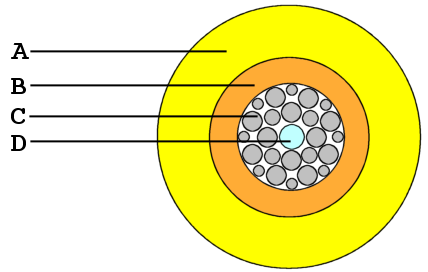 How data travels as light pulses in NTC’s internet backbone (Image: J.P.Lon at English Wikipedia, CC BY 2.5, via Openverse)
3. Bandwidth vs. Latency
- Bandwidth: Maximum data transfer rate (measured in bits per second, e.g., Mbps, Gbps). Example: A 100 Mbps connection downloads a 500 MB file in ~40 seconds.
- Latency: Time delay between sending and receiving data (measured in milliseconds, ms). Example: 50 ms latency means a 0.05-second delay in a video call.
Real-world example:
- Ncell’s 4G has ~30 Mbps bandwidth but ~50 ms latency—good for calls but not ultra-low-latency gaming.
4. Network Topologies
How devices are connected in a network. Common types:
| Topology | Advantages | Disadvantages | Used By |
|---|---|---|---|
| Bus | Cheap, easy to install | Single point of failure | Legacy school networks |
| Star | Easy to manage, scalable | Depends on central hub | Home Wi-Fi, corporate LANs |
| Mesh | Redundant paths, reliable | Expensive, complex setup | Smart cities, military |
5. Protocols and Standards
Rules governing data exchange. Key examples:
| Protocol | Layer | Used For | Example |
|---|---|---|---|
| HTTP/HTTPS | Application | Web browsing | Daraz, Google, eSewa |
| TCP/IP | Network/Transport | Internet communication | All online services |
| FTP | Application | File transfers | Downloading software |
| DNS | Application | Domain name resolution | google.com → 142.250.190.46 |
Real-world trace: Loading a Daraz page
- You type
daraz.com.ne. - DNS resolves it to an IP (e.g.,
103.245.222.77). - TCP/IP establishes a connection.
- HTTP requests the homepage.
- Server sends HTML/CSS (via bandwidth).
- Your browser renders the page (low latency ensures speed).
sequenceDiagram
    You->>DNS Server: daraz.com.ne?
    DNS Server-->>You: 103.245.222.77
    You->>Daraz Server: HTTP GET /homepage
    Daraz Server-->>You: HTML (200 OK)
6. Error Detection and Correction
Methods to ensure data integrity:
- Parity Bit: Simple error check (even/odd).
- Checksum: Sum of data blocks (e.g., used in FTP).
- CRC (Cyclic Redundancy Check): Advanced error detection (used in Ethernet, Wi-Fi).
Example:
If you send 1010 with a parity bit of 1 (odd parity), the receiver checks:
- Received
10101→ Sum =3(odd) → No error. - If
10111is received → Sum =4(even) → Error detected.
7. Modulation Techniques
Converting digital data into signals for transmission:
- ASK (Amplitude Shift Keying): Varies signal amplitude.
- FSK (Frequency Shift Keying): Varies frequency (used in old modems).
- PSK (Phase Shift Keying): Varies phase (used in Wi-Fi, 4G/5G).
Real-world example:
- Ncell’s 4G uses QAM (Quadrature Amplitude Modulation), a mix of ASK and PSK, to send data efficiently.
In the Real World
eSewa Transactions
- Uses HTTPS (protocol) for secure data transfer.
- Latency must be low (<100 ms) to avoid timeouts during payments.
- Bandwidth ensures quick processing of transaction data.
Daraz Order Fulfillment
- TCP/IP ensures orders reach warehouses reliably.
- Mesh networks in delivery hubs improve route efficiency (like Pathao’s dynamic routing).
- Error detection (CRC) prevents corrupted order data.
NTC Internet Service
- Fiber optic cables provide high bandwidth (up to 1 Gbps).
- Star topology connects users to central NTC servers.
- Modulation (DWDM) allows multiple data streams on one fiber.
Worked Example: Calculating Bandwidth and Latency
Scenario: A user in Kathmandu uploads a 2 GB file to Google Drive.
- Bandwidth: 50 Mbps (megabits per second).
- Latency: 80 ms.
Steps:
- Convert file size to bits: .
- Calculate time (ignoring latency for simplicity): .
- With latency: Each packet adds 80 ms delay. For 100 packets: extra.
Real-world tie-in:
- Ncell’s 4G (100 Mbps) would halve the upload time (~2.8 minutes).
- NTC’s fiber (1 Gbps) would reduce it to ~1.6 minutes.
Comparison Table: Common Technical Terms
| Term | Definition | Unit | Example |
|---|---|---|---|
| Throughput | Actual data transferred (after overhead) | bps, Mbps | Your Wi-Fi shows 80 Mbps throughput. |
| Jitter | Variation in packet delay | ms | VoIP calls suffer from high jitter. |
| Goodput | Useful data rate (excluding retries) | bps | Video streaming goodput. |
| SNR (Signal-to-Noise Ratio) | Signal strength vs. noise | dB | Weak Wi-Fi has low SNR. |
Exam Tip
- Memorize definitions with examples:
- "Bandwidth is the maximum capacity of a channel, while throughput is the actual achieved rate."
- Relate to real systems:
- "Ncell’s 4G uses OFDM (a modulation technique) to divide signals into multiple carriers."
- Diagrams are worth marks:
- Draw topologies, protocol stacks, or modulation waveforms in exams.
- Common mistakes to avoid:
- Confusing bandwidth (capacity) with throughput (real speed).
- Mixing latency (delay) with jitter (delay variation).
- Application-based questions:
- "How does eSewa ensure secure communication?" → HTTPS + encryption.
- "Why does Pathao use low-latency servers?" → Faster ride confirmations.
Based on the PU BE Computer (PU) syllabus for Communication Techniques (ENG110), unit 4.
Discussion
Loading…