Programming In CUnit 512 min read
Loops & Iteration: for, while, do-while and Loop Control
Unit 5 of Programming In C covers loop structures (for, while, do-while), loop control statements (break, continue, goto), nested loops, and infinite loops with practical examples, traces, and real-world applications in Nepalese software (eSewa, Daraz, Ncell).
TAKEAWAYS:
- Loops automate repetitive tasks by executing a block of code while a condition is true or for a fixed number of iterations.
whilechecks the condition before execution (entry-controlled), whiledo-whilechecks after (exit-controlled).- Loop control statements (
break,continue) alter the flow of loops;gotois rarely used but can exit nested loops. - Nested loops solve multi-dimensional problems (e.g., printing patterns, matrix traversal).
- Infinite loops occur when the termination condition is never met; they must be avoided unless intentional (e.g., servers).
- Real-world loops appear in order processing (Daraz), billing cycles (Ncell), and transaction validation (eSewa).
1. Introduction to Loops
Loops are control structures that allow a block of code to execute repeatedly based on a condition or a fixed count. They eliminate redundancy and improve efficiency.
Types of Loops in C
There are three primary loop constructs in C:
forloop: Used when the number of iterations is known.whileloop: Used when the loop must run until a condition becomes false.do-whileloop: Similar towhile, but the condition is checked after execution (guarantees at least one iteration).
2. The for Loop
The for loop is best suited for count-controlled iterations. Its syntax is:
for (initialization; condition; increment/decrement) {
    // Loop body
}
How It Works
- Initialization: Executed once at the start.
- Condition: Checked before each iteration. If
false, the loop exits. - Increment/Decrement: Executed after each iteration.
Example: Print Numbers 1 to 5
for (int i = 1; i <= 5; i++) {
    printf("%d ", i);
}
Output: 1 2 3 4 5
Trace Table
| Step | i (init) |
Condition (i <= 5) |
Action (printf) |
i++ (update) |
|---|---|---|---|---|
| 1 | 1 | True | Prints 1 |
i = 2 |
| 2 | 2 | True | Prints 2 |
i = 3 |
| 3 | 3 | True | Prints 3 |
i = 4 |
| 4 | 4 | True | Prints 4 |
i = 5 |
| 5 | 5 | True | Prints 5 |
i = 6 |
| 6 | 6 | False | Loop exits | - |
3. The while Loop
The while loop is condition-controlled and executes as long as the condition is true.
while (condition) {
    // Loop body
}
Example: Sum of Digits in a Number
Problem: Calculate the sum of digits of 1234.
int num = 1234, sum = 0, rem;
while (num != 0) {
    rem = num % 10;       // Extract last digit
    sum += rem;           // Add to sum
    num /= 10;            // Remove last digit
}
printf("Sum = %d", sum); // Output: 10 (1+2+3+4)
Trace Table
| Step | num |
rem = num % 10 |
sum |
num /= 10 |
Condition (num != 0) |
|---|---|---|---|---|---|
| 1 | 1234 | 4 | 4 | 123 | True |
| 2 | 123 | 3 | 7 | 12 | True |
| 3 | 12 | 2 | 9 | 1 | True |
| 4 | 1 | 1 | 10 | 0 | True |
| 5 | 0 | - | 10 | - | False (exit) |
4. The do-while Loop
The do-while loop always executes at least once because the condition is checked after the loop body.
do {
    // Loop body
} while (condition);
Example: Menu-Driven Program (eSewa-like)
int choice;
do {
    printf("\n1. Pay Bill\n2. Check Balance\n3. Exit\nEnter choice: ");
    scanf("%d", &choice);
    switch(choice) {
        case 1: printf("Paying bill...\n"); break;
        case 2: printf("Checking balance...\n"); break;
        case 3: printf("Exiting...\n"); break;
        default: printf("Invalid choice!\n");
    }
} while (choice != 3);
Output:
1. Pay Bill
2. Check Balance
3. Exit
Enter choice: 1
Paying bill...
Enter choice: 2
Checking balance...
Enter choice: 3
Exiting...
Trace Table
| Step | choice |
Loop Body Executes? | Condition (choice != 3) |
Action |
|---|---|---|---|---|
| 1 | 1 | Yes | True | Prints "Paying bill..." |
| 2 | 2 | Yes | True | Prints "Checking balance..." |
| 3 | 3 | Yes | False | Prints "Exiting..." (loop exits) |
5. Loop Control Statements
These statements modify the normal flow of loops.
a) break Statement
- Exits the loop immediately when encountered.
- Used in searching (e.g., finding an element in an array).
Example: Find if a Number is Prime
int num = 7, isPrime = 1;
for (int i = 2; i <= num/2; i++) {
    if (num % i == 0) {
        isPrime = 0;
        break; // Exit loop if divisor found
    }
}
printf("%d is %s", num, isPrime ? "prime" : "not prime");
Output: 7 is prime
Trace Table
| Step | i |
num % i == 0 |
isPrime |
Action |
|---|---|---|---|---|
| 1 | 2 | False | 1 | Continue |
| 2 | 3 | False | 1 | Continue |
| 3 | 4 | False | 1 | break (loop exits) |
b) continue Statement
- Skips the current iteration and moves to the next.
- Used to skip unwanted values (e.g., even numbers).
Example: Print Odd Numbers from 1 to 10
for (int i = 1; i <= 10; i++) {
    if (i % 2 == 0) continue; // Skip even numbers
    printf("%d ", i);
}
Output: 1 3 5 7 9
Trace Table
| Step | i |
i % 2 == 0 |
Action |
|---|---|---|---|
| 1 | 1 | False | Prints 1 |
| 2 | 2 | True | continue (skips print) |
| 3 | 3 | False | Prints 3 |
| ... | ... | ... | ... |
c) goto Statement
- Unconditionally jumps to a labeled statement.
- Rarely used (can make code hard to debug).
- Use case: Exiting nested loops.
Example: Exit Nested Loops on User Input
for (int i = 1; i <= 3; i++) {
    for (int j = 1; j <= 3; j++) {
        printf("(%d,%d) ", i, j);
        if (i == 2 && j == 2) goto exit; // Exit on (2,2)
    }
}
exit:
printf("\nExiting nested loops...");
Output:
(1,1) (1,2) (1,3)
(2,1) (2,2) Exiting nested loops...
6. Nested Loops
Nested loops are loops inside loops. Used for:
- Multi-dimensional problems (e.g., matrices, patterns).
- Simulating real-world scenarios (e.g., Daraz order processing).
Example: Print a Right-Angled Triangle Pattern
for (int i = 1; i <= 4; i++) {       // Rows
    for (int j = 1; j <= i; j++) {   // Columns
        printf("* ");
    }
    printf("\n");
}
Output:
*
* *
* * *
* * * *
Trace Table (Step-by-Step Execution)
Outer Loop (i) |
Inner Loop (j) |
Pattern Built |
|---|---|---|
| 1 | 1 | * |
| 2 | 1, 2 | * * |
| 3 | 1, 2, 3 | * * * |
| 4 | 1, 2, 3, 4 | * * * * |
7. Infinite Loops
An infinite loop runs forever unless manually terminated. Causes:
- Missing update in loop variable (e.g.,
for (;;)orwhile(1)). - Condition never becomes
false.
Example: Infinite Loop (Server Simulation)
while (1) { // Runs forever (like a web server)
    printf("Server running...\n");
    sleep(1); // Simulate delay
}
Output (until manually stopped):
Server running...
Server running...
...
How to Avoid Infinite Loops
- Ensure the loop condition can become
false. - Use
breakin critical sections.
8. Real-World Applications of Loops
Loops are ubiquitous in software. Here’s how Nepalese and global companies use them:
a) eSewa (Nepal) – Transaction Validation
- Loop Idea:
whileloop checks if a transaction is valid before processing. - How?
while (!isTransactionValid(userInput)) { printf("Invalid! Retry...\n"); // Re-prompt for input } - Visual:
flowchart TD
  A["Start Transaction"] --> B["Check Validity"]
  B -->|"Valid"| C["Process Payment"]
  B -->|"Invalid"| D["Show Error"]
  D --> B
b) Daraz (Nepal) – Order Processing Queue
- Loop Idea:
forloop processes each order in a queue. - How?
for (int i = 0; i < totalOrders; i++) { processOrder(orders[i]); updateInventory(orders[i]); } - Visual (Order Queue as a Queue Data Structure):
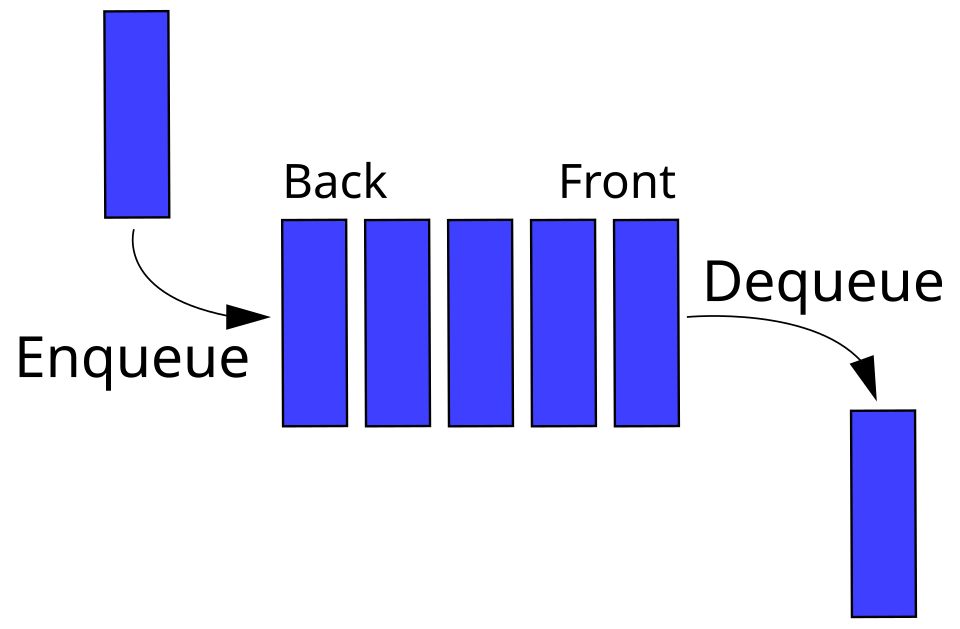 Daraz Order Processing Queue (FIFO) (Image: This Image was created by User:Vegpuff. If you are using the, CC BY-SA 3.0, via Wikimedia Commons)
[Order 1] → [Order 2] → [Order 3] → [Order 4] → NULL
### **c) Ncell (Nepal) – Billing Cycle**
- **Loop Idea**: `do-while` ensures **at least one billing cycle** runs.
- **How?**
```c
do {
    calculateBill(customer);
    sendBill(customer);
    updateCustomerStatus(customer);
} while (hasMoreCustomers());
d) Google (Global) – Page Ranking (PageRank Algorithm)
- Loop Idea:
whileloop iteratively updates page ranks until convergence. - How?
while (!hasConverged()) {
    updatePageRanks();
    checkConvergence();
}
9. Common Mistakes & Debugging
| Mistake | Example | Fix |
|---|---|---|
| Infinite loop | for (int i = 0; i <= 5; i--) |
Ensure i++ instead of i-- |
| Off-by-one error | for (int i = 0; i < 5; i++) |
Use i <= 5 if inclusive |
| Uninitialized loop variable | for (int i; i < 5; i++) |
Initialize i (e.g., int i = 0) |
| Skipping iterations | if (x == 0) continue; |
Use break if full exit is needed |
10. Exam Tip
What Examiners Look For
- Correct Syntax: Ensure
for,while, anddo-whileare used properly. - Trace Tables: Always show step-by-step execution (like the examples above).
- Real-World Connection: Relate loops to Nepali software (e.g., Daraz orders, eSewa transactions).
- Loop Control: Know when to use
break,continue, andgoto. - Nested Loops: Be able to draw patterns or explain matrix traversal.
- Infinite Loops: Identify and fix them in given code snippets.
High-Scoring Answers Include
✅ Flowcharts (for complex logic). ✅ Trace tables (showing variable changes). ✅ Real-world examples (eSewa, Daraz, Ncell). ✅ Error analysis (debugging infinite loops).
Practice Questions (Self-Check)
- Write a
forloop to print the multiplication table of 5. - Use a
whileloop to reverse a number (e.g.,123→321). - Explain why
while (1)creates an infinite loop. - Modify the following loop to print even numbers only:
for (int i = 1; i <= 10; i++) printf("%d ", i); - Debug: What’s wrong with this loop?
(Hint: Check the condition.)for (int i = 10; i >= 1; i--) { printf("%d ", i); }
Final Summary
| Loop Type | Use Case | Key Feature | Example |
|---|---|---|---|
for |
Fixed iterations | Initialization, condition, increment | for (int i=0; i<5; i++) |
while |
Condition-controlled | Checks condition before loop | while (x > 0) |
do-while |
At least one iteration | Checks condition after loop | do { ... } while (x > 0); |
break |
Exit loop early | Terminates loop immediately | if (found) break; |
continue |
Skip iteration | Jumps to next iteration | if (even) continue; |
| Nested Loops | Multi-dimensional problems | Loops inside loops | Printing patterns, matrices |
Remember: Loops are the backbone of automation in programming. Master them, and you’ll write efficient code for any problem! 🚀
Based on the PU BE Computer (PU) syllabus for Programming In C, unit 5.
Discussion
Loading…