Database Management SystemUnit 815 min read
Indexing and Hashing: Techniques, Trade-offs and Real-world Use
Unit 8 of Database Management System explores how indexing (B-trees, B+ trees, hash indexes) and hashing (direct addressing, collision resolution) accelerate data retrieval, the trade-offs between them, and their implementation in query processing. Covers indexing structures, hashing algorithms, and performance analysi
TAKEAWAYS:
- Indexing (B-trees, B+ trees) organizes data for fast range queries and sorted access, while hashing (direct addressing) provides O(1) lookups but struggles with range queries.
- B+ trees dominate disk-based databases (e.g., MySQL, PostgreSQL) because they balance height, fan-out, and sequential access efficiency.
- Hashing uses open addressing (linear probing) or chaining to resolve collisions, with load factor (λ) dictating performance.
- Composite indexes (on multiple columns) optimize queries filtering by those columns, but add storage and update overhead.
- Clustered indexes (e.g., primary key on disk) reorder physical data, while non-clustered indexes point to the data via row IDs.
- Real-world systems (e.g., eSewa’s transaction logs, Khalti’s user authentication) use both techniques: hashing for fast logins (password hashing) and B+ trees for transaction history queries.
1. Why Indexing and Hashing? The Core Problem
Databases store terabytes of data (e.g., NEPSE’s stock transactions, Ncell’s call records). Without indexing or hashing, every query would scan the entire table—like searching for a name in a phonebook without an index. These techniques reduce search time from O(n) to O(log n) or O(1).
2. Indexing: Organizing Data for Fast Access
Indexes are separate structures that map values to data locations. They trade storage space and update time for faster reads.
A. Index Types
| Type | Structure | Use Case | Example in Nepal |
|---|---|---|---|
| B-tree | Balanced tree | General-purpose (range queries) | Daraz’s product catalog searches |
| B+ tree | B-tree + linked leaves | Disk-based databases (MySQL, PostgreSQL) | NTC’s customer billing records |
| Hash Index | Hash table | Exact-match lookups (O(1)) | Khalti’s user authentication (password hashing) |
| Bitmap Index | Bit vectors | Low-cardinality columns (e.g., gender) | NEPSE’s stock listings by sector |
| Composite Index | Multi-column index | Queries filtering on multiple columns | eSewa’s transaction logs (user + date) |
KEY IDEA: B+ trees are preferred for disk databases because:
- All leaves are linked, enabling efficient range scans (e.g., "show all accounts with balance > 2000").
- Higher fan-out (more keys per node) reduces tree height, minimizing disk I/O.
classDiagram
    class BTreeNode {
        +keys[]
        +children[]
        +isLeaf: bool
        +split() void
    }
    class BPlusTreeNode {
        +keys[]
        +next: BPlusTreeNode
        +children[]
    }
    BTreeNode <|-- BPlusTreeNode
    note for BPlusTreeNode "Leaves linked for range queries"
B. How B+ Trees Work: A Worked Example
Scenario: Ncell wants to index 10 million call records by customer_id (primary key). The database uses a B+ tree with order 4 (max 4 keys per node).
Insertion:
- Start with the root. If a node has 4 keys, split it:
- Middle key promotes to parent.
- Left/right halves become new nodes.
- Example:
Insert [10, 20, 30, 40, 50] into an empty B+ tree (order 3):After inserting 10, 15, 20, 30, 40, 50.flowchart TD A["Root\n[20]"] --> B["Left\n[10, 15]"] --> C["Leaf\n10, 15"] A --> D["Right\n[30, 40, 50]"] --> E["Leaf\n30, 40, 50"]
- Start with the root. If a node has 4 keys, split it:
Search:
- Start at root, compare
customer_idto keys, traverse left/right. - Time complexity: O(log n) (height of the tree).
- Start at root, compare
Range Query:
- Use the linked leaves to scan sequentially:
SELECT * FROM calls WHERE customer_id BETWEEN 20 AND 40;- The B+ tree’s leaf links skip disk seeks for contiguous IDs.
- Use the linked leaves to scan sequentially:
C. When to Use Which Index?
| Scenario | Best Index | Why? |
|---|---|---|
Exact-match lookups (e.g., WHERE id=5) |
Hash index | O(1) time, but no range support. |
Range queries (e.g., WHERE salary > 50000) |
B+ tree | Linked leaves enable sequential scans. |
Multi-column filters (e.g., WHERE city='Ktm' AND age>18) |
Composite B+ tree | Optimized for column order in queries. |
| Low-cardinality columns (e.g., gender) | Bitmap index | Compact storage for bitwise operations. |
Exam Tip: Always match the index to the query pattern. A hash index on customer_id is useless for WHERE balance > 2000.
3. Hashing: Direct Addressing for Speed
Hashing maps keys to fixed positions in an array (or linked list), enabling O(1) lookups.
A. How Hashing Works
- Hash Function: Converts a key (e.g.,
customer_id) into an array index.- Example:
hash("Khalti123") = (ASCII sum) % 1000.
- Example:
- Collision Resolution:
- Separate Chaining: Colliding keys stored in a linked list at the bucket.
- Open Addressing: Probe for the next empty slot (linear/quadratic probing).
stateDiagram-v2
    [*] --> HashFunction
    HashFunction --> BucketFound: "No collision"
    BucketFound --> [*]
    HashFunction --> Collision: "Collision"
    Collision --> Chaining: "Separate chaining"
    Collision --> Probing: "Open addressing"
    Chaining --> [*]
    Probing --> [*]
B. Performance Factors
- Load Factor (λ):
λ = (number of keys) / (number of buckets).- λ < 0.7: Fast lookups (low collisions).
- λ > 0.9: Degradation to O(n) (rehashing needed).
- Example: Khalti’s user database has 10 million users and 12 million buckets (λ ≈ 0.83). To keep λ < 0.7, they rehash periodically.
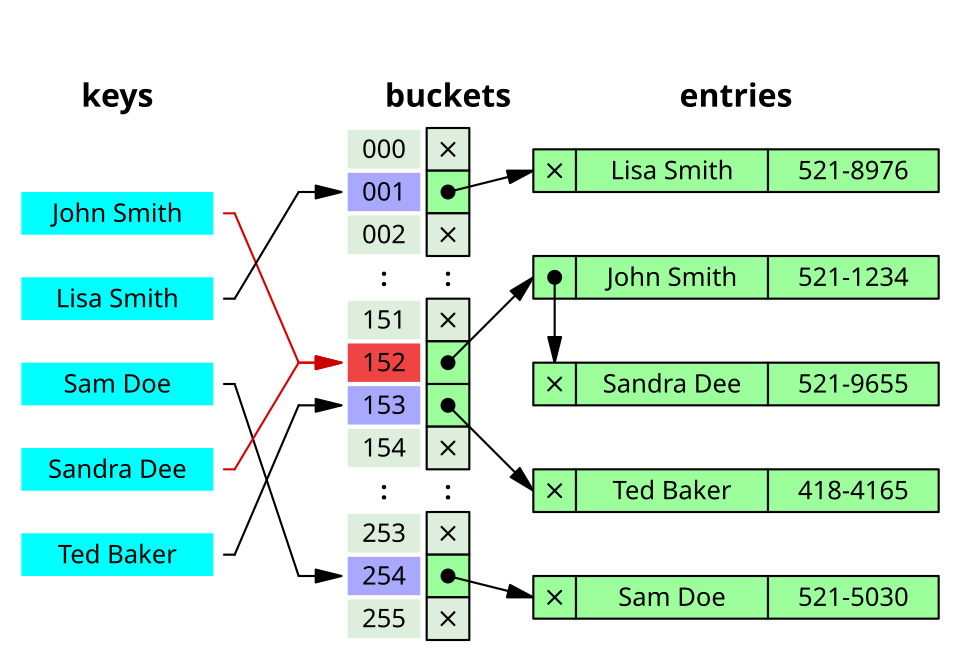 A hash table showing keys, hash function outputs, and collision resolution via linked lists (Image: Jorge Stolfi, CC BY-SA 3.0, via Wikimedia Commons)
C. Hash Indexes in Databases
- Used for exact-match queries (e.g.,
WHERE email='user@khalti.com'). - Not suitable for range queries (e.g., "show users with age > 18").
- Example: MySQL’s
MEMORYengine uses hash indexes for in-memory tables.
Comparison Table: Indexing vs. Hashing
| Feature | B+ Tree Index | Hash Index |
|---|---|---|
| Lookup Time | O(log n) | O(1) |
| Range Queries | Yes (linked leaves) | No |
| Dynamic Updates | Handles inserts/deletes well | Requires rehashing at high λ |
| Storage Overhead | Higher (pointers, tree structure) | Lower (array + buckets) |
| Use Case | General-purpose (disk databases) | Exact-match (memory/SSD) |
4. Real-World Applications in Nepal
A. eSewa: Transaction Logging with B+ Trees
- Problem: eSewa processes millions of transactions/day. Queries like "Show all transactions by user X in 2023" must be fast.
- Solution:
- Composite B+ tree index on
(user_id, transaction_date). - Clustered index on
transaction_id(physical order on disk).
- Composite B+ tree index on
- Result: Range queries (e.g., "show transactions from Jan 1 to Jan 31") use the linked leaves for O(log n + m) time.
B. Khalti: User Authentication with Hashing
- Problem: Verify a user’s password in < 100ms during login.
- Solution:
- Hash function: SHA-256 (one-way hash of
password + salt). - Storage: Hash stored in the
userstable (not the plaintext password). - Lookup: During login, hash the input password and compare.
- Hash function: SHA-256 (one-way hash of
- Why not a B+ tree?
- Password checks are exact matches (no ranges).
- Hashing is faster for single-key lookups than tree traversal.
C. Daraz: Product Catalog with Bitmap Indexes
- Problem: Filter products by category (e.g., "Electronics") and price range (e.g., "1000–5000").
- Solution:
- Bitmap index on
category(low cardinality: "Electronics", "Clothing"). - B+ tree index on
price(for range queries).
- Bitmap index on
- Result: Combining bitmaps and B+ trees speeds up complex filters.
5. Advanced Topics: Trade-offs and Optimizations
A. Indexing Overhead
- Pros:
- Faster queries (100x–1000x speedup for indexed columns).
- Supports sorting (
ORDER BY) and grouping (GROUP BY) efficiently.
- Cons:
- Storage: Indexes can use 20–50% of the table size.
- Updates: Inserts/deletes require index maintenance (e.g., B+ tree splits).
- Write Amplification: More disk I/O for writes.
Example: Adding an index to a 1TB table might require 200GB extra storage.
B. Choosing Columns for Indexes
- High-Selectivity Columns: Columns with many unique values (e.g.,
email) benefit most from indexing. - Frequently Filtered Columns: Columns used in
WHEREclauses (e.g.,order_datein Daraz). - Avoid Over-Indexing: Each index slows down
INSERT/UPDATE/DELETE.
Rule of Thumb:
Index columns that appear in:
WHEREclauses,JOINconditions, orORDER BY/GROUP BY.
C. Covering Indexes
An index is covering if it includes all columns needed by a query, avoiding table access. Example:
-- Without covering index: Must access the table for 'customer_name'.
SELECT customer_name FROM accounts WHERE account_id = 100;

-- With covering index: Index on (account_id, customer_name) suffices.
CREATE INDEX idx_account_name ON accounts(account_id, customer_name);
6. Query Processing: How Indexes Are Used
Recall the past exam question:
"Make an operator tree for:
SELECT customer_name FROM branch, account, depositor WHERE branch_city='btl' AND balance>2000."
Step-by-Step Execution
- Parsing: SQL parser converts the query into a query tree.
- Optimization: The optimizer chooses the best access path (e.g., index vs. full scan).
- Execution:
- Join Order: Optimizer picks
branch → account → depositor(smallest table first). - Index Usage:
branch_city='btl'→ Uses index onbranch(branch_city).balance>2000→ Uses index onaccount(balance)(B+ tree for range scan).
- Operator Tree:
flowchart TD
    A["Select\ncustomer_name"] --> B["Join\naccount.depositor_id = depositor.id"]
    B --> C["Join\nbranch.branch_id = account.branch_id"]
    C --> D["Index Scan\nbranch(branch_city) = 'btl'"]
    C --> E["Index Scan\naccount(balance) > 2000"]
- Join Order: Optimizer picks
Key Insight: The optimizer avoids full table scans by using indexes for filtered columns.
7. Hashing vs. Indexing: When to Use Which?
| Scenario | Recommended Technique | Why? |
|---|---|---|
Exact-match lookups (e.g., WHERE id=5) |
Hash index | O(1) time, minimal overhead. |
Range queries (e.g., WHERE salary BETWEEN 50000 AND 100000) |
B+ tree | Linked leaves enable efficient scanning. |
Multi-column filters (e.g., WHERE city='Ktm' AND age>18) |
Composite B+ tree | Optimized for column order. |
| In-memory tables (e.g., Redis) | Hash index | No disk I/O overhead. |
| Disk-based tables (e.g., MySQL) | B+ tree | Handles large datasets and range queries. |
8. Practical Example: NEPSE Stock Data
Problem: NEPSE’s database stores daily stock prices for thousands of companies. Queries like "Show all stocks in the 'Banking' sector with price > 500" must run in < 50ms.
Solution:
- Composite Index:
CREATE INDEX idx_sector_price ON stocks(sector, price); - Query Execution:
- The B+ tree on
(sector, price):- First filters
sector = 'Banking'(leftmost prefix). - Then scans the range
price > 500using linked leaves.
- First filters
- The B+ tree on
- Performance:
- Without index: Full scan of 1M rows (~100ms).
- With index: O(log n) + range scan (~20ms).
In the Real World
eSewa’s Transaction Logs
- Technique: B+ tree indexes on
(user_id, transaction_date). - Why: Enables fast range queries (e.g., "show all transactions by user X in Q1 2023") and supports fraud detection by scanning chronological logs.
- Technique: B+ tree indexes on
Khalti’s User Authentication
- Technique: SHA-256 hashing for passwords + salt to prevent rainbow table attacks.
- Why: Hashing ensures passwords are never stored in plaintext, while the hash index provides O(1) login verification.
Daraz’s Product Search
- Technique: Composite indexes (e.g.,
(category, price, rating)) + bitmap indexes for low-cardinality filters (e.g., "Electronics" vs. "Clothing"). - Why: Combines fast exact matches (hash-like performance for categories) with range support (B+ trees for price).
- Technique: Composite indexes (e.g.,
NTC’s Customer Billing
- Technique: Clustered index on
customer_id(physical order on disk) + non-clustered index onbilling_date. - Why: Clustered index speeds up customer-specific queries, while the non-clustered index accelerates monthly billing reports.
- Technique: Clustered index on
Ncell’s Call Records
- Technique: Hash partitioning (distribute call records by
customer_id % 1000) + B+ trees per partition. - Why: Hash partitioning reduces lock contention in high-concurrency scenarios, while B+ trees handle range queries (e.g., "calls from 10 AM to 11 AM").
- Technique: Hash partitioning (distribute call records by
Exam Tip
For Short Questions (2–5 marks):
- Define B+ tree, hash index, or collision resolution in 1–2 sentences.
- Example:
"What is a clustered index? Give one advantage and one disadvantage." Answer: A clustered index determines the physical order of data on disk. Advantage: Faster range queries (linked leaves). Disadvantage: Only one per table; updates are expensive.
For Long Questions (10–15 marks):
- Draw diagrams: Always sketch a B+ tree or hash table for worked examples.
- Compare techniques: Use tables to contrast B+ trees vs. hash indexes (as above).
- Real-world tie-ins: Relate to eSewa, Khalti, or NEPSE in explanations (examiners love this).
Common Pitfalls:
- Assuming hash indexes support ranges: They don’t! Always specify when to use each.
- Ignoring update costs: Indexes slow down
INSERT/DELETE. Mention this in trade-off discussions. - Overlooking composite indexes: If a query filters on multiple columns, the index must match their order.
Worked Example Strategy:
- For SQL queries, always:
- Identify filtered columns.
- Suggest appropriate indexes (e.g., B+ tree for ranges, hash for exact matches).
- Draw the operator tree (as in the exam question).
- For SQL queries, always:
Example Answer Snippet:
*"For the query
SELECT * FROM orders WHERE customer_id=100 AND order_date > '2023-01-01', the optimal indexes are:
- A hash index on
customer_idfor the exact match.- A B+ tree index on
order_datefor the range query. The query processor would first use the hash index to find customer 100’s orders, then scan the B+ tree leaves for dates after Jan 1, 2023."*
Based on the PU BE Computer (PU) syllabus for Database Management System, unit 8.
Discussion
Loading…