Computer NetworksUnit 920 min read
Application Layer: Protocols, Services & Real-World Systems
Unit 9 of Computer Networks explores the application layer—its protocols (HTTP, FTP, SMTP, DNS), service models (client-server, P2P), and real-world implementations in eSewa, WhatsApp, and NEPSE. Learn how data is formatted, exchanged, and secured at the top of the OSI stack, with visuals of packet structures, protocol
TAKEAWAYS:
- The application layer defines protocols (rules for data exchange) like HTTP/HTTPS, FTP, SMTP, and DNS, each serving distinct functions (web, file transfer, email, name resolution).
- Service models (client-server vs. peer-to-peer) dictate how applications communicate, with trade-offs in scalability, cost, and control.
- Message formats (e.g., HTTP request/response headers, DNS query/reply) encode metadata and payloads in structured fields, visible in Wireshark captures.
- Security mechanisms (TLS/SSL, digital signatures) protect data integrity and confidentiality in transactions like online banking or eSewa payments.
- Real-world systems (WhatsApp’s end-to-end encryption, NEPSE’s stock data feeds) rely on layered protocols to ensure reliability, efficiency, and user trust.
- Performance tuning involves optimizing protocol parameters (e.g., TCP window size, DNS caching) to reduce latency in applications like Pathao’s ride-matching.
Core Concepts: The Application Layer’s Role
The application layer (Layer 7 of the OSI model) is the interface between network services and user applications. Unlike lower layers (which handle routing, framing, or physical transmission), this layer:
- Defines protocols for specific tasks (e.g., retrieving a webpage, sending an email).
- Uses service models to structure communication (client-server, P2P, hybrid).
- Encapsulates data into messages with headers/metadata before passing them to the transport layer (TCP/UDP).
+---------------------+
|     Application     | ← Layer 7: Protocols like HTTP, FTP
| (User Interfaces)   |
+---------------------+
|     Presentation    | ← Layer 6: Encryption, compression
| (Data Translation)  |
+---------------------+
|      Session        | ← Layer 5: Dialog control (e.g., TCP handshake)
| (Connection Mgmt)   |
+---------------------+
|      Transport      | ← Layer 4: TCP/UDP segmentation
| (End-to-End)        |
+---------------------+
|      Network        | ← Layer 3: IP routing
| (Logical Addressing)|
+---------------------+
|    Data Link        | ← Layer 2: MAC framing
| (Physical Addressing)|
+---------------------+
|      Physical       | ← Layer 1: Bits on wire
| (Bit Transmission)  |
+---------------------+
Key Idea: The application layer does not transmit data directly—it relies on lower layers (e.g., TCP for reliability, UDP for speed) to deliver messages.
1. Application Protocols: Rules for Data Exchange
Protocols are agreements on how data is formatted, transmitted, and interpreted. Below are the most critical ones in the syllabus, with their message structures and real-world uses.
1.1 HTTP/HTTPS: The Web’s Foundation
Definition: HyperText Transfer Protocol (HTTP) enables communication between web clients (browsers) and servers. HTTPS adds TLS/SSL encryption for security.
How It Works: Request-Response Cycle
- Client (e.g., your browser) sends a request (e.g.,
GET /index.html). - Server processes the request and sends a response (status code + data).
- Connection closure: HTTP/1.0 closes after each request; HTTP/1.1/2.0 uses persistent connections.
sequenceDiagram
    participant Client as Browser
    participant Server as Web Server
    Client->>Server: GET /home.html HTTP/1.1\nHost: example.com\nUser-Agent: Chrome
    Server-->>Client: HTTP/1.1 200 OK\nContent-Type: text/html\n<html>...</html>
    Note over Client,Server: Persistent connection (HTTP/1.1)
HTTP Message Format
| Field | Example Value | Purpose |
|---|---|---|
| Request Line | GET /index.html HTTP/1.1 |
Method, path, protocol version |
| Headers | Host: google.com |
Metadata (host, cookies, caching) |
| Body | (Empty for GET) or username=admin |
Data (POST requests) |
| Status Line | HTTP/1.1 200 OK |
Response code (200=success, 404=not found) |
Worked Example: eSewa Payment Flow When you pay a bill via eSewa:
- Your browser sends an HTTPS POST to eSewa’s server with your bank details (encrypted via TLS).
- The server validates the request, deducts the amount, and sends back an HTTP 200 OK with a transaction ID.
- TLS handshake (below) secures the data in transit.
sequenceDiagram
participant Browser as User's Browser
participant eSewa as eSewa Server
Browser->>eSewa: TLS Client Hello (supports TLS 1.3)
eSewa-->>Browser: TLS Server Hello + Certificate
Browser->>eSewa: POST /pay?amount=500\nencrypted_data
eSewa-->>Browser: HTTP 200 OK\ntransaction_id=12345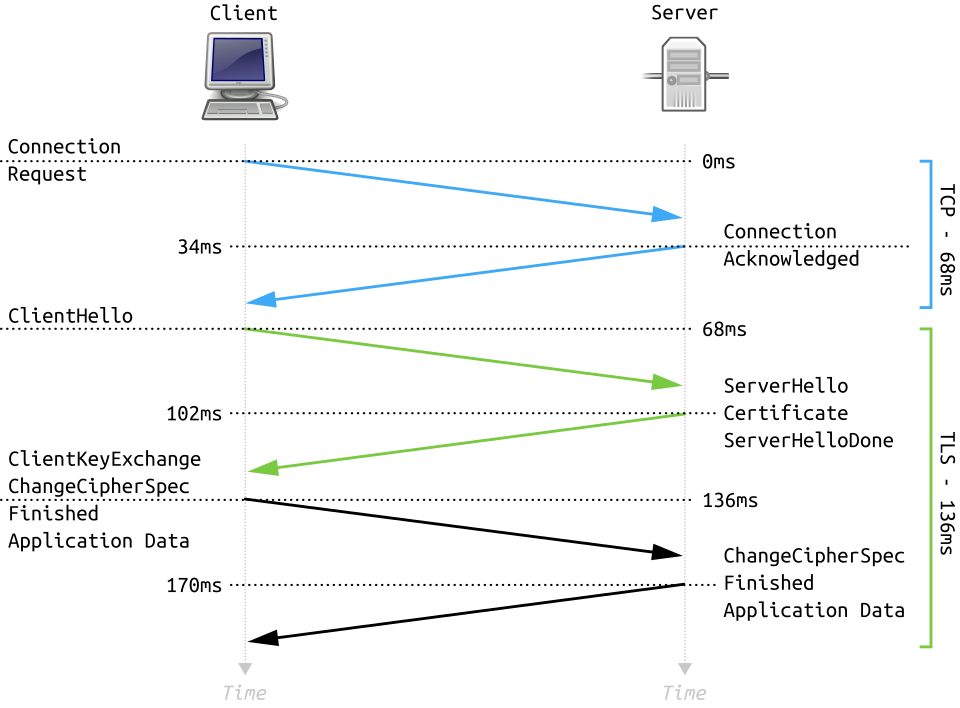 TLS handshake process with ClientHello and ServerHello (Image: Fleshgrinder and The People from The Tango! Desktop Project., Public domain, via Wikimedia Commons)
1.2 FTP: File Transfer Protocol
Definition: FTP transfers files between a client (e.g., FileZilla) and a server (e.g., Daraz’s upload server). Uses two channels:
- Control channel (port 21): Commands (
USER,PASS,RETR). - Data channel (port 20): Actual file transfer.
FTP Command-Response Example
C: USER admin
S: 331 Password required
C: PASS secret123
S: 230 Login successful
C: RETR report.pdf
S: 150 Opening data connection
[File transferred...]
S: 226 Transfer complete
Real-World Use: Daraz uses SFTP (SSH File Transfer Protocol) to securely upload product images to its servers, replacing plain FTP for security.
1.3 SMTP: Email Delivery
Definition: Simple Mail Transfer Protocol sends emails between mail servers (e.g., Gmail → Ncell’s SMTP server). Uses port 25 (unencrypted) or 587 (with STARTTLS).
SMTP Session Trace
S: 220 mail.ncell.com ESMTP
C: HELO gmail.com
S: 250 Hello gmail.com
C: MAIL FROM: <user@gmail.com>
S: 250 OK
C: RCPT TO: <recipient@ncell.com>
S: 250 OK
C: DATA
S: 354 Start mail input
C: Subject: Hello\nFrom: user@gmail.com\nTo: recipient@ncell.com\n\nHello!
S: 250 Message accepted
Real-World Use: When you send an email via Gmail, SMTP relays it through multiple servers (Gmail → ISP → Ncell’s mail server) before delivery.
1.4 DNS: The Phonebook of the Internet
Definition: Domain Name System translates human-readable names (e.g., esewa.com.np) to IP addresses (e.g., 103.246.200.223).
DNS Query-Reply Process
sequenceDiagram
    participant Client as Browser
    participant Resolver as Local DNS Server
    participant Root as Root DNS Server
    participant TLD as .np TLD Server
    participant Authoritative as eSewa's DNS Server
    Client->>Resolver: Query: esewa.com.np
    Resolver->>Root: Query: .np
    Root-->>Resolver: Refer to .np TLD
    Resolver->>TLD: Query: esewa.com.np
    TLD-->>Resolver: Refer to Authoritative
    Resolver->>Authoritative: Query: esewa.com.np
    Authoritative-->>Resolver: 103.246.200.223
    Resolver-->>Client: 103.246.200.223
DNS Record Types:
| Type | Example | Purpose |
|---|---|---|
| A | esewa.com.np → 103.246.200.223 |
Maps name to IPv4 address |
| MX | esewa.com.np → mail.esewa.com |
Mail server for domain |
| CNAME | www.esewa.com.np → esewa.com.np |
Alias for another name |
Real-World Use: When you type daraz.com.np in your browser:
- Your ISP’s DNS resolver caches the IP if seen before.
- If not, it queries root → .np → Daraz’s authoritative DNS to get
103.195.222.100. - The browser connects to this IP via HTTP/HTTPS.
1.5 Other Key Protocols
| Protocol | Port | Use Case | Example |
|---|---|---|---|
| DHCP | 67/68 | Assigns IP addresses dynamically | NTC assigning IPs to home routers |
| SNMP | 161 | Monitors network devices | Ncell tracking router health |
| SSH | 22 | Secure remote login | Linux admins accessing servers |
| RTP | 5004 | Real-time audio/video streaming | WhatsApp voice calls |
2. Service Models: How Applications Communicate
The application layer uses three primary models to structure communication, each with trade-offs.
2.1 Client-Server Model
Definition: One central server provides services to multiple clients (e.g., WhatsApp servers handling messages).
Advantages:
- Scalability: Server can handle many clients (e.g., YouTube’s servers).
- Centralized control: Easy to update/secure (e.g., eSewa’s payment gateway).
- Stateful: Server remembers client sessions (e.g., logged-in users).
Disadvantages:
- Single point of failure: Server downtime affects all clients (e.g., NEPSE’s website crashes during trading hours).
- Cost: Requires powerful servers (e.g., Google’s data centers).
Real-World Example: WhatsApp
- Your phone (client) sends messages to WhatsApp’s central servers (client-server).
- Servers store messages temporarily (until delivered or expired).
- Hybrid model: Uses P2P for media sharing (see below).
2.2 Peer-to-Peer (P2P) Model
Definition: Decentralized—peers (nodes) communicate directly without a central server. Used for file sharing, VoIP, and distributed systems.
Advantages:
- No single point of failure: If one peer leaves, others continue (e.g., BitTorrent).
- Lower cost: No need for expensive servers (e.g., Napster’s early P2P model).
- Scalability: More peers = more bandwidth (e.g., Pathao’s ride-matching uses P2P for driver locations).
Disadvantages:
- Security risks: Harder to control (e.g., pirated content on P2P networks).
- No central authority: Hard to manage updates (e.g., WhatsApp’s end-to-end encryption requires all peers to support it).
- NAT/firewall issues: Peers behind routers may not be directly reachable.
Real-World Example: BitTorrent (Used by Daraz for Large File Distribution)
- When Daraz releases a 10GB software update, it splits the file into chunks.
- Your computer (peer) downloads chunks from multiple other peers simultaneously.
- As you download, you also upload chunks to others, creating a swarm.
2.3 Hybrid Model: Best of Both Worlds
Definition: Combines client-server (for core services) and P2P (for scalability). Used by WhatsApp, Skype, and NEPSE’s trading system.
Example: WhatsApp Calls
- Client-server: Your phone registers with WhatsApp’s servers to receive calls.
- P2P: Once connected, your call bypasses WhatsApp’s servers and goes directly to the recipient’s phone (reducing latency).
- Fallback: If direct P2P fails (e.g., NAT issues), WhatsApp’s servers relay the call.
sequenceDiagram
    participant A as Your Phone
    participant Server as WhatsApp Server
    participant B as Friend's Phone
    A->>Server: Register for call
    Server->>B: Notify friend
    B->>A: Direct P2P connection (if possible)
    Note over A,B: If P2P fails, Server relays audio
Real-World Example: NEPSE’s Trading System
- Client-server: Brokers log in to NEPSE’s central servers to place orders.
- P2P: High-frequency traders (HFTs) use direct peer connections to minimize latency in stock trades.
3. Application Layer Security
Security in the application layer focuses on:
- Confidentiality (data secrecy).
- Integrity (data not altered).
- Authentication (verifying identities).
- Non-repudiation (proving a transaction occurred).
3.1 TLS/SSL: Securing Web Traffic
Definition: Transport Layer Security (TLS) encrypts HTTP → HTTPS. Works in two phases:
- Handshake: Client and server agree on encryption keys.
- Data Transfer: All data is encrypted using symmetric keys.
sequenceDiagram
    participant Client as Browser
    participant Server as Web Server
    Client->>Server: ClientHello (supported ciphers)
    Server-->>Client: ServerHello + Certificate
    Client->>Server: Key Exchange (e.g., RSA)
    Client->>Server: Encrypted data (AES)
    Server->>Client: Encrypted data (AES)
Real-World Example: eSewa Payments
- When you enter your bank card details, TLS encrypts them so even if intercepted, hackers see gibberish.
- Certificate Authority (CA): eSewa’s SSL certificate (issued by GlobalSign) proves it’s the real eSewa, not a fake site.
3.2 Digital Signatures: Proving Authenticity
Definition: Uses public-key cryptography to verify:
- The sender is who they claim to be.
- The message wasn’t altered.
How It Works:
- Sender signs data with their private key.
- Recipient verifies with the sender’s public key.
Real-World Example: NEPSE Stock Trades
- When you place a buy order for 100 shares of NMB, NEPSE’s system:
- Signs the order with the broker’s private key.
- Your trading app verifies it with the broker’s public key (embedded in their certificate).
- If verification fails, the order is rejected (preventing fraud).
3.3 Common Security Threats
| Threat | Description | Example |
|---|---|---|
| Man-in-the-Middle | Attacker intercepts/modifies traffic | Fake Wi-Fi hotspot stealing login creds |
| Replay Attack | Attacker resends valid data | Duplicate eSewa payment requests |
| Phishing | Fake login pages to steal creds | "Your Ncell account is locked!" email |
| DDoS | Overwhelming server with traffic | Taking down NEPSE’s website during IPO |
Mitigation:
- HTTPS (prevents MITM).
- CSRF tokens (prevents replay attacks in web forms).
- Multi-factor authentication (MFA) (e.g., Ncell’s OTP for login).
4. Performance Considerations
Application-layer performance depends on:
- Protocol efficiency (e.g., HTTP/2 vs. HTTP/1.1).
- Caching (reducing redundant requests).
- Load balancing (distributing traffic).
4.1 HTTP/1.1 vs. HTTP/2 vs. HTTP/3
| Feature | HTTP/1.1 | HTTP/2 | HTTP/3 (QUIC) |
|---|---|---|---|
| Multiplexing | No (sequential) | Yes (multiple requests) | Yes (over UDP) |
| Header Compression | None | HPACK compression | HPACK + reduced overhead |
| Connection | Persistent (but slow) | Persistent + multiplexed | Connectionless (UDP) |
| Latency | High (HOL blocking) | Lower | Lowest (no TCP handshake) |
Real-World Impact:
- Pathao’s app: Uses HTTP/2 to reduce latency when matching rides (multiple API calls in parallel).
- YouTube: HTTP/3 reduces buffering by avoiding TCP handshakes on mobile networks.
4.2 Caching: Reducing Latency
Definition: Storing copies of data closer to clients to avoid repeated requests.
Types of Caching:
| Type | Example | Benefit |
|---|---|---|
| Browser Cache | Storing esewa.com.np HTML |
Faster repeat visits |
| CDN Cache | Cloudflare caching YouTube videos | Reduces load on origin servers |
| DNS Caching | ISP resolver caching google.com |
Faster name resolution |
Real-World Example: Daraz’s CDN
- When you view a product page, Daraz’s CDN (Content Delivery Network) serves images from the nearest edge server (e.g., Kathmandu instead of Singapore), reducing load time.
5. Real-World Applications: How These Ideas Work Together
Let’s trace how three Nepalese systems use application-layer concepts:
5.1 eSewa: Secure Payments
- Protocol: HTTPS (TLS 1.3) for secure transactions.
- Service Model: Client-server (your phone → eSewa’s servers).
- Security:
- Digital signatures verify transactions.
- OTP (One-Time Password) adds authentication.
- Performance:
- CDN caches static content (e.g., login page).
- HTTP/2 for faster API calls (e.g., balance check).
Worked Example: Paying a Bill
1. You open eSewa app → HTTPS connection to eSewa’s server.
2. App sends POST /pay with encrypted card details (AES-256).
3. Server validates OTP, deducts amount, and sends signed receipt.
4. Your bank’s server (via NPA’s network) confirms the deduction.
5.2 WhatsApp: Messaging and Calls
- Protocol:
- XMPP (for messages).
- RTP (for voice/video calls).
- Signal Protocol (end-to-end encryption).
- Service Model:
- Client-server (account management).
- P2P (direct media sharing).
- Security:
- Perfect forward secrecy: Past messages stay private even if your key is compromised.
- Performance:
- WebRTC for direct P2P calls (reduces latency).
- CDN for storing media (photos/videos).
Worked Example: Sending a Photo
1. You take a photo → WhatsApp app compresses it (JPEG).
2. App splits photo into chunks and sends via **P2P** to friend’s phone.
3. If P2P fails, WhatsApp’s servers relay chunks.
4. Friend’s phone reassembles chunks and displays the photo.
5.3 NEPSE: Stock Trading System
- Protocol:
- FIX (Financial Information eXchange) for order routing.
- WebSockets for real-time stock quotes.
- Service Model:
- Client-server (brokers → NEPSE’s central server).
- P2P (HFTs bypassing NEPSE for direct trades).
- Security:
- Digital signatures for order validation.
- TLS for broker-server communication.
- Performance:
- Low-latency networks (fiber-optic links between brokers).
- In-memory caching for fast quote retrieval.
Worked Example: Placing a Trade
1. Your broker’s app sends a FIX message to NEPSE’s server:
   "BUY 100 NMB @ 1200".
2. NEPSE’s server validates the signature and checks liquidity.
3. If valid, it broadcasts the order to all market makers.
4. WebSocket pushes real-time price updates to your app.
6. Exam Tip: How to Score Full Marks
This unit is conceptual and application-based. Examiners test:
- Protocol details (message formats, ports, handshakes).
- Real-world mappings (e.g., "How does WhatsApp use P2P?").
- Security mechanisms (TLS, digital signatures, threats).
- Performance trade-offs (HTTP/2 vs. HTTP/1.1, caching).
Common Pitfalls to Avoid
- Vague answers: Don’t say "HTTP is used for websites." Instead, explain request/response cycles and status codes.
- Ignoring real-world examples: Always relate protocols to Nepali apps (e.g., eSewa, NEPSE, Pathao).
- Mixing layers: The application layer does not handle routing (that’s the network layer). Focus on protocols and service models.
- Skipping security: Questions often ask about TLS handshakes or DDoS mitigation. Draw the sequence diagram if asked.
High-Score Strategies
- Draw diagrams for:
- Protocol handshakes (TLS, DNS, SMTP).
- Service models (client-server vs. P2P).
- Message formats (HTTP headers, DNS records).
- Use tables to compare:
- HTTP/1.1 vs. HTTP/2 vs. HTTP/3.
- Client-server vs. P2P trade-offs.
- Relate to Nepal:
- eSewa = HTTPS + digital signatures.
- NEPSE = FIX protocol + WebSockets.
- Pathao = P2P ride matching + load balancing.
- Worked examples:
- Trace an eSewa payment step-by-step.
- Explain how WhatsApp calls switch between client-server and P2P.
Final Note: The application layer is where users interact with networks. Mastering it means understanding how apps like eSewa, WhatsApp, and NEPSE rely on protocols, security, and performance optimizations to work seamlessly. Visualize the handshakes, trace the messages, and always ask: "How does this apply to real systems?"
Based on the PU BE Computer (PU) syllabus for Computer Networks, unit 9.
Discussion
Loading…