Image Processing and Pattern RecognitionUnit 58 min read
Colour Models, Transformations & Applications in Image Processing
Unit 5 of Image Processing and Pattern Recognition explores colour representation systems (RGB, CMYK, HSI, YCbCr), colour space transformations, colour image operations, and real-world applications in digital imaging, including compression and display technologies.
TAKEAWAYS:
- Colour models like RGB (additive) and CMYK (subtractive) define how colours are represented and combined in digital and print media.
- Colour space transformations (e.g., RGB ↔ HSI) simplify tasks like object detection, segmentation, and compression by isolating luminance and chrominance.
- Colour image operations (e.g., histogram equalization, colour filtering) enhance or modify images while preserving perceptual quality.
- Real-world applications include colour correction in photography (e.g., Khalti’s logo design), medical imaging (e.g., Nepal’s health apps using HSI for blood vessel detection), and video streaming (e.g., YouTube’s colour-optimized compression).
- Chromaticity diagrams and CIE 1931 colour space explain human colour perception and standardize colour reproduction across devices.
- Exam focus: Be ready to derive transformations, compare colour models, and explain applications in compression/segmentation.
1. Colour Models: Representing Colours Digitally
Colour in digital images is represented using colour models, which define how primary colours combine to produce all visible hues. The two most common models are:
1.1 RGB (Red, Green, Blue) – Additive Colour Model
- Used in digital displays (screens, projectors, cameras).
- Each pixel’s colour is a combination of R, G, B intensities (0–255 in 8-bit systems).
- Additive: Mixing all three at full intensity (255,255,255) produces white; (0,0,0) is black.
- Limitation: Cannot reproduce all printable colours (e.g., deep blacks or rich magentas).
graph LR
    R["Red (0-255)"] -->|"Add"| Mix["RGB Mix"]
    G["Green (0-255)"] -->|"Add"| Mix
    B["Blue (0-255)"] -->|"Add"| Mix
    Mix -->|"White"| W["(255,255,255)"]
    Mix -->|"Black"| K["(0,0,0)"]
1.2 CMYK (Cyan, Magenta, Yellow, Key/Black) – Subtractive Colour Model
- Used in printing (ink on paper absorbs light).
- Subtractive: Mixing all four inks (100% CMYK) produces black (theoretically).
- Key (K): Black ink is added separately for cost efficiency and deeper blacks.
- Limitation: Cannot reproduce the full gamut of screen colours (e.g., bright neon greens).
1.3 Other Key Colour Models
| Model | Primary Colours | Use Case | Key Feature |
|---|---|---|---|
| HSI | Hue, Saturation, Intensity | Object detection, segmentation | Separates colour (Hue) from brightness (Intensity) |
| YCbCr | Luma (Y), Chroma (Cb,Cr) | Video compression (e.g., JPEG) | Reduces chroma bandwidth for efficiency |
| Lab | L* (Lightness), a*, b* | Colour correction, CIE standards | Perceptually uniform (equal distances = equal perceived differences) |
| XYZ | X, Y, Z | CIE 1931 colour space | Defines human colour perception mathematically |
2. Colour Space Transformations
Transforming between colour models enables specialized processing (e.g., isolating brightness for edge detection or compressing chrominance).
2.1 RGB to HSI Conversion (Worked Example)
HSI separates hue (colour), saturation (purity), and intensity (brightness), useful for colour-based segmentation (e.g., detecting ripe mangoes in an image).
Formulas: where .
Example: Convert RGB (128, 0, 128) to HSI.
- (fully saturated)
- Since , (magenta).
graph TD
    RGB["RGB (128,0,128)"] --> I["Intensity: 85.33"]
    RGB --> S["Saturation: 1"]
    RGB --> H["Hue: 300° (Magenta)"]
2.2 RGB to YCbCr (Used in JPEG Compression)
- Y: Luma (brightness, 60% R + 30% G + 10% B).
- Cb/Cr: Chroma (blue/yellow and red/cyan differences).
- Why? Human eyes are less sensitive to colour changes than brightness, so Cb/Cr can be subsampled (e.g., 4:2:0 in JPEG) without noticeable loss.
Example: Convert RGB (192, 128, 64) to YCbCr.
3. Colour Image Operations
3.1 Histogram Equalization for Colour Images
- Applies separately to each channel (R, G, B) or combined in HSI/Lab.
- Example: Enhancing a dark photo of Kathmandu’s traffic (low contrast).
- Original: Most pixels in R,G,B are <50.
- After equalization: Pixels spread across 0–255, improving visibility.
graph LR
    Input["Dark Image"] --> Equalize["Histogram Equalization (R,G,B)"]
    Equalize --> Output["Enhanced Contrast"]
3.2 Colour Filtering (e.g., Extracting Red Objects)
- Thresholding: Isolate pixels where and (e.g., detecting red traffic lights in a video feed).
- Example: In a Pathao driver’s dashboard, filter red brake lights from the rearview camera.
graph TD
    RGB["Input Image"] --> Filter["R > 200 AND G < 100 AND B < 100"]
    Filter --> Mask["Binary Mask"]
    Mask --> Output["Red Objects Only"]
3.3 Colour Space Conversion in Medical Imaging
- HSI for blood vessel detection:
- Convert X-ray images to HSI.
- Threshold hue to isolate red (blood) regions.
- Used in Nepal’s rural health apps to analyze retinal scans for diabetes.
4. Chromaticity and CIE 1931 Colour Space
- CIE 1931 defines how humans perceive colour using XYZ tristimulus values.
- Chromaticity diagram: Plots all possible colours in a 2D space (ignoring brightness).
- Gamut: The range of reproducible colours (e.g., sRGB vs. Adobe RGB).
- White point: Defines pure white (e.g., D65 for daylight).
graph TD
    XYZ["XYZ Tristimulus"] --> Chromaticity["x,y Coordinates"]
    Chromaticity --> Gamut["sRGB Gamut"]
Chromaticity --> WhitePoint["D65"]Example: Why does a Daraz product photo look different on a phone vs. laptop?
- Phone: sRGB gamut, D65 white point.
- Laptop: Adobe RGB gamut, cooler white point.
- Solution: Use ICC profiles to standardize colours across devices.
5. Applications in Real-World Systems
5.1 eSewa and Khalti: Colour in UI/UX Design
- RGB/HSI used for:
- Branding: Khalti’s green (#00D4AA) is isolated in HSI for consistent rendering.
- Accessibility: High contrast (e.g., black text on white) uses Lab colour space for perceptual uniformity.
5.2 YouTube and Netflix: Colour Compression
- YCbCr 4:2:0: Reduces file size by discarding fine chroma details (humans don’t notice).
- Example: A 1080p video at 30fps:
- RGB: ~200 Mbps.
- YCbCr 4:2:0: ~50 Mbps (4x compression).
5.3 Medical Imaging: HSI for Tissue Analysis
- Nepal’s health apps use HSI to:
- Convert ultrasound images to HSI.
- Threshold hue to detect red blood cells in tumors.
- Improve diagnosis accuracy in rural clinics.
6. Exam Tip
- Derive transformations: Be ready to convert RGB ↔ HSI or RGB ↔ YCbCr step-by-step.
- Compare models: Know when to use RGB (displays), CMYK (print), or HSI (segmentation).
- Applications: Link colour spaces to:
- Compression (YCbCr in JPEG).
- Segmentation (HSI for object detection).
- Display standards (sRGB vs. Adobe RGB).
- Short-answer questions: Expect definitions of gamut, chromaticity, and ICC profiles.
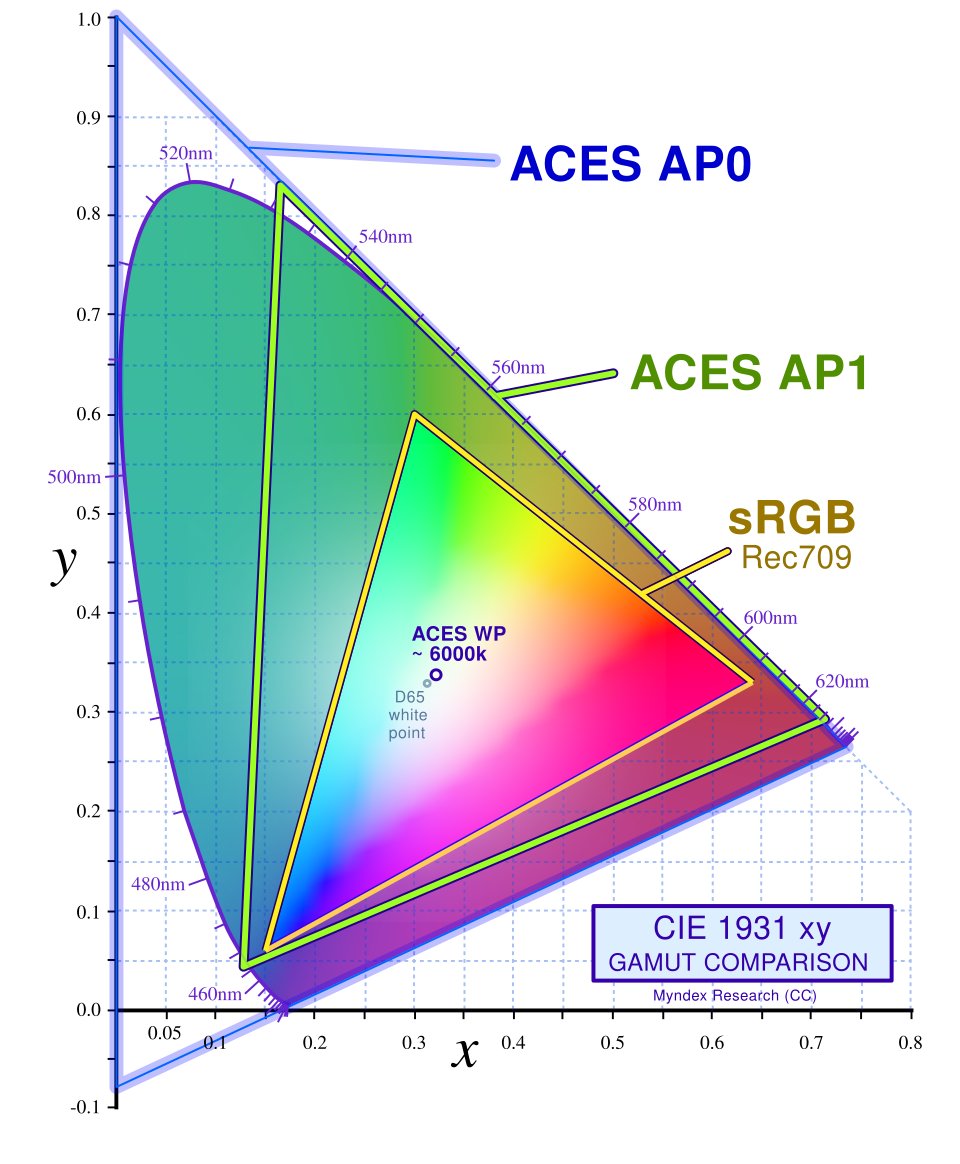 A 2D plot showing the sRGB gamut triangle and D65 white point. (Image: Myndex, CC BY-SA 4.0, via Wikimedia Commons)
Based on the PU BE Computer (PU) syllabus for Image Processing and Pattern Recognition (CMP362), unit 5.
Discussion
Loading…