Image Processing and Pattern RecognitionUnit 17 min read
Digital Image Fundamentals: Pixels, Representations & Acquisition
Unit 1 of Image Processing and Pattern Recognition covers the core concepts of digital images—how they are formed, stored, and represented in binary, including pixel structures, color models, image acquisition systems, and spatial relationships. This note explains everything from monochrome to RGB/CMYK, sampling, quant
Core Concepts
1. What is a Digital Image?
A digital image is a discrete representation of a 2D visual scene, composed of a finite number of pixels (picture elements). Each pixel stores intensity (for grayscale) or color values (for color images) in a structured grid.
Key Definitions:
- Pixel: Smallest addressable element in a digital image, defined by its intensity (0–255 for 8-bit grayscale) or color values (RGB, CMYK, etc.).
- Image Resolution: Number of pixels along width and height (e.g., 1920×1080 for Full HD). Higher resolution = finer detail but larger file size.
- Aspect Ratio: Ratio of width to height (e.g., 4:3, 16:9). Critical for display compatibility.
Visual: Pixel Grid and Intensity
Caption: A 4×4 grayscale image where each pixel’s value represents intensity (0=black, 255=white).
2. Image Representation: Binary Encoding
Digital images are stored as binary data. The bit depth determines the number of possible intensity/color values:
- 8-bit grayscale: 256 levels (0–255).
- 24-bit RGB: 8 bits per channel (R, G, B), 16.7 million colors.
- 48-bit RGB: 16 bits per channel (used in high-end imaging).
Worked Example: Storing a 100×100 Grayscale Image
- Pixel count: 100 × 100 = 10,000 pixels.
- Bits per pixel (bpp): 8 (for 8-bit grayscale).
- Total bits: 10,000 × 8 = 80,000 bits.
- Bytes: 80,000 / 8 = 10,000 bytes (10 KB).
For a color image (24-bit RGB):
- Total bits: 10,000 × 24 = 240,000 bits → 30 KB.
3. Color Models: RGB vs. CMYK vs. HSV
Different color models serve different purposes. Here’s how they compare:
| Model | Channels | Use Case | Example |
|---|---|---|---|
| RGB | Red, Green, Blue | Digital displays, web, photography | Smartphone screens, YouTube |
| CMYK | Cyan, Magenta, Yellow, Key (Black) | Print media (subtractive color) | Newspapers, Daraz product images |
| HSV | Hue, Saturation, Value | Image processing (e.g., color segmentation) | Object detection in autonomous vehicles |
Visual: RGB Color Cube
Caption: The RGB color cube shows how mixing red, green, and blue creates all possible colors.
Image Acquisition Systems
How are digital images captured? The process involves sampling (discretizing space) and quantization (discretizing intensity).
1. Digital Cameras: The CCD/CMOS Sensor
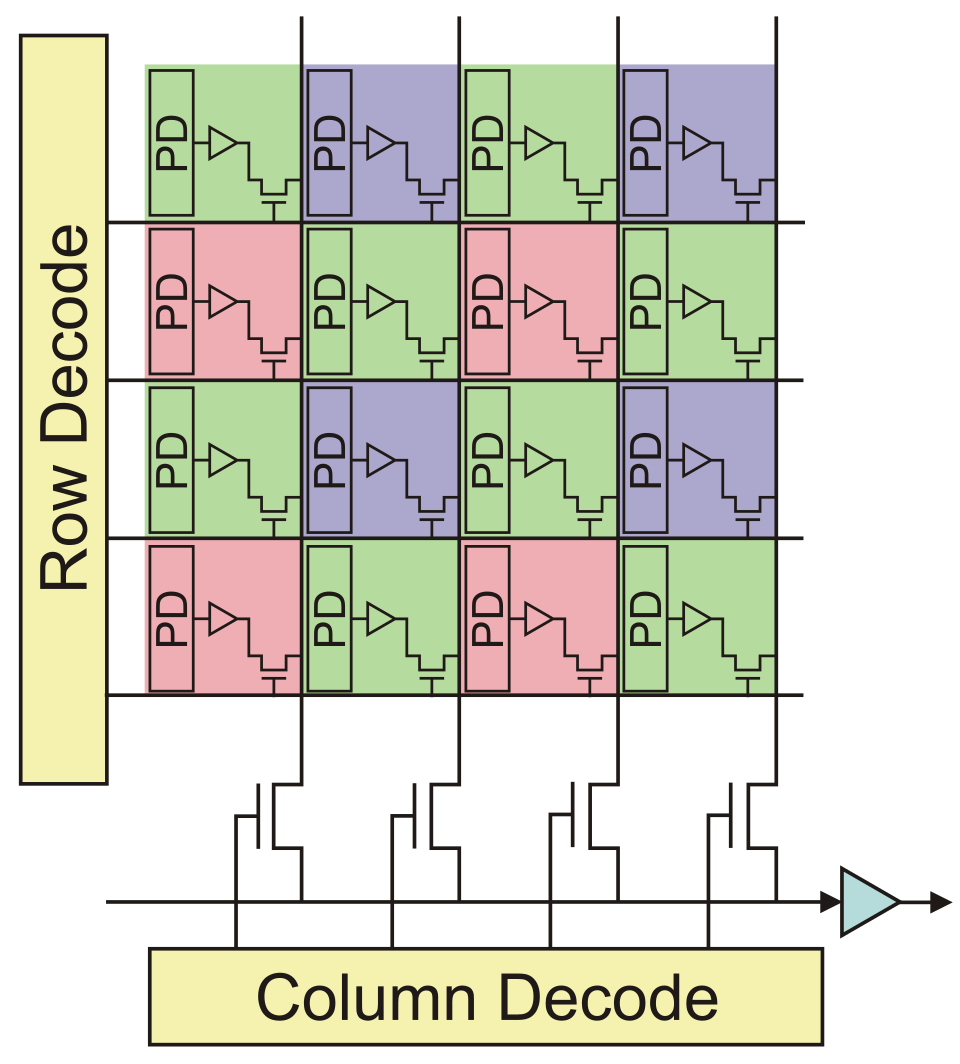 Caption: A CMOS sensor chip in a smartphone camera, showing photodiodes that convert light into electrical signals. (Image: Shape, GPL, via Wikimedia Commons)
Worked Example: Camera Sensor Resolution
- A 12 MP camera has:
- Megapixels (MP): 12 × 1,000,000 = 12,000,000 pixels.
- Typical aspect ratio: 4:3 → Width = 4000 pixels, Height = 3000 pixels.
- Sampling rate: Determined by sensor size and lens (e.g., 5 µm pixels on a 1/2.3" sensor).
2. Scanners and Medical Imaging
- Scanners: Use a light source and photodetectors to sample printed images (e.g., 300–2400 DPI).
- Medical Imaging (MRI/CT): Captures cross-sectional slices, stored as voxels (3D pixels).
Visual: Image Acquisition Pipeline
flowchart LR
    A["Light Source"] --> B["Lens"]
    B --> C["Sensor Array<br/>(CCD/CMOS)"]
    C --> D["Analog-to-Digital<br/>Converter (ADC)"]
    D --> E["Digital Image<br/>(Raw Data)"]
    E --> F["Post-Processing<br/>(White Balance, Noise Reduction)"]
    F --> G["Final Image<br/>(JPEG/PNG)"]
Caption: How a digital camera converts light into a digital image.Spatial Relationships and Neighborhood Operations
Pixels are not isolated; they interact with neighbors. Key concepts:
- 4-connectivity: Pixels share an edge (up, down, left, right).
- 8-connectivity: Pixels share an edge or corner (diagonal included).
- Neighborhood: A small window (e.g., 3×3) around a pixel for operations like smoothing or edge detection.
Worked Example: 3×3 Neighborhood in Edge Detection
Consider a grayscale image patch:
[100, 120, 150]
[110, 130, 160]
[120, 140, 170]
- Center pixel (130) has neighbors with higher intensity to the right and bottom → likely part of an edge.
In the Real World
eSewa and Khalti Apps:
- Use RGB color models to display transaction receipts and QR codes. The app’s camera scans QR codes by analyzing pixel patterns in the spatial domain (neighborhood operations to detect black/white contrasts).
- Example: When you scan a Khalti QR code, the app’s algorithm applies thresholding (converting grayscale to binary) to extract the code’s data.
Pathao Driver App:
- Uses image segmentation (a later unit) but relies on high-resolution digital images (from GPS + camera feeds) to map traffic routes. The pixel resolution of satellite images determines how accurately the app can predict congestion.
- Worked Example: If Pathao’s map uses 10 cm/pixel resolution, a 1 km × 1 km area requires:
- Width = 10,000 pixels, Height = 10,000 pixels → 100 million pixels.
- At 24-bit RGB, this is 300 MB of data before compression!
NTC’s Traffic Monitoring Cameras:
- Deploy CMOS sensors to capture license plates. The system uses pixel intensity analysis to detect edges (e.g., a car’s outline) and then applies OCR (Optical Character Recognition) to read alphanumeric characters.
- Real Picture: IMAGE: "license plate recognition camera" | Caption: A traffic camera used by NTC to capture high-resolution images for automated number plate reading.
Exam Tip
What to Expect:
- Definitions: Be ready to define pixel, resolution, bit depth, RGB, CMYK, and sampling. Expect numerical problems (e.g., "Calculate the file size of a 2048×1536 RGB image").
- Diagrams: Sketch a pixel grid, RGB color cube, or image acquisition pipeline. Label all components.
- Applications: Link concepts to real-world systems (e.g., "How does a smartphone camera use RGB?" or "Why is CMYK used in printing?").
- Short Answer: Questions like:
- "Differentiate between 4-connectivity and 8-connectivity."
- "What is the difference between spatial and frequency domain representation?" (Hint: This is a preview of Unit 3!)
- Problem Solving:
- Given a pixel matrix, identify edges or apply simple operations (e.g., "Find the neighborhood of pixel (2,2)").
- Calculate storage requirements for images with different bit depths.
Common Pitfalls:
- Confusing RGB (additive) with CMYK (subtractive). Remember: RGB is for screens, CMYK for print.
- Forgetting that higher resolution = more pixels = larger file size.
- Misapplying connectivity (e.g., using 8-connectivity when 4-connectivity is required for smooth boundaries).
Summary Checklist:
Before the exam, ensure you can: ✅ Explain the difference between analog and digital images. ✅ Calculate file sizes for grayscale/color images. ✅ Describe how a CMOS sensor works. ✅ Draw and label a 3×3 pixel neighborhood. ✅ Name two real-world applications of digital image fundamentals (e.g., QR codes, medical imaging). ✅ Convert between RGB and grayscale values (e.g., RGB(255,0,0) = red = grayscale 255 if only R is present).
Based on the PU BE Computer (PU) syllabus for Image Processing and Pattern Recognition (CMP362), unit 1.
Discussion
Loading…