IT And ApplicationsUnit 211 min read
Computer Architecture & Hardware: CPU, Memory, I/O, Buses & Peripherals
Unit 2 of IT And Applications covers the foundational architecture of computers—how hardware components (CPU, memory, storage, I/O devices) interact via buses, the Von Neumann model, and real-world applications in Nepalese tech (eSewa, Ncell, banks). Includes labelled diagrams of hardware, bus structures, and memory hi
Core Concepts: What is a Computer System?
A computer system is a combination of hardware (physical components) and software (instructions) that work together to process data. The hardware components can be classified into three main categories:
- Central Processing Unit (CPU): The "brain" of the computer.
- Memory Units: Temporary (RAM) and permanent (ROM, storage) storage.
- Input/Output (I/O) Devices: Tools for interaction (keyboard, monitor, printer, etc.).
- System Bus: The communication pathway connecting all components.
The Von Neumann Architecture
The modern computer follows the Von Neumann model, where:
- Data and instructions are stored in the same memory.
- The CPU fetches instructions sequentially.
- The system uses a stored-program concept.
graph TD
A["Memory"] -->|"Instructions/Data"| B["CPU"]
B -->|"Control Unit"| C["ALU"]
B -->|"Registers"| D["Cache"]
B -->|"Bus"| E["I/O Devices"]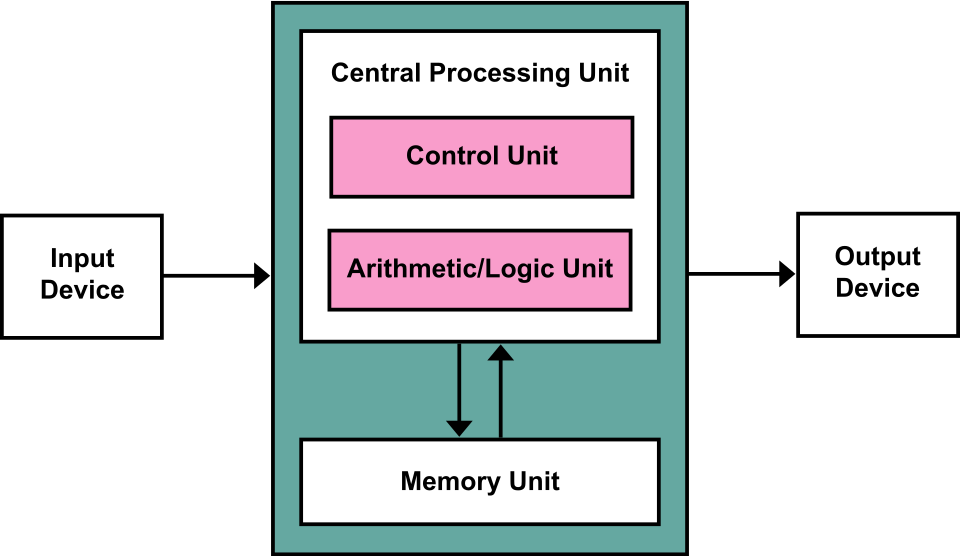 Labeled diagram showing CPU, memory, control unit, ALU, and bus connections (Image: Kapooht, CC BY-SA 3.0, via Wikimedia Commons)
1. Central Processing Unit (CPU): The Brain of the Computer
The CPU performs four main functions:
- Fetch: Retrieves instructions from memory.
- Decode: Interprets the instruction.
- Execute: Performs the operation (arithmetic/logic).
- Store: Writes results back to memory.
Three Major Components of the CPU
| Component | Function | Example (Nepal Context) |
|---|---|---|
| Control Unit (CU) | Manages instruction execution and coordinates other units. | eSewa’s server CPU controls transaction processing. |
| Arithmetic Logic Unit (ALU) | Performs math/logic operations (addition, comparison, etc.). | Ncell’s billing system calculates call charges. |
| Registers | High-speed storage for temporary data/instructions (e.g., PC, IR, ACC). | Bank ATMs use registers to store PIN verification data. |
Worked Example: CPU in a Bank ATM Transaction
- Fetch: CPU retrieves the instruction "Check PIN" from memory.
- Decode: CU interprets it as a "compare PIN with stored value" operation.
- Execute: ALU compares the entered PIN with the database value.
- Store: If correct, CU sends a signal to unlock the account.
2. Memory Hierarchy: Where Data Lives
Memory is organized in a hierarchy based on speed, cost, and capacity.
| Type | Full Form | Speed | Volatility | Capacity | Example Use Case |
|---|---|---|---|---|---|
| Cache | (L1, L2, L3) | Fastest | Volatile | KB-MB | CPU processes data from cache before RAM. |
| RAM | Random Access Memory | Fast | Volatile | GB | eSewa stores active transactions here. |
| ROM | Read-Only Memory | Slow | Non-volatile | MB | BIOS settings in a computer. |
| Secondary Storage | HDD/SSD | Slowest | Non-volatile | TB | Daraz stores customer orders on HDDs. |
RAM vs. ROM: Key Differences
| Feature | RAM | ROM |
|---|---|---|
| Type | Volatile (loses data on power off) | Non-volatile (retains data) |
| Usage | Temporary storage (e.g., running apps) | Permanent storage (e.g., firmware) |
| Speed | Faster than ROM | Slower than RAM |
| Example | WhatsApp stores chat history in RAM while open. | Ncell’s SIM card stores contacts in ROM. |
3. Input/Output (I/O) Devices: Bridging Humans and Computers
I/O devices allow interaction between users and the computer system.
Classification of I/O Devices
mindmap
  root((I/O Devices))
    Input Devices
      Keyboard
      Mouse
      Scanner
      Microphone
    Output Devices
      Monitor
      Printer
      Speaker
    Storage Devices
      HDD/SSD
      USB Drive
    Hybrid Devices
      Touchscreen
      Webcam
Worked Example: Pathao’s Ride-Hailing System
- Input: Driver’s location (GPS), passenger’s request (mobile app).
- Processing: CPU calculates the shortest route using an algorithm.
- Output: Route displayed on the driver’s app and passenger’s app.
4. System Bus: The Nervous System of a Computer
The system bus connects all hardware components and consists of three main buses:
| Bus Type | Function | Example |
|---|---|---|
| Data Bus | Transfers data between CPU, memory, and I/O devices (bidirectional). | eSewa transfers transaction data to the bank. |
| Address Bus | Sends memory addresses from CPU to memory (unidirectional). | CPU tells RAM: "Send data from address 0x1234." |
| Control Bus | Carries control signals (e.g., read/write, clock signals). | Ncell’s server sends a "reset" signal to a faulty modem. |
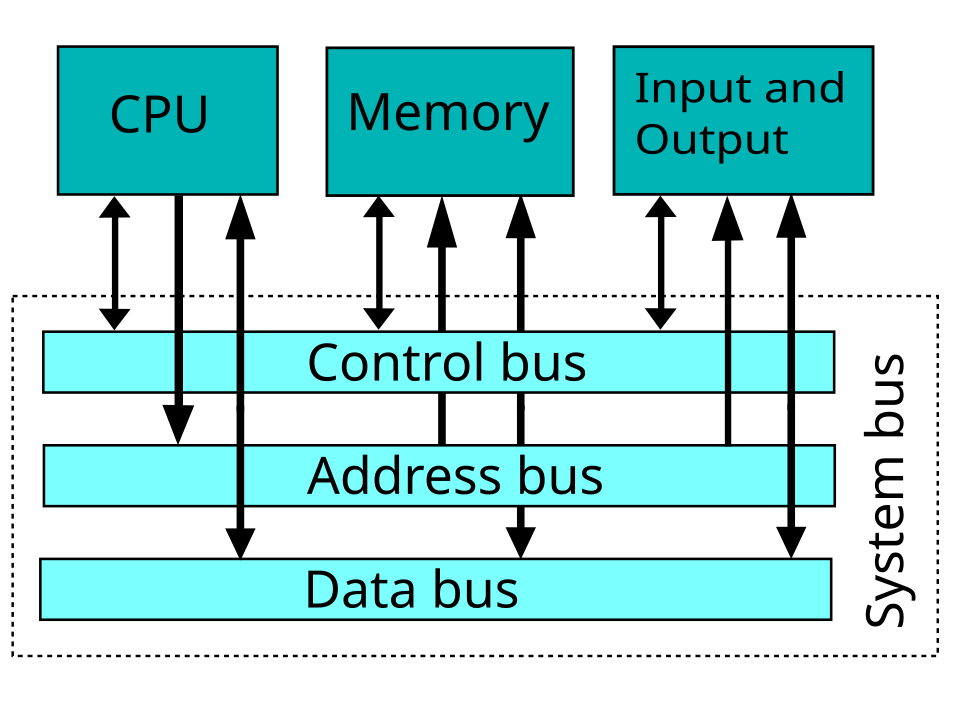 Labeled diagram showing data bus, address bus, and control bus (Image: W Nowicki, CC BY-SA 3.0, via Wikimedia Commons)
5. Peripheral Devices: Extending Computer Capabilities
Peripherals are auxiliary devices that enhance computer functionality.
Types of Peripherals
| Category | Examples | Nepalese Use Case |
|---|---|---|
| Input | Keyboard, Mouse, Scanner | NTC uses scanners to read utility meters. |
| Output | Printer, Monitor, Speaker | Banks print receipts using thermal printers. |
| Storage | HDD, SSD, USB Drive | Daraz stores product images on SSDs. |
| Communication | Modem, Network Card | Ncell uses modems for 4G/5G signal transmission. |
## In the Real World
eSewa’s Payment System
- Idea Used: CPU processing + RAM storage
- How: When you pay a bill on eSewa, the CPU fetches your account details from RAM, processes the transaction, and updates the bank’s database in real-time.
Ncell’s Billing System
- Idea Used: Secondary storage (HDD/SSD) + I/O devices
- How: Your call logs are stored on Ncell’s servers (HDDs), and when you check your bill via the app, the data is transferred from storage to your phone (output device).
Daraz’s Order Fulfillment
- Idea Used: System bus + peripheral devices (printers, scanners)
- How: When you order a product, Daraz’s server CPU sends data via the data bus to a printer to generate a shipping label, while a scanner verifies the product before dispatch.
## Exam Tip: How to Score Full Marks
Define Key Terms Precisely
- Example: "The CPU is the primary processing unit that executes instructions by performing arithmetic, logic, and control operations using the ALU, CU, and registers."
- Avoid: Vague answers like "CPU is the brain of the computer."
Use Diagrams to Explain
- Always draw a labeled diagram of:
- CPU components (CU, ALU, registers).
- Memory hierarchy (cache → RAM → ROM → storage).
- System bus (data, address, control buses).
- Example Question: "Describe the three major components of the CPU."
- Answer: Include a diagram + bullet points for CU, ALU, and registers.
- Always draw a labeled diagram of:
Relate to Nepalese Context
- Example: For "Explain the role of RAM," write: "When you use eSewa to pay a bill, the active transaction is stored in RAM. If the power cuts, the transaction is lost (since RAM is volatile), but the bank’s permanent records remain safe in secondary storage."
Compare and Contrast
- Example Question: "Differentiate between RAM and ROM."
- Use a table (as shown above) and highlight volatility, speed, and usage.
- Example Question: "Differentiate between RAM and ROM."
Worked Examples Are Gold
- Example Question: "How does a CPU process a loan application in a bank?"
- Break it into fetch, decode, execute, store steps with a real-world tie-in.
- Example Question: "How does a CPU process a loan application in a bank?"
Common Pitfalls to Avoid
- ❌ Saying "ROM is a type of RAM." (They are opposites in volatility.)
- ❌ Forgetting to mention bidirectional for the data bus.
- ❌ Describing secondary storage as fast (it’s the slowest in the hierarchy).
## Quick Revision Table for Last-Minute Studying
| Topic | Key Points | Exam Focus |
|---|---|---|
| Von Neumann Model | Stored-program concept, sequential fetch-decode-execute. | Define and draw. |
| CPU Components | CU (control), ALU (math/logic), Registers (temporary storage). | Label a diagram + explain each part. |
| Memory Types | Cache (fastest), RAM (volatile), ROM (non-volatile), Storage (slowest). | Compare RAM vs. ROM in a table. |
| System Bus | Data bus (bidirectional), Address bus (unidirectional), Control bus (signals). | Draw and label the bus structure. |
| I/O Devices | Input (keyboard), Output (monitor), Storage (HDD), Hybrid (touchscreen). | Classify with examples (eSewa, Ncell). |
| Peripherals | Extend computer functionality (printers, scanners, modems). | Relate to Daraz/NTC use cases. |
## Practice Questions (Based on Past Exams)
Define a digital computer.
"A digital computer is an electronic device that processes data in discrete binary form (0s and 1s) using stored-program instructions to perform arithmetic, logic, and control operations."
What are the three major components of the CPU?
Answer: Control Unit (CU), Arithmetic Logic Unit (ALU), and Registers. (Include a labeled diagram.)
Justify: "Securing Information System is a challenge."
Answer:
- Hardware Vulnerabilities: Physical theft (e.g., laptops in offices), hardware failures (e.g., HDD crashes in banks).
- Bus Attacks: Data interception via address bus or data bus (e.g., malware reading RAM).
- Peripheral Risks: Unauthorized USB drives (e.g., virus-infected USB in NTC systems).
- Solutions:
- Encryption (e.g., eSewa encrypts transactions).
- Biometric Authentication (e.g., fingerprint scanners in ATMs).
- Firewalls (e.g., Ncell’s network security).
Describe two types of database system architecture.
Answer:
- Centralized Architecture:
- Single server (e.g., NEPSE’s central database for stock trading).
- Pros: Easy management, low cost.
- Cons: Single point of failure.
- Client-Server Architecture:
- Clients (e.g., your laptop) request data from a server (e.g., Daraz’s database).
- Pros: Scalable, secure.
- Cons: Requires high-speed networks.
- Centralized Architecture:
Based on the TU BBA syllabus for IT And Applications (IT231), unit 2.
Discussion
Loading…