IT And ApplicationsUnit 314 min read
System & Application Software: Types, Roles & Real-World Impact
Unit 3 of IT And Applications covers the distinction between system software (OS, utilities, drivers) and application software (productivity, multimedia, specialized tools), their functions, classifications, and real-world business applications—with visual breakdowns of how they interact in devices like smartphones and
TAKEAWAYS:
- System software acts as an intermediary between hardware and applications, managing resources like CPU, memory, and storage.
- Application software performs specific tasks for end-users, categorized into general-purpose (word processors) and specialized (ERP systems).
- Multimedia software integrates text, audio, video, and graphics, revolutionizing user engagement in platforms like YouTube and eSewa.
- Software security is critical: system software enforces access controls, while application software must validate inputs to prevent exploits.
- The layered architecture of software (hardware → system → application) ensures efficient resource allocation and user convenience.
- Real-world examples show how software drives business operations, from Kathmandu’s traffic management systems to Ncell’s billing applications.
Core Concepts: System vs. Application Software
1. Definitions and Roles
Software is classified into two broad categories based on its function:
System Software
- Definition: Low-level programs that interact directly with hardware to manage system resources and provide a platform for other software to run.
- Key Functions:
- Resource allocation (CPU, memory, storage).
- Hardware abstraction (hiding complex hardware details from users).
- Providing a user interface (e.g., GUI, command-line).
- Security and access control.
- Examples: Operating systems (Windows, Linux), device drivers, compilers, utilities (e.g., antivirus, disk cleanup).
flowchart TD
  A["Hardware"] --> B["System Software"]
  B --> C["Application Software"]
  B --> D["User"]
  C --> D
Application Software
- Definition: Programs designed to perform specific tasks for end-users, such as productivity, entertainment, or specialized business functions.
- Key Functions:
- Direct interaction with users to solve real-world problems.
- Customizable for specific needs (e.g., accounting software for businesses).
- Often relies on system software for execution.
- Examples: Microsoft Office, Adobe Photoshop, eSewa, WhatsApp.
2. Types of System Software
System software is further divided into subcategories based on functionality:
| Type | Description | Examples | Real-World Use Case |
|---|---|---|---|
| Operating System (OS) | Manages hardware and software resources, provides a user interface. | Windows, macOS, Android, Linux | Ncell’s billing system: Runs on a Linux OS to process millions of transactions daily. |
| Device Drivers | Enables communication between hardware and OS. | Printer drivers, GPU drivers | Daraz’s warehouse scanners: Drivers ensure scanners communicate with the OS to log inventory. |
| Utility Software | Performs maintenance tasks (e.g., cleaning, optimization). | Antivirus, disk defragmenter | Bank ATMs: Utility software ensures smooth transactions and prevents fraud. |
| Compilers/Interpreters | Translates high-level code (e.g., Python, Java) into machine language. | GCC, Python Interpreter | NEPSE’s trading platform: Compilers convert trading algorithms into executable code. |
3. Types of Application Software
Application software is categorized based on its purpose and user base:
| Category | Description | Examples | Real-World Use Case |
|---|---|---|---|
| General-Purpose | Used by a broad audience for everyday tasks. | Microsoft Word, Excel, Photoshop | eSewa’s payment app: Uses general-purpose software for user-friendly bill payments. |
| Specialized/Purpose-Built | Designed for specific industries or tasks. | ERP (SAP), CAD (AutoCAD), CRM (Salesforce) | Pathao’s dispatch system: Specialized software routes drivers efficiently. |
| Multimedia Software | Handles audio, video, graphics, and animations. | Adobe Premiere, VLC, YouTube | YouTube’s algorithm: Uses multimedia software to recommend videos based on user preferences. |
| Educational Software | Aids in learning and teaching. | Duolingo, Khan Academy | Tribhuvan University’s LMS: Uses educational software for online course delivery. |
| Entertainment Software | Provides gaming, music, or visual experiences. | Fortnite, Spotify, Unity | Ncell’s gaming apps: Entertainment software engages users during off-peak hours. |
How System and Application Software Interact
The relationship between system and application software can be visualized as a layered architecture:
classDiagram
    class Hardware {
        +CPU, RAM, Storage, I/O Devices
    }
    class SystemSoftware {
        +Operating System
        +Device Drivers
        +Utilities
    }
    class ApplicationSoftware {
        +Productivity Tools
        +Multimedia Apps
        +Specialized Software
    }
    Hardware --> SystemSoftware : "Manages"
    SystemSoftware --> ApplicationSoftware : "Provides Platform"
    ApplicationSoftware --> Hardware : "Uses via System Software"
Worked Example: How a Smartphone Processes a WhatsApp Message
- Hardware Layer: Your smartphone’s CPU, RAM, and touchscreen detect a message.
- System Software Layer:
- The Android OS allocates resources (CPU cycles, memory).
- The WhatsApp app’s driver ensures the touchscreen input is registered.
- The security module of the OS verifies your login credentials.
- Application Software Layer:
- WhatsApp (application) processes the message, encrypts it (using its own security protocols), and sends it via the OS’s network stack.
- Result: The message is delivered to the recipient’s device.
In the Real World
eSewa’s Payment System
- Idea Used: Multimedia + System Software Integration
- How: eSewa’s app uses application software for user-friendly interfaces (e.g., scanning QR codes for payments). The system software (Android/iOS OS) manages background processes like security authentication and transaction logging. The app also incorporates multimedia (e.g., animated tutorials for new users).
Ncell’s Billing and Customer Service
- Idea Used: Specialized Application Software + OS Resource Management
- How: Ncell’s billing system runs on specialized software (e.g., Oracle databases) to process calls, SMS, and data usage. The operating system (Linux) ensures high availability and scalability. Utility software (e.g., backup tools) prevents data loss during peak hours.
Daraz’s Order Fulfillment
- Idea Used: Database Management + System Software
- How: Daraz’s warehouse uses application software (e.g., SAP ERP) to track inventory. The system software (Windows Server) manages the database, while device drivers ensure scanners and printers work seamlessly. Multimedia software (e.g., training videos) onboards new staff.
Kathmandu Traffic Management (NTC)
- Idea Used: Real-Time System Software + IoT Applications
- How: Traffic lights in Kathmandu use embedded system software to process sensor data (e.g., traffic volume) in real time. The OS (often Linux-based) runs algorithms to optimize traffic flow. Application software (e.g., NTC’s mobile app) provides live updates to drivers.
Multimedia Software: Applications and Impact
Multimedia software combines multiple forms of media (text, audio, video, graphics) to create interactive experiences. Its applications are vast:
| Application Area | Example Software | Real-World Example |
|---|---|---|
| Education | Khan Academy, Duolingo | TU’s online courses: Use multimedia to explain complex IT concepts with videos and quizzes. |
| Entertainment | YouTube, Spotify | YouTube’s algorithm: Uses multimedia metadata to recommend videos based on watch history. |
| Business | Adobe Premiere, Canva | Daraz’s product listings: Multimedia software creates high-quality images/videos for ads. |
| Healthcare | Medical imaging software | Hospitals in Nepal: Use software to analyze X-rays and MRIs, improving diagnostic accuracy. |
| Marketing | Animoto, Vyond | Ncell’s ads: Animated videos explain new tariff plans engagingly. |
Worked Example: How YouTube Uses Multimedia Software
- Uploading a Video:
- User uploads via application software (YouTube’s web/mobile app).
- The OS (Windows/macOS) manages file compression and upload speed.
- Processing:
- YouTube’s server-side system software (Linux + custom scripts) transcodes the video into multiple formats.
- Multimedia software (FFmpeg) optimizes audio/video quality.
- Recommendation:
- Database software (MySQL) stores user preferences.
- AI algorithms (application software) analyze watch history to suggest videos.
Security Challenges in Software Systems
Securing information systems is a critical challenge due to:
- Vulnerabilities in System Software: OS flaws (e.g., buffer overflows) can be exploited by malware.
- Application Software Risks: Poor input validation (e.g., SQL injection in banking apps) leads to data breaches.
- User Behavior: Phishing attacks trick users into installing malicious software.
Approaches to Securing Information Systems
| Approach | Description | Example in Nepal |
|---|---|---|
| Firewalls and Antivirus | Blocks unauthorized access and detects malware. | Nepal Rastra Bank’s servers: Use firewalls to prevent cyberattacks on financial data. |
| Encryption | Protects data in transit (e.g., HTTPS) and at rest (e.g., database encryption). | eSewa transactions: Data encrypted during payment processing. |
| Access Control | Restricts system/application access to authorized users. | Ncell’s employee portal: Multi-factor authentication (MFA) for sensitive data. |
| Regular Updates | Patches vulnerabilities in OS and applications. | Windows/macOS updates: Critical for fixing security flaws. |
| User Training | Educates users to avoid phishing and social engineering attacks. | TU’s cybersecurity workshops: Teach students to recognize fake emails. |
Worked Example: Securing a Bank’s Online Transaction System
- System Software Layer:
- OS: Linux with strict access controls.
- Firewall: Blocks DDoS attacks on the bank’s servers.
- Application Software Layer:
- Banking App: Uses input validation to prevent SQL injection.
- Encryption: TLS 1.3 secures data between user and server.
- User Layer:
- MFA: Requires OTP + fingerprint for transactions.
- Training: Employees learn to spot phishing emails.
Exam Tip
Definitions Matter:
- Memorize exact definitions of system vs. application software. For example:
- "System software manages hardware and provides a platform for applications."
- "Application software performs tasks for end-users."
- Past Exam Question: "Define system software." → Answer concisely with this definition.
- Memorize exact definitions of system vs. application software. For example:
Real-World Examples Are Key:
- Examiners love Nepal-specific examples (e.g., eSewa, Ncell, Daraz). Link software types to these in your answers.
- Example Answer for "Applications of Multimedia Software":
*"Multimedia software is used in:
- eSewa: Animated tutorials for users to understand payment processes.
- YouTube (global): Video compression and recommendation algorithms.
- Ncell’s ads: Animated videos explaining new tariff plans."*
Diagrams Save Marks:
- Draw layered architecture diagrams (hardware → system → application) to explain interactions.
- Use tables to compare system vs. application software (e.g., purpose, examples).
Security Justification:
- For questions like "Securing information systems is a challenge," structure your answer as:
- Challenge: Vulnerabilities in OS/apps + user errors.
- Approaches: Firewalls, encryption, access control, updates.
- Nepal Example: "Nepal Rastra Bank uses firewalls to secure financial transactions."
- For questions like "Securing information systems is a challenge," structure your answer as:
Avoid Generic Answers:
- Don’t just list "types of software." Explain how they work together (e.g., "The OS allocates CPU time to applications like Excel").
- Bad: "System software includes OS, drivers, utilities."
- Good: "The Windows OS manages CPU and memory for applications like Microsoft Word, while device drivers ensure the printer hardware works seamlessly."
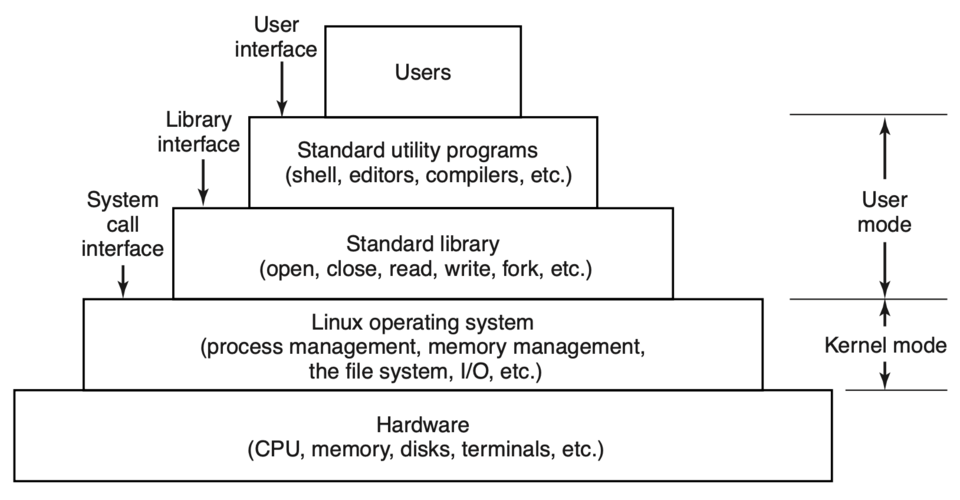 A visual breakdown of how system software interacts with hardware and applications. (Image: Andrew S. Tanenbaum, Herbert Bos, Public domain, via Wikimedia Commons)
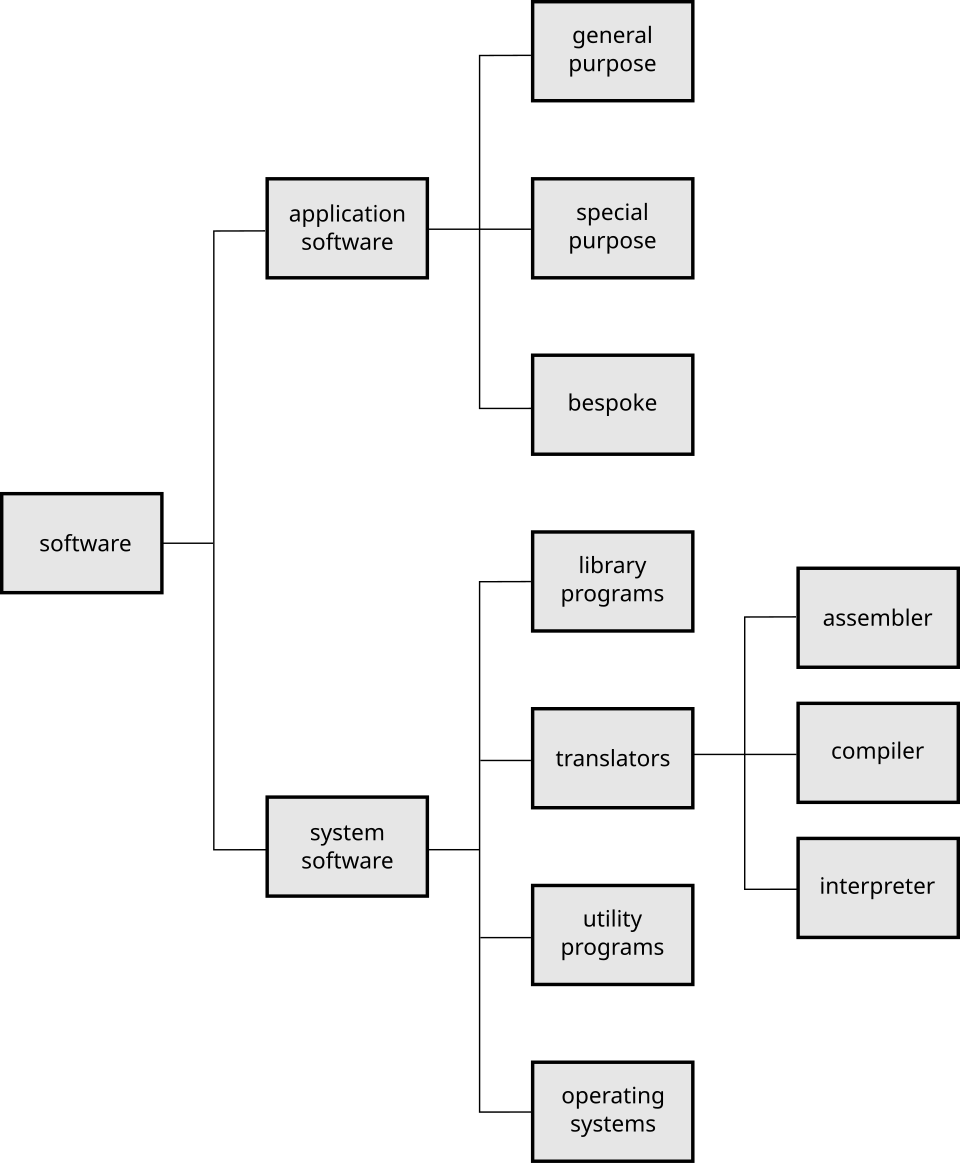 A comparison of general-purpose vs. specialized software with Nepalese examples. (Image: Pluke, CC0, via Wikimedia Commons)
Based on the TU BBA syllabus for IT And Applications (IT231), unit 3.
Discussion
Loading…