IT And ApplicationsUnit 414 min read
Operating Systems: Functions, Types & Real-World Roles
Unit 4 of IT And Applications covers the core functions of operating systems (process management, memory management, file systems), compares batch vs. real-time OS, explains system software vs. application software, and links OS concepts to Nepalese tech (eSewa, Ncell) and global platforms (Google, WhatsApp). Includes
TAKEAWAYS:
- An OS acts as a bridge between hardware and software, managing resources (CPU, memory, I/O) via scheduling, allocation, and abstraction.
- Process management (creation, termination, synchronization) ensures efficient multitasking, while memory management prevents conflicts via paging/segmentation.
- File systems organize data hierarchically (directories, metadata), and security modules enforce access controls (permissions, encryption).
- Real-time OS (used in NTC’s traffic control) prioritizes speed over fairness, unlike general-purpose OS (Windows/Linux) that balances multiple tasks.
- System software (OS, drivers, compilers) enables hardware-software interaction, while application software (e.g., WhatsApp) relies on the OS for services.
- Exam focus: Define OS functions, compare OS types, explain process states (ready, running, waiting), and link to Nepalese tech (e.g., Daraz’s order queue as a process priority example).
What is an Operating System (OS)?
An Operating System (OS) is system software that manages computer hardware and provides services for application software. It acts as an intermediary between users and hardware, ensuring efficient resource utilization.
Core Functions of an OS
graph TD
  root(("Operating System Core Functions"))
    root --> pm["Process Management"]
    pm --> pc["Creation & Termination"]
    pm --> sch["Scheduling (FCFS, SJF, Priority)"]
    pm --> sync["Synchronization (Mutex, Semaphores)"]
    root --> mm["Memory Management"]
    mm --> alloc["Allocation (Contiguous, Paging, Segmentation)"]
    mm --> prot["Protection (Base & Limit Registers)"]
    root --> fm["File Management"]
    fm --> org["Organization (Directories, Files)"]
    fm --> ac["Access Control (Permissions: R/W/X)"]
    root --> dm["Device Management"]
    dm --> drv["Drivers (Hardware Abstraction)"]
    dm --> io["I/O Scheduling (Round Robin, SSTF)"]
    root --> sec["Security & Protection"]
    sec --> auth["Authentication (User Logins)"]
    sec --> enc["Encryption (File-Level)"]
Hierarchical breakdown of OS core functions with key techniques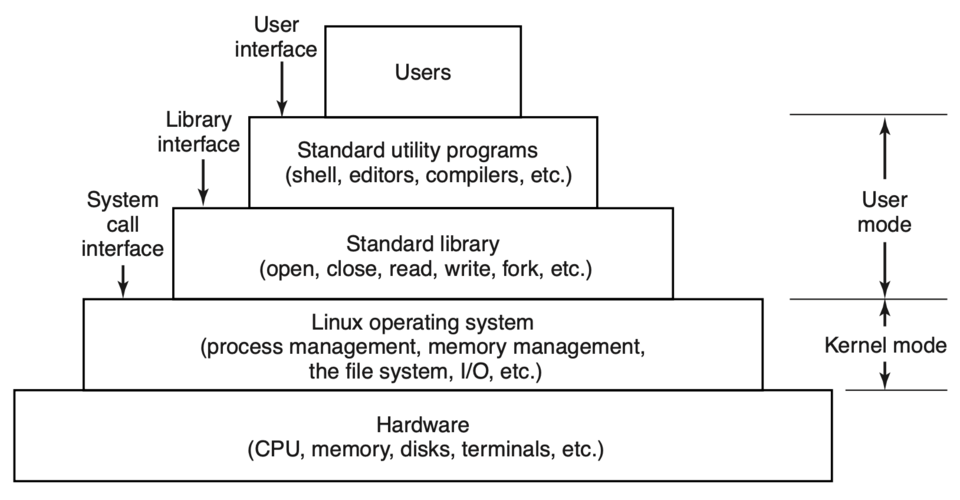 Layers of an OS: Hardware → Kernel → System Calls → Applications (Image: Andrew S. Tanenbaum, Herbert Bos, Public domain, via Wikimedia Commons)
The OS is structured in layers:
Layers of an OS: Hardware → Kernel → System Calls → Applications (Image: Andrew S. Tanenbaum, Herbert Bos, Public domain, via Wikimedia Commons)
The OS is structured in layers:
- Hardware: Physical components (CPU, RAM, storage).
- Kernel: Core OS (handles process/device management).
- System Calls: APIs for applications (e.g.,
open(),read()). - Applications: Software (e.g., WhatsApp, eSewa) that use OS services.
Types of Operating Systems
OSes are classified based on user interaction, processing mode, and purpose:
| Type | Description | Examples (Nepal/Global) | Key Feature |
|---|---|---|---|
| Batch OS | Executes jobs in batches (no user interaction). | Old mainframe systems (e.g., NTC’s bulk data processing). | Non-interactive, high throughput. |
| Time-Sharing OS | Multiple users share CPU via time slices. | Linux (used in Ncell’s servers), Windows Server. | Multitasking, responsive. |
| Real-Time OS (RTOS) | Guarantees response within strict deadlines. | NTC’s traffic light controllers, medical devices. | Deterministic, priority-based scheduling. |
| Distributed OS | Manages multiple computers as a single system. | Google’s distributed file system (GFS). | Scalability, fault tolerance. |
| Network OS | Enables communication between devices. | Windows Server (for Daraz’s backend), Linux (Nepal Telecom). | Resource sharing, remote access. |
| Embedded OS | Runs on devices with limited resources. | Android (Pathao’s app), FreeRTOS (IoT devices). | Lightweight, real-time capabilities. |
Worked Example: Ncell’s Billing System Ncell uses a real-time OS to process calls in milliseconds. If a user calls at peak hours (e.g., 7 PM), the OS prioritizes the call via preemptive scheduling (e.g., Round Robin) to avoid delays. A batch OS would fail here because it processes jobs sequentially, causing unacceptable latency.
Process Management: How Tasks Run
A process is a program in execution. The OS manages processes via:
- Process States:
stateDiagram-v2
  [*] --> New: "Process Creation"
  New --> Ready: "Dispatch"
  Ready --> Running: "CPU Allocation"
  Running --> Waiting: "I/O Request"
  Waiting --> Ready: "I/O Completion"
  Running --> Terminated: "Exit"
  Terminated --> [*]
  note right of Running
    CPU Burst
    I/O Burst
  end
Process state transitions with I/O burst annotations 2. Process Control Block (PCB): Stores process metadata (PID, registers, state). IMAGE: process control block structure diagram | PCB fields: Process ID, State, Priority, CPU Registers, Memory Limits
- Scheduling Algorithms:
Algorithm How It Works Best For Disadvantage FCFS (First-Come-First-Served) Executes processes in arrival order. Simple systems. Convoy effect (long waits). SJF (Shortest Job First) Prioritizes shortest jobs (preemptive/non-preemptive). Minimizes average waiting time. Starvation for long processes. Priority Scheduling Assigns priorities (e.g., Ncell’s emergency calls). Critical tasks first. Starvation of low-priority jobs. Round Robin (RR) Time slices (e.g., 20ms) for fairness. Time-sharing systems (e.g., WhatsApp servers). Context switching overhead. Multilevel Queue Separates processes into queues (e.g., foreground/background). Mixed workloads (e.g., Daraz’s orders + admin tasks). Complex implementation.
Worked Example: Daraz’s Order Queue Daraz’s backend uses priority scheduling:
- High priority: Urgent orders (e.g., same-day delivery) get CPU time first.
- Low priority: Bulk inventory updates run in the background. If Daraz used FCFS, a customer ordering a phone might wait hours while the system processes a bulk upload.
Memory Management: How Data is Stored and Accessed
The OS manages primary (RAM) and secondary (HDD/SSD) memory to prevent conflicts.
Memory Allocation Techniques
| Technique | Description | Pros | Cons |
|---|---|---|---|
| Contiguous Allocation | Allocates memory in one continuous block (e.g., single partition). | Simple to implement. | External fragmentation (wasted space). |
| Paging | Divides memory into fixed-size pages (e.g., 4KB). | Eliminates external fragmentation. | Internal fragmentation (unused space in last page). |
| Segmentation | Divides memory by logical segments (e.g., code, data, stack). | Flexible, shares segments. | Complex, external fragmentation. |
| Virtual Memory | Uses swap space (HDD) to extend RAM. | Runs large apps (e.g., Photoshop) on low-RAM PCs. | Slow I/O for swapped pages. |
Worked Example: eSewa’s Server Memory eSewa’s servers use virtual memory to handle thousands of transactions simultaneously:
- If RAM is full, inactive processes (e.g., old user sessions) are swapped to disk.
- When a user logs in, the OS pages in their session data from disk to RAM.
File Systems: Organizing Data
A file system manages how data is stored, named, and accessed. Key components:
File Structure:
- Directory: Folders (e.g.,
C:\Users\Documents). - File: Contains data (e.g.,
report.txt). - Metadata: File attributes (size, permissions, timestamps).
- Directory: Folders (e.g.,
File System Types:
Type Description Example FAT32 Simple, used in USB drives. Older Windows systems. NTFS Supports large files, permissions (used in Windows). Modern PCs. ext4 Linux’s default, supports journaling (recovery after crashes). Ubuntu servers. HFS+/APFS macOS file system. Apple devices.
Worked Example: Bank Transaction Logs A Nepalese bank’s OS uses NTFS with journaling to log transactions:
- If a power failure occurs mid-transaction, the journal (a backup log) helps recover data without corruption.
- Permissions: Only the "Transactions" folder is readable by the auditing team.
Device Management: Interfacing with Hardware
The OS interacts with devices via drivers and I/O scheduling.
Device Drivers:
- Software that translates OS commands to hardware signals.
- Example: The Wi-Fi driver in your laptop communicates with the network card.
I/O Scheduling:
- Shortest Seek Time First (SSTF): Moves the disk head to the nearest request (used in HDDs).
- SCAN (Elevator Algorithm): Moves the head in one direction, servicing requests along the way (used in SSDs).
Worked Example: NTC’s Traffic Light System NTC’s traffic lights use real-time I/O scheduling:
- Sensors detect car presence and send signals to the OS.
- The OS uses priority scheduling to prioritize emergency vehicles (e.g., ambulances) over regular traffic.
Security in Operating Systems
OSes enforce security via:
- Authentication: User logins (e.g., eSewa’s OTP verification).
- Authorization: Permissions (e.g.,
chmod 755in Linux). - Encryption: File-level security (e.g., BitLocker in Windows).
- Access Control Lists (ACLs): Define who can read/write files.
Worked Example: Kathmandu Traffic Police’s CCTV System
- Authentication: Only authorized officers can access CCTV feeds.
- Encryption: Video streams are encrypted in transit to prevent hacking.
- Logging: All access is logged for audits (e.g., if a hacker tries to view feeds).
In the Real World
eSewa’s Transaction Processing
- OS Function Used: Process Management (Priority Scheduling) + File System (Journaling)
- How It Works:
- When you pay a bill, eSewa’s OS prioritizes your transaction over background tasks (e.g., sending SMS alerts).
- The file system logs every transaction in a journal to ensure recovery if the server crashes.
Pathao’s Ride-Matching Algorithm
- OS Function Used: Real-Time Scheduling + Distributed OS
- How It Works:
- Pathao’s backend uses a real-time OS to match riders and drivers in <2 seconds.
- If a driver accepts a ride, the OS updates the driver’s status in shared memory (distributed OS) so the rider’s app reflects the change instantly.
Nepal Telecom’s (NTC) Network OS
- OS Function Used: Network OS (Resource Sharing) + I/O Scheduling
- How It Works:
- NTC’s routers use a network OS (Linux-based) to manage bandwidth.
- During peak hours (e.g., 8 PM), the OS uses Round Robin scheduling to fairly distribute bandwidth among users.
Exam Tip
Define Key Terms Precisely:
- OS: "System software that manages hardware and provides services to applications."
- Process: "A program in execution with its own address space."
- Thread: "Lightweight process sharing memory with other threads."
Compare OS Types in Tables:
- Exams often ask to contrast batch vs. real-time OS. Use a table with purpose, speed, and examples.
Link Theory to Nepalese Tech:
- Example Question: "How does Daraz use OS scheduling?"
Answer:
Daraz’s backend uses priority scheduling to process orders. High-priority orders (e.g., same-day delivery) get CPU time first, while low-priority tasks (e.g., inventory updates) run in the background. If Daraz used FCFS, customers would face delays during peak hours (e.g., Dashain sales).
- Example Question: "How does Daraz use OS scheduling?"
Answer:
Draw Diagrams for Process States and Memory Allocation:
- Process States: Always draw the 5-state diagram (New → Ready → Running → Waiting → Terminated).
- Memory Allocation: Show paging vs. segmentation with labeled blocks.
Common Pitfalls:
- ❌ Saying "RAM is part of the OS" (RAM is hardware).
- ❌ Confusing threads (share memory) with processes (isolated memory).
- ❌ Forgetting real-time OS guarantees deadlines (vs. general-purpose OS).
Final Checklist for Full Marks: ✅ Define OS and its 5 core functions. ✅ Compare 3 OS types (batch, real-time, time-sharing) with examples. ✅ Explain process states and scheduling algorithms with a diagram. ✅ Describe memory management (paging, segmentation, virtual memory). ✅ Link to Nepalese tech (eSewa, Daraz, NTC) in examples. ✅ Draw at least 3 diagrams (process states, memory allocation, file system hierarchy).
Based on the TU BBA syllabus for IT And Applications (IT231), unit 4.
Discussion
Loading…