IT and ApplicationsUnit 109 min read
Computer Security & Data Protection: Threats, Safeguards & Legal Frameworks
Unit 10 of IT and Applications explores the critical concepts of computer security—identifying vulnerabilities, implementing protective measures, and understanding legal frameworks for data protection. This note covers threats (malware, phishing, insider attacks), safeguards (encryption, firewalls, access controls), an
Key Concepts and Definitions
1. Computer Security: Definition and Scope
Computer security refers to the protection of computer systems, networks, programs, and data from unauthorized access, damage, or disruption. It encompasses three core pillars:
- Confidentiality: Ensuring data is accessible only to authorized users.
- Integrity: Guaranteeing data is accurate and unaltered.
- Availability: Ensuring systems and data are accessible when needed.
mindmap
  root((Computer Security))
    Confidentiality
    Integrity
    Availability
    Authentication
    Non-repudiation
Firewalls act as barriers between trusted internal networks and untrusted external networks (e.g., the internet). They filter traffic based on predefined security rules.
2. Types of Security Threats
Security threats can be categorized into malicious attacks, human errors, and natural disasters. Below are the most common threats:
| Threat Type | Description | Example |
|---|---|---|
| Malware | Software designed to harm or exploit systems. | Viruses, worms, ransomware (e.g., WannaCry attack on global networks). |
| Phishing | Tricking users into revealing sensitive information. | Fake eSewa login pages stealing credentials. |
| Denial-of-Service (DoS) | Overloading systems to make them unavailable. | Ncell website crashes during peak hours due to traffic flooding. |
| Insider Threats | Employees or contractors misusing access. | A bank employee leaking customer data to third parties. |
| Physical Threats | Damage or theft of hardware. | Theft of a company’s server containing sensitive client data. |
This diagram shows how attackers exploit weaknesses in systems, from social engineering (phishing) to technical exploits (malware).
In the Real World
eSewa and Khalti (Nepal)
- Idea Used: Multi-factor authentication (MFA) and encryption
- How? Both apps use OTP (One-Time Password) verification and AES-256 encryption to secure transactions. When you transfer money via eSewa, your PIN and OTP ensure only you can authorize payments, while encryption protects your data during transmission.
Ncell and NTC (Nepal)
- Idea Used: Firewalls and Intrusion Detection Systems (IDS)
- How? Ncell’s network uses firewalls to block unauthorized access to its billing systems. If someone tries to hack into Ncell’s database (e.g., to steal customer details), an IDS detects suspicious activity (like repeated login attempts) and alerts administrators.
WhatsApp (Global)
- Idea Used: End-to-End Encryption (E2EE)
- How? When you send a message on WhatsApp, it is encrypted on your device and only decrypted on the recipient’s device. Even WhatsApp cannot read your messages, protecting them from hackers or government surveillance.
Worked Example: Securing a Daraz Order Imagine you place an order on Daraz for a laptop. Here’s how security measures protect your transaction:
- HTTPS Encryption: Your credit card details are encrypted during checkout.
- Payment Gateway Security: Daraz uses PCI DSS compliance to secure payment data.
- Fraud Detection: If someone tries to use your card details elsewhere, Daraz’s system flags it as suspicious.
3. Security Safeguards and Protective Measures
A. Preventive Measures
These measures stop threats before they occur:
- Firewalls: Block unauthorized network access.
flowchart TD
  A["Internet"] -->|"Untrusted"| B["Firewall"]
  B -->|"Filtered Traffic"| C["Internal Network"]
  B -->|"Blocked"| D["Threat"]
- Antivirus Software: Detects and removes malware.
- Access Controls: Restricts system access (e.g., passwords, biometrics).
- Encryption: Converts data into unreadable formats (e.g., AES, RSA).
This shows how symmetric encryption (same key for encoding/decoding) is faster but less secure for key exchange, while asymmetric encryption (public/private keys) is slower but more secure.
B. Detective Measures
These identify threats after they occur:
- Intrusion Detection Systems (IDS): Monitors network traffic for suspicious activity.
- Audit Logs: Records user activities for review.
- Security Audits: Regular checks for vulnerabilities.
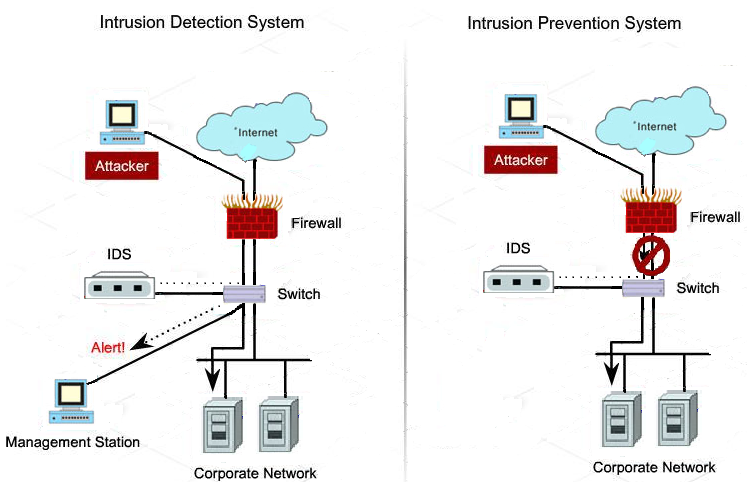 Difference between Intrusion Detection and Prevention Systems (Image: BoBeni, CC BY-SA 4.0, via Wikimedia Commons)
An IDS detects attacks (e.g., a scan for vulnerabilities) but does not block them, while an IPS actively stops them.
Difference between Intrusion Detection and Prevention Systems (Image: BoBeni, CC BY-SA 4.0, via Wikimedia Commons)
An IDS detects attacks (e.g., a scan for vulnerabilities) but does not block them, while an IPS actively stops them.
C. Corrective Measures
These fix issues after a breach:
- Backup and Recovery: Restores data from backups after a ransomware attack.
- Patch Management: Updates software to fix vulnerabilities.
- Incident Response Plan: Steps to contain and recover from a breach.
Worked Example: NEPSE Data Breach Response In 2021, NEPSE (Nepal Stock Exchange) faced a phishing attack where hackers stole investor data. Their response included:
- Isolating affected systems to prevent further damage.
- Notifying affected users via email and press releases.
- Strengthening password policies and enabling MFA for all accounts.
4. Data Protection Laws and Standards
A. Nepal’s Legal Framework
- Electronic Transactions Act (2063): Governs digital signatures and e-commerce security.
- Data Privacy Act (2075): Protects personal data and regulates data handling by organizations.
- Cyber Security Strategy (2076): Outlines Nepal’s approach to cybersecurity, including mandatory reporting of breaches.
B. Global Standards
| Standard | Description | Example Compliance |
|---|---|---|
| GDPR (EU) | Regulates data protection for EU citizens. | Banks in Europe must encrypt customer data. |
| PCI DSS | Security standards for payment card transactions. | Daraz, eSewa must comply to process payments. |
| ISO 27001 | International standard for information security management. | Ncell follows this for network security. |
This shows how companies must notify users of data collection, allow data deletion requests, and secure data storage.
5. Common Security Tools and Technologies
| Tool/Technology | Purpose | Example Use Case |
|---|---|---|
| VPN | Encrypts internet traffic for secure remote access. | Ncell employees accessing company data from home. |
| Biometric Authentication | Uses fingerprints/face recognition for access. | Smartphone unlocking (e.g., iPhone Face ID). |
| SIEM (Security Information and Event Management) | Correlates security alerts from multiple sources. | Detecting a coordinated attack across NTC’s network. |
| Blockchain | Decentralized, tamper-proof ledger for transactions. | Cryptocurrency wallets (e.g., Bitcoin). |
This shows how a VPN routes your data through an encrypted tunnel, hiding your IP address from hackers.
Exam Tip
Define Key Terms Clearly:
- Computer Crime: Any illegal act involving computers (e.g., hacking, data theft).
- Data Warehouse: A centralized repository for storing and managing data (though primarily a DBMS topic, it’s sometimes tested here).
- Encryption: The process of converting data into a secure format (e.g., AES-256).
Explain with Examples:
- When asked "How can data be secured?", mention:
- Encryption (e.g., WhatsApp messages).
- Firewalls (e.g., Ncell network).
- Access Controls (e.g., eSewa PIN + OTP).
- When asked "How can data be secured?", mention:
Compare Security Measures:
- Use tables (like the one above) to differentiate between preventive, detective, and corrective measures.
Real-World Applications:
- Always tie answers to Nepalese examples (e.g., eSewa, Ncell, Daraz) or global tech (e.g., WhatsApp, Google).
- For worked examples, use scenarios like:
- "How would you secure a bank’s online transaction system?" → MFA, encryption, IDS.
- "What steps would NTC take after a cyberattack?" → Isolate systems, notify users, audit logs.
Diagrams Are Your Friends:
- Draw firewall layers, encryption processes, or attack vectors in exams if allowed. Even a simple flowchart can earn marks.
Final Note: Computer security is not just about technology—it’s also about human behavior (e.g., avoiding phishing scams) and legal compliance (e.g., GDPR, Nepal’s Data Privacy Act). Always think about who is at risk, what they’re protecting, and how to mitigate threats.
Based on the TU BBM syllabus for IT and Applications (IT231), unit 10.
Discussion
Loading…