IT and ApplicationsUnit 512 min read
Database Management Systems: DBMS, DBMS vs File System, DBMS Components & Applications
Unit 5 of IT and Applications covers the core concepts of Database Management Systems (DBMS), comparing it with file systems, explaining its architecture, data models, and real-world applications in businesses like eSewa, banks, and NEPSE. Learn how DBMS organizes data efficiently, ensures data integrity, and supports
TAKEAWAYS:
- A Database Management System (DBMS) is software that stores, retrieves, and manages data efficiently while ensuring data integrity, security, and concurrency control.
- DBMS differs from file systems in scalability, data sharing, redundancy, and security—key advantages for businesses like banks and e-commerce platforms.
- The three-schema architecture (external, conceptual, internal) separates user views from physical storage, enabling flexibility and security.
- Relational DBMS (e.g., MySQL, PostgreSQL) uses tables, relationships, and SQL for structured data, while NoSQL (e.g., MongoDB) handles unstructured data like JSON.
- Normalization (1NF to BCNF) eliminates redundancy and anomalies in database design, critical for accurate financial records (e.g., bank transactions).
- Transactions (ACID properties) ensure reliable operations in real-time systems like Khalti payments or NEPSE stock trading.
What is a Database Management System (DBMS)?
A Database Management System (DBMS) is software designed to store, organize, retrieve, and manage data efficiently. Unlike traditional file systems, a DBMS:
- Uses a structured approach (tables, relationships, queries).
- Ensures data integrity (no duplicates, consistency).
- Supports multi-user access (concurrent transactions).
- Provides security and backup mechanisms.
Why Use a DBMS?
| Feature | File System | DBMS |
|---|---|---|
| Data Sharing | Limited (single-user access) | Multi-user access with controls |
| Redundancy | High (duplicate data in files) | Low (centralized storage) |
| Data Integrity | Manual checks required | Automatic constraints (e.g., unique IDs) |
| Backup & Recovery | Manual, error-prone | Automated, reliable |
| Scalability | Poor (files grow independently) | Excellent (handles large datasets) |
How DBMS Works: The Three-Schema Architecture
A DBMS follows a three-level architecture to separate user views from physical storage:
classDiagram
    class ExternalSchema {
        +User-specific views (e.g., "Customer Orders")
        +SQL queries tailored to users
    }
    class ConceptualSchema {
        +Logical structure (tables, relationships)
        +Entity-Relationship (ER) model
    }
    class InternalSchema {
        +Physical storage (files, indexes)
        +Data compression, encryption
    }
    ExternalSchema --> ConceptualSchema : "Mapped via External Schema Definition"
    ConceptualSchema --> InternalSchema : "Mapped via Internal Schema Definition"
    note for ExternalSchema "Example: eSewa user sees 'My Transactions'"
    note for ConceptualSchema "Example: Tables like CUSTOMER, TRANSACTION"
    note for InternalSchema "Example: Stored in MySQL tables on a server"
Key Components:
External Schema (User View):
- Customized views for different users (e.g., a bank teller sees accounts, while an auditor sees transaction logs).
- Example: In NEPSE’s trading system, investors see stock prices, while admins see all trades.
Conceptual Schema (Logical Design):
- Defines entities, attributes, and relationships (e.g.,
Customer→Order→Product). - Uses Entity-Relationship (ER) diagrams (see below).
- Defines entities, attributes, and relationships (e.g.,
Internal Schema (Physical Storage):
- How data is stored on disk (e.g., indexed tables, compressed files).
- Example: Daraz’s database stores product catalogs in optimized tables for fast searches.
Data Models in DBMS
DBMS supports different data models based on application needs:
| Data Model | Description | Example Use Case | DBMS Example |
|---|---|---|---|
| Relational (SQL) | Tables with rows/columns, linked by keys | Banking (accounts, transactions) | MySQL, Oracle, PostgreSQL |
| Hierarchical | Tree-like structure (parent-child) | Old mainframe systems | IBM IMS |
| Network | Graph structure (many-to-many) | Telecommunications billing | IDMS |
| Object-Oriented | Stores data as objects (classes) | CAD/CAM systems | db4o |
| NoSQL | Unstructured data (JSON, key-value) | Social media (user profiles, posts) | MongoDB, Cassandra |
Normalization: Eliminating Redundancy
Normalization is the process of organizing tables to minimize redundancy and data anomalies. It follows Normal Forms (NF):
flowchart TD
    A["Unnormalized Data"] --> B["1NF: Atomic Values"]
    B --> C["2NF: No Partial Dependencies"]
    C --> D["3NF: No Transitive Dependencies"]
    D --> E["BCNF: Stronger 3NF"]
    E --> F["4NF: No Multi-valued Dependencies"]
    F --> G["5NF: Join Dependency"]
Worked Example: Normalizing a Bank Loan Table Problem: A bank stores loan data in one table with repeating fields:
| LoanID | CustomerName | Amount1 | DueDate1 | Amount2 | DueDate2 |
|---|---|---|---|---|---|
| L001 | Ram Sharma | 50000 | 2024-06-30 | 30000 | 2024-12-31 |
Issues:
- Redundancy: Duplicate
CustomerName. - Update Anomaly: Changing Ram’s name requires updating all rows.
Solution: Normalize to 3NF
- 1NF: Separate repeating amounts into rows.
LoanID | CustomerName | Amount | DueDate ------------------------------------------- L001 | Ram Sharma | 50000 | 2024-06-30 L001 | Ram Sharma | 30000 | 2024-12-31 - 2NF: Remove partial dependencies (none here, since
LoanIDis the only key). - 3NF: Separate
Customerinto a new table to avoid transitive dependency.CUSTOMER (CustomerID, CustomerName) LOAN (LoanID, CustomerID, Amount, DueDate)
SQL: The Language of DBMS
Structured Query Language (SQL) is used to:
- Query data (
SELECT,WHERE). - Modify data (
INSERT,UPDATE,DELETE). - Define structure (
CREATE TABLE,ALTER TABLE).
Example: Querying NEPSE Stock Data
-- Find stocks with price > Rs. 1000 and volume > 1000
SELECT StockSymbol, Price, Volume
FROM StockData
WHERE Price > 1000 AND Volume > 1000
ORDER BY Price DESC;
Example: Updating Khalti Transaction Status
-- Mark a failed transaction as "Refunded"
UPDATE Transactions
SET Status = 'Refunded'
WHERE TransactionID = 'TXN12345' AND Status = 'Failed';
Transactions and ACID Properties
A transaction is a logical unit of work (e.g., transferring money from one account to another). DBMS ensures ACID properties:
| ACID Property | Meaning | Example in Real World |
|---|---|---|
| Atomicity | All steps succeed or none do | Khalti payment: Either deducts Rs. 500 or fails entirely. |
| Consistency | Database moves from one valid state to another | Bank balance never goes negative after a transfer. |
| Isolation | Transactions don’t interfere | Two users can’t book the same Pathao ride simultaneously. |
| Durability | Committed data persists | NEPSE trade records remain even after a server crash. |
## In the Real World
eSewa and Khalti (Digital Payments)
- DBMS Use: Stores user accounts, transaction logs, and payment histories in normalized tables.
- Why? Ensures atomic transfers (money moves only if both sender/receiver accounts are valid) and audit trails for disputes.
- Data Model: Relational (SQL) for structured transactions + NoSQL for unstructured user profiles.
NEPSE (Stock Exchange)
- DBMS Use: Manages stock prices, trade orders, and investor portfolios in real-time.
- Key Feature: ACID transactions prevent double-selling of shares.
- Example Query:
-- Check if a stock is oversold
SELECT StockSymbol, SUM(Quantity) AS TotalSold
FROM Trades
WHERE StockSymbol = 'NTC' AND TradeDate = CURRENT_DATE
GROUP BY StockSymbol HAVING SUM(Quantity) > AvailableShares;
Daraz (E-Commerce)
- DBMS Use: Handles product catalogs, order queues, and inventory with indexed tables for fast searches.
- Normalization: Separates
Customer,Order, andProducttables to avoid redundancy. - Real-Time Example: When you place an order, the system:
- Checks stock availability (transaction).
- Updates inventory (atomic).
- Sends a confirmation email (durable).
Types of DBMS
| Type | Description | Example Systems |
|---|---|---|
| Centralized DBMS | Single server (e.g., bank’s main database) | Oracle, SQL Server |
| Distributed DBMS | Data spread across multiple locations | Google Spanner, Cassandra |
| Client-Server DBMS | Clients request data from a server | MySQL, PostgreSQL |
| Cloud DBMS | Hosted on cloud (scalable) | Amazon RDS, Azure SQL Database |
| In-Memory DBMS | Data stored in RAM (fast queries) | Redis, SAP HANA |
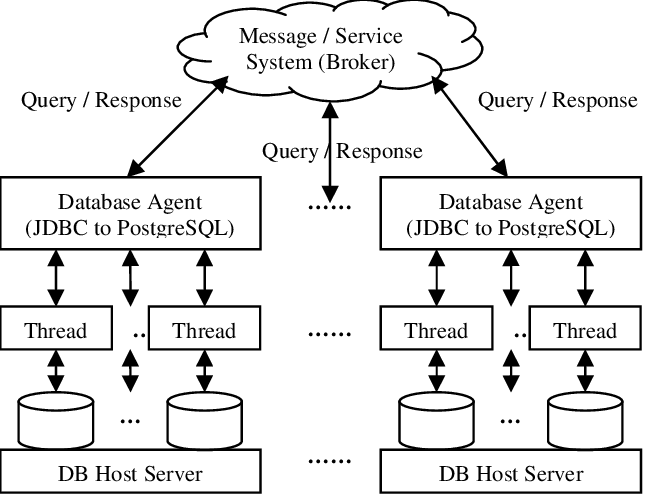 Shows nodes in different locations syncing data. (Image: dbs, CC BY-SA 4.0, via Wikimedia Commons)
## Exam Tip
Define Clearly:
- Start answers with precise definitions (e.g., "A DBMS is software that...").
- Avoid: Vague terms like "manages data" without specifying how (queries, transactions, security).
Compare DBMS vs. File System:
- Use a table (as above) to highlight scalability, sharing, and integrity.
- Exam Pitfall: Don’t just list differences—explain why each matters (e.g., "DBMS reduces redundancy in bank records").
Normalization Questions:
- If asked to normalize a table, show steps (1NF → 3NF) with before/after diagrams.
- Example Answer Starter: "The given table violates 1NF due to repeating groups. To achieve 1NF, we separate the repeating amounts into individual rows..."
SQL Queries:
- Practice writing queries for real scenarios (e.g., "Find all NEPSE stocks with P/E ratio > 20").
- Exam Tip: Always include
WHERE,GROUP BY, orJOINif data filtering is required.
ACID Properties:
- Memorize the acronym and give one real-world example per property (e.g., Khalti for atomicity).
- Diagram Tip: Draw a commit/rollback flowchart if asked about transaction handling.
Case Studies:
- Relate concepts to Nepali businesses (e.g., "How would NTC use a DBMS for billing?").
- Structure Answer:
- Identify the data model (relational for structured records).
- Explain normalization (e.g., separate
CustomerandSubscriptiontables). - Mention ACID (e.g., "Transactions ensure no duplicate billing").
Final Visual Summary:
mindmap
  root((DBMS in Business))
    Applications
      eSewa["Payments: Transactions (ACID)"]
      NEPSE["Stock Trading: Normalized Tables"]
      Daraz["Inventory: Indexed Searches"]
    Components
      ThreeSchema["External → Conceptual → Internal"]
      SQL["Queries: SELECT, JOIN, UPDATE"]
    Advantages
      NoRedundancy["Normalization"]
      MultiUser["Concurrent Access"]
      Security["Role-Based Permissions"]
Based on the TU BBM syllabus for IT and Applications (IT231), unit 5.
Discussion
Loading…