IT and ApplicationsUnit 69 min read
Information Systems and Their Applications – Concepts, Types & Business Use
Unit 6 of IT and Applications: introduces information systems, their components, types, advantages, real‑world examples and how they support business processes in Nepalese organisations.
Key points
- An Information System (IS) integrates people, data, processes and technology to support decision‑making.
- Core components are hardware, software, data, procedures and users.
- Transaction Processing Systems (TPS) and Management Information Systems (MIS) are the two most common organisational IS types.
- IS can be classified as operational, managerial, strategic and knowledge‑support systems.
- Real‑world applications include e‑payment platforms (eSewa, Khalti), e‑commerce (Daraz), and banking loan‑interest calculations.
- Understanding IS architecture helps answer exam questions on differences between system and application software, and on IS advantages/disadvantages.
1. What is an Information System?
An Information System (IS) is a coordinated set of components that collect, store, process, and disseminate information to support organisational goals. It is more than just a computer; it includes people, procedures, data, and technology working together.
Key Definition
Information System – “A collection of interrelated components that gather, transform, store, and deliver information to support decision‑making, coordination, control, analysis, and visualisation in an organisation.”
How an IS Works – Process Flow
flowchart LR
    A["Data Sources (transactions, sensors, users)"] --> B["Input (data capture)"]
    B --> C["Processing (validation, calculation, storage)"]
    C --> D["Output (reports, dashboards, alerts)"]
    D --> E["Feedback (user actions, system updates)"]
    E --> A
The cycle repeats continuously, ensuring that information stays current and relevant.
2. Components of an Information System
| Component | Description | Typical Example in Nepal |
|---|---|---|
| Hardware | Physical devices that run the system (servers, PCs, networking gear). | Server rack at Ncell’s data centre |
| Software | System software (OS, DBMS) and application software (POS, ERP). | Oracle Database used by Nabil Bank |
| Data | Raw facts that are processed into information. | Customer transaction logs |
| Procedures | Rules, policies, and methods for using the system. | SOP for online order fulfilment at Daraz |
| People | Users, IT staff, managers who interact with the system. | Cashiers, call‑centre agents, data analysts |
Visualising the Components
classDiagram
    class Hardware {
        +CPU
        +Memory
        +Storage
        +NetworkDevices
    }
    class Software {
        +SystemSoftware
        +ApplicationSoftware
    }
    class Data {
        +RawData
        +ProcessedData
    }
    class Procedures {
        +Policies
        +Workflows
    }
    class People {
        +EndUsers
        +ITStaff
        +Managers
    }
    Hardware --> Software : runs
    Software --> Data : processes
    Data --> Procedures : guides
    Procedures --> People : follows
    People --> Hardware : uses
Real‑World Picture
 Typical server rack in a Nepali telecom data centre (Image: Sakurambo, Public domain, via Wikimedia Commons)
3. Types of Information Systems
Information systems are classified by the level of decision support they provide. The two most frequently examined types are:
| Type | Primary Users | Main Purpose | Example in Nepal |
|---|---|---|---|
| Transaction Processing System (TPS) | Front‑line staff, clerks | Capture and process routine transactions | eSewa’s payment gateway records each online payment |
| Management Information System (MIS) | Middle managers | Summarise TPS data into periodic reports | Daraz’s sales‑performance dashboard for regional managers |
Other important categories (often asked in exams):
| Category | Description | Example |
|---|---|---|
| Decision Support System (DSS) | Interactive tools for complex, non‑routine decisions | Ncell’s network‑capacity planning tool |
| Executive Information System (EIS) | High‑level summaries for senior executives | NEPSE’s market‑trend visualisation |
| Knowledge Management System (KMS) | Capture, store, and retrieve organisational knowledge | Kathmandu University’s research repository |
Visual Example – TPS Workflow
flowchart TD
    A["Customer initiates payment (eSewa)"] --> B["Input validation"]
    B --> C["Transaction recorded in DB"]
    C --> D["Confirmation sent to customer"]
    D --> E["Update accounting ledger"]
4. Advantages and Disadvantages of Information Systems
| Aspect | Advantages | Disadvantages |
|---|---|---|
| Efficiency | Automates repetitive tasks, reduces processing time | High initial capital cost |
| Accuracy | Minimises human error in data entry | System failures can halt operations |
| Decision Quality | Provides timely, relevant information | Over‑reliance may diminish intuitive judgement |
| Scalability | Easy to add users or functions | Requires continuous training and support |
| Competitive Edge | Enables real‑time analytics, better customer service | Security vulnerabilities if not properly managed |
5. Applications of Information Systems in Business
- E‑Commerce Platforms – Daraz uses an integrated IS comprising inventory management, order processing, and customer relationship modules.
- Banking & Finance – Nabil Bank’s core banking system handles account management, loan calculations, and regulatory reporting.
- Telecommunications – Ncell’s OSS/BSS (Operations Support System/Business Support System) monitors network performance and billing.
- Supply Chain & Logistics – Pathao’s delivery tracking system integrates GPS data, order status, and driver allocation.
Worked Example – Calculating Loan Interest (Bank IS)
A customer takes a loan of NPR 500,000 at an annual simple interest rate of 12% for 3 years.
Total repayment = Principal + Interest = NPR 680,000.
In the bank’s IS, the loan module automatically:
- Captures the principal, rate, and tenure.
- Computes interest using the formula above.
- Generates an amortisation schedule.
- Updates the customer’s account and posts monthly instalments.
This eliminates manual calculation errors and speeds up approval.
Real‑World Picture
6. Difference Between Application Software and System Software
| Feature | System Software | Application Software |
|---|---|---|
| Purpose | Manages hardware resources, provides platform | Performs specific user‑oriented tasks |
| Examples | Operating System (Windows, Linux), DBMS | Word processor, e‑commerce website |
| User Interaction | Minimal direct interaction | Direct interaction with end‑users |
| Dependency | Runs before any application can start | Requires system software to run |
| Updates | Less frequent, often vendor‑driven | Frequent, driven by business needs |
Real‑World Picture
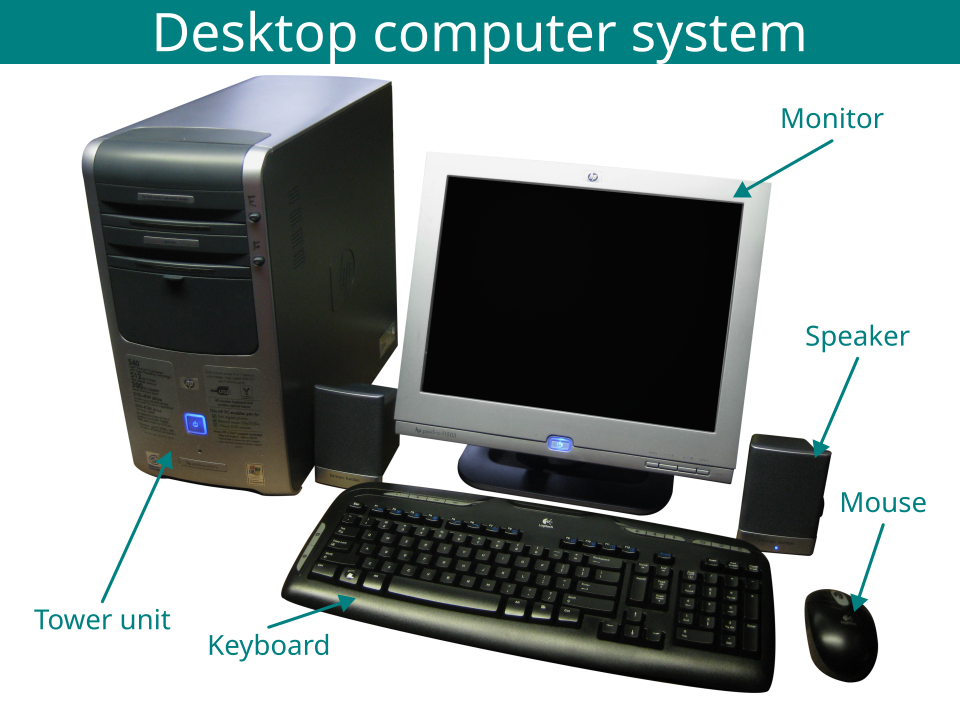 Typical workstation used by a Daraz order‑processing clerk (Image: Photograph: kjarrett on Flickr, CC BY 2.0, via Wikimedia Commons)
7. Information Systems Development Life Cycle (SDLC) – Brief Overview
- Planning – Identify need, feasibility study.
- Analysis – Gather requirements, model processes.
- Design – Architecture, UI/UX, database schema.
- Implementation – Coding, hardware setup.
- Testing – Unit, integration, user‑acceptance testing.
- Deployment – Go‑live, training.
- Maintenance – Bug fixes, upgrades.
SDLC Flow
flowchart LR
    P["Planning"] --> A["Analysis"]
    A --> D["Design"]
    D --> I["Implementation"]
    I --> T["Testing"]
    T --> Dp["Deployment"]
    Dp --> M["Maintenance"]
    M --> P
8. In the Real World
| Product / Service | IS Idea Used | How It Is Applied |
|---|---|---|
| eSewa | Transaction Processing System | Every online payment is captured, validated, stored, and a receipt is generated instantly, enabling real‑time fund transfers. |
| Khalti | Secure Database Management | Customer details and transaction histories are encrypted and stored in a relational DBMS, allowing quick retrieval for refunds. |
| Daraz | Management Information System | Sales data from thousands of orders are aggregated nightly to produce regional performance reports used by managers for stock replenishment. |
| Pathao | Decision Support System | Route optimisation algorithms use live traffic data to suggest the fastest delivery path, reducing fuel cost and delivery time. |
| NTC | Executive Information System | Senior executives view dashboards showing network uptime, subscriber growth, and revenue trends, supporting strategic decisions. |
| NEPSE | Knowledge Management System | Historical price data and company disclosures are stored and searchable, helping analysts perform technical analysis. |
Real‑World Picture
9. Summary of Key Points
- An IS is a socio‑technical system that turns raw data into actionable information.
- The five core components (hardware, software, data, procedures, people) must be aligned for success.
- TPS handles day‑to‑day operations; MIS converts TPS data into managerial reports.
- Understanding the advantages/disadvantages helps evaluate IS investments.
- Real‑world Nepali examples (eSewa, Daraz, Ncell) illustrate how IS concepts drive everyday services.
Exam tip
- Definition questions: Memorise the concise definition and be ready to expand with the five components.
- Comparison tables: Practice drawing the system‑vs‑application software table; examiners love clear side‑by‑side contrasts.
- Application questions: Use the Daraz or eSewa example; describe the TPS → MIS flow and mention specific reports or outputs.
- Worked example: Re‑create the loan‑interest calculation, showing the formula and how the bank’s IS automates each step.
- Diagram marks: When drawing the IS components or SDLC, label every block and use arrows to indicate flow – even a simple mermaid diagram earns full credit.
Based on the TU BBM syllabus for IT and Applications (IT231), unit 6.
Discussion
Loading…