IT and ApplicationsUnit 110 min read
Computer Basics, IT Evolution, Systems & Applications
Unit 1 of IT and Applications covers the foundational concepts of Information Technology, including the evolution of computers, core components of computer systems, types of information systems, applications of IT, and ethical considerations like computer crime. This note integrates real-world examples from Nepal and g
TAKEAWAYS:
- Understand the evolution of computers from analog to digital systems and their impact on modern society.
- Identify the five key components of an information system (hardware, software, data, procedures, people) and their roles.
- Differentiate between analog and digital computers using real-world examples like traffic signals (analog) and smartphones (digital).
- Recognize three major types of information systems (Transaction Processing Systems, Management Information Systems, Decision Support Systems) and their business applications.
- Apply computer crime definitions (e.g., hacking, phishing, cyber fraud) to real cases like eSewa scams or Ncell SIM cloning.
- Evaluate factors for purchasing organizational computers (e.g., budget, scalability, security needs) using a comparison table of hardware types.
1. Introduction to Information Technology (IT)
IT is the use of computers, storage, networking, and other physical devices to create, process, store, secure, and exchange data. It encompasses both hardware (physical components) and software (programs/instructions) to solve real-world problems efficiently.
1.1 Evolution of Computers
Computers have evolved through five generations, each marked by technological breakthroughs:
timeline
    title Evolution of Computers
    1940s : First Generation (Vacuum Tubes) - ENIAC (Electronic Numerical Integrator and Computer)
    1950s : Second Generation (Transistors) - IBM 701
    1960s : Third Generation (Integrated Circuits) - IBM System/360
    1970s : Fourth Generation (Microprocessors) - Apple II, IBM PC
    2000s : Fifth Generation (AI & Parallel Processing) - Smartphones, Cloud Computing
1.2 Analog vs. Digital Computers
| Feature | Analog Computer | Digital Computer |
|---|---|---|
| Data Type | Continuous (e.g., temperature, sound) | Discrete (0s and 1s) |
| Speed | Faster for real-time processing | Slower but versatile |
| Examples | Traffic light controllers, thermostats | Laptops, smartphones, ATMs |
| Precision | Less accurate over time | Highly accurate |
Worked Example:
- Analog: The NTC’s traffic signal system in Kathmandu uses analog sensors to adjust timings based on vehicle flow.
- Digital: Khalti’s payment app processes transactions using digital binary data.
2. Components of a Computer System
A computer system consists of five primary components:
classDiagram
    class Hardware {
        +Physical components (CPU, RAM, storage)
    }
    class Software {
        +Programs (OS, applications)
    }
    class Data {
        +Raw facts (text, numbers, images)
    }
    class Procedures {
        +Instructions for operations
    }
    class People {
        +Users, administrators
    }
    Hardware <--> Software : Runs on
    Software <--> Data : Processes
    Data <--> Procedures : Follows rules
    People --> Hardware : Uses
    People --> Software : Operates
2.1 Hardware
- Input Devices: Keyboard, mouse, scanner (convert human input to binary).
- Output Devices: Monitor, printer, speaker (display results).
- Processing Unit: CPU (Central Processing Unit) executes instructions.
- Memory: RAM (temporary), HDD/SSD (permanent storage).
- Storage: Hard drives, USB drives, cloud storage.
Real-World Link:
- Pathao’s ride-hailing app uses GPS hardware (input) to track driver locations and cloud storage (output) to match riders.
2.2 Software
- System Software: OS (Windows, Linux), utilities (antivirus).
- Application Software: Word processors (Microsoft Word), browsers (Chrome).
- Programming Software: Compilers (Python, Java), IDEs (VS Code).
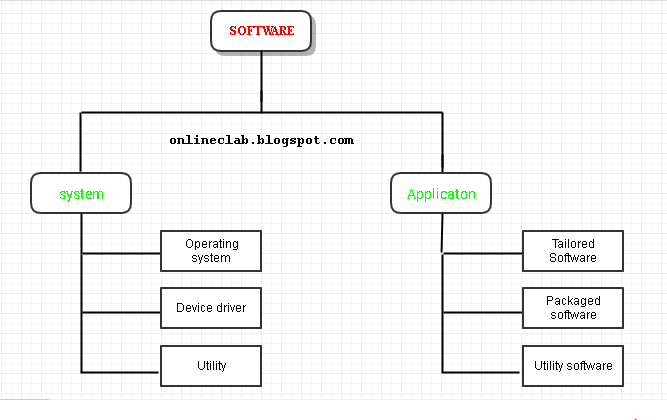 A Venn diagram showing system vs. application software. (Image: Santoshdahal12, CC BY-SA 4.0, via Wikimedia Commons)
3. Information Systems (IS) and Their Applications
An Information System (IS) is a combination of hardware, software, data, procedures, and people that processes data to produce information for decision-making.
3.1 Types of Information Systems
| Type | Description | Example (Nepal) |
|---|---|---|
| Transaction Processing (TPS) | Records routine transactions (e.g., sales, payments). | eSewa for bill payments. |
| Management Information (MIS) | Provides reports for managers (e.g., sales trends). | Daraz’s inventory dashboard. |
| Decision Support (DSS) | Helps with complex decisions (e.g., risk analysis). | NEPSE’s stock trading tools. |
| Expert Systems | Mimics human expertise (e.g., medical diagnosis). | AI chatbots in banks for loan queries. |
Worked Example:
- Ncell’s customer service chatbot uses an Expert System to answer FAQs about plans and billing, reducing human agent workload.
3.2 Applications of IT
| Sector | Application Example |
|---|---|
| Education | Online learning (e.g., TU’s e-learning portal). |
| Healthcare | Electronic Health Records (e.g., Patan Hospital’s digital patient files). |
| Banking | Online banking (e.g., NMB Bank’s mobile app for transfers). |
| Government | E-governance (e.g., eSewa for tax payments). |
| Entertainment | Streaming (e.g., YouTube for Nepali content). |
4. Computer Crime and Ethics
Computer crime involves illegal acts targeting computers or networks, such as:
- Hacking: Unauthorized access (e.g., Ncell SIM cloning scams).
- Phishing: Fraudulent emails (e.g., fake Khalti OTP scams).
- Cyber Fraud: Online scams (e.g., Daraz fake seller accounts).
- Identity Theft: Stealing personal data (e.g., Facebook account takeovers).
Prevention Tips for Businesses:
- Use firewalls and encryption (e.g., NMB Bank’s secure login).
- Train employees on phishing awareness.
- Implement two-factor authentication (e.g., eSewa’s OTP system).
5. Factors for Purchasing Computers for Organizations
When buying computers for a business (e.g., a call center or school), consider:
| Factor | Consideration | Example for a School |
|---|---|---|
| Budget | Cost per unit (e.g., Dell vs. HP laptops). | Buy 50 used laptops for ₹20,000 each. |
| Scalability | Ability to upgrade (e.g., RAM, storage). | Choose PCs with upgradeable RAM for future needs. |
| Security | Antivirus, biometric login (e.g., fingerprint scanners). | Install Kaspersky on all devices. |
| Compatibility | Software/hardware support (e.g., Windows vs. Linux). | Use Windows 10 for Microsoft Office. |
| Maintenance | Warranty, technical support (e.g., Dell Premium Support). | Buy from vendors with 3-year warranties. |
Worked Example:
- A Kathmandu call center might prioritize:
- Headsets with noise cancellation (for clear calls).
- Dual monitors (for multitasking).
- Cloud-based CRM software (e.g., Zoho Desk).
In the Real World
eSewa’s Payment System
- Idea Used: Transaction Processing System (TPS) + Digital Security
- How? eSewa processes thousands of transactions per second using encrypted digital data. If a user reports a fraudulent payment, the system flags it via DSS (Decision Support System) for investigation.
Pathao’s Ride-Matching Algorithm
- Idea Used: Real-Time Data Processing + Expert System
- How? Pathao’s app uses GPS hardware (input) to track drivers and riders, then applies an algorithm (software) to match the closest available driver. This reduces wait times using digital decision-making.
NTC’s Traffic Management
- Idea Used: Analog vs. Digital Hybrid System
- How? While older traffic lights in Kathmandu use analog sensors to detect vehicles, newer systems integrate digital cameras and AI to optimize signal timings based on real-time data.
Exam Tip
Definitions Matter: Memorize key terms like:
- "An information system is a combination of hardware, software, data, procedures, and people."
- "Computer crime includes hacking, phishing, and cyber fraud."
Compare and Contrast:
- Always draw a table for analog vs. digital or TPS vs. MIS when asked for differences.
Real-World Links:
- eSewa, Khalti, and Ncell are goldmines for examples. Relate them to TPS, DSS, or security.
- Example answer for "Explain any three applications of computers":
"1. eSewa uses computers for online transaction processing (TPS) to handle bill payments securely. 2. Daraz employs Management Information Systems (MIS) to track inventory and sales trends. 3. Ncell’s chatbot is an Expert System that answers customer queries using AI."
Diagrams Save Marks:
- If asked to "Explain the components of an information system," draw the class diagram (hardware ↔ software ↔ data) and label all five components.
Avoid Vague Answers:
- ❌ "Computers are used everywhere." → ✅ "Computers are used in Nepal’s e-governance (eSewa) for secure online transactions, in hospitals (Patan Hospital) for digital patient records, and in education (TU’s e-learning portal) for online courses."
Based on the TU BBM syllabus for IT and Applications (IT231), unit 1.
Discussion
Loading…