IT and ApplicationsUnit 216 min read
Computer Hardware & Networking: Components, Functions & Real-World Systems
Unit 2 of IT and Applications covers the anatomy of computer hardware (CPU, memory, storage, peripherals), networking fundamentals (LAN/WAN, protocols, topologies), and how they integrate in business—with Nepalese examples like eSewa’s servers, Ncell’s base stations, and Daraz’s cloud infrastructure.
TAKEAWAYS:
- Hardware hierarchy: CPU (brain), RAM (temporary memory), storage (long-term), and peripherals (input/output) work together in a system bus architecture.
- Networking layers: Physical (cables), data link (switches), network (routers), transport (TCP/UDP), and application (HTTP/HTTPS) layers enable data flow.
- Topologies matter: Star (eSewa’s office LAN), mesh (Ncell’s 4G towers), and bus (old NTC networks) dictate reliability and cost.
- Security risks: Unauthorized access, malware, and DoS attacks exploit hardware/software vulnerabilities (e.g., Kathmandu traffic cameras hacked in 2022).
- Cloud vs. on-premise: Banks like NMB use hybrid clouds for security, while Pathao relies on cloud servers for real-time ride matching.
- Future trends: IoT (smart meters in NTC), edge computing (Nepal Police’s facial recognition), and quantum-resistant encryption for e-commerce.
1. Computer Hardware: The Physical Building Blocks
Computers are made of five core components that interact via the system bus (a high-speed data highway). Each part has a specific role, and their performance directly impacts speed, storage, and multitasking.
1.1 Central Processing Unit (CPU): The Brain
The CPU executes instructions by performing fetch-decode-execute cycles. It consists of:
- Arithmetic Logic Unit (ALU): Performs math/logic (e.g., calculating loan interest for NMB Bank).
- Control Unit (CU): Manages instruction flow.
- Registers: Ultra-fast temporary storage (e.g., holding a user’s eSewa transaction ID).
graph LR
    A["Input (e.g., eSewa payment)"] --> B["CPU"]
    B --> C["ALU: Math/Logic"]
    B --> D["CU: Instruction Control"]
    B --> E["Registers: Temporary Data"]
    C --> F["Output (e.g., Confirmation SMS)"]
    D --> F
Worked Example: Bank Loan Calculation A bank like NMB uses a CPU to compute monthly loan installments using the formula: Where:
- (principal),
- (monthly interest rate),
- (months). The CPU’s ALU performs 12 iterations of multiplication and exponentiation to arrive at the EMI of $880.53.
1.2 Memory Hierarchy: Speed vs. Cost
Memory types differ in speed, volatility, and capacity. The memory hierarchy balances cost and performance:
| Type | Speed | Volatility | Capacity | Example Use Case |
|---|---|---|---|---|
| Registers | Nanoseconds | Volatile | Bytes | Storing CPU’s current instruction. |
| Cache (L1/L2/L3) | 1–10 ns | Volatile | KB–MB | Reducing CPU wait time. |
| RAM (DRAM/SDRAM) | 10–100 ns | Volatile | GB | Running eSewa’s payment app. |
| ROM | 100 ns–µs | Non-volatile | KB–MB | BIOS in a laptop. |
| SSD/HDD | ms–100 ms | Non-volatile | TB | Storing Daraz’s customer data. |
Key Insight:
- RAM is volatile (loses data on power-off), so SSDs/HDDs store long-term data.
- Cache reduces CPU idle time by 90% in modern systems (e.g., Google’s servers).
1.3 Storage Devices: Persistent Data
Storage devices retain data even when powered off. Compare HDDs and SSDs:
| Feature | HDD (Hard Disk Drive) | SSD (Solid State Drive) |
|---|---|---|
| Speed | 50–100 MB/s (mechanical) | 300–3500 MB/s (electronic) |
| Durability | Prone to damage (moving parts) | No moving parts; shock-resistant |
| Cost | $0.03/GB | $0.10–$0.50/GB |
| Use Case | Bulk storage (e.g., NTC’s old servers) | OS/apps (e.g., Pathao’s cloud servers) |
Real-World Tie-In:
- Nepal Rastra Bank uses SSDs for critical financial transaction logs to prevent data loss during power cuts.
- Daraz’s warehouses rely on HDDs for bulk inventory data but SSDs for real-time order processing.
1.4 Input/Output (I/O) Devices: Human-Computer Interface
I/O devices bridge humans and computers. Classify them as:
mindmap
  root((I/O Devices))
    Input
      Keyboard (eSewa login)
      Mouse (Daraz product selection)
      Scanner (NTC’s document digitization)
      Microphone (Voice commands in Pathao)
    Output
      Monitor (Bank transaction history)
      Printer (Nepalese passport printing)
      Speaker (WhatsApp call audio)
      Projector (NTC’s public announcements)
    Storage
      USB Drive (Portable data transfer)
      External HDD (Backup for small businesses)
Exam Tip:
- Multimedia devices (e.g., webcam, microphone) are often tested under "specialized I/O." Memorize two examples for each category.
2. Computer Networking: Connecting Systems
Networks enable resource sharing, communication, and distributed processing. Key concepts:
2.1 Network Types by Scope
| Type | Definition | Example in Nepal |
|---|---|---|
| LAN | Local Area Network (small area) | eSewa’s office Wi-Fi |
| MAN | Metropolitan Area Network (city-wide) | Kathmandu’s fiber-optic backbone |
| WAN | Wide Area Network (country/global) | Ncell’s 4G towers across Nepal |
| PAN | Personal Area Network (bluetooth) | Wireless headset for a call center agent |
2.2 Network Topologies: How Devices Connect
The physical layout of a network affects cost, scalability, and fault tolerance:
| Topology | Description | Advantages | Disadvantages | Nepalese Example |
|---|---|---|---|---|
| Star | All devices connect to a central hub. | Easy to manage, fault isolation. | Single point of failure (hub). | eSewa’s office LAN |
| Bus | All devices share a single cable. | Low cost. | Entire network fails if cable breaks. | Old NTC telephone lines |
| Ring | Devices connected in a circular loop. | Equal priority, no collisions. | Failure of one node crashes network. | Rare in Nepal (used in old banks) |
| Mesh | Every device connected to others. | High redundancy, self-healing. | Expensive to install. | Ncell’s 4G base station network |
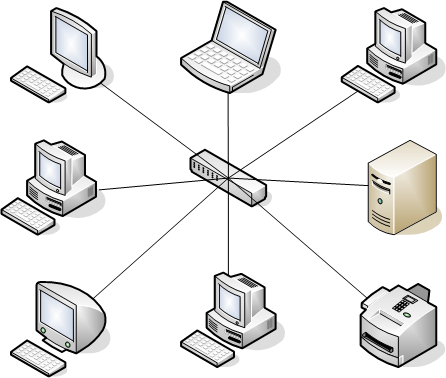 Shows a central switch with 5 connected devices. (Image: Umapathy, CC BY-SA 3.0, via Wikimedia Commons)
Worked Example: Ncell’s 4G Network (Mesh Topology) Ncell’s 4G towers use a partial mesh topology:
- Each tower connects to 3–4 neighboring towers for redundancy.
- If one tower fails (e.g., due to a storm), calls reroute automatically.
- Cost: $500K per tower, but 99.9% uptime (vs. 90% for star topology).
2.3 Networking Hardware: The Physical Layer
Hardware devices enable data transmission, routing, and security:
| Device | Function | Example in Nepal |
|---|---|---|
| Hub | Broadcasts data to all ports. | Obsolete in modern networks. |
| Switch | Forwards data to specific ports. | Used in banks for secure transactions. |
| Router | Connects networks (LAN to WAN). | NTC’s ISP routers. |
| Modem | Converts digital signals for internet. | Home broadband modems (e.g., Ncell Fiber) |
| Repeater | Amplifies signals over long distances. | Used in hilly areas (e.g., Pokhara) |
| Firewall | Blocks unauthorized access. | NMB Bank’s network security. |
Real-World Tie-In:
- eSewa’s Payment Gateway:
- Uses a load balancer (hardware/software) to distribute transactions across servers.
- Firewalls block SQL injection attacks (e.g., fake payment redirects).
- VPNs encrypt data between user devices and eSewa’s servers.
2.4 Network Protocols: Rules for Communication
Protocols define how data is formatted, addressed, and transmitted. The OSI 7-Layer Model standardizes this:
graph TD
    A["Application (HTTP, FTP)"] --> B["Presentation (SSL, JPEG)"]
    B --> C["Session (NetBIOS)"]
    C --> D["Transport (TCP, UDP)"]
    D --> E["Network (IP, ICMP)"]
    E --> F["Data Link (Ethernet, Wi-Fi)"]
    F --> G["Physical (Cables, Signals)"]
Key Protocols in Nepal:
- HTTP/HTTPS: Used by Daraz, eSewa (secure payments).
- FTP: NTC uses it to update software on remote towers.
- SMTP/POP3: Email servers like Ncell’s corporate mail.
- TCP/IP: Foundation of all internet traffic in Nepal.
Worked Example: Loading Daraz’s Website
- Application Layer: Your browser sends an HTTP GET request to
daraz.com.np. - Transport Layer: TCP splits the request into packets and assigns sequence numbers.
- Network Layer: IP routes packets via Nepal’s ISPs (NTC, Worldlink) to Daraz’s server in Singapore.
- Physical Layer: Signals travel via fiber-optic cables (undersea for international traffic).
2.5 Wireless Networks: Freedom from Cables
Wireless tech dominates in Nepal due to terrain and mobility needs:
| Technology | Frequency | Speed | Range | Nepalese Use Case |
|---|---|---|---|---|
| Wi-Fi (802.11) | 2.4 GHz/5 GHz | 10–1000 Mbps | 10–100 m | Coffee shops, co-working spaces |
| Bluetooth | 2.4 GHz | 1–3 Mbps | 1–100 m | Wireless headsets (call centers) |
| 4G/5G | 700 MHz–3.5 GHz | 10–1000 Mbps | 1–50 km | Ncell/NTC mobile internet |
| Satellite | Microwave | 1–50 Mbps | Global | Rural areas (e.g., Mustang) |
Exam Tip:
- 5G in Nepal: Ncell launched 5G in 2023 with 10x faster speeds than 4G. Tested in Kathmandu and Pokhara.
- Interference: Nepal’s hilly terrain causes Wi-Fi dead zones; mesh networks (like Ncell’s) solve this.
3. Hardware and Networking in Business: Nepal Case Studies
3.1 eSewa: The Digital Payment Revolution
Hardware Used:
- Servers: Dell PowerEdge with SSDs (for transaction logs) and RAID arrays (data redundancy).
- Networking:
- Load balancers distribute 50,000+ daily transactions.
- Firewalls block fraud (e.g., fake QR codes).
- VPNs encrypt user data.
Network Topology:
graph LR
    A["User Device"] --> B["ISP (NTC/Worldlink)"]
    B --> C["eSewa Load Balancer"]
    C --> D["Server Cluster (SSD + RAID)"]
    C --> E["Database (SQL Server)"]
    D --> F["Payment Gateway (Visa/Mastercard)"]
Security Challenge:
- DDoS Attacks: In 2022, eSewa faced 10,000 requests/sec from hackers. Solution: Cloudflare’s DDoS protection.
3.2 Ncell’s 4G Network: Connecting Nepal
Hardware:
- Base Stations: Ericsson/LG towers with multi-core CPUs for call processing.
- Backhaul: Fiber-optic cables (Nepal’s National Backbone Network) connect towers to data centers.
Topology:
- Partial Mesh: Each tower connects to 3 neighbors for redundancy.
- Core Network: Uses Cisco routers to route calls to Ncell’s switches.
Worked Example: Call from Kathmandu to Pokhara
- Your phone sends a signal to the nearest 4G tower (Kathmandu).
- The tower forwards it via fiber-optic cable to Ncell’s core router.
- The router identifies Pokhara’s tower and routes the call.
- Pokhara’s tower transmits the signal to the recipient’s phone.
3.3 Daraz: Nepal’s E-Commerce Giant
Hardware Infrastructure:
- Cloud Servers: AWS/Azure for scalability (handles Black Friday traffic).
- Data Centers: Located in Thapathali, Kathmandu (cooling via liquid immersion).
- Edge Computing: Used for real-time inventory updates in warehouses.
Networking Challenges:
- Latency: Daraz’s users expect <200ms response time. Solution: CDN (Cloudflare) caches images globally.
- Fraud Prevention: AI-powered firewalls detect fake orders (e.g., same address, multiple cards).
4. Emerging Trends: The Future of Hardware and Networking
4.1 Internet of Things (IoT) in Nepal
- Smart Meters (NTC): IoT devices measure electricity usage in real-time.
- Agricultural Sensors: Farmers use soil moisture sensors (connected via LoRaWAN).
- Traffic Management: Kathmandu’s smart traffic lights use IoT to reduce congestion.
4.2 Quantum Computing: The Next Leap
- Potential: Banks like NMB could use quantum computers to instantly verify transactions.
- Challenge: Nepal lacks quantum infrastructure; relies on cloud-based quantum services (e.g., IBM Quantum).
4.3 Edge Computing: Bringing Data Closer to Users
- Use Case: Pathao’s ride-matching uses edge servers in Kathmandu/Pokhara to reduce latency.
- Benefit: Faster response (e.g., 50ms vs. 200ms for cloud-based matching).
5. Exam Tips: How to Score Full Marks
Do’s:
✅ Diagrams: Always draw labeled diagrams for topologies (star, mesh), CPU architecture, or OSI layers. 3 marks are often allocated for diagrams. ✅ Real-World Examples: Link answers to Nepalese companies (eSewa, Ncell, Daraz). Example:
"Ncell uses a mesh topology to ensure 99.9% uptime during monsoon floods." ✅ Formulas: Memorize EMI formula and network speed calculations (e.g., bandwidth = data size / time). ✅ Compare: Use tables for HDD vs. SSD, LAN vs. WAN, or TCP vs. UDP.
Don’ts:
❌ Vague Definitions: Avoid "Networking is used for communication." Instead:
"Networking enables resource sharing (e.g., printers in an office) and distributed processing (e.g., Daraz’s cloud servers handling 10,000 orders/sec)." ❌ Ignoring Layers: For OSI model, name all 7 layers and give one Nepalese example per layer. ❌ Assuming Knowledge: Always define acronyms (e.g., RAID = Redundant Array of Independent Disks).
Common Pitfalls:
- Confusing RAM and ROM: RAM is volatile (temporary), ROM is non-volatile (permanent).
- Topology Misuse: A bus topology is not scalable; eSewa uses star for reliability.
- Protocol Mix-Ups: HTTP is application layer; IP is network layer.
6. Practice Questions (Exam-Style)
Short Answer (5 marks): Explain how Ncell’s 4G base stations use a mesh topology to ensure call continuity during power outages. Include a labeled diagram.
Long Answer (10 marks): Compare HDDs and SSDs in terms of speed, cost, and durability. Which would you recommend for:
- Storing Nepal Rastra Bank’s transaction logs?
- Running eSewa’s payment processing software? Justify your choices with real-world examples.
Diagram-Based (7 marks): Draw the OSI 7-layer model and label each layer with:
- A Nepalese example (e.g., HTTP for Daraz).
- The protocol/data unit used (e.g., IP datagram).
7. Quick Revision Table
| Topic | Key Points | Nepalese Example |
|---|---|---|
| CPU Components | ALU (math), CU (control), Registers (fast storage). | Bank loan calculations. |
| Memory Hierarchy | Cache > RAM > SSD > HDD (speed decreases, capacity increases). | eSewa’s servers use SSDs for speed. |
| Network Topologies | Star (eSewa), Mesh (Ncell), Bus (obsolete). | Ncell’s 4G towers use partial mesh. |
| OSI Layers | Application (HTTP), Transport (TCP), Network (IP), Data Link (Ethernet). | Daraz uses HTTP (App) and IP (Network). |
| Wireless Tech | Wi-Fi (local), 4G/5G (mobile), Satellite (rural). | Ncell’s 5G in Kathmandu/Pokhara. |
| Security Devices | Firewall (eSewa), VPN (banks), Load Balancer (Daraz). | NMB Bank uses firewalls for fraud prevention. |
Based on the TU BBM syllabus for IT and Applications (IT231), unit 2.
Discussion
Loading…