IT and ApplicationsUnit 312 min read
Operating Systems & System Software: Functions, Types & Real-World Use
Unit 3 of IT and Applications explores the core concepts of operating systems (OS) and system software, including their functions, types (batch, real-time, distributed), and how they interact with hardware and applications. It covers key components like the kernel, file systems, and memory management, with real-world e
What is an Operating System (OS)?
An Operating System (OS) is a system software that acts as an interface between hardware and software, managing system resources (CPU, memory, storage) and providing services to users and applications. Without an OS, computers cannot run programs or perform tasks efficiently.
Key Functions of an OS
Real-World Example: How eSewa Uses an OS
- eSewa, Nepal’s leading digital payment platform, relies on an OS to:
- Manage thousands of transactions per second (process management).
- Store user data securely (file management).
- Ensure fast response times (memory & CPU scheduling).
- The OS ensures that multiple users can access their accounts simultaneously without crashes.
Types of Operating Systems
Operating systems are classified based on their design, functionality, and usage. Below is a comparison table:
| Type | Definition | Examples | Advantages | Disadvantages |
|---|---|---|---|---|
| Batch OS | Executes jobs in batches (no user interaction). | Early IBM mainframes. | Efficient for bulk processing. | No real-time interaction. |
| Time-Sharing OS | Allows multiple users to share a single system simultaneously. | Unix, Linux, Windows Server. | Cost-effective, multi-user support. | Requires powerful hardware. |
| Real-Time OS (RTOS) | Designed for real-time applications (critical timing constraints). | Embedded systems (e.g., medical devices). | High reliability, deterministic response. | Expensive, complex to develop. |
| Distributed OS | Manages multiple independent computers as a single system. | Google’s distributed file system. | Scalability, fault tolerance. | Complex networking required. |
| Network OS | Enables communication between computers over a network. | Windows Server, Linux (with networking). | Resource sharing, remote access. | Security risks, dependency on network. |
| Multiprocessing OS | Supports multiple CPUs for parallel processing. | Windows, macOS (multi-core support). | Faster processing, better performance. | Higher hardware cost. |
Worked Example: Real-Time OS in Ncell’s Network
- Ncell, Nepal’s largest telecom provider, uses a Real-Time OS (RTOS) in its base stations (cell towers) to:
- Process calls and data in milliseconds (critical for voice and internet).
- Handle thousands of simultaneous connections without delays.
- If the OS fails, calls drop and internet slows down—hence, RTOS ensures deterministic performance.
Components of an Operating System
An OS consists of several key components that work together to manage system resources:
1. Kernel
- The core of the OS that interacts directly with hardware.
- Types of Kernels:
- Monolithic Kernel (e.g., Linux, Windows) – All OS functions in one block.
- Microkernel (e.g., macOS, QNX) – Only essential functions in kernel; others run as separate processes.
- Hybrid Kernel (e.g., Windows NT) – Combines monolithic and microkernel approaches.
2. Shell
- Acts as an interface between the user and the OS.
- Types of Shells:
- Command Line Interface (CLI) (e.g., Linux Terminal, DOS Prompt).
- Graphical User Interface (GUI) (e.g., Windows Explorer, macOS Finder).
Worked Example: Linux CLI vs. Windows GUI
- Linux (CLI): A system administrator uses
ls,grep, andkillcommands to manage files and processes faster than GUI. - Windows (GUI): A home user prefers clicking icons to open files, making it easier for non-technical users.
3. File System
- Manages storage, organization, and retrieval of files.
- Common File Systems:
- FAT32 (Used in USB drives, older Windows).
- NTFS (Windows default, supports large files).
- ext4 (Linux default, high performance).
- HFS+ (macOS default).
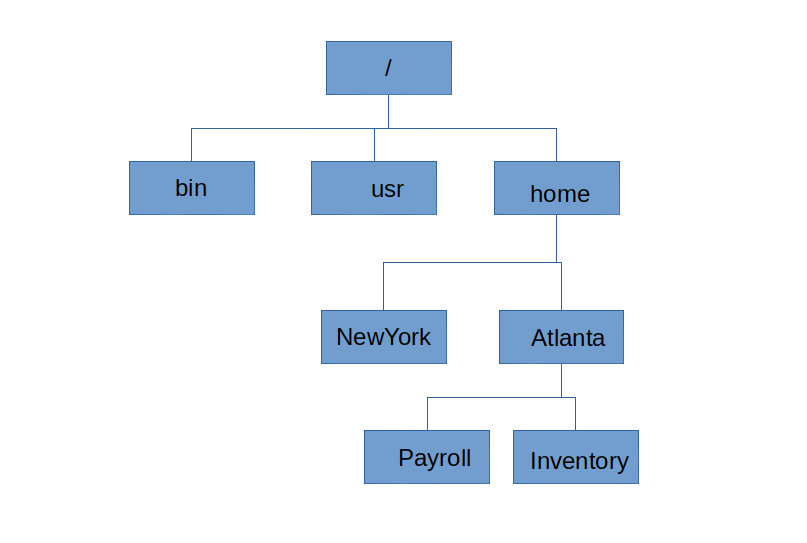 How directories and files are structured in NTFS. (Image: Peter Flass, CC BY-SA 4.0, via Wikimedia Commons)
4. Device Drivers
- Software that allows the OS to communicate with hardware devices (printers, keyboards, GPUs).
- Example: The NVIDIA driver in a gaming PC ensures smooth graphics rendering.
5. Memory Manager
- Allocates and deallocates RAM and virtual memory.
- Key Techniques:
- Paging (divides memory into fixed-size blocks).
- Segmentation (divides memory into variable-sized segments).
- Swapping (moves inactive data to disk).
Worked Example: Memory Management in Daraz’s Server
- When thousands of users browse Daraz during a sale:
- The OS uses virtual memory to load only active pages into RAM.
- If RAM is full, it swaps less-used data to SSD storage, preventing crashes.
System Software vs. Application Software
| Feature | System Software | Application Software |
|---|---|---|
| Purpose | Manages computer hardware & provides platform for apps. | Performs specific tasks for users. |
| Examples | OS (Windows, Linux), Device Drivers, Utilities (e.g., antivirus). | Microsoft Word, Photoshop, WhatsApp. |
| Dependency | Runs without user intervention. | Requires OS to function. |
| User Interaction | Minimal (background processes). | Direct (user-facing). |
Real-World Example: WhatsApp (Application Software) vs. Windows (System Software)
- WhatsApp (Application) runs on top of Windows/Linux (System Software).
- If the OS crashes, WhatsApp cannot function.
- If WhatsApp crashes, the OS continues running other apps.
How Operating Systems Work: A Step-by-Step Trace
Let’s trace how an OS handles a user opening a file in Notepad (Windows):
- User Request: Clicks "Notepad" in the Start Menu.
- GUI (Shell) sends the command to the OS Kernel.
- Process Manager creates a Notepad process and assigns it CPU time.
- Memory Manager allocates RAM for Notepad.
- File System locates and loads the Notepad executable from storage (SSD/HDD).
- Device Drivers ensure the monitor displays text and the keyboard inputs data.
- Notepad runs, and the user can open/save files.
- When closed, the Process Manager terminates the Notepad process, and Memory Manager frees RAM.
sequenceDiagram
    participant User
    participant GUI
    participant Kernel
    participant ProcessManager
    participant MemoryManager
    participant FileSystem
    participant DeviceDriver
    participant Notepad

    User->>GUI: Clicks "Notepad"
    GUI->>Kernel: Sends request
    Kernel->>ProcessManager: Create Notepad process
    ProcessManager->>MemoryManager: Allocate RAM
    MemoryManager-->>ProcessManager: RAM allocated
    Kernel->>FileSystem: Load Notepad.exe
    FileSystem->>DeviceDriver: Display on monitor
    DeviceDriver-->>FileSystem: Confirm display
    Kernel->>Notepad: Execute
    Notepad->>User: Runs
    User->>Notepad: Closes Notepad
    Notepad->>ProcessManager: Terminate
    ProcessManager->>MemoryManager: Free RAM
## In the Real World
eSewa (Digital Payments)
- OS Function Used: Process Management & Security
- How? When you transfer money via eSewa, the OS:
- Schedules transactions in milliseconds.
- Encrypts data (security module of the OS).
- Logs all transactions (file management).
Ncell’s 4G Network
- OS Function Used: Real-Time OS (RTOS) for Base Stations
- How? The RTOS ensures:
- Calls connect in <1 second (critical for VoIP).
- Data packets are routed without delay (network OS).
- Hardware failures are detected instantly (device management).
Google Search (Distributed OS)
- OS Function Used: Distributed File System & Load Balancing
- How? Google’s Colossus file system (a distributed OS) stores petabytes of data across thousands of servers, ensuring:
- Fast search results (parallel processing).
- Fault tolerance (if one server fails, others take over).
Khalti (Mobile Banking)
- OS Function Used: Memory Management & Multitasking
- How? When you check your balance:
- The OS allocates RAM for the Khalti app.
- Switches between apps (e.g., Khalti + WhatsApp) smoothly.
- Prevents crashes even with multiple background processes.
NTC’s Traffic Management System
- OS Function Used: Real-Time Scheduling & I/O Handling
- How? The system uses an OS to:
- Monitor traffic cameras in real-time (device drivers).
- Update signals dynamically (process scheduling).
- Log violations (file management).
## Exam Tip
- Define Clearly: Always start with a precise definition (e.g., "An OS is system software that manages hardware-software interaction...").
- Compare & Contrast: Exams often ask for differences between OS types (e.g., batch vs. real-time). Use tables for clarity.
- Real-World Links: Relate concepts to Nepali tech (e.g., eSewa, Ncell, Daraz) to stand out.
- Diagrams > Text: If asked to explain process management, draw a process state diagram (New → Ready → Running → Waiting → Terminated).
- Short Notes: For questions like "Differences between system and application software", use a bullet-point table (as shown above).
- Avoid Vague Answers: Instead of "OS manages resources", specify:
- "The Process Manager schedules CPU time using round-robin or priority scheduling."
Final Checklist Before Exam: ✅ Can you list 5 OS functions and give one real-world example for each? ✅ Can you compare 3 OS types (batch, real-time, distributed) in a table? ✅ Can you trace how an OS handles a user action (e.g., opening a file)? ✅ Do you know how Nepali apps (eSewa, Khalti) use OS features?
Based on the TU BBM syllabus for IT and Applications (IT231), unit 3.
Discussion
Loading…