Computer Fundamentals and ApplicationsUnit 89 min read
Multimedia, GUI, and Computer Graphics: Fundamentals, Formats, and Applications
Unit 8 of Computer Fundamentals and Applications explores multimedia systems (text, audio, video, animation), Graphical User Interfaces (GUIs) vs. Command-Line Interfaces (CLIs), and computer graphics (raster vs. vector, transformations, and 3D rendering). It covers file formats, compression techniques, GUI design prin
TAKEAWAYS:
- Multimedia integrates text, audio, video, and animation into interactive systems, enabling rich user experiences in apps like YouTube or eSewa.
- GUIs replace text-based CLIs with icons, windows, and menus, improving usability (e.g., Windows, macOS, and mobile OS interfaces).
- Computer graphics use raster (pixel-based) and vector (mathematical) models, with transformations (translation, rotation, scaling) for animations and 3D rendering.
- Compression (lossy vs. lossless) reduces file sizes for efficient storage/transmission (e.g., MP3 for audio, JPEG for images).
- GUI design follows principles like consistency, feedback, and affordance to create intuitive interfaces (e.g., Daraz’s checkout flow).
- Real-world systems (e.g., WhatsApp’s video calls, NTC’s traffic monitoring) rely on these concepts for functionality and user engagement.
1. Multimedia Systems: Types, Formats, and Applications
Multimedia combines text, audio, video, graphics, and animation into interactive digital experiences. It is the backbone of modern applications, from social media to e-commerce.
1.1 Types of Multimedia
Multimedia is classified based on input/output (I/O) methods and storage medium:
mindmap
  root((Multimedia Types))
    Input
      Text
      Audio (Microphone, MIDI)
      Video (Webcam, Camcorder)
      Graphics (Scanner, Digital Camera)
    Output
      Visual (Monitor, Projector)
      Auditory (Speaker, Headphones)
      Haptic (Vibration Feedback)
    Storage
      Digital (Hard Drive, SSD, Cloud)
      Analog (VHS Tape, Cassette)
    Interactive
      Linear (Pre-recorded, e.g., YouTube videos)
      Non-linear (User-controlled, e.g., video games)
1.2 Multimedia File Formats
Each media type has standardized formats for storage and playback. Key examples:
| Media Type | Common Formats | Compression Type | Use Case |
|---|---|---|---|
| Text | TXT, PDF, DOCX | Lossless | Documents, e-books |
| Audio | MP3, WAV, AAC, FLAC | Lossy/Lossless | Music, podcasts, voice notes |
| Video | MP4, AVI, MKV, MOV | Lossy (H.264, H.265) | Movies, streaming, surveillance |
| Graphics | JPEG, PNG, GIF, SVG | Lossy/Lossless | Photos, logos, web images |
| Animation | GIF, APNG, FLV, SWF | Lossy | Ads, cartoons, UI elements |
Worked Example: eSewa’s Multimedia Features eSewa uses:
- Audio: Voice prompts for transaction confirmation (WAV/MP3).
- Video: Tutorials for new users (MP4).
- Graphics: Icons for payment options (PNG/SVG).
- Text: Transaction receipts (PDF/DOCX).
Why?
- MP3 reduces audio file size for faster loading.
- PNG ensures crisp icons on all devices.
- PDF provides secure, printable receipts.
2. Graphical User Interface (GUI) vs. Command-Line Interface (CLI)
GUIs dominate modern computing, but CLIs remain critical for automation and server management.
2.1 GUI: Visual Interaction
GUIs use windows, icons, menus, and pointers (WIMP) for intuitive navigation. Advantages:
- Easier for beginners (e.g., Windows File Explorer).
- Visual feedback (e.g., drag-and-drop in Photoshop).
- Supports multimedia (e.g., YouTube’s video player).
Disadvantages:
- Higher resource usage (e.g., Windows vs. Linux CLI).
- Slower for complex tasks (e.g., batch processing).
2.2 CLI: Text-Based Efficiency
CLIs (e.g., DOS, Linux Terminal) use commands for precise control. Advantages:
- Faster for automation (e.g., scripting in Bash).
- Lower overhead (e.g., server administration).
- Better for remote access (e.g., SSH into a Linux server).
Disadvantages:
- Steep learning curve (e.g., memorizing
grepcommands). - No visual feedback (e.g., typing
dirvs. seeing folders).
2.3 GUI Design Principles
Good GUIs follow usability heuristics (from Jakob Nielsen):
- Consistency: Buttons behave the same (e.g., "Submit" in Daraz).
- Feedback: Visual confirmation (e.g., loading spinner in Pathao).
- Affordance: Design suggests function (e.g., a button looks clickable).
- Error Prevention: Warn users before irreversible actions (e.g., "Are you sure?" in WhatsApp delete).
Real-World Example: NTC Traffic Monitoring
- GUI: Dashboards show real-time traffic data (maps + graphs).
- CLI: Backend scripts process sensor data (Python/Bash).
3. Computer Graphics: Raster vs. Vector
Graphics are rendered using two primary models:
3.1 Raster Graphics (Pixel-Based)
- Definition: Images as a grid of pixels (e.g., JPEG, PNG).
- Pros: Photo-realistic, good for complex images.
- Cons: Scaling loses quality ("pixelation").
Example: Photoshop Layers
stateDiagram-v2
  [*] --> ActiveLayer: Open Image
  ActiveLayer --> AddLayer: Click "New Layer"
  AddLayer --> EditLayer: Draw/Text
  EditLayer --> MergeLayers: Click "Merge"
  MergeLayers --> Export: Save as PNG/JPEG
  Export --> [*]
3.2 Vector Graphics (Mathematical)
- Definition: Shapes defined by paths (e.g., SVG, AI).
- Pros: Scalable without quality loss (e.g., logos).
- Cons: Poor for photos, complex for organic shapes.
Worked Example: Ncell Logo
- Designed in Adobe Illustrator (vector) for crisp scaling on billboards and mobile screens.
3.3 Transformations in Graphics
Key operations to manipulate objects:
- Translation: Move (e.g., dragging a window).
- Rotation: Turn (e.g., rotating a 3D model in Blender).
- Scaling: Resize (e.g., zooming in Google Maps).
- Shearing: Skew (e.g., distorting text in Photoshop).
Mermaid Example: 2D Transformation
graph LR
  A["Original Shape"] -->|"Translate(10,20)"| B["Moved Right"]
  A -->|"Rotate(45°)"| C["Rotated"]
  A -->|"Scale(2x)"| D["Enlarged"]
3.4 3D Graphics Pipeline
Rendering 3D involves:
- Modeling: Create objects (e.g., 3D Max).
- Texturing: Apply surfaces (e.g., UV mapping).
- Lighting: Add shadows/reflections.
- Rendering: Generate final image (e.g., Ray Tracing).
Real-World Use: YouTube 360° Videos
- Uses 3D graphics to stitch panoramic footage for VR headsets.
4. Multimedia Compression Techniques
Reduces file size without (lossless) or with (lossy) quality loss.
| Technique | Type | Example Formats | Use Case |
|---|---|---|---|
| Lossless | No quality loss | ZIP, PNG, FLAC | Documents, archives |
| Lossy | Quality loss | MP3, JPEG, MP4 | Music, photos, videos |
| Hybrid | Combines both | MKV, WebP | High-quality streaming |
Worked Example: WhatsApp Video Calls
- Uses H.264 (lossy) to compress video in real-time.
- Why? Balances quality and bandwidth (critical for mobile users).
5. Emerging Trends in Multimedia and GUI
- Augmented Reality (AR): Overlays digital content (e.g., IKEA Place app).
- Virtual Reality (VR): Immersive environments (e.g., Meta Quest).
- Touchless Interfaces: Gesture control (e.g., Microsoft Kinect).
- AI-Generated Media: Tools like DALL·E (text-to-image).
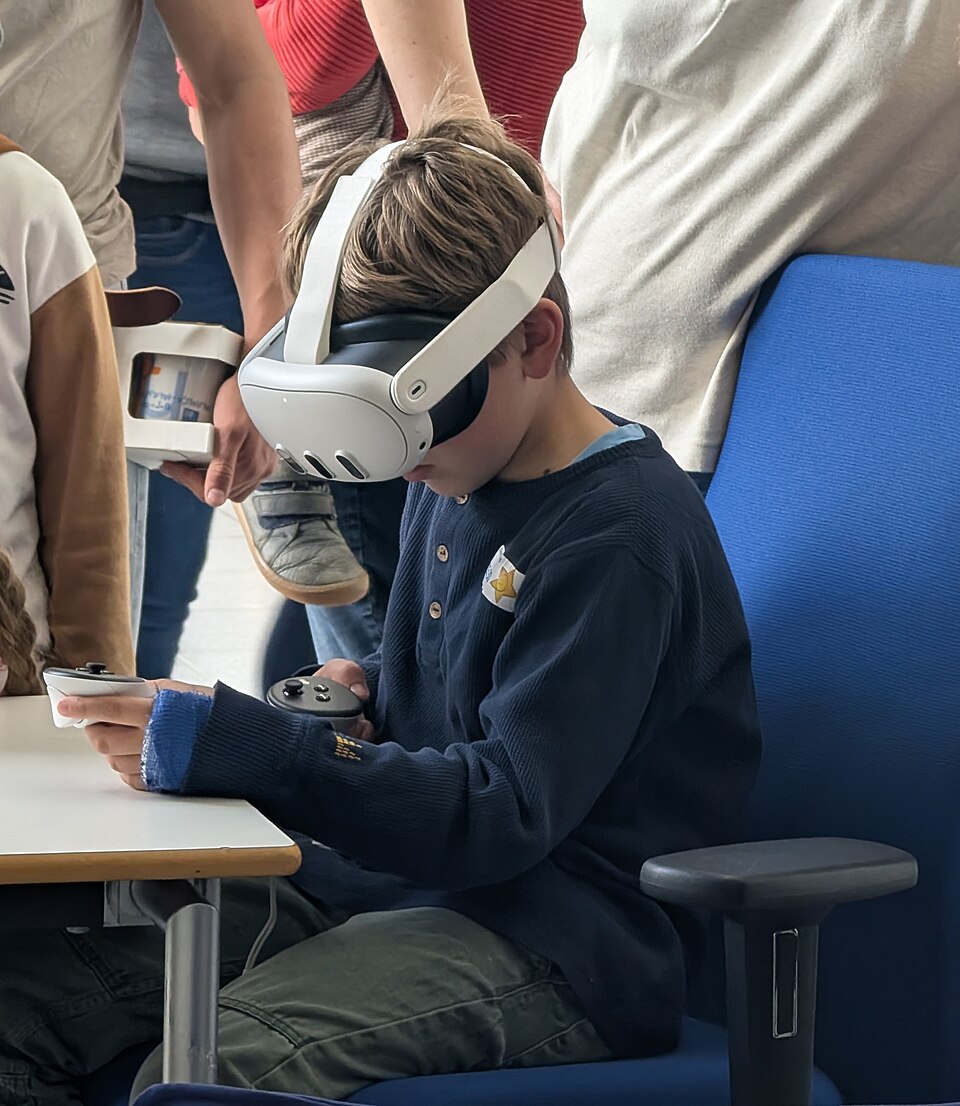 Gesture-controlled VR interface (Image: Siarhei Besarab, CC BY-SA 4.0, via Wikimedia Commons)
In the Real World
eSewa
- Uses multimedia for voice prompts (audio), transaction receipts (PDF), and animated tutorials (GIF/MP4).
- GUI: Mobile app with icons for payment options (consistency principle).
YouTube
- Video compression (H.264/H.265) reduces bandwidth for streaming.
- GUI: Player controls (play/pause) follow affordance (buttons look clickable).
Photoshop (Adobe)
- Raster (PNG) + Vector (SVG) for logos and digital art.
- Transformations: Free Transform tool for scaling/rotating.
NTC Traffic Monitoring
- GUI Dashboards: Real-time maps with traffic data.
- CLI Backend: Python scripts process sensor data.
Daraz
- Animation: Product hover effects (CSS/GIF).
- GUI Principles: "Add to Cart" button uses color contrast for affordance.
Exam Tip
- Definitions Matter: Know the difference between raster/vector, lossy/lossless, and GUI/CLI.
- Format Examples: Memorize 2-3 formats for each media type (e.g., MP3 for audio, SVG for vector).
- Real-World Links: Connect concepts to apps (e.g., "WhatsApp uses H.264 compression").
- Diagrams: Draw OSI-like layers for multimedia (e.g., Input → Processing → Output).
- Short Answers:
- "GUI vs. CLI" → Compare usability vs. efficiency.
- "Compression" → Define lossy/lossless with examples.
- Long Answers:
- Describe how eSewa uses multimedia (audio + video + text).
- Explain 3D graphics pipeline with steps (modeling → rendering).
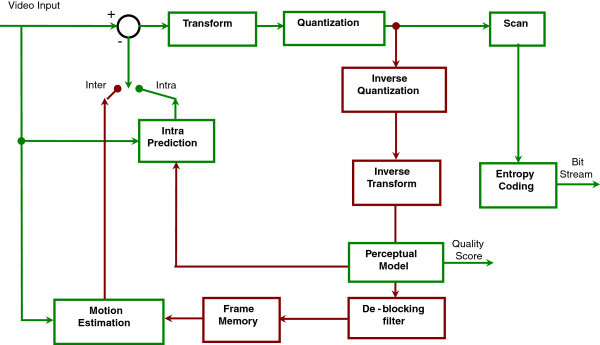 How video frames are encoded (Image: Karthikeyan R, Sainarayanan G, Deepa SN, CC BY-SA 4.0, via Wikimedia Commons)
Based on the TU BCA syllabus for Computer Fundamentals and Applications (BCA101), unit 8.
Discussion
Loading…