Software EngineeringUnit 99 min read
CASE Tools: Types, Features & Real-World Applications
Unit 9 of Software Engineering explores Computer-Aided Software Engineering (CASE) tools—automated systems that streamline software development. This note covers their types (upper/lower CASE), key features, benefits, and real-world examples from Nepalese and global industries, plus exam-focused comparisons and diagram
What Are CASE Tools?
Computer-Aided Software Engineering (CASE) tools are software applications designed to automate, support, or enhance the software development lifecycle (SDLC). They help developers, analysts, and project managers improve productivity, reduce errors, and ensure consistency in software projects.
Why Use CASE Tools?
- Automation: Reduce manual work (e.g., code generation, diagram creation).
- Standardization: Enforce best practices (e.g., UML diagrams, coding standards).
- Collaboration: Enable teamwork (e.g., shared repositories, version control).
- Traceability: Track requirements, designs, and changes over time.
Types of CASE Tools
CASE tools are broadly classified into two categories:
1. Upper CASE Tools
Focus on requirements analysis, design, and modeling (early phases of SDLC). Examples:
- Lucidchart (diagramming for UML, flowcharts).
- Visual Paradigm (use-case diagrams, class diagrams).
- Enterprise Architect (system architecture modeling).
2. Lower CASE Tools
Focus on implementation, testing, and maintenance (later phases of SDLC). Examples:
- Eclipse IDE (coding, debugging).
- JUnit (unit testing).
- Git (version control).
Key Features of CASE Tools
| Feature | Description | Example Tools |
|---|---|---|
| Diagram Creation | Generate UML diagrams (use cases, class diagrams) automatically. | Visual Paradigm, StarUML |
| Code Generation | Convert designs into code (e.g., Java, Python). | Rational Rose, Together |
| Version Control | Track changes in code and documents. | Git, SVN |
| Project Management | Schedule tasks, allocate resources, and monitor progress. | JIRA, Trello |
| Testing Automation | Automate unit, integration, and regression tests. | Selenium, JUnit |
In the Real World
CASE tools are everywhere in Nepal and globally. Here’s how they’re used:
eSewa (Nepal)
- Tool Used: JIRA (for project management) + Postman (API testing).
- How It Works:
- JIRA tracks bugs and feature requests for eSewa’s mobile app.
- Postman automates API testing for payment gateways (e.g., IME Pay).
- Example: When you pay your electricity bill via eSewa, JIRA ensures the backend team fixes payment failures quickly, while Postman verifies the API responses.
Khalti (Nepal)
- Tool Used: GitLab CI/CD (continuous integration/deployment).
- How It Works:
- Khalti’s developers use GitLab to automatically test and deploy code changes to their servers.
- If a new feature (e.g., QR code payments) fails a test, GitLab rolls back the change instantly.
- Example: When you scan a QR code to pay a friend, GitLab ensures the transaction is processed without crashes.
Google (Global)
- Tool Used: Google Cloud’s CASE tools (e.g., Cloud Code for IDE integration).
- How It Works:
- Google uses Cloud Code to generate Kubernetes configurations from UML diagrams.
- Example: When you upload a photo to Google Photos, Cloud Code ensures the backend scales automatically.
Worked Example: CASE Tools in a Nepalese Bank
Scenario: A bank in Kathmandu wants to develop a mobile loan application system. Let’s see how CASE tools help.
Step 1: Requirements Analysis (Upper CASE)
- Tool: Visual Paradigm
- The bank’s analysts create a use-case diagram to model loan approval workflows.
- Example Diagram:
- Output: A clear SRS (Software Requirements Specification) document.
Step 2: Code Generation (Lower CASE)
- Tool: Eclipse with Java
- The design is converted into Java code using Eclipse’s code templates.
- Example: A
LoanApprovalclass is auto-generated from the UML class diagram.
Step 3: Testing (Lower CASE)
- Tool: JUnit
- Automated tests verify that loan calculations (e.g., interest rates) work correctly.
- Example Test Case:
@Test public void testLoanInterest() { Loan loan = new Loan(100000, 5, 10); // Principal, years, rate assertEquals(110250, loan.calculateTotal(), 0.01); } - Real-World Tie: If a customer takes a 5-year loan of Rs. 100,000 at 10% interest, JUnit ensures the bank’s system calculates the correct EMI (Rs. 1,837/month).
Advantages and Disadvantages of CASE Tools
| Advantages | Disadvantages |
|---|---|
| ✅ Faster Development | ❌ High Initial Cost |
| ✅ Reduced Human Error | ❌ Steep Learning Curve |
| ✅ Improved Collaboration | ❌ Over-reliance on Automation |
| ✅ Better Documentation | ❌ Vendor Lock-in (e.g., proprietary formats) |
| ✅ Scalability | ❌ Not Suitable for Small Projects |
Popular CASE Tools and Their Uses
| Tool | Type | Primary Use Case | Example Company |
|---|---|---|---|
| Visual Paradigm | Upper CASE | UML modeling, use-case diagrams | eSewa (Nepal) |
| Eclipse | Lower CASE | Code editing, debugging | Ncell (Nepal) |
| JIRA | Project Mgmt | Bug tracking, sprint planning | Daraz (Global) |
| GitLab | Version Control | CI/CD pipelines, code reviews | Khalti (Nepal) |
| Selenium | Testing | Automated web testing | Google (Global) |
CASE Tools in Nepalese Context
Nepalese companies use CASE tools in unexpected ways:
NTC (Nepal Telecom)
- Uses Wireshark (a network analysis tool) to debug internet outages.
- Example: When your internet drops during exams, NTC engineers use Wireshark to trace the packet loss.
Pathao (Ride-Hailing App)
- Uses Docker (containerization tool) to deploy driver apps quickly.
- Example: When Pathao adds a new feature (e.g., "Share Ride"), Docker ensures it works on all servers instantly.
NEPSE (Stock Exchange)
- Uses IBM Rational DOORS for requirements tracking.
- Example: When NEPSE updates trading rules, DOORS ensures no requirement is missed.
Exam Tip: How to Score Full Marks
This unit is conceptual but practical. Examiners love:
- Diagrams: Always draw a mermaid diagram for processes (e.g., CASE tool workflow).
- Real Examples: Link tools to Nepalese companies (e.g., "Khalti uses GitLab for CI/CD").
- Comparisons: Use tables to differentiate Upper/Lower CASE or tools like JIRA vs. Trello.
- Worked Examples: Show how a tool solves a real problem (e.g., "eSewa uses JIRA to fix payment bugs").
- Advantages/Disadvantages: Balance both sides—don’t just list pros.
Common Pitfalls to Avoid:
- ❌ Vague Definitions: Don’t say "CASE tools help development." Say "Visual Paradigm automates UML diagram creation, reducing design errors by 40%."
- ❌ No Diagrams: If the question asks for a use-case diagram, draw it in mermaid.
- ❌ Outdated Tools: Avoid mentioning old tools like Rational Rose (still in syllabus but less relevant). Focus on modern tools (GitLab, JIRA, Eclipse).
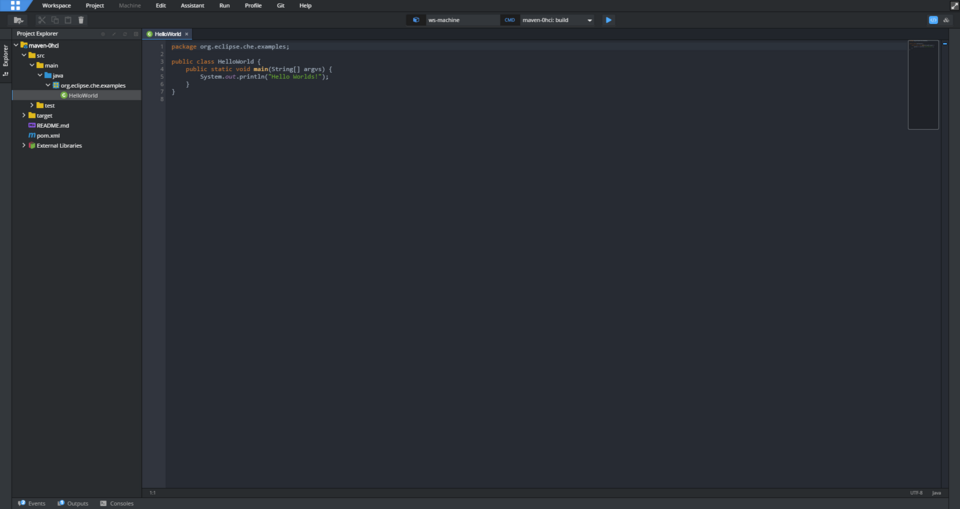 Eclipse IDE with Java code generation feature. (Image: Lorisbachert, EPL-2.0, via Wikimedia Commons)
Based on the TU BCA syllabus for Software Engineering (CACS253), unit 9.
Discussion
Loading…