Software EngineeringUnit 810 min read
SCM & Re-engineering: Version Control, Builds, Refactoring & Legacy Systems
Unit 8 of Software Engineering explores Software Configuration Management (SCM) techniques—version control, branching, merging, and build automation—and Software Re-engineering strategies for maintaining, migrating, and modernizing legacy systems. Covers tools (Git, SVN), metrics, and real-world challenges like code ro
Core Concepts of Software Configuration Management (SCM)
What is SCM?
Software Configuration Management (SCM) is the process of systematically managing changes to software systems. It ensures that software is consistent, traceable, and reproducible across development, testing, and production environments. SCM includes:
- Version control: Tracking changes to source code and related artifacts.
- Build management: Automating compilation, testing, and deployment.
- Change control: Managing modifications through approval workflows.
- Release management: Coordinating software releases and rollbacks.
stateDiagram-v2
    [*] --> Idle: No changes
    Idle --> Edit: Developer modifies code
    Edit --> Commit: Changes saved to repository
    Commit --> Branch: New branch created
    Branch --> Merge: Changes merged into main
    Merge --> Test: Automated tests run
    Test --> Release: Deployed to production
    Release --> [*]: Software in use
    Release --> Rollback: Revert to previous version
Why SCM Matters
SCM solves real-world problems like:
- Collaboration: Multiple developers working on the same project without overwriting each other’s work.
- Traceability: Knowing who changed what and when (critical for debugging and audits).
- Reproducibility: Ensuring builds and deployments are consistent across environments.
- Disaster recovery: Rolling back to a stable version if a new release fails.
In the Real World
eSewa (Nepal):
- Version Control: eSewa’s backend team uses Git to manage changes across microservices (e.g., payment processing, user authentication). When a new feature (like QR-based payments) is developed, it’s branched, tested, and merged into
mainonly after rigorous review. - Build Automation: CI/CD pipelines (using Jenkins) automatically test and deploy code to staging servers, ensuring no broken payments reach users.
- Version Control: eSewa’s backend team uses Git to manage changes across microservices (e.g., payment processing, user authentication). When a new feature (like QR-based payments) is developed, it’s branched, tested, and merged into
Khalti (Nepal):
- Release Management: Khalti’s mobile app undergoes canary releases—new versions are rolled out to 1% of users first. If fraud detection logic fails, they roll back instantly using SCM tools to track the exact commit that introduced the bug.
- Legacy System Integration: Khalti’s older COBOL-based banking integrations are refactored incrementally (re-engineering) to support modern APIs, reducing technical debt.
Pathao (Nepal/Global):
- Branching Strategy: Pathao uses GitFlow to manage feature branches (e.g., "ride-sharing UI overhaul") separately from production (
master). Hotfixes for crashes (e.g., during Diwali traffic surges) are deployed via emergency branches. - Configuration Management: Different driver apps (Android/iOS) share core logic but have platform-specific configurations (e.g., GPS APIs), managed via feature flags in SCM.
- Branching Strategy: Pathao uses GitFlow to manage feature branches (e.g., "ride-sharing UI overhaul") separately from production (
Version Control Systems (VCS)
Version control tracks changes to files over time, enabling collaboration and recovery. Two dominant models:
| Feature | Centralized (SVN) | Distributed (Git) |
|---|---|---|
| Repository Structure | Single central server | Every user has a full copy of the repo |
| Offline Work | ❌ Requires server connection | ✅ Works offline; syncs later |
| Branching | Heavy (slow, resource-intensive) | Lightweight (cheap, fast) |
| Data Integrity | Server manages history | Cryptographic hashes ensure integrity |
| Learning Curve | Easier for beginners | Steeper (but industry standard) |
| Use Case | Small teams, simple projects | Large teams, open-source (e.g., Linux kernel) |
How Git Works: A Trace Example
Scenario: Two developers, A and B, work on a Khalti payment gateway feature.
- Initial State:
git clone https://github.com/khalti/payment-gateway.git - Developer A adds a new API endpoint:
git checkout -b feature/upi-payments # Edit code, test locally git add . git commit -m "Add UPI payment support" - Developer B fixes a bug in the same file (without knowing A’s changes):
git checkout main git pull origin main # Fix bug, commit git commit -m "Fix transaction timeout" - Merge Conflict:
- Git detects conflicting changes in
payment_handler.py. - Resolution: Use
git mergetoolto manually reconcile differences, thengit push.
- Git detects conflicting changes in
sequenceDiagram
    DeveloperA->>Git: git checkout -b feature/upi-payments
    DeveloperA->>Git: git commit (UPI code)
    DeveloperB->>Git: git checkout main
    DeveloperB->>Git: git pull
    DeveloperB->>Git: git commit (bug fix)
    Git->>DeveloperA: Conflict detected!
    DeveloperA->>Git: git merge --no-ff
    Git-->>DeveloperA: Merged commit
Build Automation and CI/CD
Build automation compiles code, runs tests, and packages software. CI/CD (Continuous Integration/Deployment) extends this to automate releases.
Key Components
- Build Tools:
- Maven/Gradle (Java): Manages dependencies and compiles projects.
- Makefile (C/C++): Defines build steps (e.g.,
make clean && make).
- CI Servers:
- Jenkins: Open-source, plugin-based (used by eSewa for automated testing).
- GitHub Actions: Native to GitHub, triggers workflows on
git push.
- Artifact Repositories:
- Nexus/Artifactory: Stores compiled binaries (e.g.,
.jar,.exe) for deployment.
- Nexus/Artifactory: Stores compiled binaries (e.g.,
Worked Example: Daraz’s Order Queue System
Problem: Daraz’s backend processes orders in a queue. A new feature adds real-time order tracking, but it breaks the queue system. Solution: Use CI/CD with GitLab:
- Developer pushes code to
feature/order-trackingbranch. - GitLab CI triggers:
- Unit tests (JUnit) → Fail: Queue timeout bug found.
- Rollback: Deploy previous stable version (
v1.2.0) to production.
- Fix: Developer amends the branch, and CI retests before merging to
main.
flowchart TD
    A["Developer Pushes Code"] --> B["GitLab CI Trigger"]
    B --> C["Run Unit Tests"]
    C -->|"Fail"| D["Alert Team"]
    D --> E["Rollback to v1.2.0"]
    E --> F["Fix Bug"]
    F --> C
    C -->|"Pass"| G["Merge to main"]
Software Re-engineering
Re-engineering transforms legacy systems (old, poorly documented code) into modern, maintainable software. Two approaches:
| Approach | Reverse Engineering | Forward Engineering |
|---|---|---|
| Goal | Understand existing system (e.g., COBOL to Java) | Build new system from scratch |
| Tools | Decompilers, static analyzers (e.g., Understand) | IDEs, modern frameworks (e.g., Spring Boot) |
| Risk | High (loss of original intent) | High (requirements may be incomplete) |
| Use Case | Banks migrating from mainframe to cloud | Startups replacing legacy ERP systems |
Challenges in Re-engineering
- Technical Debt: Accumulated shortcuts (e.g., spaghetti code) make refactoring hard.
- Documentation Gap: No comments or design docs for old systems.
- Business Logic Entanglement: UI, database, and business rules are mixed.
- Performance Trade-offs: Modernizing may require rewriting optimized but obscure code.
Example: Nepal Rastra Bank’s Legacy Core Banking System
- Problem: Written in COBOL, runs on mainframes, lacks APIs for digital banking.
- Solution:
- Step 1: Use reverse engineering to extract business logic (e.g., loan calculation rules).
- Step 2: Refactor into microservices (e.g.,
LoanService,CustomerService). - Step 3: Forward engineer a new UI with React.js and integrate via REST APIs.
erDiagram
    LegacySystem ||--o{ BusinessRule : "contains"
    BusinessRule ||--o{ Microservice : "migrated to"
    Microservice ||--o{ API : "exposes"
    API ||--o{ MobileApp : "used by"
Configuration Management Tools
| Tool | Type | Use Case | Example Companies |
|---|---|---|---|
| Git | Version Control | Code collaboration | Google, Facebook |
| Jenkins | CI/CD | Automated testing/deployment | eSewa, Daraz |
| Docker | Containerization | Consistent environments | Ncell’s cloud services |
| Ansible | Configuration Mgmt | Server provisioning | NTC’s network automation |
| SonarQube | Code Quality | Static analysis, technical debt tracking | Khalti’s security audits |
Exam Tip
What Examiners Want to See
SCM:
- Define version control, branching strategies (e.g., GitFlow), and merge conflicts.
- Compare Git vs. SVN with a table (as above).
- Worked Example: Show how a team (e.g., Pathao) uses branches for features/hotfixes.
Re-engineering:
- Explain reverse vs. forward engineering with a real system (e.g., NRB’s COBOL migration).
- Challenges: List technical debt, documentation gaps, and trade-offs.
- Tools: Mention Understand (reverse engineering) or Spring Boot (forward engineering).
Build Automation:
- Diagram a CI/CD pipeline (use
sequenceDiagramorflowchart). - Link to Nepal: How eSewa uses Jenkins for payment system testing.
- Diagram a CI/CD pipeline (use
Common Pitfalls
- Vague Definitions: Avoid saying "SCM is about managing code." Instead, specify version control, build automation, and change management.
- Ignoring Tools: Always name Git, Jenkins, or Docker in answers about real-world applications.
- Overlooking Challenges: Re-engineering questions often ask for risks (e.g., "Why is migrating COBOL hard?").
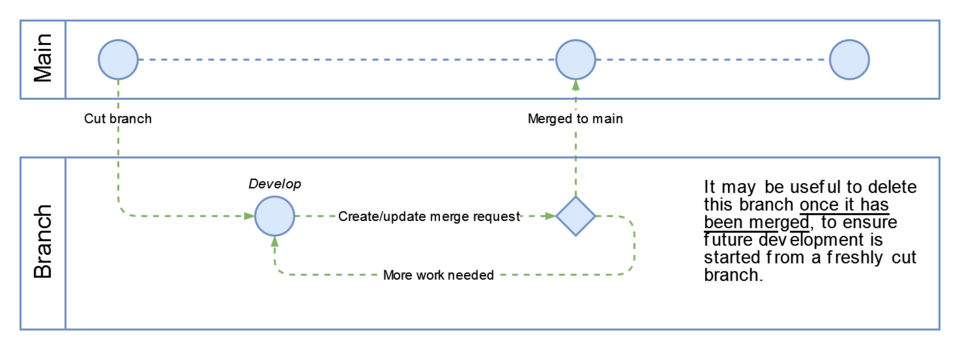 How Git tracks changes across branches and merges (Image: TheresNoTime, CC BY-SA 4.0, via Wikimedia Commons)
Based on the TU BCA syllabus for Software Engineering (CACS253), unit 8.
Discussion
Loading…