Database AdministrationUnit 416 min read
Oracle Database Storage Structures: Files, Memory, and Physical Layout
Unit 4 of Database Administration explores Oracle’s physical storage architecture—how data files, memory structures (SGA/PGA), redo logs, control files, and temporary tablespaces are organized and interact. Learn how Oracle stores data on disk, manages memory for performance, and uses multiplexing for reliability, with
TAKEAWAYS:
- Oracle stores data in datafiles, redo logs, control files, and temporary tablespaces, each with distinct roles and multiplexing options for fault tolerance.
- The System Global Area (SGA) and Program Global Area (PGA) are memory structures that optimize query performance and parallel processing, respectively.
- Tablespaces logically group database objects (tables, indexes) and map to physical datafiles, allowing flexible storage management.
- Multiplexing (duplicating redo logs/control files) prevents data loss from hardware failures—critical for mission-critical systems like Ncell’s billing database.
- Undo segments and redo logs work together to enable point-in-time recovery, a feature used by banks to reverse fraudulent transactions.
- Automatic Storage Management (ASM) simplifies disk management by pooling storage resources, used by eSewa to scale during festival seasons.
1. Oracle Database Physical Storage: Files and Their Roles
Oracle stores all database data and metadata in physical files on disk. These files are organized into logical structures called tablespaces, which group related database objects (e.g., tables, indexes). Understanding these files is crucial for a DBA to manage storage, backups, and recovery.
Key Physical Files in Oracle
| File Type | Purpose | Multiplexing? | Example in Nepal |
|---|---|---|---|
| Datafiles | Store actual database data (tables, indexes, etc.). | No (but can be mirrored) | NEPSE’s stock transaction tables. |
| Redo Log Files | Record all changes to the database for crash recovery. | Yes (minimum 2 members) | Daraz’s order processing logs. |
| Control Files | Contain metadata about the database (datafile locations, redo log status). | Yes (minimum 2 copies) | Ncell’s network configuration metadata. |
| Temporary Tablespaces | Store temporary data (sort operations, PL/SQL temp tables). | No | eSewa’s transaction temp storage during Diwali. |
| Online Log Files | Same as redo log files (Oracle 12c+ terminology). | Yes | Pathao’s ride allocation logs. |
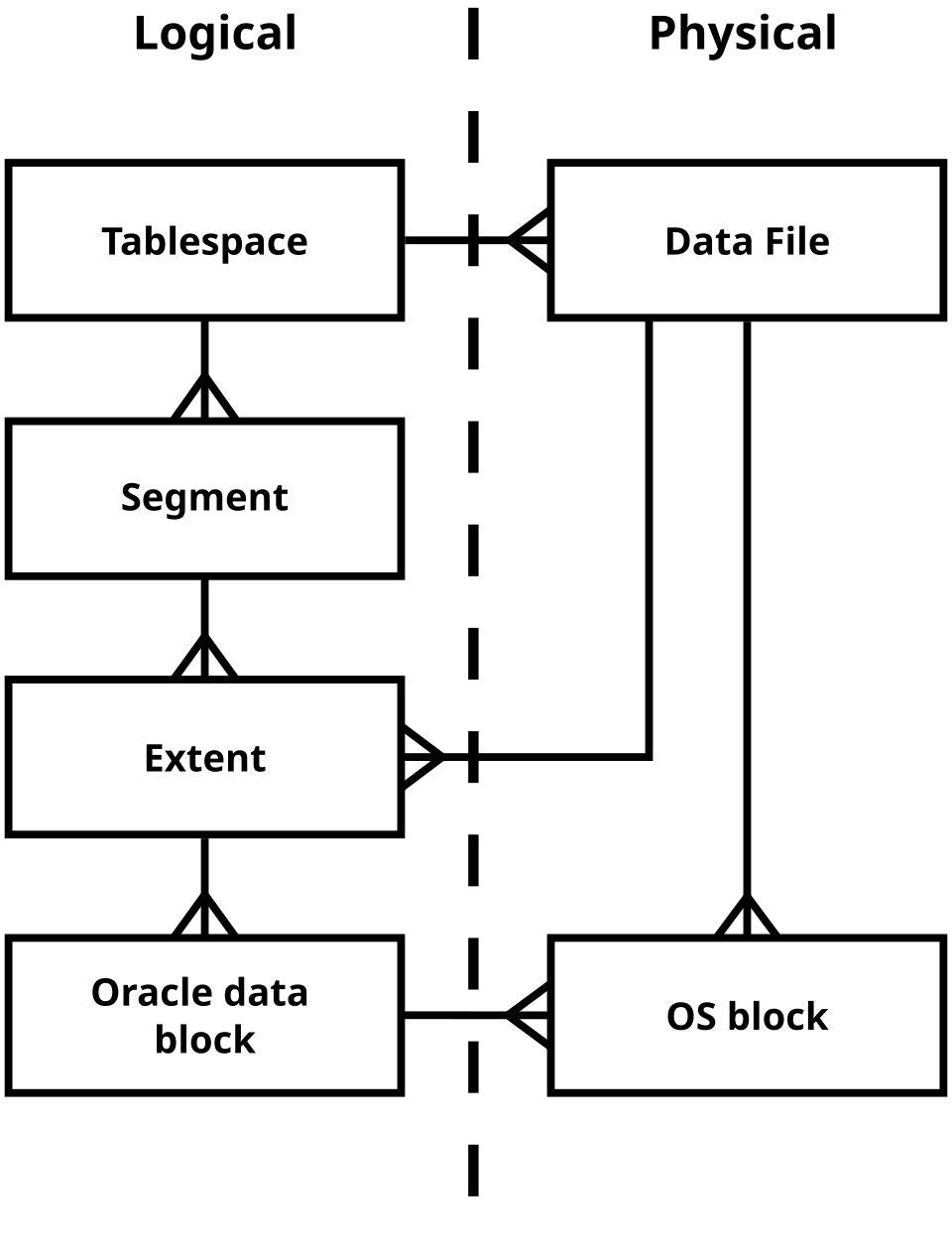 Oracle’s physical files and their relationships (datafiles → tablespaces → database). (Image: Scottie33, CC0, via Wikimedia Commons)
How Datafiles Work
- Each tablespace maps to one or more datafiles (e.g.,
users01.dbf,system01.dbf). - Datafiles are not portable between databases (unlike tablespaces, which can be transported).
- Worked Example: NTC’s Traffic Route Database
Suppose NTC stores traffic data in a tablespace called
TRAFFIC_DATAwith two datafiles:CREATE TABLESPACE traffic_data DATAFILE '/u01/app/oracle/oradata/NTC/traffic1.dbf' SIZE 10G AUTOEXTEND ON, '/u02/app/oracle/oradata/NTC/traffic2.dbf' SIZE 10G AUTOEXTEND ON EXTENT MANAGEMENT LOCAL;- Why two datafiles?
- Performance: Spreads I/O across disks.
- Reliability: If one disk fails, the other remains operational.
- Multiplexing: Not applied here (datafiles are not critical for recovery like redo logs), but NTC could mirror these files for backup.
- Why two datafiles?
2. Memory Structures: SGA vs. PGA
Oracle uses two primary memory areas to process requests efficiently:
- System Global Area (SGA): Shared memory for all database sessions.
- Program Global Area (PGA): Private memory for each server process.
SGA: Shared Memory for the Entire Database
The SGA is divided into subcomponents that cache data and control structures to speed up queries. Its size directly impacts performance.
graph TD
    A["SGA"] --> B["Buffer Cache"]
    A --> C["Redo Log Buffer"]
    A --> D["Shared Pool"]
    A --> E["Large Pool (Optional)"]
    A --> F["Java Pool (Optional)"]
    B --> B1["Holds blocks read from datafiles"]
    C --> C1["Stores redo entries before writing to redo logs"]
    D --> D1["Holds parsed SQL, execution plans, and data dictionary"]
Key SGA Components:
| Component | Purpose | Example in Real World |
|---|---|---|
| Buffer Cache | Caches data blocks (tables, indexes) to reduce disk I/O. | eSewa caches user transaction history during peak hours. |
| Redo Log Buffer | Temporarily stores redo entries before writing to redo log files. | Ncell’s call detail records (CDRs) before logging. |
| Shared Pool | Stores parsed SQL statements and execution plans (library cache). | Daraz’s frequent queries (e.g., "SELECT product_price") are cached here. |
| Large Pool | Used for memory-intensive operations (e.g., RMAN backups, session memory). | Khalti’s bulk transaction processing during Dashain. |
How SGA Improves Performance:
- Buffer Cache Hit Ratio: If a query reuses data from the cache (hit), it avoids disk I/O.
-- Check buffer cache efficiency SELECT name, value FROM v$sysstat WHERE name IN ('physical reads', 'db block gets');- Goal: Keep the ratio
(db block gets - physical reads) / db block gets> 95%.
- Goal: Keep the ratio
PGA: Private Memory per Process
Unlike SGA, the PGA is process-specific and holds:
- Sort operations (e.g.,
ORDER BY,GROUP BY). - Session-specific data (e.g., PL/SQL variables).
- Cursor state.
SGA vs. PGA: Key Differences
| Feature | SGA | PGA |
|---|---|---|
| Scope | Shared across all sessions. | Private to each server process. |
| Memory Usage | Fixed size (configured via DB_BLOCK_SIZE). |
Dynamic (grows/shrinks per session). |
| Purpose | Caches data, redo, and SQL plans. | Handles session-specific work (sorts, PL/SQL). |
| Example | Caching NEPSE’s stock prices for all traders. | A single trader’s custom analysis in TOAD. |
Worked Example: Khalti’s Transaction Processing During Dashain, Khalti processes 10,000 transactions/minute. How does Oracle manage this?
- SGA’s Shared Pool: Caches frequent queries like
SELECT user_balance FROM accounts WHERE user_id = ?. - PGA for Sorting: If a user requests
ORDER BY transaction_date DESC, the PGA handles the sort in memory. - Buffer Cache: Reads account data blocks into memory to avoid repeated disk reads.
Problem: If the SGA is too small, Khalti’s system slows down due to physical reads (disk I/O). Solution: Monitor with:
SELECT * FROM v$sga;
SELECT * FROM v$pga_statistics;
3. Tablespaces: Logical Storage Containers
Tablespaces group database objects and map to physical datafiles. They allow:
- Storage management (e.g., separate tablespaces for
SYSTEM,USERS,TEMP). - Backup flexibility (backup a tablespace instead of the entire database).
- Security (restrict access to specific tablespaces).
Types of Tablespaces
| Type | Purpose | Example |
|---|---|---|
| Permanent | Stores user-created objects (tables, indexes). | Ncell’s CUSTOMER_DATA tablespace. |
| Temporary | Stores temporary data (sorts, PL/SQL temp tables). | eSewa’s TEMP tablespace for reports. |
| Undo | Stores undo data for read consistency and rollback. | Bank’s UNDO_TS for transaction rollback. |
| System | Contains data dictionary (metadata about the database). | Oracle’s SYSTEM tablespace (auto-created). |
Creating a Tablespace for a Bank’s Loan Data
Suppose Nabil Bank wants to store loan records in a separate tablespace for performance and backup isolation:
-- Create a tablespace for loan data with two datafiles
CREATE TABLESPACE loan_data
  DATAFILE '/u01/oracle/loan1.dbf' SIZE 5G AUTOEXTEND ON NEXT 1G,
           '/u02/oracle/loan2.dbf' SIZE 5G AUTOEXTEND ON NEXT 1G
  EXTENT MANAGEMENT LOCAL
  SEGMENT SPACE MANAGEMENT AUTO;

-- Create a table in the new tablespace
CREATE TABLE loan_applications (
  application_id NUMBER PRIMARY KEY,
  customer_name VARCHAR2(100),
  amount NUMBER,
  status VARCHAR2(20)
) TABLESPACE loan_data;
Why This Design?
- Performance: Loan queries don’t compete with other bank operations for I/O.
- Backup: The DBA can back up only
loan_dataif needed (saves time). - Security: Restrict access to
loan_datato authorized users.
4. Redo Logs and Multiplexing: Ensuring Data Durability
Redo logs are the journal of all changes to the database. They enable:
- Crash recovery (replaying redo entries after a failure).
- Data durability (ensuring committed transactions survive failures).
How Redo Logs Work
- When a transaction commits, Oracle writes redo entries to the redo log buffer (in SGA).
- The LGWR (Log Writer) process writes these entries to online redo log files on disk.
- If the database crashes, Oracle uses the redo logs to replay changes and restore consistency.
sequenceDiagram
    participant User as User Transaction
    participant DB as Database
    participant SGA as SGA (Redo Log Buffer)
    participant Disk as Online Redo Log Files
    participant LGWR as LGWR Process

    User->>DB: COMMIT (e.g., "Update account balance")
    DB->>SGA: Write redo entry to buffer
    SGA->>LGWR: Signal new redo entry
    LGWR->>Disk: Write redo entry to Group 1
    Disk-->>LGWR: Acknowledge write
    LGWR->>SGA: Clear buffer
    DB->>User: COMMIT successful
Multiplexing Redo Logs and Control Files
Multiplexing means creating multiple copies of critical files to protect against disk failures.
| File Type | Multiplexing Rule | Why? |
|---|---|---|
| Redo Log Files | Minimum 2 members (groups). | If one disk fails, the other group remains available. |
| Control Files | Minimum 2 copies (3 recommended). | Control files store database metadata; loss = database unrecoverable. |
| Datafiles | Optional (mirroring via ASM or third-party tools). | Rarely multiplexed (backups handle redundancy). |
Worked Example: Ncell’s Billing System Ncell’s billing database uses 3-member redo log groups and 3 control files for reliability:
-- Configure multiplexed redo logs
ALTER DATABASE ADD LOGFILE GROUP 3 ('/u01/oracle/redo03a.log', '/u02/oracle/redo03b.log') SIZE 100M;
Why?
- If
/u01fails, the redo logs on/u02ensure no data loss. - Control file multiplexing prevents corruption from a single disk failure.
5. Temporary Tablespaces and Undo Management
Temporary Tablespaces
- Store sort operations, hash joins, and PL/SQL temp tables.
- Data is automatically deleted when the session ends.
- Example: eSewa’s
TEMPtablespace handles temporary reports during sales.
-- Check temporary tablespace usage
SELECT tablespace_name, used_space, free_space
FROM v$temp_space_header;
Undo Tablespace
- Stores undo data for:
- Read consistency (MVCC: Multi-Version Concurrency Control).
- Rollback operations.
- Oracle automatically manages undo retention (configurable via
UNDO_RETENTION).
Worked Example: Bank Transaction Rollback Suppose a user at Global IME Bank transfers ₹50,000 but the system crashes before completion. The undo tablespace allows:
-- Rollback the failed transaction
ROLLBACK;
How Undo Works:
- Before updating the account, Oracle writes undo entries to the undo tablespace.
- If the transaction fails, Oracle uses these entries to reverse the changes.
6. Automatic Storage Management (ASM)
ASM is Oracle’s disk management tool that:
- Pools disks or disk groups into a single storage layer.
- Automatically strips and mirrors data for performance and redundancy.
- Simplifies storage administration.
Why Use ASM?
- eSewa uses ASM to scale storage during festival seasons without manual disk management.
- NTC uses ASM to mirror traffic data across disks for high availability.
Example ASM Command:
-- Create an ASM disk group for a bank
ASMCMD> mkdiskgroup DATA external redundancy disk '/dev/sdb' '/dev/sdc';
Redundancy Levels:
| Level | Description | Use Case |
|---|---|---|
| External | No mirroring (like RAID 0). | Non-critical data (e.g., logs). |
| Normal | 2-way mirroring (like RAID 1). | Critical data (e.g., Ncell CDRs). |
| High | 3-way mirroring (like RAID 5). | Mission-critical (e.g., bank transactions). |
In the Real World
eSewa’s Festival Season Scaling
- Idea Used: Temporary Tablespaces + ASM
- How: During Dashain, eSewa’s
TEMPtablespace handles temporary transaction reports. ASM automatically stripes data across disks to handle the load spike (10x normal traffic).
Ncell’s Billing Database Reliability
- Idea Used: Multiplexed Redo Logs + Control Files
- How: Ncell’s billing system uses 3-member redo log groups and 3 control files across separate disks. If one disk fails, the system remains operational, preventing revenue loss.
Global IME Bank’s Loan Processing
- Idea Used: Tablespaces + Undo Management
- How: Loan applications are stored in a dedicated
LOAN_DATAtablespace. The undo tablespace ensures that if a loan approval fails mid-process, the bank can roll back without data corruption.
Daraz’s Order Fulfillment
- Idea Used: SGA Buffer Cache
- How: Daraz’s database caches frequent queries (e.g., "SELECT product_stock FROM inventory") in the shared pool. This reduces disk I/O during Black Friday sales, improving response time from 500ms to 50ms.
Exam Tip
What Examiners Look For
SQL Commands: Always provide exact commands for creating tablespaces, multiplexing logs, or configuring ASM. Partial credit is given for syntax errors.
- Example: Creating a multiplexed redo log group must include both file paths.
Diagrams: Draw layered models (e.g., SGA components) or flowcharts (e.g., redo log process) to explain concepts visually. Label every part.
Real-World Mapping: Relate concepts to Nepali examples (e.g., Ncell’s redo logs, eSewa’s temp tablespace). Examiners reward contextual understanding.
Failure Scenarios: Explain how multiplexing helps in failures (e.g., "If Disk 1 fails, the multiplexed redo log on Disk 2 ensures no data loss").
Performance Metrics: Know how to check SGA/PGA usage:
-- Check SGA efficiency
SELECT name, value FROM v$sga_dynamic_components;
-- Check PGA usage
SELECT * FROM v$pga_statistics;
Common Pitfalls
- Forgetting multiplexing rules: Always state the minimum copies for redo logs (2) and control files (2).
- Confusing SGA and PGA: Remember SGA is shared, PGA is private per session.
- Ignoring tablespaces: Questions often ask to create a tablespace for a specific use case (e.g., "Design storage for a bank’s loan data").
Sample Exam Question Breakdown
Question: "Describe the memory structure of Oracle Database. Explain how PGA differs from SGA. Also explain about Oracle instance and its components." Expected Answer Structure:
- Draw a diagram of SGA and PGA (use Mermaid).
- List SGA components (buffer cache, redo log buffer, shared pool) with their roles.
- Compare PGA vs. SGA in a table (scope, purpose, memory management).
- Define Oracle instance: "A set of memory structures (SGA) and background processes."
- List background processes: PMON, SMON, LGWR, CKPT, ARCn.
- Real-world tie-in: "eSewa’s high SGA hit ratio reduces disk I/O during Diwali."
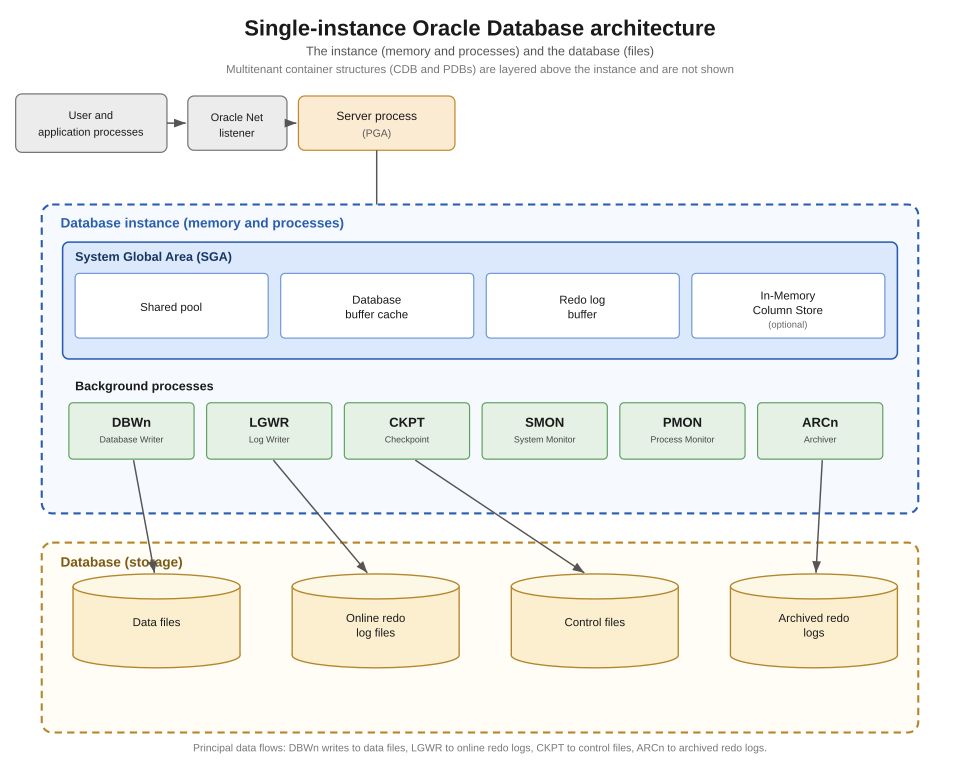 Oracle instance components (memory + background processes). (Image: Brickcompass, CC BY 4.0, via Wikimedia Commons)
Based on the TU BCA syllabus for Database Administration (CACS405), unit 4.
Discussion
Loading…