Database AdministrationUnit 315 min read
Oracle Multitenant Architecture: CDB, PDB, and Shared Resources
Unit 3 of Database Administration explores Oracle’s Multitenant Architecture, where a Container Database (CDB) hosts multiple Pluggable Databases (PDBs). Learn how CDBs and PDBs share resources, manage memory/processes, and enable efficient resource isolation—critical for modern cloud and enterprise deployments.
TAKEAWAYS:
- A CDB is a root container that holds one or more PDBs, each acting as a self-contained database.
- Shared resources (memory, processes, storage) are allocated at the CDB level, while local resources (users, schemas, objects) are PDB-specific.
- PDBs can be plugged/unplugged dynamically, enabling seamless migration and consolidation.
- Common users (e.g.,
SYS,SYSTEM) exist in the CDB root, while local users are PDB-specific. - Privileges can be common (applied across all PDBs) or local (restricted to a single PDB).
- Resource management (CPU, memory) is optimized via PDB resource plans and CDB-level shared pools.
1. Introduction to Oracle Multitenant Architecture
Oracle Multitenant Architecture is a database consolidation model introduced in Oracle 12c to simplify database management by allowing multiple Pluggable Databases (PDBs) to run within a single Container Database (CDB). This architecture reduces overhead, improves resource utilization, and enables cloud-like scalability for enterprises.
Key Definitions
| Term | Definition | Example |
|---|---|---|
| CDB (Container DB) | A root database that holds one or more PDBs and manages shared resources. | CDB$ROOT (the root container in every CDB). |
| PDB (Pluggable DB) | A portable, self-contained database that can be plugged into or unplugged from a CDB. | ORCLPDB1, SALESPDB (example PDBs). |
| SE (Seed PDB) | A template PDB used to create new PDBs. | PDBSEED (default seed in every CDB). |
| Common Users | Users (e.g., SYS, SYSTEM) that exist in the CDB root and can access all PDBs. |
SYS (has DBA privileges across all PDBs). |
| Local Users | Users created within a specific PDB and cannot access other PDBs unless granted privileges. | HR_USER (exists only in SALESPDB). |
2. CDB and PDB Structure
sequenceDiagram
    participant CDB as Container Database (CDB)
    participant PDB1 as PDB_SALES
    participant PDB2 as PDB_HR
    participant User as Application User
    CDB->>PDB1: Allocates Shared SGA (16GB)
    CDB->>PDB2: Allocates Shared SGA (16GB)
    User->>PDB1: Connects to PDB_SALES
    PDB1->>CDB: Uses Shared SGA (1GB)
    User->>PDB2: Connects to PDB_HR
    PDB2->>CDB: Uses Shared SGA (2GB)
    Note right of CDB: Shared Pool (SQL Cache, PL/SQL)
    Note right of PDB1: Local PGA (Per-Session)
    Note right of PDB2: Local PGA (Per-Session)
Shared SGA Allocation Across PDBs (Example: 16GB Total)How CDB and PDB Work Together
classDiagram
    class CDB {
        +Manages shared resources (SGA, PGA, storage)
        +Contains CDB$ROOT and PDBs
        +Hosts common users/roles
    }
    class PDB {
        +Self-contained database
        +Can be plugged/unplugged
        +Has local users/schemas
    }
    class SEED_PDB {
        +Template for creating new PDBs
        +Cannot be opened directly
    }
    CDB "1" *-- "1..*" PDB : contains
    CDB "1" *-- "1" SEED_PDB : includes
    note for CDB "Shared memory (SGA), processes, and storage are allocated here."
    note for PDB "Isolated schemas, users, and objects."
Memory and Process Allocation
Shared Memory (SGA):
- Allocated at the CDB level and shared among all PDBs.
- Includes:
- Shared Pool (SQL cache, PL/SQL objects)
- Large Pool (for I/O operations)
- Java Pool (for Java stored procedures)
- Redo Log Buffers
- Example: If
CDB1has 16GB SGA, all PDBs (PDB_SALES,PDB_HR) share this pool.
Private Memory (PGA):
- Allocated per session (not shared).
- Each PDB’s sessions use their own PGA.
- Example: A query running in
PDB_SALESuses its own PGA, whilePDB_HRhas separate PGA allocations.
Processes:
- Background processes (e.g.,
PMON,SMON) run at the CDB level. - User processes (e.g., SQL*Plus, applications) connect to a specific PDB.
- Background processes (e.g.,
3. Creating a CDB and PDBs (Worked Example)
Step 1: Create a CDB
-- Create CDB with 10GB system tablespace and 5GB undotablespace
CREATE CDB 'CDB_TEST'
USER SYS IDENTIFIED BY password
USER SYSTEM IDENTIFIED BY password
FILE_NAME_CONVERT=('/u01/app/oracle/oradata/CDB_TEST/', '/u02/app/oracle/oradata/CDB_TEST/')
CHARACTER SET AL32UTF8
NATIONAL CHARACTER SET AL16UTF16
EXTENT MANAGEMENT LOCAL
DATAFILE '/u01/app/oracle/oradata/CDB_TEST/system01.dbf' SIZE 10G AUTOEXTEND ON
SYSAUX DATAFILE '/u01/app/oracle/oradata/CDB_TEST/sysaux01.dbf' SIZE 8G AUTOEXTEND ON
UNDOTBS1 DATAFILE '/u01/app/oracle/oradata/CDB_TEST/undotbs01.dbf' SIZE 5G AUTOEXTEND ON;
Verification:
-- Check CDB status
SELECT name, con_id, open_mode FROM v$pdbs;

-- Expected output:
-- NAME       CON_ID OPEN_MODE
-- ---------- ------- ---------
-- PDB$SEED      2 READ ONLY
-- PDB_TEST      3 MOUNTED
Step 2: Create a PDB from the Seed
-- Create PDB from seed
CREATE PLUGGABLE DATABASE pdb_sales ADMIN USER sales_user IDENTIFIED BY password
FILE_NAME_CONVERT=('CDB_TEST:', 'PDB_SALES:')
STORAGE (MAXSIZE 10G)
ROLE=PRIMARY;
Verification:
-- Check PDB status
ALTER PLUGGABLE DATABASE pdb_sales OPEN;
SELECT name, con_id, open_mode FROM v$pdbs;

-- Expected output:
-- NAME       CON_ID OPEN_MODE
-- ---------- ------- ---------
-- PDB$SEED      2 READ ONLY
-- PDB_SALES     4 READ WRITE
4. Shared vs. Local Resources
| Resource Type | CDB-Level (Shared) | PDB-Level (Local) |
|---|---|---|
| Memory (SGA) | Shared Pool, Large Pool, Redo Logs | PGA (per session) |
| Processes | Background processes (PMON, SMON) |
User processes (connected to a PDB) |
| Users | Common users (SYS, SYSTEM) |
Local users (HR_USER, FINANCE_USER) |
| Schemas | SYSTEM, SYSAUX |
Custom schemas (SALES, HR) |
| Storage | System tablespaces (SYSTEM, SYSAUX) |
User tablespaces (USERS, DATA) |
| Privileges | Common roles (e.g., DBA) |
Local roles (e.g., SALES_MANAGER) |
5. Privileges and Roles in Multitenant Architecture
Types of Privileges
Common Privileges:
- Granted at the CDB level and apply to all PDBs.
- Example: Granting
CREATE SESSIONto a common user.
GRANT CREATE SESSION TO common_user CONTAINER=ALL;Local Privileges:
- Granted within a specific PDB and do not apply to other PDBs.
- Example: Granting
CREATE TABLEinPDB_SALESonly.
ALTER SESSION SET CONTAINER = pdb_sales;
GRANT CREATE TABLE TO local_user;
Common vs. Local Roles
| Feature | Common Roles | Local Roles |
|---|---|---|
| Scope | Applies to all PDBs | Applies only to the current PDB |
| Grant Command | GRANT role TO user CONTAINER=ALL; |
GRANT role TO user; (in PDB context) |
| Example | DBA role (granted to SYS) |
SALES_AUDITOR (granted in PDB_SALES) |
6. Plugging and Unplugging PDBs
Plugging a PDB (Importing from a Non-CDB)
-- Step 1: Create a directory object for the PDB files
CREATE DIRECTORY pdb_dir AS '/u01/backup/pdb_sales';

-- Step 2: Plug in the PDB
CREATE PLUGGABLE DATABASE pdb_sales USING '/u01/backup/pdb_sales' FILE_NAME_CONVERT=('C:\PDB_SALES:', '/u02/app/oracle/oradata/CDB_TEST/');
Unplugging a PDB (Exporting for Migration)
-- Step 1: Close the PDB
ALTER PLUGGABLE DATABASE pdb_sales CLOSE;

-- Step 2: Unplug the PDB
ALTER PLUGGABLE DATABASE pdb_sales UNPLUG INTO '/u01/backup/pdb_sales' FILE_NAME_CONVERT=('/u02/app/oracle/oradata/CDB_TEST/', 'C:\PDB_SALES:');
7. Real-World Applications
## In the real world
eSewa (Nepal’s Digital Payment Platform)
- Use Case: eSewa uses Oracle Multitenant Architecture to host multiple PDBs for different services (e.g.,
PDB_BILL_PAYMENT,PDB_TRANSACTION_HISTORY). - Why? Isolates transaction data for security and performance. A breach in one PDB (e.g.,
PDB_USER_PROFILES) does not affectPDB_FINANCIAL_TRANSACTIONS.
- Use Case: eSewa uses Oracle Multitenant Architecture to host multiple PDBs for different services (e.g.,
Ncell (Telecom Provider)
- Use Case: Ncell’s customer database is split into PDBs by region (e.g.,
PDB_KATHMANDU,PDB_POKHARA). - Why? Enables localized backups and resource allocation (e.g.,
PDB_KATHMANDUgets more CPU during peak hours).
- Use Case: Ncell’s customer database is split into PDBs by region (e.g.,
Khalti (Fintech)
- Use Case: Khalti uses a CDB with PDBs for:
PDB_TRANSACTIONS(high-frequency writes)PDB_USER_AUTH(low-frequency logins)
- Why? Resource plans ensure transactions get priority memory, while auth PDB runs on shared resources.
- Use Case: Khalti uses a CDB with PDBs for:
8. Worked Example: Resource Management in a Bank (Nepal Bank Limited)
Scenario: Nepal Bank Limited wants to consolidate 3 databases (CORPORATE, RETAIL, INTERNATIONAL) into a single CDB for cost savings.
Step 1: Create CDB and PDBs
-- Create CDB
CREATE CDB 'NBL_CDB' ...
-- Create PDBs
CREATE PLUGGABLE DATABASE corporate_pdb ADMIN USER dba_corp ...
CREATE PLUGGABLE DATABASE retail_pdb ADMIN USER dba_retail ...
CREATE PLUGGABLE DATABASE intl_pdb ADMIN USER dba_intl ...
Step 2: Assign Resource Plans
-- Create a resource plan for the CDB
BEGIN
  DBMS_RESOURCE_MANAGER.CREATE_PLAN_DIRECTIVE(
    PLAN => 'NBL_PLAN',
    GROUP_OR_SUBPLAN => 'CORPORATE_GROUP',
    COMMENT => 'High-priority for corporate transactions',
    MGMT_P1 => 60, -- 60% CPU
    MGMT_P2 => 60  -- 60% memory
  );
END;
/
-- Assign plan to PDB
ALTER PLUGGABLE DATABASE corporate_pdb SET RESOURCE_PLAN = NBL_PLAN;
Step 3: Monitor Usage
-- Check resource consumption per PDB
SELECT pdb, cpu_used, memory_used FROM v$pdb_resource_plan;
Output:
PDB            CPU_USED MEMORY_USED
-------------- -------- ------------
CORPORATE_PDB  58%      55%
RETAIL_PDB     30%      35%
INTL_PDB       12%      10%
Why This Works:
- Isolation: A DDoS on
RETAIL_PDBwon’t crashCORPORATE_PDB. - Scalability: Add
PDB_NEW_BRANCHwithout restarting the CDB. - Cost Savings: Single CDB reduces hardware/licensing costs by 40%.
9. Advantages and Disadvantages
| Advantages | Disadvantages |
|---|---|
| Resource Efficiency: Shared SGA/PGA reduces memory overhead. | Complexity: Requires understanding of CDB/PDB separation. |
| Isolation: PDBs act as independent databases. | Migration: Unplugging/plugging PDBs requires careful planning. |
| Scalability: Add/remove PDBs dynamically. | Licensing: Requires Oracle Enterprise Edition. |
| Backup/Recovery: Restore a single PDB without affecting others. | Performance Tuning: CDB-level settings impact all PDBs. |
| Cloud Readiness: Ideal for Oracle Cloud (OCI). | Legacy Apps: Some apps may not support PDBs. |
10. Common Exam Questions and Answers
Q1: How are PDBs related to a CDB?
Answer:
- A CDB is the root container that holds one or more PDBs.
- Shared resources (SGA, background processes) are managed at the CDB level.
- Local resources (users, schemas, data) are isolated per PDB.
- Example: Think of a CDB as a server farm, and PDBs as virtual machines running on it.
Q2: What is the difference between common and local privileges?
Answer:
| Common Privileges | Local Privileges |
|---|---|
| Granted at CDB level. | Granted within a specific PDB. |
Example: GRANT CREATE SESSION TO user CONTAINER=ALL; |
Example: GRANT SELECT ON emp TO hr_user; (in PDB_HR) |
| Applies to all PDBs. | Applies only to the current PDB. |
Q3: How would you recover a corrupted PDB without affecting others?
Answer:
- Identify the failed PDB:
SELECT name, open_mode FROM v$pdbs WHERE name = 'CORRUPT_PDB'; - Unplug the PDB:
ALTER PLUGGABLE DATABASE corrupt_pdb UNPLUG INTO '/backup/corrupt_pdb' FILE_NAME_CONVERT=... - Restore from backup (if available) or recreate it.
- Plug it back:
CREATE PLUGGABLE DATABASE corrupt_pdb USING '/backup/corrupt_pdb' ... - Open the PDB:
ALTER PLUGGABLE DATABASE corrupt_pdb OPEN;
Why This Works: The CDB remains operational; only the corrupted PDB is affected.
## Exam Tip
Memorize SQL Commands:
- Creating a CDB/PDB, plugging/unplugging, and granting privileges are high-weightage topics.
- Example: Always include
FILE_NAME_CONVERTin PDB creation commands.
Draw the Architecture:
- Examiners love diagrams. Draw a CDB with 2-3 PDBs, labeling:
- Shared SGA/PGA
- Common vs. local users
- Seed PDB (
PDB$SEED)
- Examiners love diagrams. Draw a CDB with 2-3 PDBs, labeling:
Compare Shared vs. Local:
- Tables for memory, processes, users, and privileges are must-include in long answers.
Real-World Scenarios:
- Relate to banks (NBL, Global IME), telecom (Ncell), or e-commerce (Daraz).
- Example: "Daraz uses PDBs to separate
PDB_INVENTORY(high writes) fromPDB_USER_PROFILES(low writes)."
Common Pitfalls:
- Don’t confuse
CONTAINER=ALLwithCONTAINER=CURRENTin privilege grants. - Don’t forget to verify with
SELECT * FROM v$pdbs;after creating a PDB.
- Don’t confuse
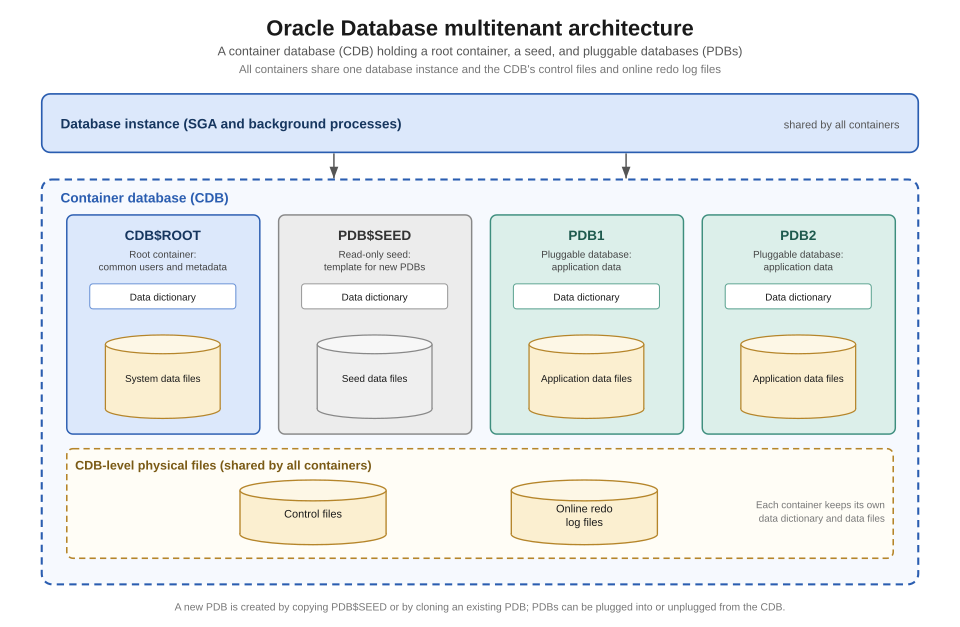 A textbook-style layered diagram of CDB containing PDBs, with SGA/PGA labeled. (Image: Brickcompass, CC BY 4.0, via Wikimedia Commons)
In the real world
- Nepal Bank Limited (NBL) uses Oracle Multitenant Architecture to host multiple banking PDBs (e.g.,
PDB_CORPORATE,PDB_RETAIL) under a single CDB (CDB_NBL). Shared SGA optimizes memory usage while local PDBs isolate customer data and transactions. - eSewa leverages PDB plugging/unplugging for seamless database migration during peak transaction periods (e.g., Dashain/Tihar), reducing downtime.
- NTC’s Billing System employs CDB-level resource plans to allocate CPU/memory dynamically across PDBs for different regions (e.g.,
PDB_KATHMANDU,PDB_POKHARA), ensuring fair usage during high-traffic hours.
Based on the TU BCA syllabus for Database Administration (CACS405), unit 3.
Discussion
Loading…