Foundation of Information TechnologyUnit 57 min read
Operating Systems & System Software: Kernels, Processes, Memory, File Systems
Unit 5 of Foundation of Information Technology covers the core concepts of operating systems (OS), including their types, functions, system software, process management, memory management, file systems, and security—essential for understanding how computers run applications efficiently.
What is an Operating System (OS)?
An operating system (OS) is system software that manages hardware and software resources, provides common services for computer programs, and acts as an intermediary between users and hardware. It controls execution of programs, manages file systems, and handles input/output operations.
Key Functions of an OS
mindmap
  root((Operating System Functions))
    Kernel["Core component (manages CPU, memory, devices)"]
    ProcessManagement["Creates, schedules, terminates processes"]
    MemoryManagement["Allocation, protection, swapping"]
    FileSystem["Organizes, stores, retrieves files"]
    IOManagement["Handles input/output devices"]
    Security["User authentication, permissions, protection"]
    UserInterface["CLI, GUI, APIs"]
Types of Operating Systems
| Type | Description | Examples |
|---|---|---|
| Batch OS | Executes jobs in batches without user interaction. | Early IBM mainframes. |
| Time-Sharing OS | Allows multiple users to share a single system simultaneously. | Unix, Linux. |
| Distributed OS | Manages multiple computers as a single system. | Google Cloud, Kubernetes. |
| Real-Time OS | Responds to inputs within strict time constraints. | Embedded systems (e.g., medical devices). |
| Multiprocessing OS | Supports multiple CPUs for parallel processing. | Windows Server, macOS. |
| Network OS | Manages resources across a network. | Novell NetWare, Windows Server. |
System Software
System software supports application software and computer hardware. It includes:
- Operating Systems (Windows, Linux, macOS)
- Utility Programs (Antivirus, Disk Cleanup, File Compression)
- Device Drivers (Printer drivers, GPU drivers)
- Language Processors (Compilers, Interpreters)
How System Software Works
sequenceDiagram
    User->>Application: Runs a program
    Application->>OS: Requests resources (CPU, memory)
    OS->>Hardware: Allocates resources
    Hardware->>OS: Returns data
    OS->>Application: Provides services
    Application->>User: Executes task
Process Management
A process is an instance of a program in execution. The OS manages processes using:
- Process States: New, Ready, Running, Waiting, Terminated.
- Process Control Block (PCB): Stores process info (PID, registers, state).
- Scheduling Algorithms: First-Come-First-Served (FCFS), Shortest Job First (SJF), Round Robin (RR).
Process States Transition
stateDiagram-v2
    [*] --> New
    New --> Ready : Admitted
    Ready --> Running : CPU Allocated
    Running --> Waiting : I/O Request
    Waiting --> Ready : I/O Complete
    Running --> Terminated : Exit
    Terminated --> [*]
Worked Example: Bank Customer Queue (Round Robin Scheduling)
- Scenario: A bank has 3 customers (A, B, C) with tasks taking 5, 3, and 8 minutes respectively.
- Time Quantum (TQ) = 2 minutes
- Cycle 1: A (2/5), B (2/3), C (2/8)
- Cycle 2: A (3/5), B (1/3), C (6/8)
- Cycle 3: A (Terminated), B (Terminated), C (4/8)
- Cycle 4: C (4/8) → Total Time = 12 minutes
Memory Management
The OS allocates and manages memory (RAM) for processes using:
- Partitioning: Fixed vs. Dynamic
- Paging: Divides memory into fixed-size blocks.
- Segmentation: Divides memory into variable-sized segments.
- Virtual Memory: Uses disk space (swap file) when RAM is full.
Memory Allocation Strategies
| Strategy | Description | Pros | Cons |
|---|---|---|---|
| First-Fit | Allocates the first available block. | Simple, fast. | External fragmentation. |
| Best-Fit | Allocates the smallest sufficient block. | Minimizes wasted space. | Slower search. |
| Worst-Fit | Allocates the largest available block. | Reduces fragmentation (theoretical). | Wastes memory. |
File Systems
A file system organizes and stores files on storage devices (HDD, SSD). Key components:
- File: Collection of related data (e.g.,
report.docx). - Directory: Contains files and subdirectories.
- File Attributes: Name, size, type, permissions.
Common File Systems
| File System | Used In | Features |
|---|---|---|
| FAT32 | USB drives, older Windows | Simple, widely compatible. |
| NTFS | Windows | Security, compression, large files. |
| ext4 | Linux | Journaling, reliability. |
| APFS | macOS, iOS | Space sharing, encryption. |
Worked Example: File Permissions (Linux)
- Scenario: A file
data.txthas permissionsrw-r--r--.- Owner (User): Read (r), Write (w)
- Group: Read (r)
- Others: Read (r)
- Command to change permissions:
chmod 644 data.txt
In the Real World
- eSewa (Nepal) uses a real-time OS to process payments instantly, ensuring low latency for transactions.
- WhatsApp relies on a distributed OS (Google Cloud) to handle billions of messages globally without downtime.
- NTC (Nepal Telecom) uses network OS (Cisco IOS) to manage routers and ensure stable internet connectivity.
Exam Tip
- Define clearly: Always explain terms like "process," "thread," and "virtual memory" with examples.
- Compare OS types: Questions often ask to differentiate between batch, time-sharing, and real-time OS.
- Diagrams are key: Draw process state transitions or memory allocation strategies in exams.
- Real-world links: Relate concepts to apps like Khalti (process scheduling) or Daraz (file systems for order storage).
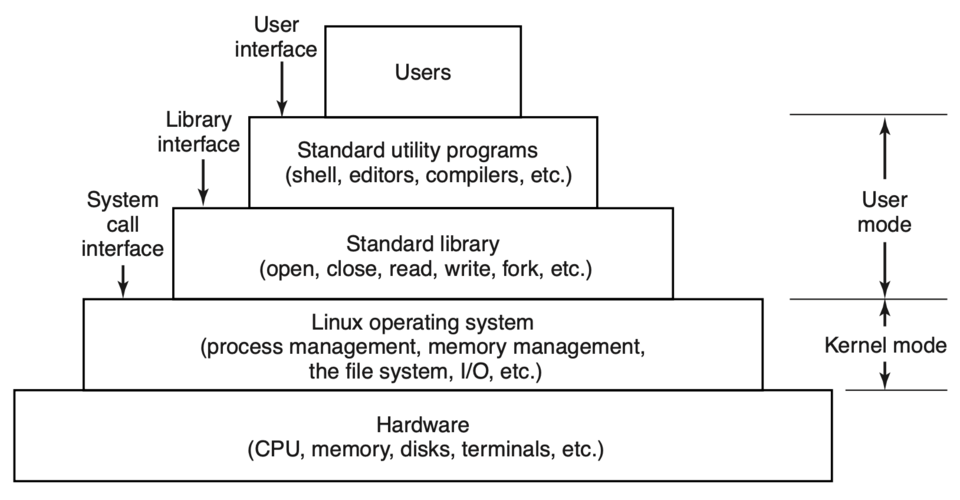 Shows kernel, shell, and application layers in an OS. (Image: Andrew S. Tanenbaum, Herbert Bos, Public domain, via Wikimedia Commons)
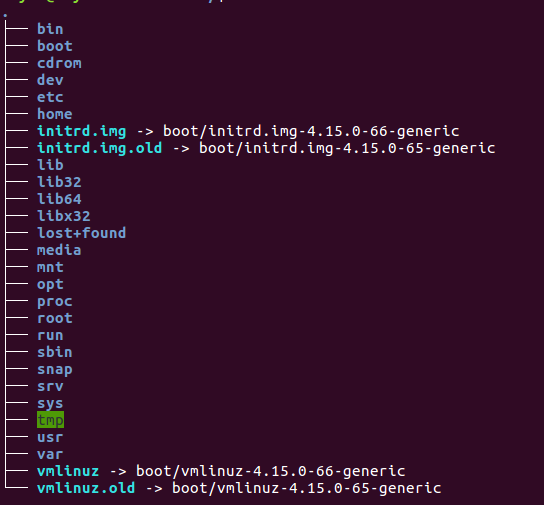 Depicts directories, files, and attributes in a tree structure. (Image: Rasulnrasul, CC BY-SA 4.0, via Wikimedia Commons)
Based on the TU BIM syllabus for Foundation of Information Technology (IT231), unit 5.
Discussion
Loading…