Database Management SystemUnit 610 min read
Database Security & Integrity Constraints: Rules, Attacks & Safeguards
Unit 6 of Database Management System explores how to protect databases from unauthorized access, corruption, and errors while ensuring data remains accurate, consistent, and reliable through constraints, encryption, and access controls.
TAKEAWAYS:
- Integrity constraints (entity, referential, domain, user-defined) enforce data accuracy and relationships in relational databases.
- Security threats (SQL injection, privilege escalation, data leakage) exploit vulnerabilities in authentication, encryption, or validation.
- Access control models (DAC, MAC, RBAC) determine who can read, modify, or delete data based on roles or permissions.
- Encryption (symmetric/asymmetric) and hashing (SHA-256, MD5) secure data at rest and in transit.
- Audit trails and backup strategies (full, incremental, differential) recover data after breaches or failures.
- SQL injection and buffer overflows are common attacks that bypass weak input validation.
Core Concepts: Why Security and Integrity Matter
1. Data Integrity: Rules That Keep Data Correct
Data integrity ensures that data remains accurate, consistent, and reliable over its lifecycle. Violations can lead to:
- Incorrect business decisions (e.g., wrong inventory counts in Daraz).
- Financial losses (e.g., duplicate payments in eSewa).
- Legal penalties (e.g., GDPR fines for inaccurate customer data in banks).
Types of Integrity Constraints
mindmap
  root((Data Integrity Constraints))
    Entity Integrity
      "PK (Primary Key) ≠ NULL"
      "PK values are unique"
    Referential Integrity
      "FK (Foreign Key) must match PK or be NULL"
      "Cascading actions (ON DELETE CASCADE)"
    Domain Integrity
      "Data type restrictions (e.g., age > 0)"
      "Format checks (e.g., email@domain.com)"
    User-Defined Constraints
      "CHECK (salary > minimum_wage)"
      "Custom business rules (e.g., 'no overlapping shifts')"
Worked Example: NEPSE Stock Database Assume NEPSE’s database tracks trades with these constraints:
- Entity Integrity:
trade_id(PK) cannot beNULLor duplicate. - Referential Integrity:
stock_id(FK) must reference an existing stock in thestockstable. - Domain Integrity:
quantitymust be a positive integer. - User-Defined:
pricemust be ≥ minimum bid price.
CREATE TABLE trades (
    trade_id INT PRIMARY KEY,
    stock_id INT NOT NULL,
    quantity INT CHECK (quantity > 0),
    price DECIMAL(10,2) CHECK (price >= (SELECT min_bid FROM stocks WHERE stock_id = trades.stock_id)),
    trader_id INT,
    FOREIGN KEY (stock_id) REFERENCES stocks(stock_id) ON DELETE CASCADE
);
2. Security Threats: How Databases Get Hacked
Databases are targeted for confidentiality, integrity, and availability (CIA triad). Common threats:
| Threat | How It Works | Real-World Example |
|---|---|---|
| SQL Injection | Malicious SQL via input fields | Hackers drain bank accounts by injecting OR 1=1 into login forms. |
| Privilege Escalation | Exploiting weak access controls | An employee in Pathao’s database gains admin rights to modify fares. |
| Data Leakage | Unauthorized exposure of sensitive data | Ncell customer records sold on the dark web. |
| Denial of Service (DoS) | Overloading the database server | DDoS attack on NTC’s billing system during peak hours. |
| Insider Threats | Employees or contractors misusing access | A Daraz warehouse manager alters stock levels for personal gain. |
Worked Example: SQL Injection in eSewa A hacker inputs this into the login form:
username = admin' --
password = anything
The query becomes:
SELECT * FROM users WHERE username = 'admin' --' AND password = 'anything';
The -- comments out the password check, granting access.
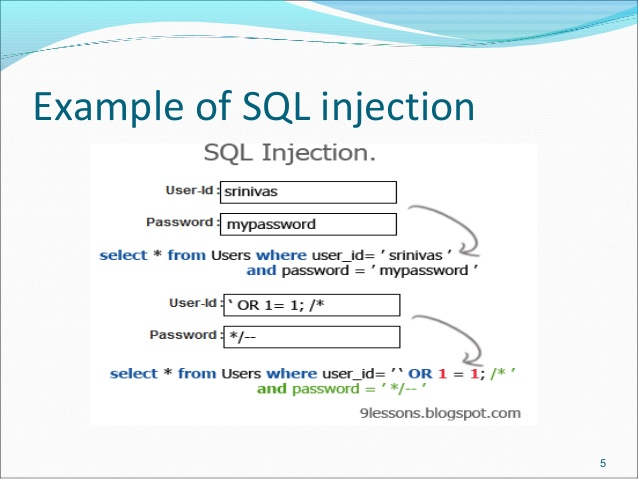 How input validation fails in a login form (Image: Batka savemazaalai, CC BY-SA 4.0, via Wikimedia Commons)
3. Access Control: Who Gets to Do What?
Access control determines who can perform which actions on data. Three models:
| Model | Definition | Example in Nepal |
|---|---|---|
| DAC (Discretionary) | Owner sets permissions (e.g., read/write). | A bank manager grants a teller access to customer accounts. |
| MAC (Mandatory) | System enforces rules (e.g., military data). | NTC restricts network access to authorized technicians only. |
| RBAC (Role-Based) | Permissions tied to roles (e.g., admin, user). | In Khalti, "Cashier" can process payments but not view customer PINs. |
Mermaid Diagram: RBAC in a Hospital Database
classDiagram
  class User {
    +String username
    +String password
    +Role[] roles
  }
  class Role {
    <<abstract>>
    +String name
    +Permission[] permissions
  }
  class Doctor
  class Nurse
  class Admin
  class Permission {
    +String action
    +String resource
  }
  User "1" --o "1..*" Role : holds
  Role <|-- Doctor
  Role <|-- Nurse
  Role <|-- Admin
  Role "1" --o "*" Permission : grants
  Doctor : +view_patient_records()
  Doctor : +prescribe_medicine()
  Nurse : +update_vitals()
  Admin : +manage_users()
  Admin : +backup_database()
4. Encryption and Hashing: Protecting Data
| Method | How It Works | Use Case |
|---|---|---|
| Symmetric Encryption (AES, DES) | Same key encrypts/decrypts. Fast but key distribution is risky. | Encrypting customer data in Ncell’s database. |
| Asymmetric Encryption (RSA, ECC) | Public key encrypts; private key decrypts. Slower but secure for key exchange. | Secure login tokens in eSewa. |
| Hashing (SHA-256, MD5) | One-way function (no decryption). Used for passwords. | Storing user passwords in Daraz’s system. |
Worked Example: Encrypting NEPSE Transactions
- Symmetric Key: AES-256 encrypts trade data before storage.
- Asymmetric Key: RSA encrypts the symmetric key for secure transmission.
- Hashing: SHA-256 hashes trader passwords (never stored in plaintext).
sequenceDiagram
    participant Trader
    participant NEPSE_Server
    participant Database
    Trader->>NEPSE_Server: Sends trade data (encrypted with AES)
    NEPSE_Server->>Database: Stores encrypted data
    NEPSE_Server->>Trader: Returns hashed confirmation (SHA-256)
5. Audit Trails and Backups: Recovering from Attacks
Audit Trails
- Log all CRUD (Create, Read, Update, Delete) operations.
- Example: NTC logs every network configuration change to detect unauthorized modifications.
Backup Strategies
| Type | How It Works | Recovery Time | Use Case |
|---|---|---|---|
| Full Backup | Copies all data. | Slowest | Weekly backup of NEPSE’s ledger. |
| Incremental | Backs up changes since last backup. | Fastest | Daily backups in Khalti. |
| Differential | Backs up changes since last full backup. | Medium | Monthly backups in Ncell. |
Worked Example: Restoring eSewa After a Ransomware Attack
- Restore from the last full backup (Sunday).
- Apply incremental backups from Monday to Wednesday.
- Verify transactions using audit logs to identify corrupted data.
In the Real World
eSewa’s Two-Factor Authentication (2FA)
- Uses asymmetric encryption (RSA) to secure login tokens.
- Hashing (SHA-256) stores user passwords without plaintext storage.
- RBAC ensures cashiers can only process payments, not view transaction histories.
Ncell’s Customer Data Protection
- Domain integrity ensures phone numbers follow the format
+977XXXXXXXX. - Referential integrity links customer IDs to billing records.
- Audit trails track every data access for compliance with Nepal’s PDPA (Personal Data Protection Act).
- Domain integrity ensures phone numbers follow the format
Daraz’s Inventory Management
- Entity integrity prevents duplicate product IDs.
- User-defined constraints enforce stock levels ≥ 0.
- Backup strategy: Differential backups nightly + full backups weekly to prevent data loss during sales events.
Exam Tip
- Constraints: Always link constraints to real-world scenarios (e.g., "How would you enforce referential integrity in NEPSE’s trade database?").
- Attacks: Explain how an attack works (e.g., "SQL injection bypasses input validation by appending
--to comments out the rest of the query"). - Diagrams: Draw ER diagrams with constraints or sequence diagrams for access control in exams.
- Shortcuts:
- PK/FK: Primary Key = unique identifier; Foreign Key = link to another table.
- DAC vs. RBAC: DAC = user-level permissions; RBAC = role-level (easier to manage).
- Common Pitfalls:
- Forgetting cascading actions (e.g.,
ON DELETE CASCADEin FKs). - Confusing encryption (reversible) with hashing (one-way).
- Forgetting cascading actions (e.g.,
- Numerical Questions: For backup strategies, calculate recovery time (e.g., "If full backup is 10GB and incremental is 1GB/day, how long to restore 5 days of data?").
Based on the TU BIM syllabus for Database Management System (IT220), unit 6.
Discussion
Loading…