Operating SystemUnit 818 min read
File Systems: Structure, Operations, and Management
Unit 8 of Operating System explores file systems, covering their types, structures, operations, and management techniques, including file allocation methods, directory structures, and performance optimization strategies.
TAKEAWAYS:
- File systems organize and manage data storage efficiently, enabling users and applications to access files logically.
- File allocation methods (contiguous, linked, indexed) determine how files are stored on disk and impact performance.
- Directory structures (single-level, two-level, tree-structured, acyclic-graph) define how files are organized hierarchically.
- File system performance depends on factors like access methods, caching, and disk scheduling algorithms.
- File system security involves access control mechanisms like permissions (read, write, execute) and ownership.
- Real-world applications like eSewa, Khalti, and cloud storage rely on file systems for secure and efficient data management.
What is a File System?
A file system is a method and data structure that an operating system uses to control how data is stored and retrieved. It organizes data into files and directories, manages metadata (file attributes like size, type, permissions), and provides mechanisms for efficient data access.
Key Components of a File System
- Files: Logical units of storage (e.g., text files, executables, media).
- Directories: Containers that hold files and other directories (folders).
- Metadata: Information about files (e.g., name, size, creation date, permissions).
- File System Structure: How files and directories are organized (e.g., hierarchical trees).
- File Allocation: How files are stored on disk (e.g., contiguous, linked, indexed).
Why File Systems Matter
Without file systems, data would be stored as raw bits on disks, making it impossible to manage or retrieve efficiently. File systems provide:
- Abstraction: Users interact with logical files, not physical storage.
- Organization: Files are grouped into directories for easy navigation.
- Security: Permissions control who can access or modify files.
- Efficiency: Optimized access methods reduce latency.
Types of File Systems
File systems vary based on their design and purpose. Below are common types:
1. FAT (File Allocation Table)
- Description: Simple and widely compatible file system used in older systems (e.g., Windows 95, USB drives).
- Structure: Uses a table to track clusters (blocks) allocated to files.
- Limitations:
- No journaling (risk of corruption on crashes).
- Limited file size and partition size.
- Example: FAT32 on USB drives.
2. NTFS (New Technology File System)
- Description: Advanced file system used in modern Windows OS.
- Features:
- Supports large files and partitions.
- Journaling for crash recovery.
- Security descriptors (permissions).
- Example: Windows 10/11 file storage.
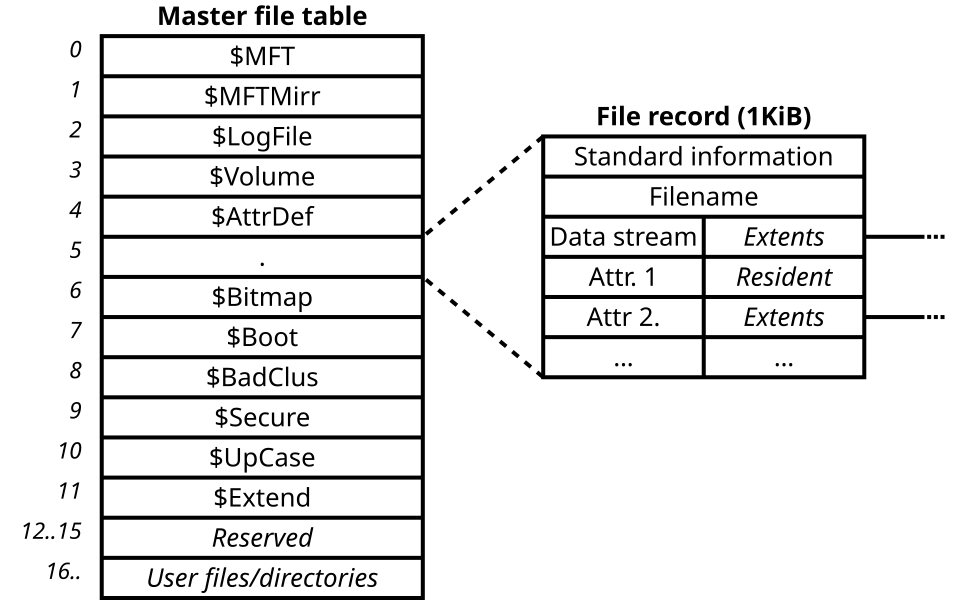 NTFS’s MFT: Each file has a dedicated 1KB record (Image: MrDrBob, CC BY-SA 3.0, via Wikimedia Commons)
3. ext4 (Fourth Extended File System)
- Description: Default file system for Linux distributions.
- Features:
- Supports large files and volumes.
- Journaling for reliability.
- Flexible allocation methods.
- Example: Ubuntu, CentOS file storage.
4. APFS (Apple File System)
- Description: Used in macOS and iOS devices.
- Features:
- Optimized for flash storage (SSDs).
- Space sharing and cloning for efficiency.
- Encryption support.
- Example: iPhone, MacBook storage.
5. Network File Systems
- Description: Allow files to be stored on remote servers and accessed over a network.
- Examples:
- NFS (Network File System): Used in Linux/Unix environments.
- SMB (Server Message Block): Used in Windows networks (e.g., shared folders).
- Cloud Storage: Services like Google Drive or AWS S3 use distributed file systems.
File System Structure
File systems organize data hierarchically using directories and files. Below are common directory structures:
1. Single-Level Directory Structure
- All files are stored in one directory.
- Disadvantages:
- No hierarchy; difficult to manage many files.
- No subdirectories.
- Example: Early Unix systems.
2. Two-Level Directory Structure
- Users have their own directories under a root directory.
- Disadvantages:
- Still limited hierarchy.
- No shared files between users.
- Example: Some embedded systems.
3. Tree-Structured Directory
- Directories can contain subdirectories (hierarchical).
- Advantages:
- Easy to organize and navigate.
- Supports large numbers of files.
- Example: Windows, Linux, macOS.
graph TD
    A["Root (C:)"]
    A --> B["Users"]
    A --> C["Program Files"]
    B --> D["Alice"]
    B --> E["Bob"]
    D --> F["Documents"]
    D --> G["Pictures"]
4. Acyclic-Graph Directory
- Directories can share subdirectories (no cycles).
- Advantages:
- Saves space (shared subdirectories).
- Flexible linking.
- Example: Plan 9 (research OS).
File Allocation Methods
Files are stored on disk using different allocation methods, each with trade-offs in speed, space, and complexity.
1. Contiguous Allocation
- A file occupies a set of contiguous blocks on disk.
- Advantages:
- Fast sequential access (good for large files).
- Simple to implement.
- Disadvantages:
- External fragmentation (wasted space).
- Difficult to extend files.
- Example: FAT file system.
2. Linked Allocation
- File blocks are linked using pointers (like a linked list).
- Advantages:
- No external fragmentation.
- Easy to extend files.
- Disadvantages:
- Slow random access (must follow pointers).
- Pointer overhead.
- Example: Some Unix file systems.
3. Indexed Allocation
- Uses an index block to store pointers to all file blocks.
- Advantages:
- Fast random access (directly access any block via index).
- No external fragmentation.
- Disadvantages:
- Overhead for small files (index block may be large).
- Limited by index block size.
- Example: ext4, NTFS.
Comparison Table
| Method | Speed (Random Access) | External Fragmentation | Overhead | Use Case |
|---|---|---|---|---|
| Contiguous | Fast | Yes | Low | Large sequential files |
| Linked | Slow | No | Medium | Dynamic files (e.g., logs) |
| Indexed | Fast | No | High | General-purpose (ext4, NTFS) |
File System Operations
File systems support operations to create, read, write, delete, and manage files. Key operations include:
1. File Creation
- Allocate space for the file (using allocation method).
- Initialize metadata (name, size, permissions).
- Example:
touch file.txtin Linux.
2. File Reading/Writing
- Sequential Access: Read/write data in order (e.g., text files).
- Random Access: Access any part of the file directly (e.g., databases).
- Example: Opening a Word document and editing a specific paragraph.
3. File Deletion
- Free allocated blocks.
- Remove metadata from directory.
- Example:
rm file.txtin Linux.
4. Directory Operations
- Create, delete, rename directories.
- List contents of a directory.
- Example:
mkdir folderorlsin Linux.
5. File Sharing
- Multiple processes can access the same file (e.g., shared logs).
- Requires synchronization to avoid conflicts.
Performance Considerations
File system performance depends on:
- Access Methods:
- Sequential access is faster than random access.
- Indexed allocation improves random access speed.
- Caching:
- Frequently accessed files are kept in RAM (e.g., Linux page cache).
- Disk Scheduling:
- Algorithms like Shortest Seek Time First (SSTF) or SCAN optimize disk head movement.
- Journaling:
- Logs changes before applying them to avoid corruption (e.g., ext4, NTFS).
File System Security
Security mechanisms protect files from unauthorized access or modification:
- Permissions:
- Read (r): View file contents.
- Write (w): Modify file contents.
- Execute (x): Run file as a program.
- Example:
chmod 755 file.txt(owner: rwx, group: r-x, others: r-x).
- Ownership:
- Files have owners (user/group) who control permissions.
- Encryption:
- Files can be encrypted (e.g., BitLocker, VeraCrypt).
- Access Control Lists (ACLs):
- Fine-grained permissions for users/groups (e.g., NTFS).
In the Real World
File systems are everywhere, powering the apps and services we use daily:
eSewa and Khalti (Nepal)
- Idea Used: Network File Systems (NFS/SMB) and Database File Storage.
- How: These apps store transaction records, user profiles, and payment data in secure file systems on remote servers. For example:
- User uploads a payment receipt → stored as a file in a cloud file system (e.g., AWS S3).
- Transaction logs are written sequentially to disk for audit purposes (contiguous allocation).
- Database files (e.g., SQLite or PostgreSQL) use indexed allocation for fast queries.
Daraz (Nepal/E-commerce)
- Idea Used: Hierarchical Directory Structure and File Caching.
- How: Daraz’s backend organizes product images, descriptions, and inventory data in a tree-structured directory:
/products /electronics /smartphones /samsung.txt /iphone.txt /fashion /men.txt /women.txt - Product images are cached in RAM (e.g., using Redis) to speed up page loads for millions of users.
Ncell (Telecom) – Customer Data Management
- Idea Used: Indexed File Allocation and Journaling.
- How: Ncell’s billing system stores customer records (e.g.,
customer_12345.dat) using indexed allocation for fast lookups:- Index block maps customer IDs to disk blocks.
- Journaling ensures that if the system crashes during a billing update, the file system can recover without corruption.
- Example: When you check your Ncell bill online, the system reads your file from disk in milliseconds.
NEPSE (Stock Exchange)
- Idea Used: Transaction Logs (Sequential Access) and ACLs.
- How: NEPSE’s trading system records every buy/sell transaction in a sequential log file (contiguous allocation) for audit trails:
- Each trade is appended to the log as
trade_20240515_1000.dat. - Only authorized personnel (e.g., auditors) have read permissions (
r--), while traders have read/write (rw-).
- Each trade is appended to the log as
Google Drive / Cloud Storage
- Idea Used: Distributed File Systems and Block Storage.
- How: Google Drive uses a distributed file system (like Google File System) to store your files across multiple servers:
- Your
resume.pdfis split into blocks and stored on different machines. - Metadata (e.g., owner, permissions) is stored in a separate index.
- When you download the file, Google’s system reassembles the blocks and streams them to you.
- Your
Worked Example: File Allocation in a Bank’s Loan System
Scenario: A bank stores loan applications as files on its server. Each loan file contains details like applicant name, amount, and approval status. The bank uses indexed allocation for fast access.
File Structure:
- Each loan is a file named
loan_<ID>.dat(e.g.,loan_1001.dat). - An index block maps loan IDs to disk blocks:
Loan ID | Disk Block
-------------------
1001    | 5
1002    | 12
1003    | 20
- Each loan is a file named
Operations:
- Create Loan: Allocate a new block (e.g., block 25) and update the index.
- Read Loan: Look up
loan_1001in the index → read block 5. - Update Status: Modify block 5 (e.g., change "Pending" to "Approved") and log the change in a journal.
Performance:
- Random access to any loan is O(1) (constant time) because the index block is loaded into memory.
- Sequential access (e.g., processing all loans) is efficient due to contiguous blocks for each file.
Security:
- Only loan officers have write permissions (
rw-). - Auditors have read-only access (
r--).
- Only loan officers have write permissions (
Disk Layout and Boot Process
File systems are stored on disks, which have a specific layout:
1. Disk Partitioning
- A disk is divided into partitions, each with its own file system.
- Example: A 1TB disk may have:
- Partition 1: 500GB (NTFS for Windows).
- Partition 2: 300GB (ext4 for Linux).
- Partition 3: 200GB (FAT32 for USB compatibility).
2. Boot Block
- Contains code to load the OS (e.g., GRUB for Linux, Bootmgr for Windows).
- Located at the first sector (sector 0) of the disk.
3. File System Metadata
- Stored in reserved blocks (e.g., superblock in ext4, $MFT in NTFS).
- Contains info like total blocks, free blocks, and file system type.
File System Implementation: ext4 (Example)
Let’s dive into how ext4 (Linux’s default file system) works:
1. Block Groups
- The disk is divided into block groups (e.g., 1GB each).
- Each group contains:
- Metadata (superblock, group descriptors).
- Inode table (file metadata).
- Data blocks (file contents).
2. Inodes
- An inode is a data structure storing file metadata:
- File size, permissions, owner, timestamps.
- 12 direct pointers to data blocks.
- 1 indirect pointer (for 128 blocks).
- Double indirect (for 16KB blocks).
- Triple indirect (for very large files).
3. Journaling
- Changes are logged in a journal before being applied to the file system.
- If the system crashes, the journal is replayed to restore consistency.
Common File System Issues and Solutions
| Issue | Cause | Solution |
|---|---|---|
| Fragmentation | Files scattered across disk | Defragmentation or use indexed allocation |
| Corruption | Power failure, bugs | Journaling, checksums |
| Slow Performance | Too many small files | Use larger block sizes |
| Permission Errors | Incorrect ACLs | Check chmod/chown commands |
| Disk Full | No free blocks | Delete unused files, expand disk |
Exam Tip
For the Operating System (IT241) exam, focus on these high-yield topics:
1. File Allocation Methods
- Compare contiguous, linked, and indexed allocation in terms of speed, fragmentation, and overhead.
- Example Question: "A file system uses indexed allocation with a 128-block index. If a file has 500 blocks, how many indirect blocks are needed?" Answer: 1 direct block (12) + 1 single indirect (128) + 1 double indirect (16KB = 16384 blocks) → Total: 3 blocks.
2. Directory Structures
- Draw and explain tree-structured vs. acyclic-graph directories.
- Example Question:
"What is the advantage of an acyclic-graph directory over a tree-structured one?"
Answer: Shared subdirectories save space (e.g.,
/usr/bincan be linked by multiple users).
3. File System Operations
- Know how create, read, write, delete operations work at the disk level.
- Example Question:
"Describe the steps to delete a file in a file system using indexed allocation."
Answer:
- Free all data blocks referenced by the inode.
- Update the inode table to mark the inode as free.
- Remove the file entry from the directory.
4. Performance Optimization
- Explain how caching, journaling, and disk scheduling improve performance.
- Example Question: "Why is sequential access faster than random access in a file system?" Answer: Sequential access reads contiguous blocks, reducing disk head movement. Random access requires seeking to non-contiguous blocks.
5. Security Mechanisms
- Define permissions (rwx), ownership, and ACLs.
- Example Question:
"What does
chmod 644 file.txtmean?" Answer: Owner has read/write (rw-), group and others have read-only (r--).
6. Real-World Applications
- Relate concepts to Nepalese apps (e.g., Khalti’s file storage, Daraz’s directory structure).
- Example Question: "How does Daraz use file systems to manage product data?" Answer: Hierarchical directories for categories, indexed allocation for fast product lookups, and caching for frequently accessed images.
7. Diagrams
- Practice drawing:
- File allocation methods (contiguous/linked/indexed).
- Directory structures (tree/acyclic-graph).
- Disk layout (partitions, boot block, metadata).
Final Checklist Before the Exam
- Can you compare FAT, NTFS, and ext4?
- Can you explain how inodes work in ext4?
- Can you draw a disk layout with partitions and file systems?
- Can you solve a problem involving file allocation (e.g., calculating indirect blocks)?
- Can you describe how journaling prevents corruption?
- Can you relate file systems to real-world apps (e.g., eSewa, Daraz)?
Based on the TU BIM syllabus for Operating System (IT241), unit 8.
Discussion
Loading…