Business Information SystemsUnit 511 min read
Telecommunications, Internet & Wireless Tech: Networks, Protocols & Apps
Unit 5 of Business Information Systems explores how data travels—from wired/wireless networks to the internet’s architecture, protocols (TCP/IP, HTTP), and wireless tech (Wi-Fi, Bluetooth, 5G). It covers real-world applications in Nepal (e.g., Ncell’s 4G, eSewa’s secure transactions) and global systems (Google’s fiber,
Core Concepts: How Data Moves
1. Telecommunications Basics
Telecommunications is the electronic transmission of data (voice, text, video) over distances using wired or wireless media. Businesses rely on it for:
- Internal communication (email, intranets).
- External transactions (online banking, e-commerce).
- Remote operations (cloud services, telemedicine).
How It Works: The Data Pipeline
flowchart TD
    A["Data Source\n(e.g., your laptop)"] -->|"Encapsulation"| B["Application Layer\n(HTTP, FTP)"]
    B --> C["Transport Layer\n(TCP/UDP)"]
    C --> D["Network Layer\n(IP)"]
    D --> E["Data Link Layer\n(Ethernet/Wi-Fi)"]
    E --> F["Physical Layer\n(Cables/Waves)"]
    F --> G["Transmission Medium\n(Copper, Fiber, Air)"]
    G --> H["Destination\n(e.g., Daraz server)"]
    H -->|"Decapsulation"| I["Recipient"]
Key Terms:
- Bandwidth: Capacity to transmit data (measured in bps—bits per second). NTC’s fiber optic cables have 10 Gbps bandwidth.
- Latency: Delay between sending and receiving data (e.g., 50ms for Ncell’s 4G).
- Throughput: Actual data transferred (lower than bandwidth due to overhead).
2. Network Types
| Type | Definition | Example in Nepal | Pros | Cons |
|---|---|---|---|---|
| LAN | Local Area Network (small area, high speed) | Office Wi-Fi, college intranet | Fast, low cost | Limited range (~100m) |
| WAN | Wide Area Network (global, slow) | Internet, Ncell’s mobile network | Global reach | High cost, latency |
| MAN | Metropolitan Area Network (city-wide) | Kathmandu’s fiber backbone | Covers a city | Expensive infrastructure |
| VPN | Virtual Private Network (secure tunnel) | Nabil Bank’s remote access | Encrypted, secure | Slower speed |
In the Real World
Ncell’s 4G Network
- Uses TCP/IP protocol to route calls/data. When you send a WhatsApp message, it travels via cell towers → core network → internet → recipient’s device.
- Worked Example: Tracing a call from Pokhara to Kathmandu:
Latency: ~30ms (Pokhara to Kathmandu).Your Phone (4G) → Ncell Tower (Pokhara) → Microwave Link → Core Switch (Kathmandu) → Recipient’s Phone
eSewa’s Secure Transactions
- Relies on HTTPS (HTTP + SSL/TLS) to encrypt data between your phone and eSewa’s server.
- How it works:
sequenceDiagram
    participant User
    participant eSewa
    participant Bank
    User->>eSewa: Enter payment details (encrypted via TLS)
    eSewa->>Bank: Request payment (via VPN)
    Bank-->>eSewa: Confirmation (encrypted)
    eSewa-->>User: Success
Daraz’s Order Fulfillment
- Uses SCM (Supply Chain Management) + Telecommunications to track orders:
- Your order → Wi-Fi/4G → Daraz server → Fiber backbone → Warehouse robot → Delivery partner (Pathao/Khalti).
- Real-time tracking: GPS + cellular networks update your location.
- Uses SCM (Supply Chain Management) + Telecommunications to track orders:
3. Internet Architecture: The OSI and TCP/IP Models
OSI Model (7 Layers)
mindmap
  root((OSI Model))
    Layer 7: Application (HTTP, FTP)
    Layer 6: Presentation (Encryption, Compression)
    Layer 5: Session (NetBIOS, RPC)
    Layer 4: Transport (TCP, UDP)
    Layer 3: Network (IP, Routing)
    Layer 2: Data Link (Ethernet, Wi-Fi)
    Layer 1: Physical (Cables, Signals)
TCP/IP Model (4 Layers)
| OSI Layer | TCP/IP Equivalent | Protocols | Example in Nepal |
|---|---|---|---|
| Application | Application | HTTP, DNS, SMTP | Loading Daraz website (HTTP) |
| Transport | Transport | TCP, UDP | Ncell’s VoIP calls (UDP for voice) |
| Internet | Internet | IP, ICMP | Routing data from Pokhara to India |
| Network Access | Network Access | Ethernet, Wi-Fi, PPP | Your home Wi-Fi (802.11n) |
Worked Example: Loading a YouTube Video
- Application Layer: Your browser sends an HTTP GET request to YouTube’s server.
- Transport Layer: TCP splits the video into packets and assigns sequence numbers.
- Internet Layer: IP adds a source/destination IP address (e.g.,
192.168.1.2→142.250.190.46). - Network Access: Ethernet/Wi-Fi sends packets via frames to your router.
4. Wireless Technologies
A. Wi-Fi (IEEE 802.11 Standards)
| Standard | Frequency | Speed | Range | Used By |
|---|---|---|---|---|
| 802.11n | 2.4 GHz / 5 GHz | Up to 600 Mbps | 70m | Home Wi-Fi, cafes |
| 802.11ac | 5 GHz | Up to 3.5 Gbps | 35m | Modern offices, hotels |
| 802.11ax | 2.4/5 GHz | Up to 10 Gbps | 100m | Airports, stadiums |
Real-World Use: Khalti’s POS machines use Wi-Fi to connect to banks for real-time transactions.
B. Cellular Networks (2G, 3G, 4G, 5G)
| Generation | Speed | Latency | Nepal Example |
|---|---|---|---|
| 2G | Up to 384 Kbps | ~300ms | Ncell’s SMS (still used) |
| 3G | Up to 42 Mbps | ~100ms | NTC’s mobile internet |
| 4G | Up to 1 Gbps | ~30ms | Ncell’s 4G LTE |
| 5G | Up to 10 Gbps | ~1ms | Pilot projects in Kathmandu |
Worked Example: Ncell’s 4G vs. 5G
- 4G: Downloads a 1GB movie in ~10 minutes (theoretical max).
- 5G: Same movie in ~1 minute (10x faster). Used for AR/VR apps (e.g., virtual property tours).
C. Bluetooth & NFC
- Bluetooth: Short-range (10m), low power (used in wireless headphones, keyboards).
- NFC: Ultra-short (4cm), used in Khalti Tap, contactless payments.
5. Internet Protocols
A. TCP (Transmission Control Protocol)
- Reliable, connection-oriented (like a phone call).
- Features:
- Handshake: SYN → SYN-ACK → ACK before data transfer.
- Flow Control: Adjusts speed to avoid overload.
- Error Checking: Retransmits lost packets.
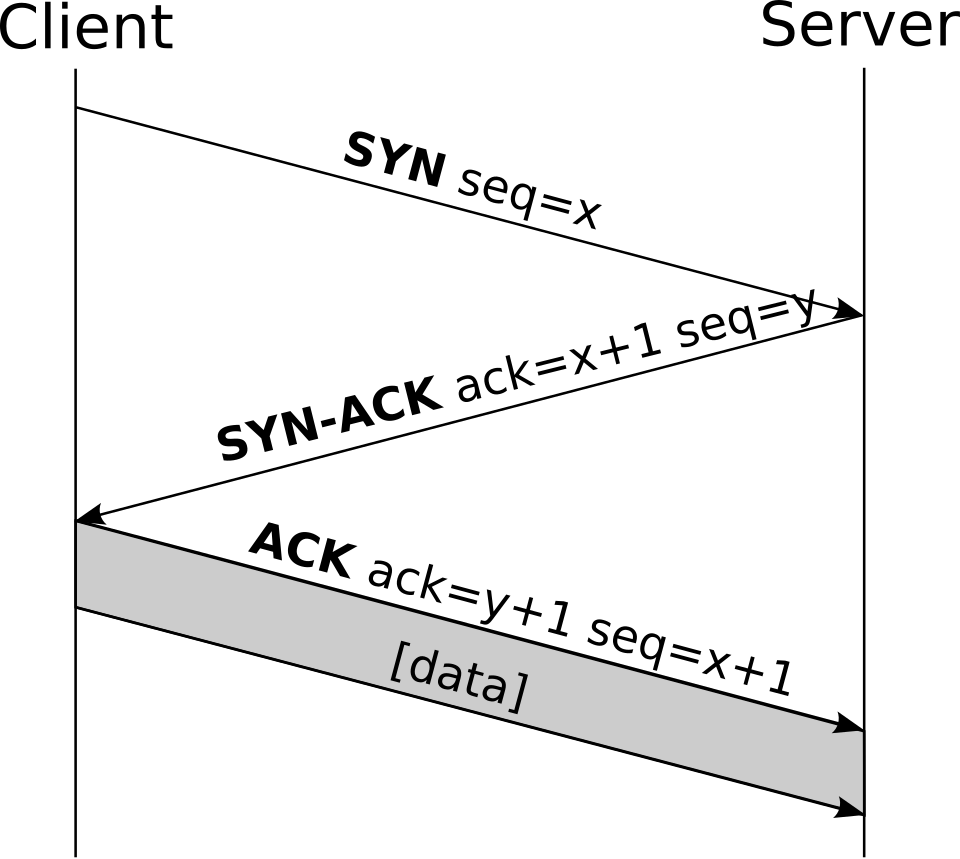 How TCP establishes a connection (Image: CC BY-SA 3.0, via Wikimedia Commons)
Real-World Use: Bank transfers via internet banking (e.g., Nabil Bank’s online portal) use TCP to ensure no data is lost.
B. UDP (User Datagram Protocol)
- Fast, connectionless (like sending a postcard).
- Used for:
- Video streaming (YouTube, Netflix).
- Online gaming (low latency is critical).
Comparison Table:
| Feature | TCP | UDP |
|---|---|---|
| Reliability | Guaranteed delivery | No guarantee |
| Speed | Slower (handshakes, retries) | Faster |
| Use Case | File transfers, emails | Live video, VoIP |
6. Emerging Wireless Technologies
A. IoT (Internet of Things)
- Devices like smart meters (NTC), wearable health monitors connect via wireless.
- Protocols: MQTT (lightweight), LoRaWAN (long-range, low power).
B. Satellite Internet (Starlink, Ncell’s LEO)
- Low Earth Orbit (LEO) satellites provide internet in remote areas (e.g., Dolpa, Mustang).
- Latency: ~20-50ms (better than geostationary satellites).
C. 6G (Future)
- Expected by 2030, with:
- 1 Tbps speed.
- AI-driven networks.
- Holographic communication.
Case Study: NTC’s Fiber Optic Network in Nepal
Problem: Nepal’s hilly terrain made wired networks expensive. Solution: NTC built a fiber optic backbone (2015–present) using:
- Dense Wavelength Division Multiplexing (DWDM): Sends multiple data streams on a single fiber.
- Microwave links: Connects remote areas (e.g., Pokhara to Dhangadi).
- Undersea cables: Links Nepal to India (EAI) and China (CPEC).
Impact:
- Bandwidth: Increased from 10 Mbps (2010) to 100 Gbps (2023).
- Coverage: 90% of districts now have fiber.
- Applications:
- e-Governance: Online voter registration.
- E-commerce: Daraz, Sastodeal.
- Telemedicine: Hospitals in Dhankuta connect to Kathmandu doctors.
Exam Tip
What Examiners Look For
- Definitions with Examples:
- Don’t just say “TCP is reliable.” Explain how (handshake, retransmission) and give a Nepali example (e.g., Nabil Bank’s secure login).
- Layered Models:
- Always draw OSI/TCP/IP when asked about data transmission. Label each layer + protocol (e.g., “Layer 4: TCP for Ncell calls”).
- Real-World Applications:
- Link concepts to Nepali companies:
- Ncell: 4G/5G, TCP/IP.
- eSewa: HTTPS, VPN.
- NTC: Fiber, DWDM.
- Link concepts to Nepali companies:
- Comparisons:
- Tables for Wi-Fi standards, TCP vs. UDP, or 2G vs. 5G score extra marks.
- Diagrams:
- Mandatory for:
- OSI/TCP/IP models.
- TCP handshake.
- Network topologies (LAN/WAN).
- Label every arrow (e.g., “HTTP request → DNS lookup”).
- Mandatory for:
- Shortcomings:
- Always mention limitations (e.g., “5G is expensive but has low latency”).
- Numerical Problems:
- If asked to calculate bandwidth usage, use:
Bandwidth (bps) = File Size (bits) / Time (seconds) - Example: A 5MB file takes 10 seconds to download on 4G.
- Convert 5MB to bits:
5 × 8 × 1024 × 1024 = 41,943,040 bits. - Bandwidth =
41,943,040 / 10 = 4,194,304 bps ≈ 4 Mbps.
- Convert 5MB to bits:
- If asked to calculate bandwidth usage, use:
Common Mistakes to Avoid
- ❌ Saying “Wi-Fi uses radio waves” without specifying 2.4 GHz/5 GHz.
- ❌ Confusing TCP (reliable) with UDP (fast)—always state the trade-off.
- ❌ Forgetting physical layer (cables, signals) in OSI model.
- ❌ Not linking theory to Nepali examples (e.g., “Ncell uses TCP for calls”).
Quick Revision Checklist
| Topic | Key Points to Remember |
|---|---|
| OSI Model | 7 layers: Application → Physical. Layer 3 (Network): IP routing. |
| TCP/IP | 4 layers. TCP: Reliable (handshake). UDP: Fast (gaming, video). |
| Wi-Fi Standards | 802.11n (600 Mbps), 802.11ac (3.5 Gbps), 802.11ax (10 Gbps). |
| Cellular Networks | 2G (SMS), 3G (mobile internet), 4G (1 Gbps), 5G (10 Gbps, 1ms latency). |
| Internet Protocols | HTTP/HTTPS (web), DNS (domain to IP), FTP (file transfer). |
| Nepal Examples | Ncell (4G), NTC (fiber), eSewa (HTTPS), Daraz (SCM + telecom). |
Based on the TU BIM syllabus for Business Information Systems (IT245), unit 5.
Discussion
Loading…