Networking and System AdministrationUnit 16 min read
System Admin: Roles, Tools, OS & Network Basics
Unit 1 of Networking and System Administration introduces core concepts of system administration, including roles, responsibilities, operating systems, hardware/software layers, and basic networking principles essential for managing IT infrastructure.
What is System Administration?
System administration (sysadmin) is the management of computer systems, networks, and servers to ensure smooth operation, security, and efficiency. Sysadmins handle tasks like user management, hardware maintenance, software updates, and troubleshooting.
Key Roles of a System Administrator
mindmap
  root((System Administrator))
    Roles
      Hardware Management
        Servers
        Workstations
        Storage Devices
      Software Management
        OS Installation
        Application Deployment
        Updates & Patches
      User & Group Management
        Account Creation
        Permissions
        Access Control
      Network Administration
        IP Configuration
        Firewall Rules
        DNS & DHCP
      Security & Compliance
        Firewalls
        Encryption
        Backup & Recovery
      Monitoring & Troubleshooting
        Log Analysis
        Performance Tuning
        Incident Response
Operating Systems in System Administration
Operating systems (OS) act as intermediaries between hardware and software. Common OS types include:
| OS Type | Examples | Use Case |
|---|---|---|
| Desktop OS | Windows, macOS, Linux (Ubuntu) | Personal computers, workstations |
| Server OS | Windows Server, Linux (CentOS, RHEL) | Web servers, databases, file storage |
| Embedded OS | Android, FreeRTOS | Smartphones, IoT devices |
| Mobile OS | iOS, Android | Smartphones, tablets |
How OS Works in Layers
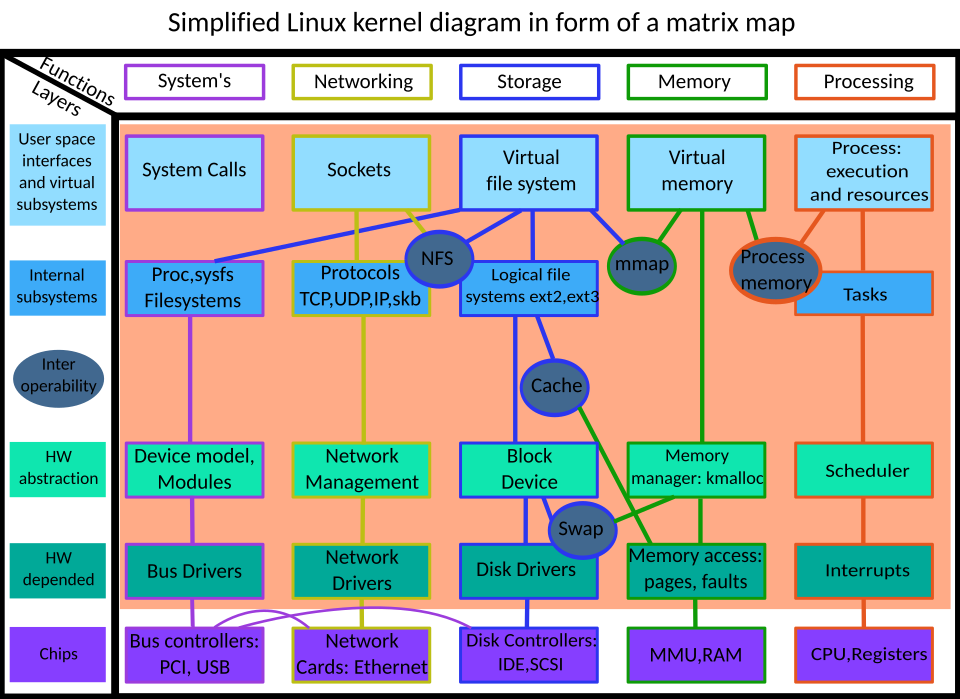 Layers of the Linux kernel showing hardware interaction, device drivers, and system calls. (Image: Kuzux, CC BY-SA 2.5, via Wikimedia Commons)
Hardware and Software Components
Hardware Components
mindmap
  root((Server Hardware))
    CPU
      Cores & Speed
    RAM
      Volatile Memory
    Storage
      HDD vs SSD
    Motherboard
      Chipset & BIOS
    Network Interface
      NIC (Ethernet/Wi-Fi)
Software Components
- System Software: OS, device drivers, utilities (e.g.,
ls,grepin Linux). - Application Software: Web browsers, databases, office suites.
- Middleware: APIs, message brokers (e.g., Apache Kafka).
Basic Networking Concepts
Network Topologies
graph TD
  A["Star Topology"] --> B["Central Hub/Switch"]
  C["Bus Topology"] --> D["Single Backbone Cable"]
  E["Ring Topology"] --> F["Closed Loop"]
  G["Mesh Topology"] --> H["Full/Partial Interconnections"]
Network Models: OSI vs TCP/IP
| Layer | OSI Model | TCP/IP Model | Function |
|---|---|---|---|
| 7 | Application | Application | HTTP, FTP, DNS |
| 6 | Presentation | Encryption, compression | |
| 5 | Session | NetBIOS, RPC | |
| 4 | Transport | Transport | TCP (reliable), UDP (fast) |
| 3 | Network | Internet | IP (routing), ICMP |
| 2 | Data Link | Network Access | Ethernet, Wi-Fi, MAC addresses |
| 1 | Physical | Cables, signals, hubs |
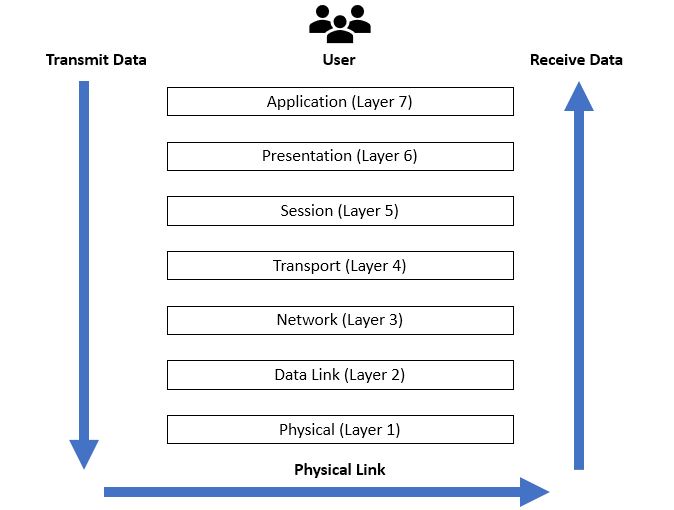 A labeled OSI model showing each layer’s role. (Image: Ardika6879, CC BY-SA 4.0, via Wikimedia Commons)
System Administration Tools
Command-Line Tools (Linux)
# Check system info
uname -a
lsb_release -a

# Monitor processes
top
htop

# Network tools
ifconfig (or ip a)
ping google.com
traceroute example.com
GUI Tools
- Windows: Task Manager, Event Viewer, Server Manager.
- Linux: GNOME System Monitor, Cockpit, Webmin.
Worked Example: Managing a Small Office Network
Scenario: A company with 10 employees needs a sysadmin to set up a file server, configure user access, and ensure security.
Hardware Setup:
- Install a Linux server (Ubuntu Server) with 16GB RAM, 2TB HDD.
- Connect via Ethernet to a switch.
Software Setup:
- Install Samba for file sharing.
- Configure user accounts with
adduserand set permissions.
Security:
- Enable firewall (
ufw allow 22/tcpfor SSH). - Set up automatic backups (
rsyncto an external drive).
- Enable firewall (
Monitoring:
- Use
cronfor scheduled tasks. - Log errors with
journalctl.
- Use
In the Real World
eSewa (Nepal):
- Uses load balancing (Layer 4/7) to distribute traffic across servers during peak hours (e.g., festival seasons).
- Real-world tie: When you pay bills via eSewa, requests are routed efficiently to prevent crashes.
Ncell (Nepal):
- Relies on DHCP servers to assign IP addresses dynamically to mobile users connecting via 4G/5G.
- Real-world tie: Your phone gets an IP automatically when you connect to Ncell’s network.
Daraz (Nepal):
- Uses load balancers (like Nginx) to distribute orders across multiple web servers during sales events.
- Real-world tie: When you place an order, it’s processed by the least busy server to avoid delays.
Exam Tip
- Focus on definitions: Know what sysadmin, OS layers, and network models (OSI/TCP/IP) are.
- Compare OSI vs TCP/IP: Memorize the layers and their functions.
- Practical scenarios: Be ready to explain how tools like
ping,traceroute, orufware used in real-world setups (e.g., troubleshooting a Daraz outage). - Diagrams: Draw OSI layers, network topologies, or OS architecture in exams—visuals score extra marks!
Key Takeaways:
- System administration involves managing hardware, software, users, and networks.
- OS layers (hardware → applications) define how systems interact.
- Networking relies on models (OSI/TCP/IP) and topologies (star, bus, mesh).
- Tools like
ping,traceroute, and firewalls are essential for troubleshooting. - Real-world examples (eSewa, Ncell, Daraz) show how these concepts apply daily.
Based on the TU BIM syllabus for Networking and System Administration (IT271), unit 1.
Discussion
Loading…