Networking and System AdministrationUnit 1012 min read
Firewall Rules, IDS/IPS, Encryption & Security Policies
Unit 10 of Networking and System Administration covers firewall types (packet-filtering, stateful, NGFW), intrusion detection/prevention systems (IDS/IPS), encryption (symmetric/asymmetric), security policies, and real-world security threats like DDoS and malware—with hands-on examples from Nepali banks, eSewa, and Nce
Key Concepts and How They Work
1. Firewalls: Types and How They Filter Traffic
Firewalls act as gatekeepers between trusted internal networks and untrusted external networks (e.g., the internet). They inspect packets based on predefined rules to allow or block traffic.
Types of Firewalls
| Type | How It Works | Example Use Case |
|---|---|---|
| Packet-Filtering | Checks headers (source/destination IP, port) against a rule set. | Basic home router security. |
| Stateful Inspection | Tracks the state of active connections (e.g., TCP handshake). | Corporate networks where session tracking is needed. |
| Next-Gen Firewall (NGFW) | Combines stateful inspection + deep packet inspection (DPI) for apps/services. | Banks (e.g., Nabil Bank) blocking unauthorized access to online banking APIs. |
| Proxy Firewall | Acts as an intermediary for requests (e.g., web proxy). | Schools filtering student internet access. |
| Application-Level | Inspects application-layer data (e.g., HTTP, FTP). | E-commerce sites (e.g., Daraz) blocking SQL injection attacks. |
How Firewall Rules Work (Packet-Filtering Example)
A firewall rule table typically looks like this (evaluated top-down):
| Rule # | Action | Source IP | Dest. IP | Port | Protocol | Description |
|---|---|---|---|---|---|---|
| 1 | Allow | 192.168.1.0/24 | Any | 80, 443 | TCP | Allow HTTP/HTTPS from LAN. |
| 2 | Block | Any | 192.168.1.10 | 22 | TCP | Block SSH to server. |
| 3 | Allow | Any | Any | 53 | UDP | Allow DNS queries. |
| 4 | Drop | Any | Any | Any | Any | Default: Drop all other traffic. |
Worked Example: Blocking Unauthorized Access to eSewa’s API
eSewa’s backend servers (IP: 103.12.45.67) should only accept requests from:
- Their own load balancers (
192.168.10.10-192.168.10.20). - Nepali bank servers (
203.123.45.0/24).
Firewall Rule:
| Action | Source IP | Dest. IP | Port | Protocol | Description |
|---|---|---|---|---|---|
| Allow | 192.168.10.10-192.168.10.20 | 103.12.45.67 | 443 | TCP | Load balancer traffic. |
| Allow | 203.123.45.0/24 | 103.12.45.67 | 443 | TCP | Bank traffic. |
| Drop | Any | 103.12.45.67 | 443 | TCP | Block all other HTTPS requests. |
Real-World Impact:
- Without this rule, attackers could brute-force the API to steal user data.
- eSewa uses NGFW (e.g., Palo Alto) to also inspect payloads for malware.
2. Intrusion Detection/Prevention Systems (IDS/IPS)
IDS/IPS monitor network traffic for malicious activity. The key difference:
- IDS (Intrusion Detection System): Passive (logs alerts but does not block).
- IPS (Intrusion Prevention System): Active (blocks traffic in real-time).
How IDS/IPS Work
- Signature-Based Detection: Matches traffic against a database of known attack patterns (e.g., SQL injection strings).
- Anomaly-Based Detection: Uses ML to detect deviations from normal behavior (e.g., sudden spike in login attempts).
- Behavioral Analysis: Profiles normal user/device behavior (e.g., a laptop suddenly scanning ports).
Example: Detecting a DDoS Attack on Ncell’s Website Ncell’s IDS (e.g., Snort) logs:
- Signature Match: "HTTP Flood" pattern detected from 10,000 IPs.
- Anomaly: Traffic spikes from 1000 to 50,000 requests/sec on port 80.
IPS Action:
- Drops packets from malicious IPs.
- Alerts Ncell’s SOC (Security Operations Center).
sequenceDiagram
    participant Client as Attacker (Botnet)
    participant IDS as Snort (Ncell's IDS)
    participant IPS as Suricata (Ncell's IPS)
    participant WebServer as Ncell Website

    Client->>IDS: Sends malicious traffic (HTTP Flood)
    IDS->>IPS: Alert: "DDoS detected (signature: HTTP.FLOOD)"
    IPS->>WebServer: Drops packets from attacker IPs
    IPS->>SOC: Sends alert to Ncell's SOC
    SOC->>IPS: Updates blacklist rules
Real-World Example:
- Pathao uses IPS to block fake ride requests (e.g., GPS spoofing).
- Nepal Rastra Bank (NRB) deploys IDS/IPS to monitor interbank transactions for fraud.
3. Encryption: Symmetric vs. Asymmetric
Encryption protects data confidentiality and integrity. Two main types:
| Type | Key Size | Speed | Use Case | Example in Nepal |
|---|---|---|---|---|
| Symmetric | 128-256 bits | Fast | Encrypting large data (e.g., files). | eSewa encrypting user transaction data. |
| Asymmetric | 2048+ bits | Slow | Key exchange (e.g., TLS handshake). | Ncell’s VPN for remote employees. |
How Encryption Works in TLS (HTTPS)
- Client (Browser) → Server:
- Client sends a "Client Hello" with supported cipher suites.
- Server responds with its public key (e.g., RSA 2048-bit).
- Key Exchange:
- Client generates a symmetric session key, encrypts it with the server’s public key, and sends it.
- Secure Communication:
- Both sides now use the symmetric key (e.g., AES-256) for fast encryption.
sequenceDiagram
    participant Client as Browser (User)
    participant Server as eSewa Website
    participant KeyExchange as TLS Handshake

    Client->>Server: Client Hello (Supported Ciphers)
    Server-->>Client: Server Hello + Certificate (Public Key)
    Client->>Server: Encrypted Symmetric Key (using Server's Public Key)
    KeyExchange->>Client: Decrypts key with Private Key
    Client->>Server: Encrypted Data (AES-256)
    Server->>Client: Encrypted Response
Worked Example: Encrypting a Khalti Payment
- User enters card details on Khalti’s website (HTTPS).
- TLS encrypts the data with a symmetric key (AES-256).
- The symmetric key is exchanged via RSA (asymmetric).
- Khalti’s server decrypts the data only with its private key.
Real-World Example:
- Nepal Stock Exchange (NEPSE) uses TLS to encrypt real-time stock data feeds.
- Daraz encrypts user orders with symmetric encryption (AES) for speed.
4. Security Policies and Compliance
Security policies define rules for protecting systems. Key components:
- Password Policy: Minimum length, complexity, expiry (e.g., TU’s IT policy).
- Access Control: Principle of least privilege (e.g., only admins can reset passwords).
- Audit Logs: Track who accessed what (e.g., Ncell logs all admin actions).
- Incident Response Plan: Steps for breaches (e.g., isolating infected servers).
Example: TU’s IT Security Policy for Students
| Policy | Requirement |
|---|---|
| Password Complexity | 12+ chars, 1 uppercase, 1 number, 1 special char. |
| Multi-Factor Auth (MFA) | Enabled for all email/logins. |
| Data Backup | Daily backups of student records (encrypted). |
| Incident Reporting | Report phishing emails within 1 hour to IT helpdesk. |
Real-World Example:
- Nabil Bank enforces:
- MFA for all online transactions.
- IP Whitelisting for admin logins (only from bank offices).
- Automated Lockout after 5 failed PIN attempts.
5. Common Security Threats and Mitigations
| Threat | Description | Mitigation | Nepal Example |
|---|---|---|---|
| Phishing | Fake emails/websites to steal credentials. | Employee training, SPF/DKIM for emails. | Ncell phishing scams (e.g., "Your SIM is blocked"). |
| DDoS | Overwhelming traffic to crash a service. | Rate limiting, IPS (e.g., Cloudflare). | Daraz during Diwali sales. |
| SQL Injection | Malicious SQL queries to steal data. | Use parameterized queries (e.g., PHP PDO). | eSewa’s API protections. |
| Man-in-the-Middle (MITM) | Intercepting unencrypted traffic. | Enforce HTTPS (TLS), VPNs for remote access. | Ncell’s VPN for field engineers. |
| Malware | Viruses, ransomware (e.g., encrypting files). | Antivirus (e.g., ESET), regular updates. | NTC’s network infected by WannaCry. |
Worked Example: Mitigating a MITM Attack on Pathao Drivers
- Threat: Hacker intercepts driver-app traffic to steal ride details.
- Solution:
- Enforce HTTPS (TLS 1.3) for all app communications.
- Use certificate pinning (app verifies Pathao’s server certificate).
- Result: Even if a driver uses public Wi-Fi, data remains encrypted.
In the Real World
eSewa’s Security Stack
- Firewall: NGFW (Palo Alto) blocks unauthorized API access.
- Encryption: AES-256 for transaction data + TLS 1.3 for HTTPS.
- IDS: Snort monitors for fraudulent payment patterns.
- Policy: MFA + daily backups of transaction logs.
Ncell’s Network Security
- IPS: Suricata drops DDoS attacks during peak hours (e.g., New Year).
- VPN: OpenVPN for remote engineers (asymmetric encryption for key exchange).
- Compliance: Follows Nepal Telecom Authority (NTA) regulations for data privacy.
Nepal Rastra Bank (NRB) Interbank Transactions
- Firewall Rules: Only allow traffic between bank servers (e.g.,
192.168.5.0/24). - Encryption: RSA for key exchange + AES for transaction data.
- Audit Logs: All transfers logged for fraud detection (e.g., sudden large transfers).
- Firewall Rules: Only allow traffic between bank servers (e.g.,
Exam Tip
Firewall Rules:
- Always draw a rule table (like the eSewa example) and explain the order of evaluation (top-down).
- Remember: Implicit deny (last rule drops all unmatched traffic).
IDS vs. IPS:
- IDS = "Detects and alerts" (passive).
- IPS = "Detects and blocks" (active).
- Example: "Snort is an IDS; Suricata can be an IPS."
Encryption:
- Symmetric = Fast, same key (e.g., AES for files).
- Asymmetric = Slow, public/private keys (e.g., TLS handshake).
- Always show a TLS handshake diagram in exams.
Security Policies:
- Link policies to real-world examples (e.g., "Nabil Bank’s MFA policy").
- Use bullet points to list requirements (like the TU policy table).
Threats and Mitigations:
- Match threats to Nepal-specific examples (e.g., DDoS on Daraz, phishing on Ncell).
- Explain how mitigations work (e.g., "IPS drops packets" vs. "IDS logs alerts").
Diagrams You Must Know:
- Firewall rule table.
- TLS handshake sequence.
- IDS/IPS flow (Snort → Suricata).
- Encryption key exchange (symmetric vs. asymmetric).
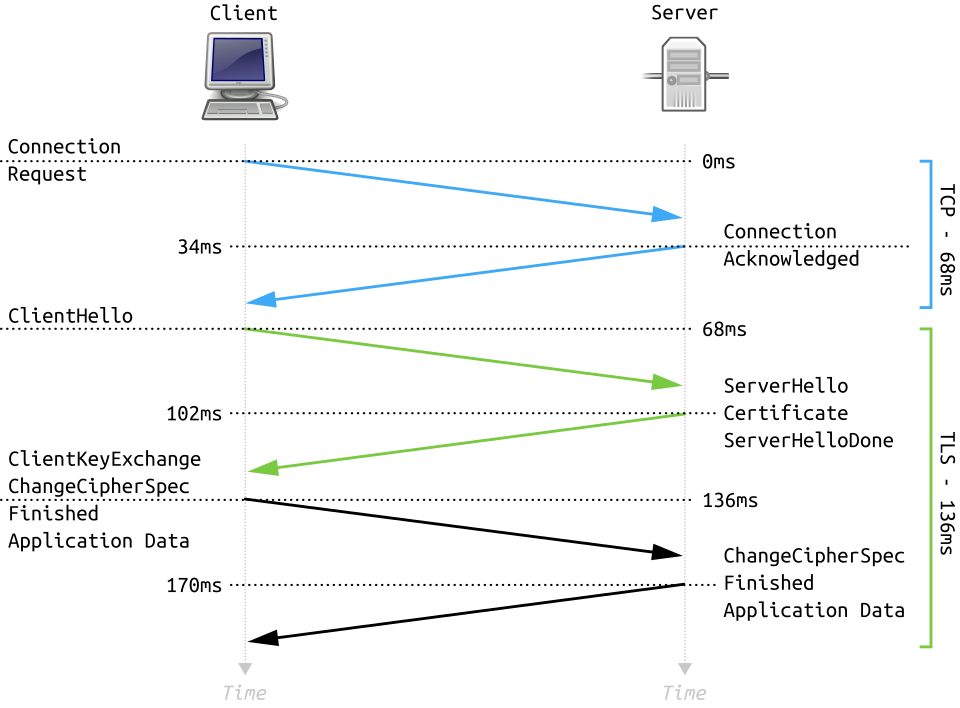 A visual of the Client Hello, Server Hello, and key exchange steps. (Image: Fleshgrinder and The People from The Tango! Desktop Project., Public domain, via Wikimedia Commons)
Based on the TU BIM syllabus for Networking and System Administration (IT271), unit 10.
Discussion
Loading…