NET Centric ComputingUnit 311 min read
HTTP Protocol, ASP.NET Core & Web Communication
Unit 3 of NET Centric Computing explores HTTP/HTTPS fundamentals, request-response cycles, ASP.NET Core’s role in web communication, and how stateless protocols enable scalable web apps—with real-world examples from eSewa, Daraz, and Ncell APIs.
TAKEAWAYS:
- HTTP is a stateless, text-based protocol where clients (browsers) send requests and servers (like ASP.NET Core) return responses with status codes (200, 404, 500).
- ASP.NET Core leverages HTTP to handle routing, middleware pipelines, and RESTful API design, while HTTPS adds encryption via TLS/SSL.
- Key HTTP methods (GET, POST, PUT, DELETE) map directly to CRUD operations in web apps, with headers (e.g.,
Content-Type,Authorization) controlling behavior. - ASP.NET Core’s
Startup.csconfigures middleware (e.g.,UseRouting(),UseEndpoints()) to process HTTP requests in a pipeline. - Real-world apps like eSewa use HTTP to authenticate users via OAuth tokens, while Daraz relies on REST APIs for inventory updates.
- Performance and security trade-offs exist: HTTP/2 multiplexes requests, but HTTPS adds latency due to TLS handshakes.
1. HTTP: The Foundation of Web Communication
HTTP (HyperText Transfer Protocol) is the stateless, client-server protocol that powers the web. Unlike TCP (which ensures reliable data delivery), HTTP focuses on request-response cycles for fetching resources (HTML, JSON, images). It runs on top of TCP (port 80 for HTTP, 443 for HTTPS).
How HTTP Works: A Step-by-Step Trace
sequenceDiagram
    participant Client as Browser (User)
    participant Server as ASP.NET Core App
    Client->>Server: GET /products HTTP/1.1\nHost: api.daraz.com\nAccept: application/json
    Server-->>Client: HTTP/1.1 200 OK\nContent-Type: application/json\n{"products": [...]}
Key Components of an HTTP Request/Response:
| Part | Request Example | Response Example |
|---|---|---|
| Method | GET, POST, PUT, DELETE |
Status code (e.g., 200 OK, 404 Not Found) |
| Headers | Host: api.esewa.com, Authorization: Bearer xxxx |
Content-Type: application/json |
| Body | (For POST/PUT) {"name":"John", "email":"john@example.com"} |
JSON/XML payload or empty for GET |
Worked Example: Daraz Order Placement
- User clicks "Buy Now" → Browser sends:
POST /api/orders HTTP/1.1 Host: api.daraz.com Content-Type: application/json Authorization: Bearer eyJhbGciOiJIUzI1NiIsInR5cCI6IkpXVCJ9... {"productId": 123, "quantity": 2, "userId": 456} - ASP.NET Core validates the token (JWT), checks inventory, and returns:
HTTP/1.1 201 Created
Location: /api/orders/789
{"orderId": 789, "status": "Processing"}
2. HTTP vs. HTTPS: Security and Performance Trade-offs
| Feature | HTTP | HTTPS |
|---|---|---|
| Security | No encryption (plaintext) | Encrypted via TLS/SSL (AES, RSA) |
| Port | 80 | 443 |
| Use Case | Local development, intranets | E-commerce (eSewa), banking (NMB) |
| Performance | Faster (no handshake) | Slower (TLS handshake overhead) |
| Trust | Vulnerable to MITM attacks | Trusted via SSL certificates |
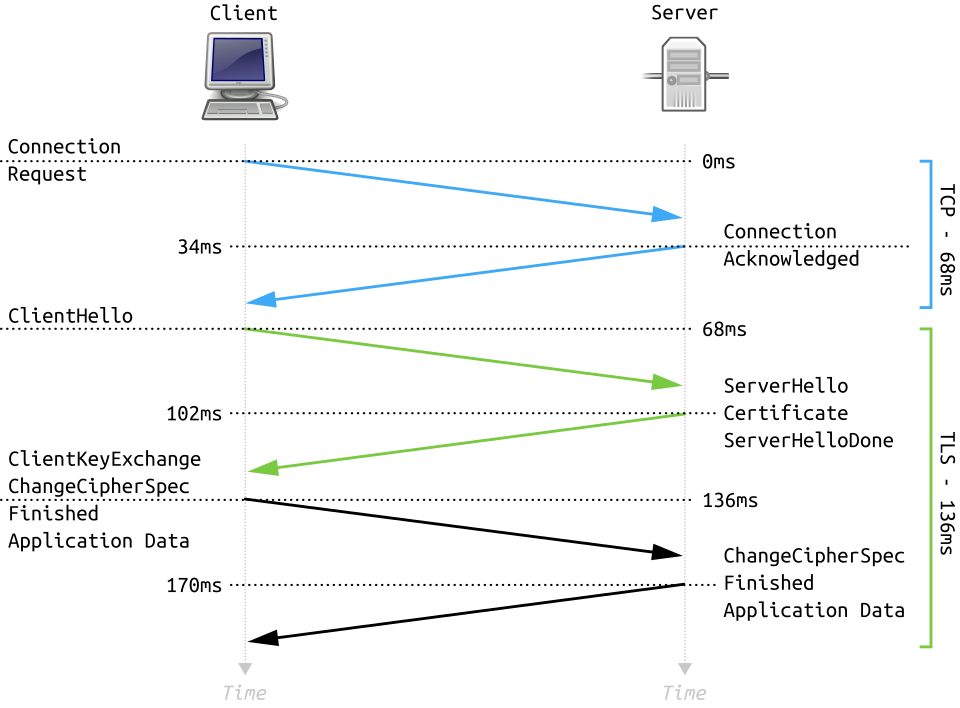 How HTTPS establishes a secure connection between a browser and ASP.NET Core server (Image: Fleshgrinder and The People from The Tango! Desktop Project., Public domain, via Wikimedia Commons)
Caption: The 4-step TLS handshake (ClientHello → ServerHello → Key Exchange → Symmetric Encryption).
How HTTPS establishes a secure connection between a browser and ASP.NET Core server (Image: Fleshgrinder and The People from The Tango! Desktop Project., Public domain, via Wikimedia Commons)
Caption: The 4-step TLS handshake (ClientHello → ServerHello → Key Exchange → Symmetric Encryption).
Real-World Impact:
- eSewa uses HTTPS to secure payment tokens (e.g.,
Authorization: Bearer <JWT>). - Ncell’s myNcell app encrypts SMS-based transactions to prevent interception.
3. ASP.NET Core’s Role in HTTP Processing
ASP.NET Core is a cross-platform framework that handles HTTP requests via:
- Middleware Pipeline: A chain of components (e.g., routing, authentication) that process requests sequentially.
- Routing: Maps URLs to controller actions (e.g.,
GET /products→ProductsController.Index()). - Endpoints: Define how HTTP methods (GET/POST) trigger logic.
Middleware Pipeline in ASP.NET Core
flowchart TD
    A["Request\n(HTTP GET /home)"] --> B["UseRouting\nMatches pattern"]
    B --> C["UseAuthentication\nChecks JWT/OAuth"]
    C --> D["UseAuthorization\nValidates roles"]
    D --> E["UseEndpoints\nInvokes controller"]
    E --> F["Response\n(HTTP 200 OK)"]
Code Example: Configuring Middleware in Program.cs
var builder = WebApplication.CreateBuilder(args);
var app = builder.Build();

// Middleware order matters!
app.UseRouting();
app.UseAuthentication();
app.UseAuthorization();
app.MapControllerRoute(
    name: "default",
    pattern: "{controller=Home}/{action=Index}/{id?}");
app.Run();
Worked Example: NTC’s Website (HTTP → ASP.NET Core)
- User visits ntc.gov.np → Browser sends:
GET /services/electricity-bill HTTP/1.1 Host: ntc.gov.np - ASP.NET Core routes to
ServicesController.Bill()and returns:HTTP/1.1 200 OK Content-Type: text/html <html>...</html>
4. HTTP Methods and CRUD Operations
| HTTP Method | Purpose | ASP.NET Core Attribute | Example Use Case |
|---|---|---|---|
GET |
Retrieve data | [HttpGet] |
Fetching a product list (Daraz) |
POST |
Create new resource | [HttpPost] |
Submitting a new order (eSewa) |
PUT |
Update existing resource | [HttpPut] |
Updating user profile (Khalti) |
DELETE |
Remove resource | [HttpDelete] |
Deleting a chat message (Pathao) |
PATCH |
Partial update | [HttpPatch] |
Updating only a user’s email |
Worked Example: Khalti’s Payment API
[HttpPost("payments")]
public IActionResult ProcessPayment([FromBody] PaymentRequest request)
{
    if (!ModelState.IsValid) return BadRequest();
    var result = _paymentService.Process(request);
    return CreatedAtAction(nameof(GetPayment), new { id = result.Id }, result);
}
- Request:
POST /api/payments HTTP/1.1 Content-Type: application/json {"amount": 500, "userId": 123, "method": "khalti"} - Response (201 Created):
HTTP/1.1 201 Created
Location: /api/payments/abc123
{"transactionId": "abc123", "status": "Pending"}
5. HTTP Status Codes: What They Mean
| Code | Class | Meaning | Example Scenario |
|---|---|---|---|
| 200 | Success | OK | Daraz returns product details. |
| 201 | Success | Created | eSewa confirms a new payment. |
| 400 | Client Error | Bad Request | Missing Authorization header in API call. |
| 401 | Client Error | Unauthorized | Ncell app rejects expired JWT token. |
| 404 | Client Error | Not Found | User visits /nonexistent-page. |
| 500 | Server Error | Internal Server Error | ASP.NET Core crashes during peak traffic. |
6. Headers: Controlling HTTP Behavior
Headers add metadata to requests/responses. Key headers in ASP.NET Core:
| Header | Purpose | Example Value |
|---|---|---|
Content-Type |
Specifies payload format | application/json |
Authorization |
Sends credentials (Bearer tokens) | Bearer eyJhbGciOiJIUzI1NiIsInR5cCI6IkpXVCJ9 |
Accept |
Tells server preferred response type | application/xml |
Cache-Control |
Controls caching | no-cache |
Worked Example: NEPSE API with Headers
GET /api/stock-prices HTTP/1.1
Host: api.nepse.com.np
Accept: application/json
Authorization: ApiKey xxxxx-yyyy-zzzz
- Response:
HTTP/1.1 200 OK
Content-Type: application/json
Cache-Control: max-age=300
{"stocks": [...]}
7. HTTP/2 and Performance Optimizations
HTTP/2 improves performance via:
- Multiplexing: Multiple requests over a single connection (reduces latency).
- Header Compression: Uses HPACK to shrink headers.
- Server Push: Proactively sends resources (e.g., CSS/JS files).
Comparison: HTTP/1.1 vs. HTTP/2
| Feature | HTTP/1.1 | HTTP/2 |
|---|---|---|
| Connections | 6 parallel connections | 1 connection (multiplexed) |
| Headers | Uncompressed | HPACK compression |
| Latency | High (HOL blocking) | Low (parallel requests) |
| Use Case | Legacy systems | Modern apps (React + ASP.NET Core) |
Real-World Use:
- YouTube uses HTTP/2 to stream videos faster.
- Google’s ASP.NET Core apps leverage multiplexing for search results.
In the Real World
eSewa’s API
- Uses HTTP + JWT tokens for authentication:
POST /api/payments Authorization: Bearer <JWT> - ASP.NET Core validates tokens via
UseAuthentication()middleware before processing payments.
- Uses HTTP + JWT tokens for authentication:
Daraz’s Order System
- Relies on RESTful HTTP methods:
GET /products→ Fetch inventory.POST /orders→ Create an order (withContent-Type: application/json).
- ASP.NET Core routes these to controllers like
OrdersController.
- Relies on RESTful HTTP methods:
Ncell’s myNcell App
- HTTPS secures SMS-based transactions (e.g.,
POST /api/topup). - Status codes handle failures:
402 Payment Required→ Insufficient balance.503 Service Unavailable→ Network downtime.
- HTTPS secures SMS-based transactions (e.g.,
Exam Tip
Memorize HTTP Methods and CRUD:
GET= Read,POST= Create,PUT= Update,DELETE= Delete.- Exam Question: "Which HTTP method would you use to update a user’s profile in ASP.NET Core?"
Answer:
PUT /api/users/{id}with[HttpPut]attribute.
Middleware Order Matters:
- Always configure in this order:
UseRouting()→UseAuthentication()→UseAuthorization()→UseEndpoints(). - Exam Question: "Why does
UseAuthentication()fail if placed afterUseEndpoints()?" Answer: Endpoints are invoked before authentication checks.
- Always configure in this order:
Status Codes Are Common:
- Know
200,201,401,404,500and when to return them. - Exam Question: "What status code should ASP.NET Core return if a user tries to access
/adminwithout a role?" Answer:403 Forbidden(afterUseAuthorizationrejects the request).
- Know
Real-World Scenarios:
- Expect questions like:
"How would you design an HTTP API for a Khalti-like payment system?"
Answer:
- Use
POST /paymentswithAuthorization: Bearer <JWT>. - Return
201 Createdon success,402 Payment Requiredon failure. - Secure with HTTPS (TLS 1.2+).
- Use
- Expect questions like:
"How would you design an HTTP API for a Khalti-like payment system?"
Answer:
ASP.NET Core Configuration:
- Know how to add middleware in
Program.csand map routes. - Exam Question: "Write the code to enable JWT authentication in ASP.NET Core."
Answer:
builder.Services.AddAuthentication(JwtBearerDefaults.AuthenticationScheme)
    .AddJwtBearer(options => { /* Configure issuer/signing key */ });
app.UseAuthentication();
- Know how to add middleware in
Based on the TU BIT syllabus for NET Centric Computing (BIT351), unit 3.
Discussion
Loading…