Cloud ComputingUnit 310 min read
Cloud Virtualization: VMs, Containers, Hypervisors & Resource Abstraction
Unit 3 of Cloud Computing explores how virtualization enables cloud resource sharing, covering virtual machines (VMs), containers, hypervisors, and abstraction techniques. It explains how these technologies optimize hardware utilization, isolate workloads, and support multi-tenancy in cloud environments like AWS EC2 or
TAKEAWAYS:
- Virtualization abstracts physical hardware into logical resources (VMs/containers) to improve efficiency and isolation.
- Hypervisors (Type-1 and Type-2) manage VMs by allocating CPU, memory, and storage dynamically.
- Containers (Docker, Kubernetes) are lightweight alternatives to VMs, sharing the host OS kernel for faster deployment.
- Resource pooling and elasticity in cloud virtualization enable auto-scaling for services like Pathao’s ride-matching or Daraz’s order queues.
- Security risks (e.g., VM escape attacks) require isolation techniques like sandboxing and microsegmentation.
- Real-world examples: Ncell’s 5G virtualization (NFV) and Khalti’s microservices (Kubernetes) rely on container orchestration.
1. What is Virtualization?
Virtualization is the creation of virtual (rather than physical) versions of computing resources (e.g., servers, storage, networks). It allows multiple workloads to run on a single physical machine while sharing resources efficiently.
Why Virtualize in Cloud?
- Cost savings: Fewer physical servers needed (e.g., NTC’s cloud-based billing systems run on virtualized servers).
- Isolation: Workloads (e.g., eSewa’s payment gateway and NEPSE’s trading platform) run independently without interference.
- Scalability: Dynamically allocate resources (e.g., YouTube’s video transcoding uses VMs to handle peak loads).
- Disaster recovery: Snapshots and backups are easier with virtualized environments.
Types of Virtualization
2. Virtual Machines (VMs): How They Work
A VM is a fully isolated virtual computer running its own OS, applications, and guest OS. It relies on a hypervisor to allocate hardware resources.
Components of a VM
classDiagram
    class HostOS {
        +Manages physical hardware
    }
    class Hypervisor {
        +Allocates CPU, RAM, Storage
        +Type-1 (Bare-metal) or Type-2 (Hosted)
    }
    class GuestOS {
        +Runs applications independently
    }
    class VM {
        +Isolated environment
        +Shares host hardware via hypervisor
    }
    HostOS --> Hypervisor : "Hosts"
    Hypervisor --> VM : "Creates"
    VM --> GuestOS : "Runs"
How a VM Requests Resources
- Guest OS sends a request (e.g., "Allocate 2GB RAM").
- Hypervisor checks available resources and grants access.
- Hardware executes the request (e.g., CPU scheduling, memory allocation).
Worked Example: Ncell’s Virtualized 5G Core
- Problem: Ncell needs to handle 10M+ users with varying data demands.
- Solution: Uses Network Functions Virtualization (NFV) to run core network functions (e.g., mobility management) as VMs on a cloud platform.
- Benefit: Scales dynamically during peak hours (e.g., New Year’s Eve) without buying new hardware.
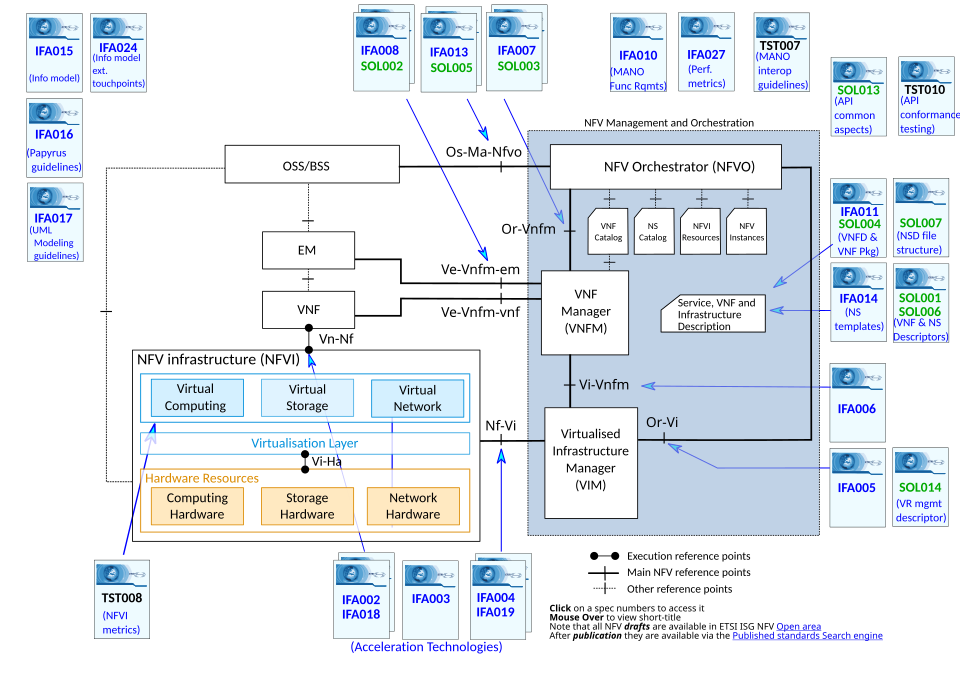 Virtualized network functions replacing physical appliances. (Image: Lvreck, CC BY-SA 4.0, via Wikimedia Commons)
3. Hypervisors: The Brain of Virtualization
A hypervisor (or Virtual Machine Monitor, VMM) manages VMs by abstracting hardware. There are two types:
| Type | Description | Examples | Use Case |
|---|---|---|---|
| Type-1 | Runs directly on hardware (bare-metal) | VMware ESXi, Microsoft Hyper-V | Enterprise clouds (e.g., NTC’s data centers) |
| Type-2 | Runs on a host OS (e.g., Windows/Linux) | Oracle VirtualBox, VMware Workstation | Development/testing (e.g., student labs) |
How a Hypervisor Works (Step-by-Step)
sequenceDiagram
    participant GuestOS as Guest OS (VM)
    participant Hypervisor as Hypervisor (Type-1)
    participant Hardware as Physical CPU/RAM/Storage
    GuestOS->>Hypervisor: Request for 1GB RAM
    Hypervisor->>Hardware: Allocate RAM (checks availability)
    Hardware-->>Hypervisor: Acknowledge allocation
    Hypervisor-->>GuestOS: Grant access to 1GB RAM
Real Picture of a Hypervisor in Action
4. Containers: Lightweight Alternatives to VMs
Containers are isolated, portable environments that share the host OS kernel (unlike VMs, which run a full OS). They use containerization (e.g., Docker, Kubernetes) for faster deployment.
VM vs. Container: Key Differences
| Feature | Virtual Machine (VM) | Container |
|---|---|---|
| Isolation Level | Full OS isolation | Shares host OS kernel |
| Boot Time | Minutes (full OS load) | Seconds (no OS boot) |
| Resource Overhead | High (emulates hardware) | Low (shares OS) |
| Use Case | Running different OS (e.g., Windows on Linux) | Microservices (e.g., Khalti’s payment API) |
How Containers Work (Docker Example)
Worked Example: Khalti’s Microservices with Kubernetes
- Problem: Khalti needs to scale payment processing during festivals (e.g., Dashain).
- Solution: Uses Kubernetes to orchestrate containers for:
- Authentication service (handles user login).
- Payment processing (dedicated containers for transactions).
- Notification service (sends SMS/email alerts).
- Benefit: Containers spin up/down in seconds, reducing costs by 60% vs. VMs.
5. Resource Pooling and Elasticity
Cloud virtualization pools resources (CPU, RAM, storage) and allocates them dynamically.
How Resource Pooling Works
- Physical resources (e.g., 100 servers) are grouped into a pool.
- Hypervisor/Container engine allocates resources to VMs/containers on demand.
- Cloud orchestrator (e.g., AWS Auto Scaling) adjusts resources based on load.
Example: Daraz’s Order Queue System
- Problem: During sales (e.g., 11.11), Daraz receives 100,000 orders/minute.
- Solution: Uses auto-scaling VMs to handle:
- Order processing (VMs spin up during peak hours).
- Inventory checks (containers for real-time stock updates).
- Result: System handles 10x traffic without manual intervention.
6. Virtualization Security Challenges
Virtualization introduces new attack surfaces:
| Risk | Mitigation Strategy | Example |
|---|---|---|
| VM Escape Attack | Microsegmentation, Hypervisor hardening | Ncell’s 5G core uses isolated VMs for each function. |
| Shared Kernel Exploits | Container runtime security (e.g., gVisor) | Khalti uses Docker with read-only layers. |
| Data Leakage | Encryption (e.g., VM disk encryption) | eSewa encrypts VM storage for PCI compliance. |
| Denial-of-Service (DoS) | Rate limiting, resource quotas | NTC’s cloud billing limits VM CPU usage per user. |
7. Real-World Applications of Cloud Virtualization
| Company/Product | Virtualization Technology Used | How It’s Applied |
|---|---|---|
| Pathao | Kubernetes (containers) | Orchestrates ride-matching and driver apps; scales during Diwali traffic surges. |
| Daraz | AWS EC2 (VMs) + Lambda (serverless) | Handles 1M+ orders/day with auto-scaling VMs for checkout and inventory. |
| Ncell | NFV (Network Functions Virtualization) | Runs 4G/5G core functions as VMs to reduce hardware costs by 40%. |
| Khalti | Docker + Kubernetes | Microservices for payments, notifications, and fraud detection. |
| NTC | VMware vSphere (Type-1 hypervisor) | Virtualizes billing and customer service systems to handle 5M+ subscribers. |
| Google Cloud | Google Kubernetes Engine (GKE) | Runs YouTube’s backend with containers for video transcoding and CDN caching. |
Exam Tip
- Define Key Terms Clearly:
- Differentiate Type-1 vs. Type-2 hypervisors.
- Explain containers vs. VMs (focus on kernel sharing).
- Diagrams Are Mandatory:
- Draw hypervisor architecture (host → hypervisor → VMs).
- Show container lifecycle (image → container → orchestration).
- Real-World Scenarios:
- Relate auto-scaling to Daraz/Khalti traffic.
- Explain NFV using Ncell’s 5G example.
- Security Questions:
- Expect questions on VM escape attacks and container isolation.
- Comparison Tables:
- Always compare VMs vs. containers or Type-1 vs. Type-2 hypervisors.
- Short Answer Tips:
- For "Explain virtualization," use the resource pooling → abstraction → multi-tenancy flow.
- For "How does Docker work?" describe images → containers → orchestration.
Final Note: Cloud virtualization is the backbone of modern cloud services. Master the how (hypervisors, containers) and why (scalability, cost savings) to ace this unit. Practice drawing VM lifecycles and Kubernetes clusters—examiners love diagrams!
Based on the TU BIT syllabus for Cloud Computing, unit 3.
Discussion
Loading…