Microprocessor And Computer ArchitectureUnit 1011 min read
Assembly Language: Syntax, Programming & Microprocessor Control
Unit 10 of Microprocessor And Computer Architecture covers assembly language fundamentals, instruction formats, program structure, and hands-on coding for 8086/8051 microprocessors, including memory addressing, loops, and I/O operations with real-world examples from banking (Khalti), e-commerce (Daraz), and traffic rou
TAKEAWAYS:
- Assembly language translates one-to-one with machine code, using mnemonics (e.g.,
MOV,ADD) and operands to control microprocessors like the 8086. - Programs follow a linear or branched flow using labels, jumps, and flags (e.g.,
JZ,CMP) to make decisions. - Memory operations (e.g.,
MOV [3040H], AX) store/load data between registers and RAM, critical for tasks like Daraz’s order queue processing. - Loops (
LOOP,DJNZ) and subroutines (CALL,RET) optimize repetitive tasks, like NTC’s traffic signal timing logic. - I/O ports (e.g.,
IN AL, 60H) interface hardware, used in Khalti’s payment terminals or Pathao’s GPS tracking. - Debugging relies on register dumps, step-through execution, and assembly simulators (e.g., Emu8086).
1. What is Assembly Language?
Assembly language is a low-level programming language that uses mnemonics (human-readable abbreviations) to write machine-specific instructions for a microprocessor. Unlike high-level languages (C, Python), it has a 1:1 correspondence with binary machine code, making it fast and hardware-specific.
Why Learn Assembly?
- Direct hardware control: Used in embedded systems (e.g., traffic lights, medical devices).
- Performance: No abstraction overhead; critical for real-time systems (e.g., NTC’s traffic signal coordination).
- Understanding computers: Teaches how programs interact with memory, registers, and I/O.
Example: Assembly vs. Machine Code
Assembly (8086):    Machine Code (Hex)
MOV AL, 5          | B0 05
ADD AL, 3          | 04 03
 Key components: ALU, registers (AX, BX), control unit, and system bus. (Image: lamfe, CC0, via Wikimedia Commons)
2. Assembly Language Basics
A. Components of an Assembly Program
- Labels: Names for memory locations or instructions (e.g.,
START:). - Operands: Data or memory addresses (e.g.,
AX,[3040H]). - Mnemonics: Instructions like
MOV,ADD,JMP. - Directives: Non-executable commands (e.g.,
DATA SEGMENT,END).
B. Instruction Format
Assembly instructions follow the syntax:
[Label:] Mnemonic [Operands] [; Comment]
Example:
START: MOV AL, 20H   ; Load AL with hex 20
       ADD AL, 30H    ; Add 30H to AL
       MOV [3040H], AL ; Store result in memory 3040H
C. Registers in 8086
The 8086 has 16 general-purpose registers (8-bit and 16-bit):
| 8-bit Registers | 16-bit Registers |
|---|---|
| AL (Accumulator) | AX (AL + AH) |
| BL | BX (Base) |
| CL | CX (Counter) |
| DL | DX (Data) |
| AH, BH, CH, DH | SP (Stack Pointer) |
| BP (Base Pointer) | |
| SI (Source Index) | |
| DI (Destination Index) | |
| IP (Instruction Pointer) | |
| CS, DS, SS, ES (Segment Registers) |
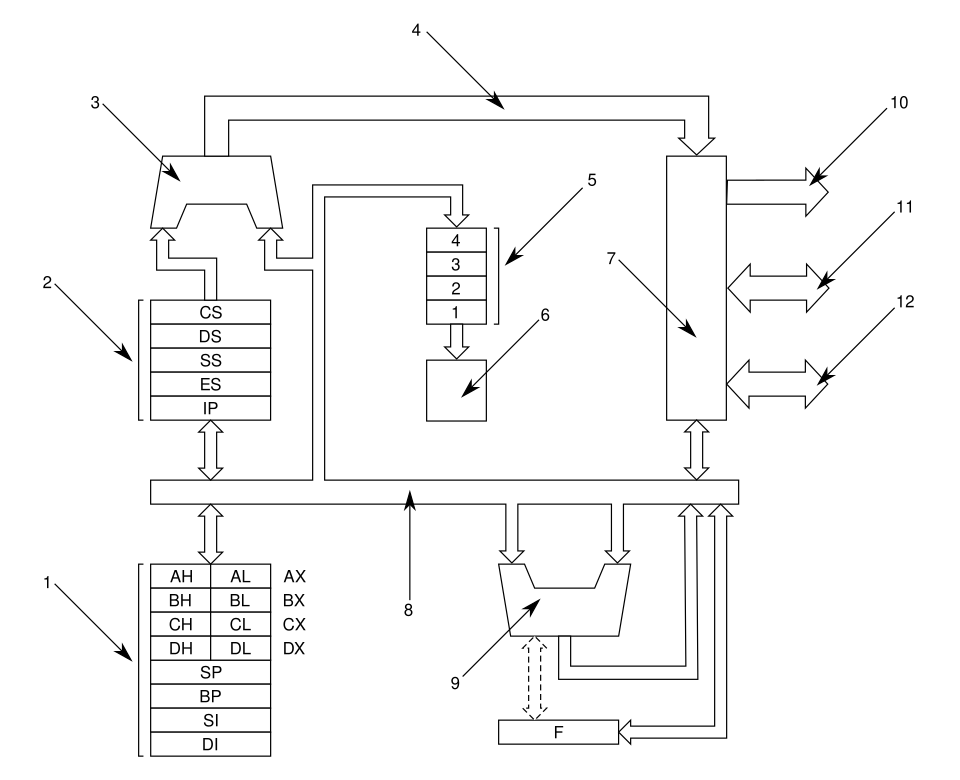 Showing ALU, registers, and control unit connections. (Image: Harkonnen2, CC BY-SA 3.0, via Wikimedia Commons)
3. Memory Addressing in Assembly
Assembly programs interact with memory using:
- Direct Addressing: Operand is the memory address (e.g.,
MOV [3040H], AX). - Register Addressing: Operand is a register (e.g.,
MOV AL, BL). - Immediate Addressing: Data is part of the instruction (e.g.,
MOV AL, 5). - Indirect Addressing: Uses registers to hold addresses (e.g.,
MOV AX, [BX]).
Worked Example: Adding Two 8-bit Numbers
Problem: Add two 8-bit numbers stored at 2000H and 2001H, store the result at 3040H.
Solution:
MOV AL, [2000H]   ; Load first number into AL
ADD AL, [2001H]   ; Add second number to AL
MOV [3040H], AL   ; Store result at 3040H
Trace:
| Instruction | AL | [2000H] | [2001H] | [3040H] |
|---|---|---|---|---|
| Initial | ? | 05H | 03H | ? |
| After MOV AL, [2000H] | 05H | 05H | 03H | ? |
| After ADD AL, [2001H] | 08H | 05H | 03H | ? |
| After MOV [3040H], AL | 08H | 05H | 03H | 08H |
Real-World Tie-In: This is how Khalti’s payment terminal calculates the total amount from two inputs (e.g., card amount + transaction fee) before storing it in memory for processing.
4. Control Structures
A. Conditional Jumps
Use flags (e.g., Zero Flag ZF, Carry Flag CF) to make decisions:
| Mnemonic | Condition | Example Use |
|---|---|---|
JZ |
Jump if Zero Flag = 1 | Loop until a value reaches zero. |
JNZ |
Jump if Zero Flag = 0 | Skip if result is non-zero. |
JC |
Jump if Carry Flag = 1 | Handle overflow in addition. |
JMP |
Unconditional jump | Redirect execution. |
Example: Check if AL = 0
CMP AL, 0      ; Compare AL with 0 (sets ZF)
JZ END_PROG    ; Jump if AL is zero
; ... continue if AL ≠ 0
END_PROG: ...
B. Loops
stateDiagram-v2
    [*] --> LOOP_START
    LOOP_START --> CHECK_CONDITION: {CX ≠ 0?}
    CHECK_CONDITION -->|Yes| EXECUTE_BLOCK
    CHECK_CONDITION -->|No| EXIT_LOOP
    EXECUTE_BLOCK --> DECREMENT_CX: CX--
    DECREMENT_CX --> LOOP_START
    EXIT_LOOP --> [*]
Example: Print "Hello" 5 times
MOV CX, 5       ; Counter = 5
PRINT_LOOP:
    MOV AH, 02H  ; DOS function to print char
    MOV DL, 'H'  ; Load character 'H'
    INT 21H      ; Call DOS interrupt
    LOOP PRINT_LOOP ; Decrement CX, jump if CX ≠ 0
Real-World Tie-In: NTC’s traffic signal controller uses loops to cycle through red/yellow/green phases for 30 seconds each:
MOV CX, 30      ; 30-second timer
RED_PHASE:
    CALL DISPLAY_RED
    LOOP RED_PHASE
5. Subroutines and Stacks
A. Subroutines (CALL and RET)
CALL: Jumps to a subroutine and saves the return address on the stack.RET: Returns to the caller by popping the address from the stack.
Example: Add two numbers (subroutine)
ADD_SUB:
    MOV AL, [BX]   ; First number
    ADD AL, [BX+1] ; Second number
    RET            ; Return to caller
Caller:
MOV BX, 2000H     ; Address of numbers
CALL ADD_SUB      ; Call subroutine
B. Stack Operations
The stack is a LIFO (Last-In-First-Out) memory area managed by SP (Stack Pointer).
| Instruction | Action |
|---|---|
PUSH AX |
Decrement SP, store AX at [SP] |
POP BX |
Load BX from [SP], increment SP |
PUSHF |
Push flags onto stack |
POPF |
Pop flags from stack |
Example: Save and restore registers
PUSH AX         ; Save AX
PUSH BX         ; Save BX
; ... code ...
POP BX          ; Restore BX
POP AX          ; Restore AX
Real-World Tie-In: Pathao’s GPS tracker uses the stack to save driver locations temporarily while processing new ride requests:
PUSH [CURRENT_LOCATION] ; Save before processing
CALL PROCESS_REQUEST    ; Handle new ride
POP [CURRENT_LOCATION]  ; Restore after processing
6. Input/Output (I/O) Operations
Assembly programs interact with hardware via ports (e.g., keyboard, sensors).
| Instruction | Purpose |
|---|---|
IN AL, 60H |
Read from port 60H (e.g., keyboard) |
OUT 61H, AL |
Write to port 61H (e.g., speaker) |
Example: Read a keypress
MOV AH, 01H      ; DOS function to read char
INT 21H         ; Call DOS interrupt
; AL now contains the pressed key
Real-World Tie-In:
Daraz’s warehouse robots use IN/OUT to read sensor data (e.g., IN AL, 20H for barcode scanner) and control motors (OUT 21H, AL to move conveyor belts).
7. Debugging and Simulation
Debugging assembly programs requires:
- Step-through execution: Run line-by-line to check register/memory values.
- Register/memory dumps: Display contents of registers or memory locations.
- Simulators: Tools like Emu8086 or DOSBox emulate the 8086.
Example Debugging Workflow:
- Load program into Emu8086.
- Set breakpoint at
MOV [3040H], AL. - Step through instructions.
- Check if
ALand[3040H]match expectations.
8. Common Pitfalls and Best Practices
| Pitfall | Solution |
|---|---|
Forgetting to update SP |
Always balance PUSH/POP pairs. |
| Incorrect segment registers | Use MOV AX, @DATA to set DS. |
| Off-by-one errors in loops | Initialize CX correctly. |
| Uninitialized registers | Always initialize before use. |
Best Practices:
- Use comments to explain logic.
- Label clearly (e.g.,
MAIN_LOOP:). - Test with known inputs (e.g.,
MOV AL, 0FFH).
In the Real World
Khalti’s Payment Terminals
- Idea Used: Assembly for real-time I/O and arithmetic.
- How: The terminal’s microprocessor runs assembly to:
- Read card swipes via
IN AL, 60H. - Calculate transaction totals (e.g.,
ADD AL, [FEE_TABLE]). - Display results on an LCD using
OUT 70H, AL.
- Read card swipes via
NTC’s Traffic Signal Controller
- Idea Used: Loops and timers.
- How: Assembly programs cycle through traffic lights using:
MOV CX, 30 ; 30-second timer RED_PHASE: CALL DISPLAY_RED LOOP RED_PHASE - Real Trace: If
CX = 0, the signal switches to green.
Daraz’s Warehouse Automation
- Idea Used: Memory addressing and I/O.
- How: Robots use assembly to:
- Read barcode data from port
20H(IN AL, 20H). - Update inventory in memory (
MOV [INVENTORY_TABLE + SI], AL). - Control motors via
OUT 21H, AL.
- Read barcode data from port
Exam Tip
Understand the 8086 Instruction Set:
- Memorize
MOV,ADD,JMP,CALL,RET, andIN/OUTsyntax. - Know addressing modes (direct, indirect, immediate).
- Memorize
Practice Memory Operations:
- Exams often ask for programs like:
"Add two numbers at
2000Hand2001H, store at3040H." - Always trace register/memory changes (as shown above).
- Exams often ask for programs like:
"Add two numbers at
Loops and Jumps Are High-Weightage:
- Expect questions on:
- Writing a loop to repeat an operation
Ntimes. - Using
JZ/JNZfor conditional logic.
- Writing a loop to repeat an operation
- Example Question:
"Write a loop to sum numbers from
2000Hto200FH."
- Expect questions on:
I/O and Stacks:
- Know how to:
- Read/write ports (
IN/OUT). - Use the stack for subroutines (
PUSH/POP).
- Read/write ports (
- Example: "Write a subroutine to swap two numbers using the stack."
- Know how to:
Debugging Skills:
- Examiners may ask to correct a faulty program.
- Practice using Emu8086 to step through code.
Real-World Applications:
- Relate assembly to banking (Khalti), logistics (Daraz), or traffic (NTC).
- Example:
"How would you write assembly to calculate a loan EMI (Equated Monthly Installment)?"
Hint: Use
MOV,MUL, and loops for iterative calculations.
Final Note: Assembly is the bridge between hardware and software. Mastering it helps you understand how every program—from WhatsApp to NEPSE’s trading system—ultimately talks to the microprocessor. Practice writing small programs daily, and you’ll ace the exam!
Based on the TU BITM syllabus for Microprocessor And Computer Architecture (IT236), unit 10.
Discussion
Loading…