Microprocessor And Computer ArchitectureUnit 414 min read
Memory Hierarchy, Cache Design, and Address Mapping
Unit 4 of Microprocessor And Computer Architecture explores how modern computers organize memory into a layered hierarchy (registers → cache → RAM → disk) to balance speed, cost, and capacity, and how caches (direct-mapped, fully associative, set-associative) map and replace blocks using tags, indices, and LRU policies
TAKEAWAYS:
- Memory hierarchy trades off speed vs. cost by stacking smaller, faster layers (L1 cache → L2 → RAM → SSD → HDD) so the CPU rarely accesses slow storage.
- Cache mapping (direct-mapped, associative, set-associative) determines how blocks from main memory are placed in cache slots, affecting hit rates and replacement policies.
- Cache hits (data found in cache) are 10–100× faster than misses (fetching from RAM), so optimizing mapping and replacement (e.g., LRU) is critical for performance.
- Memory addressing must account for byte-addressability (each byte has a unique address) and word alignment (data must start at addresses divisible by word size).
- Cache coherence (ensuring all caches see the same data) is vital in multi-core systems, often handled via snooping protocols or directory-based schemes.
- Real-world impact: Poor cache design can slow down apps like Khalti’s payment processing (high miss rates → delays) or Daraz’s order queues (cache thrashing → crashes).
1. Why Memory Hierarchy? The Speed-Cost-Capacity Tradeoff
Computers cannot rely solely on fast but tiny registers or cheap but slow disks. Instead, they use a layered memory hierarchy to balance these needs. The goal: keep frequently used data close to the CPU while minimizing cost.
stateDiagram-v2
    [*] --> Access
    Access --> Cache: Hit (90% of accesses)
    Access --> RAM: Miss (10% of accesses)
    RAM --> Disk: Page fault (rare)
    Cache --> CPU: Data delivered
    RAM --> Cache: Data loaded
    Disk --> RAM: Data swapped
Key layers (from fastest to slowest):
| Layer | Speed (ns) | Size (KB–TB) | Cost per bit | Example Use Case |
|---|---|---|---|---|
| Registers | 0.5–1 | 32–256 | Very high | CPU arithmetic, loop counters |
| L1 Cache | 1–4 | 32–256 KB | High | Instruction fetch, ALU ops |
| L2 Cache | 4–10 | 256 KB–8 MB | Medium | Branch prediction, data locality |
| L3 Cache | 10–30 | 8 MB–64 MB | Medium | Multi-core sharing, prefetching |
| Main Memory (RAM) | 50–100 | GBs | Low | OS, applications, large datasets |
| SSD | 10,000–100,000 | TBs | Very low | Databases, file systems |
| HDD | 1,000,000+ | TBs | Extremely low | Archival storage |
Why not just use RAM everywhere?
- Cost: RAM is ~1000× more expensive per bit than HDDs.
- Power: Accessing RAM consumes 1000× more energy than cache.
- Latency: A single RAM access can stall the CPU for hundreds of cycles.
Real-world example: eSewa’s transaction system When you pay a bill via eSewa, the app must:
- Fetch your account balance from L3 cache (if recently used).
- If not found, load it from RAM (managed by the bank’s server).
- If the RAM is full, swap data to SSD (but this is rare for active accounts). Poor cache design → delays in processing → frustrated users.
2. How Caches Work: Blocks, Tags, and Mapping
Caches store blocks (typically 32–128 bytes) of data from main memory. Each block has:
- A tag (identifies which memory block it belongs to).
- Valid bit (1 = data is valid; 0 = unused or stale).
- Dirty bit (1 = modified; must be written back to RAM).
Cache Mapping Schemes
The mapping function determines where a memory block goes in the cache. Three main types:
A. Direct-Mapped Cache
- Simplest: Each memory block maps to exactly one cache line.
- Formula:
Cache index = (Memory address) MOD (Number of cache lines) - Pros: Fast lookup, low hardware cost.
- Cons: Conflict misses (two frequently used blocks map to the same line).
Example Trace (Direct-Mapped Cache): Assume:
- Cache size = 8 lines (each 32 bytes).
- Memory block size = 1 KB (256 bytes).
- Memory address = 0x12345 (binary:
0001 0010 0011 0101 0101).
- Calculate cache index:
Index = (0x12345 / 1KB) MOD 8 = 47 MOD 8 = 7→ Maps to Line 7. - Extract tag:
Tag = 0x12345 / (8 * 1KB) = 0x12(simplified for example). - Check Line 7:
- If tag matches and valid bit = 1 → HIT.
- Else → MISS (fetch from RAM).
Worked Example: Daraz Order Queue Daraz’s backend uses a direct-mapped cache for order status updates:
- Memory block: Stores 1000 orders (1KB).
- Cache line: Holds orders for a specific zip code (e.g., Kathmandu 44600).
- Problem: If two zip codes (e.g., 44600 and 44700) map to the same cache line, conflict misses occur → slower order processing.
- Solution: Use set-associative mapping (see below).
B. Fully Associative Cache
- Flexible: Any memory block can go into any cache line.
- Pros: No conflict misses (optimal placement).
- Cons: Slow lookup (requires searching all lines), expensive hardware.
Limitation of Associative Memory (Exam Question!)
- Hardware complexity: Requires parallel tag comparisons (slow for large caches).
- Power consumption: High due to searching all lines.
- Example: Early CPUs (e.g., Intel 4004) used associative caches, but modern systems avoid this for L1/L2 due to speed limits.
C. Set-Associative Cache (Best of Both Worlds)
- Compromise: Cache divided into sets; each set has multiple lines (e.g., 2-way or 4-way).
- Example: A 16-line, 4-way set-associative cache has:
- 4 sets (16 lines / 4 lines per set).
- Each set can hold 4 blocks (but only one at a time).
How It Works (Example):
- Cache: 16 lines, 4-way set-associative.
- Memory block size = 64 bytes.
- Memory address = 0xA1B2C3D4.
- Calculate set index:
Set = (0xA1B2C3D4 / 64) MOD 4 = 1→ Goes to Set 1. - Tag comparison:
Compare tag with all 4 lines in Set 1.
- If any line’s tag matches → HIT.
- Else → MISS (replace using LRU policy).
Worked Example: Ncell’s Call Routing Ncell’s call routing system uses a 4-way set-associative cache to store:
- Frequent tower IDs (e.g., towers in busy areas like Thapathali).
- Problem: If two towers map to the same set, one must be evicted.
- Solution: LRU replacement keeps the most recently used tower in cache.
3. Cache Replacement Policies
When a cache line is full and a new block arrives, the system must evict an existing block. Common policies:
| Policy | Description | Pros | Cons |
|---|---|---|---|
| FIFO | Evicts the oldest block. | Simple to implement. | Poor performance (may evict hot data). |
| LRU | Evicts the least recently used block. | Optimizes for temporal locality. | Requires hardware support (bits to track usage). |
| Random | Evicts a random block. | Fast, no tracking needed. | Unpredictable performance. |
| LFU | Evicts the least frequently used block. | Good for cold data. | High overhead (counting accesses). |
Example: Pathao’s Ride-Matching Pathao’s backend uses LRU cache for:
- Driver locations: Frequently accessed drivers stay in cache.
- Problem: If a driver is idle for hours, they get evicted (FIFO would evict them too soon).
- Result: Faster ride assignments for active drivers.
4. Cache Performance Metrics
| Metric | Formula | Typical Value | Impact |
|---|---|---|---|
| Hit Time (t_h) | Time to access cache. | 1–4 ns | Faster hits → better throughput. |
| Miss Penalty (t_m) | Time to fetch from RAM. | 50–100 ns | Higher penalty → more stalls. |
| Hit Rate (H) | Hits / (Hits + Misses) | 80–99% | Higher rate → better performance. |
| Miss Rate (M) | 1 – H | 1–20% | Lower misses → fewer stalls. |
| AMAT | t_h + M * t_m |
~5–10 ns | Average memory access time. |
Example Calculation (Exam Question!):
- Hit time = 2 ns, Miss penalty = 100 ns, Hit rate = 90%.
- AMAT =
2 + (0.1 * 100) = 12 ns.
5. Memory Addressing and Byte-Addressable Systems
Modern computers use byte-addressable memory, where:
- Each byte has a unique address.
- Word size (e.g., 4 bytes) must be aligned to addresses divisible by word size.
Example (8-bit microprocessor):
- Memory address:
0x3040H(12320 in decimal). - If storing a 16-bit (2-byte) word, it must start at an even address (e.g.,
0x3040H). - Misaligned access (e.g., storing at
0x3041H) may cause bus errors.
Worked Example: Assembly Program (Exam Question!)
Task: Add two 8-bit numbers and store the result at 3040H.
Solution (x86 Assembly):
MOV AL, [2000H]   ; Load first number from 2000H into AL
ADD AL, [2001H]   ; Add second number from 2001H
MOV [3040H], AL   ; Store result at 3040H
Trace:
MOV AL, [2000H]→ Loads byte at2000HintoAL.ADD AL, [2001H]→ Adds byte at2001HtoAL.MOV [3040H], AL→ Stores sum at3040H.
Real-world tie-in: Bank Loan Interest Calculation Banks use aligned memory access to:
- Store loan amounts in 4-byte (32-bit) words (aligned to addresses like
0x1000,0x1004). - Avoid misaligned accesses that could corrupt data (e.g., interest rate tables).
6. Cache Coherence in Multi-Core Systems
In multi-core CPUs, each core has its own cache. The problem:
- Stale data: If Core 1 modifies a variable in its cache, Core 2’s cache may still have the old value. Solutions:
- Snooping Protocol (MESI):
- Modified (M): Exclusive copy (dirty).
- Exclusive (E): Clean copy (shared but not modified).
- Shared (S): Read-only copy.
- Invalid (I): Stale copy.
- Directory-Based Coherence:
- A central directory tracks which cores have which data.
Example: NEPSE Stock Trading System NEPSE’s servers use cache coherence to:
- Ensure all traders see the same stock price (no stale data).
- Use MESI protocol to invalidate old prices when updated.
In the Real World
eSewa’s Payment Processing
- Idea: Cache hierarchy (L1/L2 for transaction logs, RAM for active payments, SSD for history).
- How: Frequently used accounts (e.g., your eSewa ID) stay in L3 cache; rarely used accounts go to RAM/SSD.
- Impact: Faster payments → happier users.
Pathao’s Ride-Matching Algorithm
- Idea: Set-associative cache for driver locations.
- How: Nearby drivers are cached in sets based on grid zones (e.g., Lalitpur vs. Bhaktapur).
- Problem: If two zones map to the same set, conflict misses slow down matching.
- Solution: LRU replacement keeps active drivers in cache.
Daraz’s Order Fulfillment
- Idea: Direct-mapped cache for inventory status.
- How: Each warehouse’s inventory block maps to a specific cache line.
- Issue: If two warehouses (e.g., Kathmandu and Pokhara) map to the same line, thrashing occurs → delays.
- Fix: Upgrade to 4-way set-associative cache.
Ncell’s Call Routing
- Idea: Cache replacement policies (LRU for active towers).
- How: Towers handling many calls stay in cache; idle towers are evicted.
- Result: Faster call connections during peak hours.
Bank Loan Servers
- Idea: Byte-addressable memory for loan records.
- How: Each loan’s interest rate is stored in a 4-byte word at an aligned address (e.g.,
0x2000). - Why: Misaligned access could corrupt loan data → financial losses.
Exam Tip
- Memory Hierarchy Diagram: Always draw the speed-size-cost tradeoff pyramid in exams. Label each layer and its typical use case.
- Cache Mapping Questions:
- For direct-mapped, show the modulo calculation (e.g.,
address MOD cache_lines). - For set-associative, explain sets + ways (e.g., "8 sets, 4-way").
- For direct-mapped, show the modulo calculation (e.g.,
- Hit Rate Calculations:
- If given hits = 1000, misses = 200, hit rate =
1000 / (1000 + 200) = 83.3%. - AMAT =
hit_time + miss_rate * miss_penalty.
- If given hits = 1000, misses = 200, hit rate =
- Assembly Programs:
- For memory operations, show:
- Load (
MOV AL, [addr]). - Store (
MOV [addr], AL). - Alignment (e.g., 16-bit words must start at even addresses).
- Load (
- For memory operations, show:
- Real-world Applications:
- eSewa/Khalti: Cache hierarchy for transactions.
- Pathao/Daraz: Cache mapping for location/data.
- Banks/NEPSE: Memory alignment for critical data.
- Common Pitfalls:
- Forgetting valid/dirty bits in cache lines.
- Misaligned memory access in assembly.
- Ignoring miss penalty in AMAT calculations.
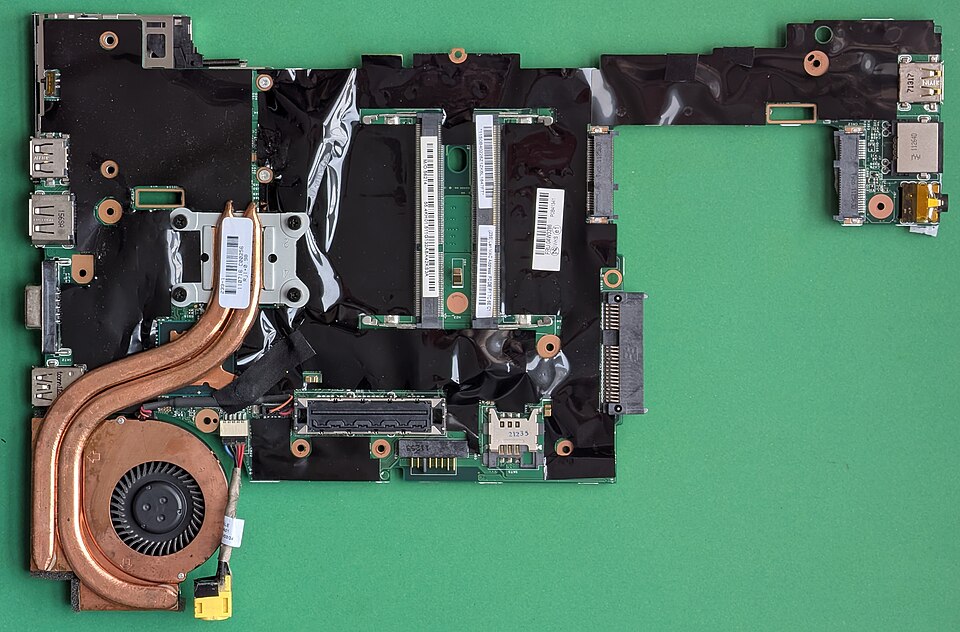 A close-up of a modern CPU motherboard showing L1/L2 cache (inside CPU), RAM slots, and SSD/HDD connectors. (Image: Siarhei Besarab, CC BY-SA 4.0, via Wikimedia Commons)
Based on the TU BITM syllabus for Microprocessor And Computer Architecture (IT236), unit 4.
Discussion
Loading…