Operating SystemUnit 85 min read
File Systems: Structure, Operations & Management
Unit 8 of Operating System explores file system architecture, storage management, directory structures, file allocation methods, and performance optimization techniques essential for modern OS design.
File System Fundamentals
What is a File System?
A file system is the method and data structure that an operating system uses to control how data is stored and retrieved. It organizes data into files and directories, manages access permissions, and optimizes storage usage.
stateDiagram-v2
    [*] --> Idle: System Boot
    Idle --> Active: User Login
    Active --> File_Operation: Open/Read/Write
    File_Operation --> Idle: Close/Exit
    File_Operation --> Error: Permission Denied
    Error --> Idle: Handle Error
Key Components
- Files: Logical storage units (e.g.,
notes.txt,image.jpg). - Directories: Folders that group related files (e.g.,
Documents/,Downloads/). - File Control Block (FCB): Metadata about each file (name, size, location, permissions).
- Volume: A single accessible storage device or partition (e.g.,
C:,D:).
File System Structure
Hierarchical Directory Structure
Most modern OS use a tree-like hierarchy (e.g., /home/user/Documents/). This avoids naming conflicts and simplifies navigation.
mindmap
  root((Root "/"))
    ├── home["/home"]
      ├── user1["/home/user1"]
        ├── Documents["/home/user1/Documents"]
        ├── Downloads["/home/user1/Downloads"]
      ├── user2["/home/user2"]
    ├── etc["/etc"]
    └── var["/var"]
File System Mounting
- Mounting: Attaching a storage device (e.g., USB, HDD) to the filesystem hierarchy.
- Example:
mount /dev/sdb1 /mnt(Linux command to mount a partition).
File Allocation Methods
1. Contiguous Allocation
- How it works: Files are stored in contiguous blocks on disk.
- Pros: Fast access (sequential reads), simple management.
- Cons: External fragmentation (wasted space), difficult resizing.
2. Linked Allocation
- How it works: Each block points to the next (like a linked list).
- Pros: No external fragmentation, flexible resizing.
- Cons: Slow random access (must traverse links), complex management.
3. Indexed Allocation
- How it works: Uses an index block to store pointers to all file blocks.
- Pros: Fast access (direct block lookup), no fragmentation.
- Cons: Overhead for small files, limited by index block size.
Comparison Table
| Method | Speed (Sequential) | Speed (Random) | Fragmentation | Resizing Flexibility |
|---|---|---|---|---|
| Contiguous | Fast | Fast | External | Difficult |
| Linked | Slow | Slow | None | Easy |
| Indexed | Fast | Fast | None | Easy |
File System Operations
1. File Creation & Deletion
- Creation: Allocate space, initialize FCB, add to directory.
- Deletion: Free blocks, remove FCB, update directory.
2. Directory Operations
- Traversal: Navigate from root to target file (e.g.,
cd /home/user/Documents). - Search: Locate files using names or metadata (e.g.,
find / -name "*.txt").
3. File Open/Close
- Open: Check permissions, load FCB, allocate system resources.
- Close: Release resources, update FCB.
Performance Optimization
1. Caching
- How it works: Store frequently accessed files in RAM (e.g., Linux
page cache). - Example:
vfs_cachein Linux reduces disk I/O.
2. Buffering
- How it works: Temporarily hold data in memory before writing to disk.
- Example:
stdoutbuffering in C (setvbuf()).
3. Disk Scheduling
- Goal: Minimize seek time (e.g., SCAN, C-LOOK algorithms).
- Example: NTC’s server logs are written using C-LOOK for efficiency.
Real-World Applications
1. eSewa (Nepal)
- Uses indexed allocation for transaction logs to ensure fast access during peak hours.
- Example: When you pay a bill, eSewa’s file system quickly retrieves your transaction history from indexed blocks.
2. Khalti (Digital Payments)
- Employs journaling file systems (e.g.,
ext4) to recover from crashes without corruption. - Example: If a server crashes during a transfer, Khalti’s journaling ensures no funds are lost.
3. Daraz (E-Commerce)
- Uses contiguous allocation for product images to speed up loading during sales events.
- Example: During the "Daraz Big Buying Days," product images are pre-loaded from contiguous blocks for faster display.
4. Ncell (Mobile Network)
- Relies on RAID (Redundant Array of Independent Disks) for storing call logs and customer data.
- Example: If one disk fails in Ncell’s RAID setup, data remains accessible without downtime.
Exam Tip
- Focus on:
- Differences between contiguous, linked, and indexed allocation.
- How directory structures (e.g., tree vs. graph) affect performance.
- File system operations (open/close, create/delete) and their system calls.
- Common Exam Questions:
- Compare ext4 (Linux) and NTFS (Windows) file systems.
- Explain how fragmentation affects performance.
- Trace the steps for opening a file in Linux (
open()system call).
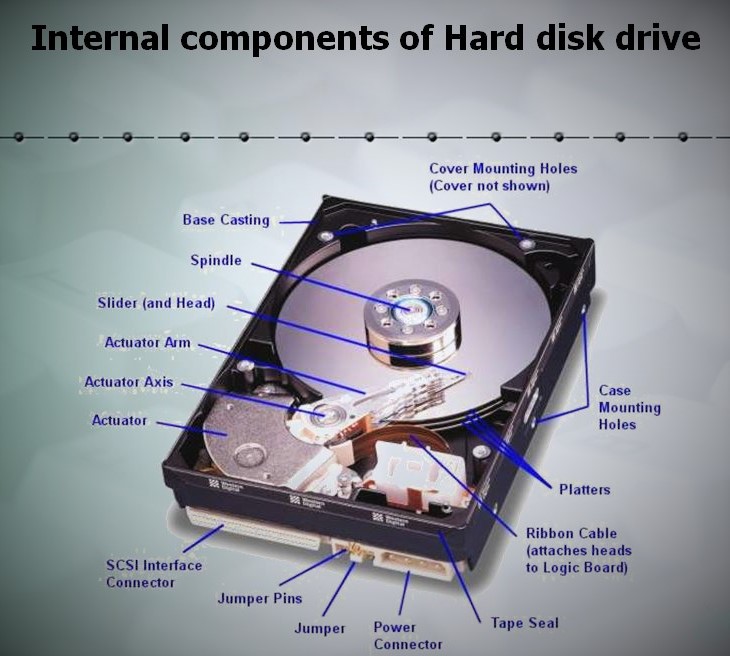 How blocks are physically stored on a disk (Image: Imicrokallol, CC BY-SA 4.0, via Wikimedia Commons)
Based on the TU BITM syllabus for Operating System (IT241), unit 8.
Discussion
Loading…