Multimedia System ApplicationUnit 38 min read
Images & Graphics: Types, Formats, Compression & Applications
Unit 3 of Multimedia System Application explores raster vs. vector graphics, image file formats (JPEG, PNG, GIF, SVG), color models (RGB, CMYK), resolution, compression techniques (lossy/lossless), and real-world applications in design, web, and multimedia authoring.
TAKEAWAYS:
- Raster vs. Vector: Raster images (pixels) are best for photos; vector graphics (math-based) are ideal for logos and scalable designs.
- Color Models: RGB is for digital screens, CMYK for print; HSL/HSV simplify color adjustments.
- Resolution & DPI: Higher DPI (dots per inch) improves print quality, while PPI (pixels per inch) matters for digital displays.
- File Formats: JPEG for photos, PNG for transparency, SVG for scalable graphics, GIF for animations.
- Compression: Lossy (JPEG) reduces file size but loses quality; lossless (PNG) preserves quality but increases size.
- Applications: Used in UI design (Khalti app), digital art (Photoshop), and web development (YouTube thumbnails).
1. Introduction to Images and Graphics
Types of Graphics
Graphics can be broadly classified into two categories:
- Raster Graphics (Bitmap Images): Made of pixels (tiny dots). Examples: photographs, digital paintings.
- Vector Graphics: Made of mathematical paths (lines, curves). Examples: logos, icons, diagrams.
classDiagram
class Graphics {
+Type: Raster or Vector
+Used for: Photos, Logos, UI Elements
}
class Raster {
+Made of Pixels
+Examples: JPEG, PNG
+Best for: Photos, Complex Images
}
class Vector {
+Made of Paths
+Examples: SVG, AI
+Best for: Logos, Scalable Graphics
}
Graphics <|-- Raster
Graphics <|-- Vector Shows pixel-based vs. path-based rendering. (Image: TU Wien: Dirk Praetorius, Michele Ruggeri, Public domain, via Wikimedia Commons)
2. Raster Graphics
Raster images are composed of a grid of pixels, each with a color value. They are resolution-dependent, meaning they lose quality when scaled up.
Key Concepts:
- Resolution: Measured in pixels (e.g., 1920×1080). Higher resolution = sharper image.
- DPI (Dots Per Inch): For print quality (e.g., 300 DPI for high-quality prints).
- PPI (Pixels Per Inch): For digital displays (e.g., 72–300 PPI for screens).
Worked Example: A Daraz product image must be at least 1000×1000 pixels for high quality. If scaled to 2000×2000, it becomes pixelated.
graph LR
    A["Low Resolution"] --> B["Pixelated Image"]
    C["High Resolution"] --> D["Sharp Image"]
    A -->|"Scaling Up"| E["Blurry"]
    C -->|"Scaling Down"| F["Still Sharp"]
Advantages & Disadvantages:
| Advantages | Disadvantages |
|---|---|
| Realistic for photos | Large file sizes |
| Easy to edit (Photoshop) | Loses quality when scaled up |
| Supports transparency (PNG) | Not ideal for logos/scalable art |
3. Vector Graphics
Vector graphics use mathematical equations to define shapes, making them infinitely scalable without quality loss.
Key Concepts:
- Paths: Defined by points, lines, and curves (Bezier curves).
- Scalability: Can be resized without pixelation.
- File Formats: SVG, AI (Adobe Illustrator), EPS.
 Shows how a logo is made of paths (e.g., Khalti’s logo). (Image: Vector Graphic, Public domain, via Wikimedia Commons)
mindmap
  root((Vector Graphics))
    Paths
      Points
      Curves
    Scalability
      No Quality Loss
    Formats
      SVG
      AI
      EPS
Advantages & Disadvantages:
| Advantages | Disadvantages |
|---|---|
| Scalable without loss | Complex for photos |
| Small file sizes | Limited color depth (compared to raster) |
| Editable (Adobe Illustrator) | Not ideal for realistic textures |
4. Color Models
Color models define how colors are represented in digital and print media.
Common Color Models:
- RGB (Red, Green, Blue): Used in digital screens (e.g., YouTube videos).
- CMYK (Cyan, Magenta, Yellow, Key/Black): Used in print (e.g., Daraz brochures).
- HSL/HSV: Used for color adjustments (Hue, Saturation, Lightness/Value).
| Model | Primary Colors | Used For | Example Application |
|---|---|---|---|
| RGB | Red, Green, Blue | Digital Screens | YouTube, eSewa App |
| CMYK | Cyan, Magenta, Yellow, Black | Daraz Catalogs, Magazines | |
| HSL | Hue, Saturation, Lightness | Color Editing | Photoshop, Canva |
5. Image File Formats
Different formats serve different purposes based on compression, transparency, and scalability.
| Format | Type | Compression | Best For | Example Use |
|---|---|---|---|---|
| JPEG | Raster | Lossy | Photos, Web Images | YouTube Thumbnails |
| PNG | Raster | Lossless | Transparency, Logos | Khalti App Icons |
| GIF | Raster | Lossless | Simple Animations | Loading Spinners (Daraz) |
| SVG | Vector | None | Scalable Graphics, Logos | Ncell Branding |
| TIFF | Raster | Lossless | High-Quality Prints | Professional Photography |
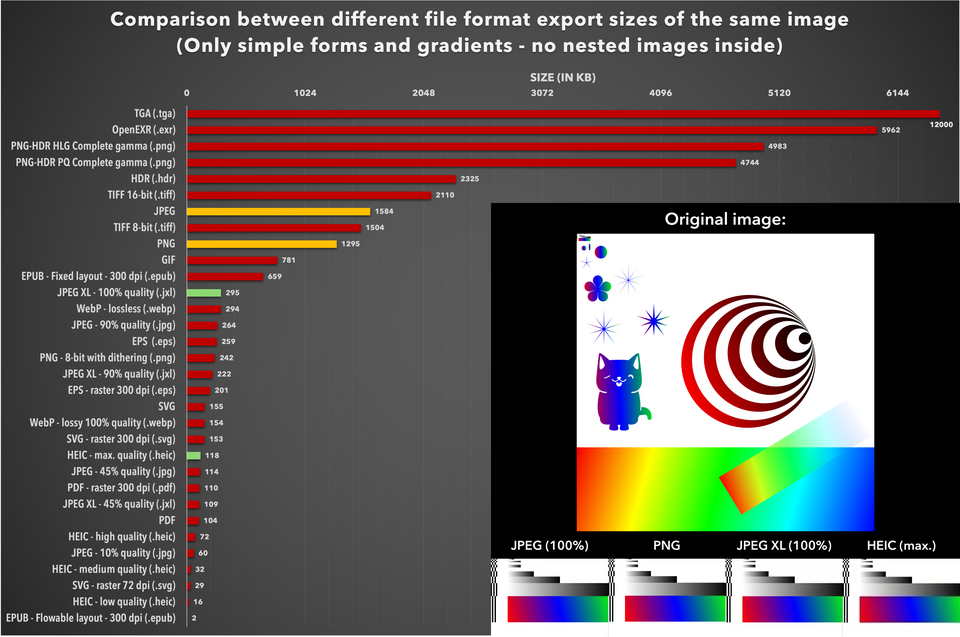 Shows file size vs. quality trade-offs. (Image: LucaLindholm, CC BY 4.0, via Wikimedia Commons)
6. Image Compression
Compression reduces file size for faster transmission and storage.
Types of Compression:
- Lossless: No quality loss (PNG, ZIP). Used for documents, logos.
- Lossy: Reduces quality but significantly cuts file size (JPEG). Used for photos, videos.
Worked Example: A NEPSE stock chart as a PNG (lossless) may be 5 MB, but as a JPEG (lossy) it could be 200 KB—ideal for quick loading on the NEPSE website.
flowchart TD
    A["Original Image"] --> B["Lossless Compression"]
    B --> C["PNG, ZIP"]
    A --> D["Lossy Compression"]
    D --> E["JPEG, MP3"]
    C --> F["No Quality Loss"]
    E --> G["Smaller File Size"]
7. Applications in Real World
In the Real World:
eSewa App:
- Uses SVG for icons (scalable without quality loss).
- PNG for transparent backgrounds (e.g., payment success screens).
Daraz Website:
- JPEG for product images (balanced quality vs. size).
- Vector graphics for logos (ensures sharpness on all devices).
YouTube Thumbnails:
- High-resolution JPEG (1280×720) for clarity.
- RGB color model for vibrant digital display.
Ncell Branding:
- SVG for logos (scalable across billboards and mobile screens).
- CMYK for print ads (ensures color accuracy in physical media).
Khalti Digital Payments:
- PNG for QR codes (transparency for overlay on receipts).
- Vector graphics for UI elements (clean, scalable buttons).
8. Exam Tip
For TU/PU exams, focus on:
- Differentiating raster vs. vector (examples: photos vs. logos).
- Color models (RGB for screens, CMYK for print).
- File format advantages (JPEG for photos, SVG for scalability).
- Compression trade-offs (lossy vs. lossless).
- Real-world applications (eSewa icons, Daraz images, YouTube thumbnails).
Common Exam Questions:
- "Why does a JPEG image lose quality when edited repeatedly?" → Answer: Due to lossy compression (each save discards data).
- "Which format would you use for a logo that needs to be printed and displayed digitally?" → Answer: SVG (vector) for scalability, CMYK for print.
- "Explain the difference between DPI and PPI." → Answer: DPI = print resolution; PPI = screen resolution.
Final Note: Mastering image types, formats, and compression is crucial for multimedia design, web development, and digital marketing. Practice identifying formats in real apps (e.g., WhatsApp stickers = PNG, Google Maps logos = SVG).
Based on the TU BITM syllabus for Multimedia System Application (IT273), unit 3.
Discussion
Loading…