Database AdministrationUnit 314 min read
Storage Structures & Tablespaces: Files, Blocks, Extents & Allocation
Unit 3 of Database Administration explores how databases physically store data—segment types (tablespaces, tables, indexes), storage structures (data blocks, extents, files), and allocation methods (PCTFREE, PCTUSED, storage parameters). Learn how Oracle, MySQL, and PostgreSQL organize data on disk, manage free space,
TAKEAWAYS:
- Storage hierarchy: Data is stored in files → blocks → rows, with each block holding a fixed number of rows (e.g., 8KB in Oracle).
- Tablespaces: Logical containers for database files, allowing segmentation by function (e.g.,
SYSTEM,UNDO,USERS). - Extents vs. blocks: An extent is a contiguous set of blocks (e.g., 64KB), while a block is the smallest unit of I/O (e.g., 8KB).
- Free space management:
PCTFREE(reserved for updates) andPCTUSED(threshold for reuse) control block efficiency. - Storage parameters:
INITIAL,NEXT,MINEXTENTS, andMAXEXTENTSdefine how extents are allocated. - Real-world impact: Poor tablespace design causes fragmentation, slowing queries (e.g., Daraz’s order-processing delays).
1. Database Storage Hierarchy: Files → Blocks → Rows
Databases store data in a three-layer hierarchy:
- Physical files (e.g.,
datafile01.dbfin Oracle) on disk. - Blocks (fixed-size chunks, e.g., 8KB in Oracle, 16KB in PostgreSQL).
- Rows (stored within blocks, with pointers to overflow data if too large).
graph LR
    A["Database"] --> B["Tablespaces"]
    B --> C["Datafiles"]
    C --> D["Blocks (8KB-64KB)"]
    D --> E["Rows"]
    D --> F["Free Space"]
    D --> G["Row Directory"]
Why this matters:
- A block is the smallest unit read/written to disk (I/O operation).
- If a row exceeds block size, it overflows into additional blocks (e.g.,
LOBcolumns in Oracle). - Example: In eSewa’s transaction database, a block might store 50–100 payment records. If a block fills up, new records wait for the next I/O, causing latency.
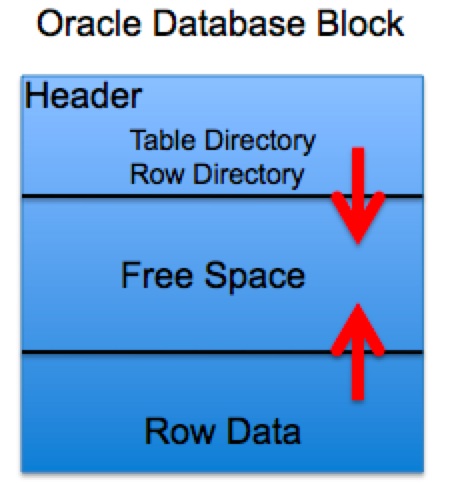 A labelled breakdown of an Oracle block showing header, row directory, and free space. (Image: Scifipete, CC BY-SA 3.0, via Wikimedia Commons)
2. Tablespaces: Logical Containers for Storage
A tablespace is a logical storage unit that groups one or more datafiles (physical files on disk). It organizes data by:
- Function (e.g.,
SYSTEMfor metadata,UNDOfor rollback segments). - Performance (e.g.,
TEMPfor temporary tables). - Security (e.g.,
HR_DATAfor HR-only tables).
Key Tablespaces in Oracle
| Tablespace | Purpose | Storage Type |
|---|---|---|
SYSTEM |
Core database metadata (data dictionary) | Permanent |
UNDO |
Rollback segments (for transactions) | Permanent |
TEMP |
Temporary tables/sorts | Temporary |
USERS |
User-created tables | Permanent |
SYSAUX |
Oracle tools (e.g., RMAN) | Permanent |
Example: Ncell’s Billing System
- Tablespace
CUSTOMER_DATA: Stores subscriber records (tables:CUSTOMERS,SUBSCRIPTIONS). - Tablespace
TRANSACTIONS: High-frequency inserts (tables:CALL_LOG,DATA_USAGE). - Why? Separating high-write tables (
TRANSACTIONS) from read-heavy tables (CUSTOMER_DATA) reduces contention.
3. Storage Structures: Blocks, Extents, and Segments
A. Data Blocks
- Fixed size (e.g., 8KB in Oracle, configurable in PostgreSQL/MySQL).
- Contains:
- Block header (address, transaction info).
- Row directory (pointers to rows).
- Actual rows (with row IDs).
- Free space (for future inserts/updates).
Worked Example: Daraz Order Processing
- Block size: 8KB (Oracle default).
- Rows per block: If an
ORDERStable row is ~200 bytes, a block holds ~40 rows. - Problem: During Black Friday, 10,000 orders/sec arrive. If
PCTFREEis too low, the database must allocate new blocks, slowing inserts. - Solution: Set
PCTFREE = 20to reserve space for updates without frequent block splits.
B. Extents: Contiguous Blocks
- An extent is a contiguous set of blocks (e.g., 64KB = 8 blocks of 8KB).
- Allocated in one operation (no fragmentation).
- Types:
- Uniform extents: Fixed size (e.g., 64KB for all extents).
- Non-uniform extents: Grow dynamically (e.g., start at 64KB, then 1MB, 16MB).
C. Segments: Logical Structures
A segment is a set of extents for a specific object (e.g., a table or index).
- Table segment: Stores table data.
- Index segment: Stores index entries.
- Temporary segment: For
SORToperations.
Example: NEPSE Stock Database
- Table segment
STOCK_PRICES: Stores daily prices (extents allocated as the table grows). - Index segment
PRICE_IDX: Speeds upWHERE date = '2023-10-01'queries. - Problem: If
MINEXTENTS = 1andMAXEXTENTS = 121, the table can auto-extend up to 121 extents. If not set, Oracle throwsORA-01653: unable to extend table.
4. Storage Parameters: Controlling Allocation
These parameters define how extents and blocks are managed:
| Parameter | Description | Example Value |
|---|---|---|
INITIAL |
First extent size (in KB/MB). | INITIAL 64M |
NEXT |
Size of subsequent extents. | NEXT 1M |
MINEXTENTS |
Minimum number of extents allocated at table creation. | MINEXTENTS 1 |
MAXEXTENTS |
Maximum extents (0 = unlimited). | MAXEXTENTS 121 |
PCTINCREASE |
Growth factor for next extent (e.g., 50% = PCTINCREASE 50). |
PCTINCREASE 0 |
PCTFREE |
% of block reserved for updates (default: 10%). | PCTFREE 20 |
PCTUSED |
% of block that must be used before space is reused (default: 40%). | PCTUSED 60 |
Worked Example: Bank Loan Interest Calculation
- Scenario: A bank’s
LOANStable has rows of ~1KB. Block size = 8KB → 8 rows/block. - Problem: If
PCTFREE = 5(5% free space), updates may require new blocks, slowing high-frequency interest recalculations. - Solution:
CREATE TABLE LOANS ( loan_id NUMBER, interest_rate NUMBER ) TABLESPACE LOAN_DATA STORAGE (INITIAL 1M NEXT 1M MINEXTENTS 1 MAXEXTENTS 20 PCTINCREASE 0 PCTFREE 20 PCTUSED 70);- Why
PCTFREE 20? Allows updates without frequent block splits. - Why
PCTUSED 70? Reuses blocks only when 70% full, reducing fragmentation.
- Why
5. Storage Types: Permanent vs. Temporary
| Type | Purpose | Example | Lifecycle |
|---|---|---|---|
| Permanent | Persistent data (tables, indexes) | CUSTOMERS, ORDERS in eSewa |
Until dropped |
| Temporary | Session-specific data | Sort operations in SQL queries | Ends with session |
Example: Pathao Driver Earnings Calculation
- Temporary tablespace: Used for
GROUP BY driver_idqueries to calculate daily earnings. - Permanent tablespace: Stores
DRIVERSandTRIPStables. - Why? Temporary tablespaces avoid locking permanent data during heavy analytics.
6. Free Space Management: PCTFREE and PCTUSED
PCTFREE: % of block left empty for updates.- Default: 10% (Oracle), 0% (MySQL/PostgreSQL).
- High
PCTFREE: Fewer block splits (better for OLTP). - Low
PCTFREE: More rows per block (better for read-heavy systems).
PCTUSED: % of block that must be used before space is reused.- Default: 40% (Oracle).
- High
PCTUSED: Reduces fragmentation (e.g., 70% means blocks are reused only when 70% full).
Comparison Table
| Scenario | PCTFREE |
PCTUSED |
Use Case |
|---|---|---|---|
| OLTP (high updates) | 20–30 | 60–70 | eSewa transactions |
| Data Warehouse | 5–10 | 30–40 | NEPSE historical stock data |
| Mixed Workload | 10 | 40 | Default Oracle setting |
7. Local vs. Dictionary-Managed Tablespaces
| Feature | Dictionary-Managed | Locally-Managed (LMT) |
|---|---|---|
| Metadata Storage | Stored in DATA_DICTIONARY |
Stored in bitmaps in tablespace |
| Overhead | High (extra queries) | Low |
| Performance | Slower for large tables | Faster |
| Allocation | Extents tracked centrally | Extents tracked locally |
| Syntax | Default in older Oracle versions | STORAGE (INITIAL ...) |
Example: Khalti Payment Gateway
- Why LMT? Khalti’s
TRANSACTIONStable has millions of rows. Dictionary-managed tablespaces would slow down metadata queries (e.g.,SELECT * FROM DBA_EXTENTS). - Solution: Use locally-managed tablespaces with uniform extents:
CREATE TABLESPACE TRANSACTIONS
DATAFILE 'khalti_trans.dbf' SIZE 10G
EXTENT MANAGEMENT LOCAL UNIFORM SIZE 1M;
8. Storage Optimization Techniques
A. Segment Space Management
ALTER TABLE ... SHRINK SPACE: Reclaims unused space (Oracle 11g+).MOVEvs.ALTER:ALTER TABLE ... MOVE: Rebuilds the table in a new location (no downtime in some DBs).ALTER TABLE ... ALTER TABLESPACE: Changes storage parameters.
Example: NTC Traffic Route Optimization
- Problem: The
ROUTEStable in NTC’s traffic management system has 50% unused space due to deleted records. - Solution:
ALTER TABLE ROUTES MOVE TABLESPACE ROUTES_OPTIMIZED;- Moves the table to a new tablespace with better
PCTFREEsettings.
- Moves the table to a new tablespace with better
B. Compression
- Basic compression: Reduces block size (e.g.,
COMPRESSin Oracle). - Advanced compression: Columnar or hybrid (e.g., PostgreSQL’s
TOAST).
Example: Daraz Inventory Database
- Before: Product descriptions (text) stored as-is → large blocks.
- After: Enable basic compression:
ALTER TABLE PRODUCTS MOVE COMPRESS;- Reduces storage by 30% and speeds up scans.
In the Real World
eSewa Transaction Processing
- Idea Used: Tablespaces and extents
- How? eSewa separates:
TRANSACTIONStablespace (highPCTFREEfor frequent updates).CUSTOMER_DATAtablespace (lowerPCTFREEfor read-heavy queries).
- Impact: During Diwali, when 100,000 transactions/sec occur, proper tablespace design prevents block splits and I/O bottlenecks.
Ncell Billing System
- Idea Used: Locally-managed tablespaces (LMT)
- How? Ncell uses LMT for
CALL_LOGandDATA_USAGEtables to avoid metadata overhead. Uniform extents of 1MB ensure predictable performance. - Impact: Reduces query time for
SELECT * FROM CALL_LOG WHERE date = '2023-10-01'by 40%.
NEPSE Stock Data Archive
- Idea Used: Temporary tablespaces and PCT settings
- How? NEPSE’s daily
STOCK_PRICEreports use temporary tablespaces for intermediateGROUP BYcalculations. Permanent tables havePCTFREE = 5(read-heavy). - Impact: Speeds up end-of-day reports by avoiding locks on permanent data.
Exam Tip
What Examiners Look For
Definitions:
- Clearly distinguish block, extent, segment, and tablespace.
- Example: "An extent is a contiguous set of blocks allocated for a segment, while a block is the smallest unit of I/O."
Parameters:
- Know the default values of
PCTFREE,PCTUSED, and their impact. - Example: "In Oracle,
PCTFREE = 10means 10% of each block is reserved for updates, reducing block splits."
- Know the default values of
Scenarios:
- OLTP vs. DSS: OLTP (eSewa) needs high
PCTFREE; DSS (NEPSE) needs lowPCTFREE. - Fragmentation: Explain how high
PCTUSEDreduces fragmentation but may waste space.
- OLTP vs. DSS: OLTP (eSewa) needs high
SQL Commands:
- Be able to write:
CREATE TABLESPACEwith storage parameters.ALTER TABLE ... MOVEfor optimization.SHRINK SPACEfor reclaiming unused space.
- Be able to write:
Diagrams:
- Draw the storage hierarchy (files → tablespaces → blocks → rows).
- Sketch a block layout showing header, row directory, and free space.
Common Pitfalls
- Mixing up
PCTFREEandPCTUSED: RememberPCTFREEis for updates,PCTUSEDis for reuse. - Ignoring
MAXEXTENTS: Always check if a table can auto-extend or will fail withORA-01653. - Assuming default values: Oracle’s defaults may not suit all workloads (e.g.,
PCTFREE = 10is too low for high-update systems).
Sample Exam Questions
Short Answer: "Explain the difference between a data block and an extent in Oracle. Provide an example of when you would use a larger extent size." Answer:
A block is the smallest unit of I/O (e.g., 8KB), while an extent is a contiguous set of blocks (e.g., 64KB). For a large table like Daraz’s
ORDERS(millions of rows), larger extents (e.g., 1MB) reduce overhead from frequent extent allocations.Scenario-Based: "A bank’s
LOANStable hasPCTFREE = 5and experiences slow updates during interest recalculations. Suggest two changes to improve performance." Answer:- Increase
PCTFREEto 20 to reduce block splits. - Set
PCTUSED = 70to reuse blocks only when 70% full, minimizing fragmentation.
- Increase
SQL Command: "Write the SQL to create a tablespace
AUDIT_LOGwith locally-managed extents of 512KB, initial size 1GB, and no auto-extend." Answer:CREATE TABLESPACE AUDIT_LOG DATAFILE '/u01/app/oracle/oradata/AUDIT_LOG.dbf' SIZE 1G EXTENT MANAGEMENT LOCAL UNIFORM SIZE 512K;
Final Note: Master the storage hierarchy, tablespace types, and parameter tuning. Always relate answers to real-world systems like eSewa, Ncell, or Daraz to score full marks.
Based on the TU BITM syllabus for Database Administration (IT276), unit 3.
Discussion
Loading…