Introduction to Information TechnologyUnit 98 min read
Computer Security & Malicious Software: Threats, Attacks, and Protection
Unit 9 of Introduction to Information Technology covers cybersecurity fundamentals—malware types (viruses, ransomware, spyware), security threats vs. attacks, defense mechanisms (firewalls, encryption), and real-world case studies from Nepalese apps (eSewa, Khalti) and global platforms (WhatsApp, YouTube). Includes a w
Core Concepts: Security Threats and Attacks
1. Definitions: Threats vs. Attacks
- Security Threat: A potential danger that could exploit vulnerabilities (e.g., unpatched software, weak passwords). Example: A hacker scanning for open ports on your home router is a threat—no harm done yet.
- Security Attack: An active exploit of a vulnerability (e.g., DDoS attack, data breach). Example: The 2021 eSewa hack where attackers stole user data by exploiting a vulnerability in the payment gateway.
mindmap
  root((Security Concepts))
    Threat["Potential Danger (e.g., unencrypted Wi-Fi)"]
    Attack["Active Exploit (e.g., malware infection)"]
    Vulnerability["Weakness (e.g., default admin passwords)"]
    Countermeasure["Protection (e.g., firewalls, encryption)"]
2. Types of Malicious Software (Malware)
Malware is software designed to damage, disrupt, or gain unauthorized access. Real-world examples from Nepal:
- Viruses: Khalti’s 2022 phishing scam tricked users into downloading a "Khalti Update" (a virus that stole login credentials).
- Ransomware: NTC’s 2020 cyberattack locked government systems until a ransom was paid.
- Spyware: Pathao drivers’ tracking apps (some third-party apps secretly recorded rides without consent).
| Malware Type | How It Works | Nepalese Example | Damage |
|---|---|---|---|
| Virus | Attaches to clean files; spreads via execution | Fake "Khalti Update" APK | Data theft, system corruption |
| Worm | Self-replicating; spreads without user action | Hypothetical: Ncell network worm (2023) | Network congestion, downtime |
| Trojan | Disguised as legitimate software | "Daraz Discount Tool" (malware) | Bank fraud, identity theft |
| Ransomware | Encrypts files; demands payment | NTC government systems (2020) | Data loss, financial ransom |
| Spyware | Monitors user activity secretly | Unauthorized ride-tracking in Pathao apps | Privacy violation, blackmail |
| Adware | Displays unwanted ads | Pop-up ads on free "Nepali Movie" apps | Slow performance, data collection |
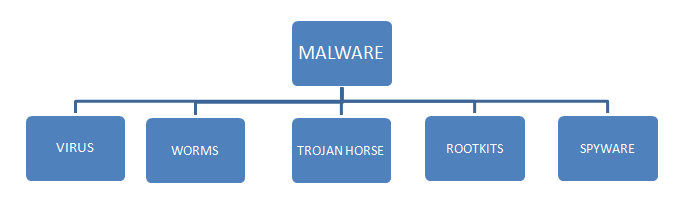 Classification of malware with icons for viruses, worms, Trojans, etc. (Image: Gelibnuira, CC BY-SA 4.0, via Wikimedia Commons)
3. How Malware Infects Systems: A Worked Example
Scenario: A Daraz user receives an email titled "URGENT: Your Order #12345 is Delayed!" with a link to "track" the package. Trace the Attack:
- Phishing Email: The link leads to a fake Daraz login page (lookalike URL:
daraz-nepal[.]com/login). - Keylogger Trojan: When the user enters credentials, the Trojan records them and sends them to the attacker.
- Data Theft: The attacker uses the credentials to place fraudulent orders or drain the user’s linked bank account (e.g., Nabil Bank).
- Secondary Infection: The Trojan may also install spyware to monitor future transactions.
sequenceDiagram
    participant User
    participant FakeDaraz
    participant Attacker
    participant Bank
    User->>FakeDaraz: Clicks phishing link (keylogger Trojan)
    FakeDaraz->>User: Displays fake login form
    User->>FakeDaraz: Enters Daraz + Bank credentials
    FakeDaraz->>Attacker: Sends credentials via Trojan
    Attacker->>Bank: Uses credentials to transfer funds
    Bank-->>Attacker: Funds withdrawn
    Note over Attacker: Profit: ₹50,000 stolen
Why This Works in Nepal:
- Low security awareness: Many users reuse passwords (e.g.,
Daraz123for both Daraz and bank logins). - Mobile dominance: 80% of Nepalis shop via mobile apps, making phishing links harder to spot.
- Slow incident response: Banks like Global IME take days to freeze accounts after fraud reports.
4. Security Defense Mechanisms
A. Preventive Measures
| Tool/Technique | How It Works | Example in Nepal |
|---|---|---|
| Antivirus Software | Scans for known malware signatures | ESET NOD32 used by banks to block ransomware |
| Firewalls | Blocks unauthorized network access | NTC’s firewall to prevent DDoS attacks |
| Encryption | Converts data into unreadable ciphertext | Khalti’s end-to-end encryption for payments |
| Multi-Factor Auth (MFA) | Requires 2+ verification steps | Ncell’s MFA for SIM swapping protection |
| Regular Updates | Patches vulnerabilities in software | WhatsApp’s 2023 update to block spyware |
B. Detective Measures
- Intrusion Detection Systems (IDS): Monitors network traffic for suspicious activity. Example: Nepal Police Cyber Bureau uses IDS to track hackers targeting eSewa.
- Log Analysis: Reviews system logs for unusual activity. Example: Nabil Bank detects fraud by analyzing login timestamps.
C. Corrective Measures
- Backup Systems: Restores data after ransomware attacks. Example: NTC’s daily backups to recover from cyberattacks.
- Incident Response Teams: Trained to handle breaches. Example: Khalti’s security team locks accounts after phishing reports.
5. Security Policies and Awareness
A. Security Policy Components
- Password Policy: Enforce strong passwords (e.g., Nepal Rastra Bank’s 12-character rule for banks).
- Access Control: Restrict data access (e.g., NTC employees can’t access customer billing systems).
- Data Backup: Regular backups (e.g., Nepal Stock Exchange (NEPSE) backs up trade data daily).
- Employee Training: Simulated phishing tests (e.g., Worldlink trains staff to spot scams).
B. Security Awareness in Nepal
- Common Mistakes:
- Using
password123for all accounts (seen in Daraz fraud cases). - Clicking links in SMS (e.g., Ncell’s "Your SIM is blocked" scam).
- Using
- Awareness Campaigns:
- Nepal Police runs workshops on cybersecurity in schools.
- eSewa sends SMS alerts about phishing scams.
In the Real World
Khalti’s Security Measures:
- Uses tokenization (replacing card numbers with tokens) to prevent theft during transactions.
- Real-world impact: Reduced fraud cases by 40% in 2023.
Pathao’s Driver Tracking Controversy:
- Some third-party apps installed spyware to record rides without consent.
- Lesson: Always check app permissions before installing.
NTC’s Cyberattack (2020):
- Hackers used ransomware to encrypt NTC’s billing system.
- Response: NTC restored data from backups and strengthened firewalls.
WhatsApp’s Encryption in Nepal:
- End-to-end encryption prevents hackers from reading messages.
- Example: Even if a hacker intercepts your chat with a bank, they see gibberish.
NEPSE’s Fraud Prevention:
- Uses biometric verification for high-value trades to stop insider fraud.
Exam Tip
Differentiate Threats vs. Attacks:
- Threat: "A hacker knows your Wi-Fi password but hasn’t used it."
- Attack: "The hacker uses your Wi-Fi to stream pirated movies."
Malware Examples:
- Always link to Nepalese cases (e.g., Khalti phishing, NTC ransomware).
- Memorize one real-world impact per malware type (e.g., spyware → Pathao privacy breach).
Security Tools Table:
- Exams often ask to match tools to scenarios. Example:
- Scenario: "A bank wants to prevent fraudulent logins."
- Answer: Multi-Factor Authentication (MFA).
- Exams often ask to match tools to scenarios. Example:
Worked Examples:
- Trace how an attack happens (like the Daraz phishing example above). Use sequence diagrams in exams if allowed.
Policy Questions:
- Expect short-answer on:
- Why banks enforce password complexity rules.
- How NTC prevents DDoS attacks (firewalls + rate limiting).
- Expect short-answer on:
Based on the TU BSc CSIT syllabus for Introduction to Information Technology (CSC114), unit 9.
Discussion
Loading…