Introduction to Information TechnologyUnit 1010 min read
Storage Devices & Data Management: Types, Functions & Security
Unit 10 of Introduction to Information Technology covers storage devices (primary, secondary, tertiary), data management (organization, backup, compression), and security (encryption, access control). Learn how devices like SSDs and HDDs work, how data is structured, and how real-world systems (e.g., eSewa, Ncell) use
TAKEAWAYS:
- Storage devices are classified by speed, capacity, and volatility; SSDs and HDDs are the most common secondary storage types.
- Data management includes organization (file systems, directories), backup (RAID, cloud storage), and compression (lossless vs. lossy).
- Encryption (symmetric/asymmetric) and access control (permissions, firewalls) are critical for data security.
- RAID improves reliability and speed by combining multiple disks; cloud storage (e.g., Google Drive) uses distributed servers.
- Data redundancy (backups, RAID) and error correction (parity bits) ensure data integrity.
- Real-world applications: eSewa uses encrypted databases for transactions, Ncell stores call logs in compressed formats, and Daraz relies on RAID for order processing.
1. Storage Devices: Types and Functions
Storage devices store data permanently or temporarily. They are classified based on speed, capacity, and volatility (whether data is lost when power is off).
1.1 Classification of Storage Devices
Key Differences:
| Type | Speed | Capacity | Volatility | Examples |
|---|---|---|---|---|
| Primary | Very Fast | Low (KB-MB) | Volatile | RAM, Cache |
| Secondary | Moderate | High (GB-TB) | Non-volatile | HDD, SSD, USB |
| Tertiary | Slow | Very High | Non-volatile | Tape, Optical Discs |
1.2 How Storage Devices Work
- HDD (Hard Disk Drive):
- Uses magnetic storage on spinning platters.
- Data is read/written by a moving read/write head.
- Slower but cheaper and has higher capacity (e.g., 1TB–10TB).
- Example: Laptops and desktops use HDDs for bulk storage.
SSD (Solid State Drive):
- Uses flash memory (no moving parts).
- Faster (10x–100x HDD) but more expensive.
- Example: Modern laptops and gaming PCs use SSDs for the OS and apps.
Optical Discs (CD/DVD/Blu-ray):
- Uses laser technology to read/write data.
- Slow and limited capacity (700MB–50GB).
- Example: Software distribution, movie storage.
Magnetic Tape:
- Used for archival storage (e.g., backups).
- Very slow but extremely cheap per GB.
- Example: Banks and government agencies use tapes for long-term backups.
1.3 Worked Example: Choosing Storage for a Small Business
Scenario: A café in Kathmandu wants to store customer orders, receipts, and inventory data.
- Primary Storage (RAM): Temporary storage for active orders (fast but lost on power off).
- Secondary Storage (SSD): Store daily transactions (fast access for staff).
- Tertiary Storage (HDD/Cloud): Backup daily data (cheap and reliable).
- Optical Discs: Archive yearly data (rarely accessed).
2. Data Management: Organization, Backup, and Compression
Data management ensures efficient storage, quick retrieval, and protection from loss or corruption.
2.1 File Systems and Directories
- File System: Organizes data into files and directories (folders).
- Examples: FAT32, NTFS (Windows), ext4 (Linux), HFS+ (Mac).
- Directory Structure:
Root/
├── Users/
│   ├── Alice/
│   │   ├── Documents/
│   │   └── Pictures/
│   └── Bob/
└── System/
    ├── OS/
    └── Apps/
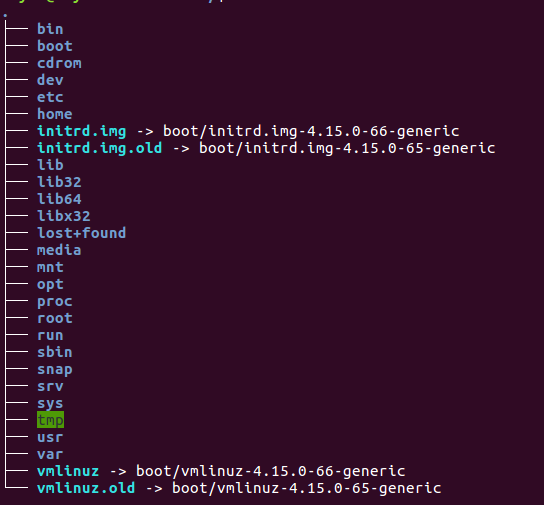 Tree structure showing root, folders, and files. (Image: Rasulnrasul, CC BY-SA 4.0, via Wikimedia Commons)
2.2 Data Backup Strategies
Backups prevent data loss from hardware failure, viruses, or human error.
| Backup Type | Description | Example |
|---|---|---|
| Full Backup | Copies all data. | Weekly backup of entire database. |
| Incremental Backup | Copies only changed data since last backup. | Daily backups after full backup. |
| Differential Backup | Copies all changes since last full backup. | Used in critical systems. |
| RAID (Redundant Array of Independent Disks) | Combines multiple disks for speed and redundancy. | RAID 1 (mirroring), RAID 5 (parity). |
Worked Example: RAID in a Bank’s Transaction System
- Problem: A bank’s server crashes during peak hours.
- Solution: Use RAID 10 (combination of RAID 1 and RAID 0).
- RAID 1: Mirrors data across two disks (redundancy).
- RAID 0: Stripes data across disks (speed).
- Result: If one disk fails, data is still accessible.
2.3 Data Compression
Reduces file size to save storage and speed up transfers.
| Type | Description | Example | Lossy/Lossless |
|---|---|---|---|
| Lossless | No data loss; original can be restored. | ZIP, PNG, FLAC | Lossless |
| Lossy | Some data is lost for smaller size. | JPEG, MP3, MP4 | Lossy |
Worked Example: Compressing Medical Images in a Hospital
- Problem: A hospital stores 10,000 X-ray images (each 5MB → 50GB total).
- Solution: Compress using JPEG (lossy) or PNG (lossless).
- JPEG (90% compression): Reduces size to ~500KB per image (total 5GB).
- PNG (lossless): Slightly larger but no quality loss.
- Result: Faster transfers over the hospital’s network.
3. Data Security: Encryption and Access Control
Protects data from unauthorized access, theft, and corruption.
3.1 Encryption Techniques
| Type | Description | Example | Use Case |
|---|---|---|---|
| Symmetric | Same key for encryption/decryption. | AES, DES | Encrypting files on a hard drive. |
| Asymmetric | Public key (encrypt) + Private key (decrypt). | RSA, ECC | Secure online transactions (e.g., eSewa). |
| Hashing | One-way function (no decryption). | SHA-256, MD5 | Password storage. |
3.2 Access Control Methods
- Permissions: Read (R), Write (W), Execute (X).
- Example: A file set to
rwxr-xr--allows:- Owner: Read, Write, Execute.
- Group: Read, Execute.
- Others: Read only.
- Example: A file set to
- Firewalls: Blocks unauthorized network access.
- Biometric Authentication: Uses fingerprints, facial recognition (e.g., smartphone unlock).
Worked Example: Securing eSewa Transactions
- Encryption: Uses AES-256 for symmetric encryption of transaction data.
- Asymmetric Keys: RSA for secure key exchange between user and server.
- Access Control: Requires OTP (One-Time Password) + biometric verification.
- Firewall: Blocks SQL injection attacks on the database.
4. Real-World Applications
4.1 eSewa: Secure Data Storage and Transactions
- Storage: Uses SSDs for fast transaction processing.
- Backup: RAID 10 for redundancy (prevents downtime).
- Security:
- AES-256 for encrypting user data.
- RSA for secure login.
- OTP for two-factor authentication.
4.2 Ncell: Call Log Storage and Compression
- Problem: Millions of call logs generated daily (uncompressed = huge storage).
- Solution:
- Compression: Logs stored in binary format (smaller than text).
- Database: Uses SQLite for efficient querying.
- Backup: Cloud storage (AWS) for disaster recovery.
4.3 Daraz: Order Processing with RAID
- Problem: High traffic during sales (e.g., Dashain).
- Solution:
- RAID 5 for order databases (speed + redundancy).
- SSDs for caching frequent orders.
- Load Balancers distribute traffic across servers.
5. Exam Tip
Define Key Terms Clearly:
- Always explain HDD vs. SSD, RAID levels, and encryption types with examples.
- Example answer for "Define hard copy and soft copy devices":
Hard copy refers to physical output (e.g., printed reports, CDs). Soft copy refers to digital output (e.g., files on a screen, cloud storage).
Compare Technologies in Tables:
- Examiners love side-by-side comparisons (e.g., HDD vs. SSD, RAID types).
Relate to Real-World Scenarios:
- Use eSewa, Ncell, or Daraz in examples to show practical applications.
- Example for "Explain RAID":
RAID 1 (Mirroring) is used in banks to duplicate data across two disks. If one disk fails, the other takes over without downtime.
Diagrams Are Your Friends:
- Draw file system hierarchies, RAID configurations, or encryption workflows in exams.
Common Mistakes to Avoid:
- ❌ Confusing lossless vs. lossy compression.
- ❌ Forgetting to mention volatility in storage device definitions.
- ❌ Not explaining how RAID improves performance (striping) or reliability (mirroring).
Final Checklist Before Exam: ✅ Can you list 3 primary, 3 secondary, and 2 tertiary storage devices? ✅ Do you know the difference between RAID 0, 1, and 5? ✅ Can you explain how AES and RSA encryption work in simple terms? ✅ Are you comfortable with file system structures and permissions?
Based on the TU BSc CSIT syllabus for Introduction to Information Technology (CSC114), unit 10.
Discussion
Loading…