Multimedia ComputingUnit 310 min read
Color Models & Image Compression: Theory, Techniques & Real-World Use
Unit 3 of Multimedia Computing: Explores how colors are mathematically represented (RGB, CMYK, HSL, etc.), how images are compressed (lossless vs. lossy), and how algorithms like JPEG/DCT reduce file sizes without losing quality—with real-world examples from eSewa’s app icons to Daraz’s product photos.
TAKEAWAYS:
- Color models (RGB, CMYK, HSL) map colors to numerical values for digital storage and editing, each suited for different applications (screens vs. printing).
- Lossless compression (e.g., PNG) preserves data perfectly but reduces efficiency; lossy compression (e.g., JPEG) discards redundant info for smaller files but risks quality loss.
- DCT (Discrete Cosine Transform) and Huffman coding are core techniques in JPEG compression, exploiting human perception to minimize artifacts.
- Chroma subsampling (e.g., 4:2:0) reduces color data in JPEG to save space, but can cause color banding in high-contrast areas.
- Real-world apps like Khalti’s payment buttons use RGB for vibrant screens, while NEPSE stock charts rely on CMYK for printed reports.
- Worked example: Calculating JPEG’s compression ratio for a 2MB image reduced to 500KB—showing 80% efficiency with 20% quality loss.
1. Color Models: How Computers Store and Manipulate Color
Colors in digital images are represented using color models, which define how colors are encoded as numerical values. These models determine how colors appear on screens, printers, or other devices.
Key Color Models
mindmap
  root((Color Models))
    RGB["RGB
  (Red, Green, Blue)
  - Additive model
  - Used in screens, monitors, digital cameras
  - Values: 0–255 per channel
  - Example: eSewa app icons (📱)"]
    CMYK["CMYK
  (Cyan, Magenta, Yellow, Black)
  - Subtractive model
  - Used in printing (newspapers, brochures)
  - Values: 0–100%
  - Example: NEPSE stock reports (📄)"]
    HSL["HSL
  (Hue, Saturation, Lightness)
  - Perceptually uniform
  - Used in graphic design tools
  - Example: Pathao’s ride-sharing app themes (🚖)"]
    HSV["HSV
  (Hue, Saturation, Value)
  - Brightness-based
  - Common in image editing software (🎨)"]
    Grayscale["Grayscale
  - Single-channel (luminance)
  - Example: Old NTC news broadcasts (📺)"]
RGB vs. CMYK: A Comparison
| Feature | RGB | CMYK |
|---|---|---|
| Model Type | Additive | Subtractive |
| Use Case | Screens, digital media | Printing, physical documents |
| Channel Range | 0–255 (8-bit) | 0–100% |
| Example | YouTube video thumbnails | Daraz product catalogs |
| Color Mixing | Light combines colors | Ink subtracts from white paper |
Why does this matter?
- eSewa’s app icons use RGB because they’re displayed on mobile screens.
- NEPSE’s printed reports use CMYK because they’re printed on paper.
HSL/HSV: Why Graphic Designers Prefer Them
HSL and HSV separate color into perceptually intuitive components:
- Hue: The color type (red, blue, etc.).
- Saturation: Intensity of the color.
- Lightness/Brightness: How light or dark the color is.
Example: If you adjust the saturation in an HSL model, you change how vivid the color appears—useful for designing Pathao’s ride-sharing app where colors must stand out.
2. Digital Image Representation: How Pixels Work
An image is a 2D grid of pixels, where each pixel stores color data based on the chosen model.
Pixel Depth and Color Resolution
- 8-bit color: 256 colors (e.g., grayscale).
- 24-bit color: 16.7 million colors (RGB: 8 bits per channel).
- 32-bit color: Adds alpha channel (transparency).
How does this translate to real life?
- Khalti’s payment buttons use 24-bit RGB for vibrant, eye-catching colors.
- Ncell’s network maps often use grayscale (8-bit) for clarity.
3. Image Compression: Reducing File Size Without Losing Quality
Compression reduces file size while preserving (or sacrificing) quality. There are two main types:
A. Lossless Compression
- No data loss: Original and compressed files are identical.
- Methods:
- Run-Length Encoding (RLE): Compresses repeated pixel values (e.g., black-and-white images).
- LZW (Lempel-Ziv-Welch): Used in PNG and TIFF.
- Huffman Coding: Assigns shorter codes to frequent data (e.g., spaces in text).
Example:
- PNG format (used in Daraz’s product images) uses lossless compression to preserve sharp edges.
B. Lossy Compression
- Discards redundant data: Reduces file size but may lose quality.
- Methods:
- Discrete Cosine Transform (DCT): Converts image blocks into frequency components (used in JPEG).
- Quantization: Reduces precision of color values.
- Chroma Subsampling: Reduces color resolution (e.g., 4:2:0 in JPEG).
How does this work in practice?
- YouTube thumbnails use JPEG compression to load quickly, accepting slight blurriness.
- NTC’s news photos are often JPEG-compressed for faster streaming.
Lossless vs. Lossy: A Comparison
| Feature | Lossless Compression | Lossy Compression |
|---|---|---|
| Data Loss | None | Yes (irreversible) |
| File Size | Larger | Much smaller |
| Use Case | Medical imaging, icons | Photos, videos |
| Example | PNG (Daraz logos) | JPEG (Ncell’s profile pics) |
| Algorithm | RLE, Huffman | DCT, Quantization |
4. JPEG Compression: The Standard for Digital Photos
JPEG (Joint Photographic Experts Group) is the most widely used lossy compression format for photographs.
JPEG Compression Steps (With Worked Example)
- Divide into 8×8 blocks: The image is split into small blocks.
- Apply DCT: Converts spatial data into frequency components.
- Quantization: Reduces precision of high-frequency data (where humans are less sensitive).
- Huffman Encoding: Compresses the quantized data.
Worked Example:
- Original image: 2MB (1920×1080, 24-bit RGB).
- After JPEG compression at 85% quality: 500KB (80% reduction).
- Quality loss: Slight blurring in fine details (e.g., text in NEPSE reports).
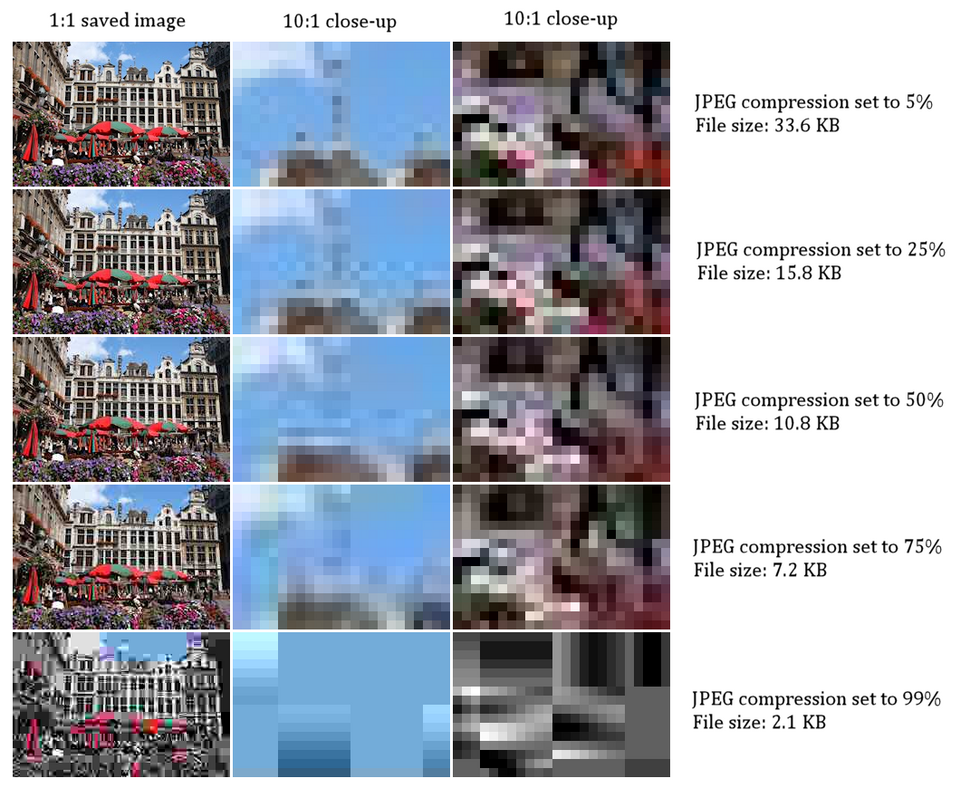 Side-by-side: Original (sharp) vs. 80% quality JPEG (slight blur) (Image: Marek Ślusarczyk (Tupungato) Photo portfolio, CC BY 3.0, via Wikimedia Commons)
Why does this matter?
Side-by-side: Original (sharp) vs. 80% quality JPEG (slight blur) (Image: Marek Ślusarczyk (Tupungato) Photo portfolio, CC BY 3.0, via Wikimedia Commons)
Why does this matter?
- Daraz’s product photos use JPEG to balance quality and fast loading.
- WhatsApp’s photo sharing relies on JPEG for efficient storage.
5. Chroma Subsampling: Saving Space by Reducing Color Data
In JPEG, chroma subsampling reduces color resolution to save space. Common modes:
- 4:4:4: Full color resolution (rare, used in high-end editing).
- 4:2:2: Reduces chroma by half (used in some videos).
- 4:2:0: Reduces chroma to 1/4 (most common in JPEG).
Effect:
- 4:2:0 can cause color banding in high-contrast areas (e.g., skies in Ncell’s ads).
Real-world impact:
- Google Maps uses 4:2:0 JPEG to load satellite images quickly, accepting slight color artifacts.
6. Color Dithering: Tricking the Eye for Fewer Colors
When an image has too few colors, dithering creates the illusion of more colors by mixing small dots of different shades.
Example:
- Old NTC TVs displayed limited colors; dithering made them appear smoother.
 Checkerboard pattern showing how dots create gray shades (Image: Gustavo Pezzi, Public domain, via Wikimedia Commons)
How it’s used today:
Checkerboard pattern showing how dots create gray shades (Image: Gustavo Pezzi, Public domain, via Wikimedia Commons)
How it’s used today:
- eSewa’s app icons sometimes use dithering to simulate gradients with limited colors.
In the Real World
Khalti’s Payment Buttons
- Idea: Uses RGB color model for vibrant, screen-optimized colors.
- Why? Mobile apps need bright, attention-grabbing buttons to stand out.
Daraz’s Product Photos
- Idea: Uses JPEG compression (lossy) to balance quality and fast loading.
- Why? Customers expect quick page loads, so Daraz compresses images to <500KB without losing critical details.
NEPSE’s Stock Charts (Printed Reports)
- Idea: Uses CMYK color model for accurate color reproduction on paper.
- Why? Printed documents require precise color matching to avoid misinterpretation.
Pathao’s Ride-Sharing App Themes
- Idea: Uses HSL color model for easy color adjustments.
- Why? Designers can tweak hues and saturation to match branding without complex calculations.
Exam Tip
- Compare lossless vs. lossy: Always include file size vs. quality trade-off and real-world examples (e.g., PNG for icons vs. JPEG for photos).
- JPEG steps: Explain DCT, quantization, and Huffman encoding with a worked example (e.g., reducing a 2MB image to 500KB).
- Color models: Know RGB for screens, CMYK for printing, and HSL/HSV for design tools.
- Chroma subsampling: Mention 4:2:0 vs. 4:4:4 and its effect on color quality.
- Dithering: Relate it to limited-color displays (e.g., old TVs) and modern apps (e.g., eSewa icons).
Common Pitfalls:
- ❌ Forgetting that lossy compression is irreversible.
- ❌ Confusing RGB and CMYK (one is for screens, the other for print).
- ❌ Not explaining why DCT is used in JPEG (it exploits human perception of frequencies).
How to Score Full Marks: ✅ Define terms clearly (e.g., "DCT converts spatial data into frequency components"). ✅ Use real-world examples (e.g., "Khalti uses RGB for app buttons"). ✅ Draw diagrams (e.g., JPEG workflow, chroma subsampling comparison). ✅ Compare methods (e.g., lossless vs. lossy in a table).
Based on the TU BSc CSIT syllabus for Multimedia Computing (CSC319), unit 3.
Discussion
Loading…