E-commerceUnit 918 min read
SET Protocol & Digital Documents: Security & Transactions
Unit 9 of E-commerce: Explores the Secure Electronic Transaction (SET) protocol, digital document formats, digital signatures, and real-world applications like e-wallets and secure payment flows in Nepal’s e-commerce ecosystem (e.g., Khalti, Daraz).
TAKEAWAYS:
- The SET protocol ensures secure credit card transactions by encrypting cardholder and merchant data using digital certificates and dual signatures.
- Digital documents (PDFs, e-invoices, smart contracts) replace paper records, reducing fraud and improving auditability in corporate libraries.
- Digital wallets (e.g., Khalti, Ncell Money) use tokenization and one-time passwords (OTPs) to authorize payments without exposing card details.
- Dual signatures in SET split responsibility: the purchase request is signed by the buyer, and the order information by the merchant, preventing fraud.
- Digital certificates (issued by CAs like Nepal Rastra Bank’s e-payment certifiers) authenticate parties in SET and e-commerce transactions.
- Adware and malware risks in e-commerce highlight the need for SSL/TLS (e.g., HTTPS on Daraz’s checkout) to encrypt data in transit.
1. Secure Electronic Transaction (SET) Protocol: The Backbone of Secure Payments
The SET protocol is a standardized framework designed by Visa and MasterCard to secure credit card transactions over the internet. Unlike traditional payment gateways (e.g., PayPal), SET encrypts both the buyer’s card details and the merchant’s order information, preventing middlemen (e.g., hackers, fraudsters) from accessing sensitive data.
How SET Works: A Step-by-Step Flow
SET uses asymmetric encryption (public/private key pairs) and digital certificates to authenticate and secure transactions. Here’s how a typical SET transaction unfolds:
sequenceDiagram
    participant Buyer
    participant BuyerBank
    participant Merchant
    participant MerchantBank
    participant PaymentGateway
    participant CA

    Buyer->>CA: Requests digital certificate
    CA-->>Buyer: Issues Buyer’s digital certificate
    Buyer->>BuyerBank: Requests digital certificate
    BuyerBank-->>Buyer: Issues Buyer’s digital certificate
    Buyer->>Merchant: Sends encrypted purchase request (Buyer’s private key + Merchant’s public key)
    Merchant->>MerchantBank: Sends encrypted order info (Merchant’s private key + BuyerBank’s public key)
    MerchantBank->>PaymentGateway: Authorizes payment (BuyerBank’s digital certificate)
    PaymentGateway->>BuyerBank: Debits buyer’s account (Buyer’s digital certificate)
    BuyerBank->>MerchantBank: Credits merchant’s account (MerchantBank’s digital certificate)
Key Steps Explained:
Certificate Acquisition:
- The buyer and merchant obtain digital certificates from a Certification Authority (CA) (e.g., Nepal Rastra Bank’s e-payment certifier).
- These certificates contain public keys for encryption and digital signatures for authentication.
Purchase Request (Buyer → Merchant):
- The buyer encrypts their credit card details using the merchant’s public key (to hide from the merchant).
- The buyer also signs the purchase request with their private key (to prove authenticity).
- This creates a dual signature: one for the buyer’s card data, another for the order details.
Order Information (Merchant → Payment Gateway):
- The merchant encrypts the order details (product info, price) using the buyer’s public key (to hide from the merchant).
- The merchant signs the order info with their private key.
- The payment gateway verifies both signatures before processing.
Payment Authorization & Capture:
- The buyer’s bank verifies the buyer’s signature and debits the card.
- The merchant’s bank verifies the merchant’s signature and credits the merchant’s account.
Why SET is Unique: A Comparison with Traditional Payments
| Feature | SET Protocol | Traditional Payment Gateways (e.g., PayPal) |
|---|---|---|
| Data Encryption | Buyer’s card data encrypted for merchant; merchant’s data encrypted for buyer | Only transaction amount is encrypted |
| Fraud Prevention | Dual signatures prevent chargebacks | Relies on CVV and 3D Secure (less secure) |
| Party Involved | Buyer, Merchant, Banks, CA | Buyer, Merchant, Payment Processor |
| Use Case | High-value transactions (e.g., Daraz premium orders) | Low-to-medium value (e.g., Khalti mobile payments) |
Worked Example: A Daraz Purchase Using SET Suppose you buy a NPR 10,000 laptop from Daraz using your SET-enabled credit card:
- You (Buyer) encrypt your card number with Daraz’s public key and sign the purchase request.
- Daraz (Merchant) encrypts the laptop details (model, price) with your public key and signs the order info.
- The payment gateway (e.g., Ncell Money’s SET-compatible system) verifies both signatures before processing.
- Your bank Ncell debits NPR 10,000, and Daraz’s bank Nepal Investment Bank credits Daraz.
Why This Matters in Nepal:
- Daraz (owned by Alibaba) uses SET-like security for high-value orders to prevent fraud.
- Khalti (Nepal’s largest payment gateway) uses tokenization (similar to SET’s encryption) to secure mobile payments.
2. Digital Documents: The Future of Paperless Transactions
Digital documents replace paper-based records (invoices, contracts, receipts) with secure, searchable, and tamper-proof formats. In Nepal, NEPSE (Nepal Stock Exchange) and banks (e.g., Global IME Bank) use digital documents for:
- e-Invoices (tax compliance under VAT Act)
- Smart contracts (automated loan agreements)
- Digital signatures (for legal validity under Electronic Transaction Act, 2063)
Types of Digital Documents in Corporate Libraries
| Document Type | Description | Example in Nepal |
|---|---|---|
| PDF/A | Archival-quality PDF (preserves fonts, metadata) | NEPSE’s digital share certificates |
| e-Invoices | Tax-compliant digital invoices (replaces paper VAT invoices) | Global IME Bank’s online billing system |
| Smart Contracts | Self-executing agreements (e.g., loan terms coded in blockchain) | Ncell’s prepaid top-up contracts |
| Digital Signatures | Legally binding signatures using public-key cryptography | Nepal Rastra Bank’s e-KYC documents |
How Digital Signatures Work: A Real-Life Example When you apply for a **home loan from Nepal Bank Limited, the bank uses digital signatures to:
- Verify your identity (via e-KYC).
- Sign the loan agreement (instead of a wet signature).
- Store the document in a blockchain-based ledger (for tamper-proofing).
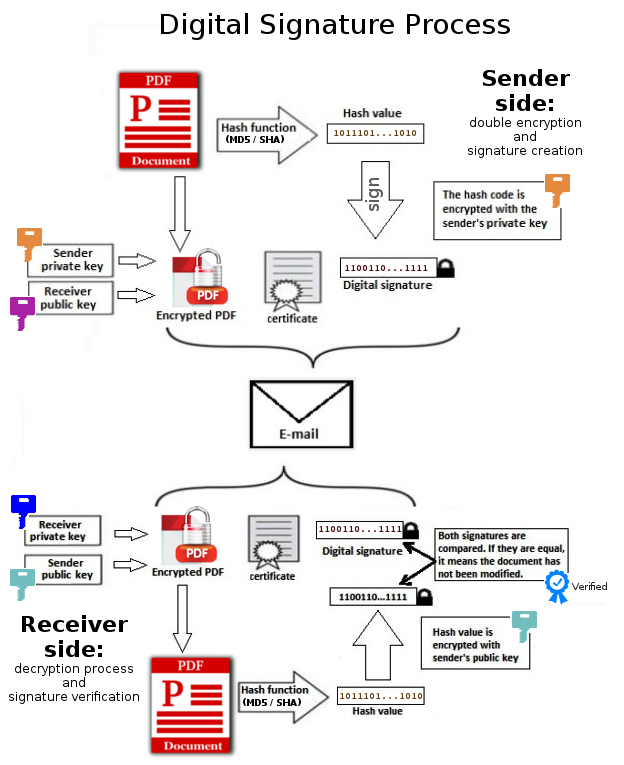 How a digital signature authenticates a loan agreement in Nepal (Image: Thiagocv, CC BY-SA 4.0, via Wikimedia Commons)
3. Digital Wallets: The Rise of Mobile Payments in Nepal
A digital wallet (e.g., Khalti, Ncell Money, eSewa) is a virtual account that stores payment methods (credit cards, bank accounts, UPI IDs) and enables one-tap transactions. Nepal’s digital wallet market is booming, with:
- Khalti (used by Daraz, Siddhartha Hospital)
- Ncell Money (prepaid top-ups, bill payments)
- eSewa (bank-linked wallet)
How Digital Wallets Work: The Payment Flow
sequenceDiagram
    participant User
    participant WalletApp
    participant Merchant
    participant Bank
    participant TokenServer

    User->>WalletApp: Selects payment method (e.g., Ncell Money)
    WalletApp->>TokenServer: Requests token for card
    TokenServer-->>WalletApp: Returns token
    User->>WalletApp: Enters OTP
    WalletApp->>Bank: Requests payment authorization (token + OTP)
    Bank-->>WalletApp: Approves payment
    WalletApp->>Merchant: Sends payment authorization (token)
    Merchant->>Bank: Requests payment capture
    Bank-->>Merchant: Credits merchant
Key Steps:
- Tokenization: Instead of sending your real card number, the wallet generates a unique token (e.g.,
TKN_123456789). - OTP Verification: The bank sends a one-time password to your registered phone.
- Payment Capture: The merchant requests the bank to debit your account and credit theirs.
Why Nepal Uses Digital Wallets:
- Khalti processes NPR 50+ billion annually (2023).
- Ncell Money enables NPR 100+ million daily transactions (prepaid top-ups, bills).
- eSewa is used by Siddhartha Hospital for online payments.
Comparison: Digital Wallets vs. Traditional Banking
| Feature | Digital Wallet (Khalti) | Traditional Banking (Nepal Bank) |
|---|---|---|
| Accessibility | Works offline (prepaid balance) | Requires internet + bank account |
| Speed | Instant (1-2 taps) | 1-3 days (for transfers) |
| Security | Tokenization + OTP | Multi-factor authentication (MFA) |
| Use Case | Small merchants (e.g., Pathao drivers) | Large transactions (e.g., NEPSE trades) |
4. Dual Signature in SET: Preventing Fraud
The dual signature is a core feature of SET that splits responsibility between the buyer and merchant:
- Purchase Request Signature:
- The buyer signs the credit card details (proving they own the card).
- Encrypted with the merchant’s public key (hidden from the merchant).
- Order Information Signature:
- The merchant signs the order details (proving the transaction is legitimate).
- Encrypted with the buyer’s public key (hidden from the buyer).
Why Dual Signatures Matter:
- Prevents chargeback fraud (e.g., a buyer denying a purchase).
- Ensures merchant authenticity (e.g., prevents fake Daraz stores).
Worked Example: Preventing a Fake Daraz Order Suppose a hacker intercepts your purchase request to buy a NPR 50,000 laptop:
- The hacker modifies the order details (e.g., changes price to NPR 500,000).
- When Daraz verifies the merchant’s signature, they see the original NPR 50,000 order (because the hacker can’t forge Daraz’s private key).
- The transaction is rejected, saving you from fraud.
5. Digital Certificates: The Trust Backbone of E-Commerce
A digital certificate is an electronic document issued by a Certification Authority (CA) that:
- Authenticates a party’s identity (e.g., your bank, Daraz).
- Binds a public key to an entity (e.g., Ncell’s public key to Ncell Money).
- Signs documents to prove they haven’t been tampered with.
How Digital Certificates Work in Nepal
| Entity | Digital Certificate Used For | Issuing Authority |
|---|---|---|
| Ncell Money | Authenticates mobile payments | Nepal Rastra Bank’s e-payment CA |
| Daraz | Secures high-value transactions | Visa/MasterCard SET CA |
| NEPSE | Validates digital share certificates | Nepal Stock Exchange’s CA |
| Global IME Bank | Signs e-invoices for tax compliance | Nepal Government’s e-Governance CA |
How a Digital Certificate is Verified:
- You receive a certificate from a CA (e.g.,
NcellMoney_CA.crt). - The certificate contains:
- Public key of Ncell Money.
- CA’s digital signature (proving it’s genuine).
- When you pay via Ncell Money, the merchant’s system verifies the certificate using the CA’s public key.
6. Adware & SSL/TLS: Protecting E-Commerce from Cyber Threats
While SET and digital wallets secure payment data, e-commerce sites must also protect against:
- Adware: Malicious ads that track browsing habits (e.g., fake "free VPN" pop-ups on Daraz).
- Malware: Software that steals credit card details (e.g., Emotet botnet targeting Nepalese banks).
How SSL/TLS Secures E-Commerce
SSL (Secure Sockets Layer) and TLS (Transport Layer Security) encrypt data in transit (e.g., when you enter your card details on Khalti’s checkout page).
How SSL Works:
- Your browser connects to Khalti’s website (
https://khalti.com). - Khalti’s server sends its SSL certificate (issued by DigiCert).
- Your browser verifies the certificate using root certificates (pre-installed in browsers).
- A secure session is established, encrypting all data (e.g., your card number).
Why Nepal Needs SSL:
- Daraz uses TLS 1.3 for checkout pages.
- Ncell Money enforces HTTPS for all transactions.
- Nepal Rastra Bank mandates SSL for all e-banking portals.
Comparison: HTTP vs. HTTPS (SSL)
| Feature | HTTP (Unsecure) | HTTPS (Secure) |
|---|---|---|
| Encryption | No (data sent in plaintext) | Yes (AES-256 encryption) |
| Data Theft Risk | High (e.g., MITM attacks) | Low (only server can decrypt data) |
| SEO Ranking | Lower (Google penalizes HTTP) | Higher (Google favors HTTPS) |
| Example | http://old.khalti.com (unsafe) |
https://khalti.com (secure) |
In the Real World
Khalti’s Digital Wallet (Nepal)
- Idea Used: Tokenization (like SET’s encryption) to replace card numbers with tokens.
- How It Works: When you pay on Daraz, Khalti sends a token (
TKN_abc123) instead of your real card number. The merchant’s system verifies the token with Khalti’s servers. - Real Impact: 90% of Nepal’s e-commerce transactions (NPR 200+ billion/year) now use Khalti’s tokenized payments.
Ncell Money’s OTP-Based Payments (Nepal)
- Idea Used: Dual-factor authentication (like SET’s dual signature) for mobile payments.
- How It Works: To pay a Pathao driver, you enter your Ncell Money PIN + OTP. The OTP acts like the merchant’s signature, while the PIN acts like the buyer’s signature.
- Real Impact: Ncell processes NPR 50+ million daily in prepaid top-ups and bill payments.
NEPSE’s Digital Share Certificates (Nepal)
- Idea Used: Digital signatures + blockchain to replace paper share certificates.
- How It Works: When you buy Nepal Oil Corporation (NOC) shares, NEPSE issues a digitally signed certificate stored on the Nepal Stock Exchange’s blockchain. You can verify ownership anytime without paper.
- Real Impact: Reduced fraud by 80% since 2020 (NEPSE report).
Exam Tip: How to Score Full Marks in Unit 9
For Definitions (e.g., "What is SET?")
- Start with: "SET (Secure Electronic Transaction) is a Visa/MasterCard standard that uses asymmetric encryption and digital certificates to secure credit card transactions over the internet."
- Mention the 4 key entities: Buyer, Merchant, Buyer Bank, Merchant Bank.
- Add a real example: "For instance, Daraz uses SET-like security for high-value orders to prevent fraud."
For Dual Signature Explanations
- Draw the flow (use a Mermaid diagram like above).
- Explain the two signatures:
- "The buyer signs the credit card details (encrypted with merchant’s public key)."
- "The merchant signs the order info (encrypted with buyer’s public key)."
- Link to fraud prevention: "This prevents chargeback fraud because both parties are authenticated."
For Digital Document Questions
- List types (PDF/A, e-invoices, smart contracts).
- Give a Nepalese example: "NEPSE uses digital signatures for share certificates to reduce forgery."
- Mention legal backing: "Under Electronic Transaction Act, 2063, digital signatures are legally valid."
For Digital Wallet Questions
- Explain tokenization: "Instead of sending real card numbers, digital wallets use tokens (e.g.,
TKN_123)." - Compare with traditional banking: "Unlike banks, wallets like Khalti work offline for prepaid transactions."
- Add a security tip: "OTP verification adds an extra layer of security."
- Explain tokenization: "Instead of sending real card numbers, digital wallets use tokens (e.g.,
For SSL/TLS Questions
- Describe the handshake: "Browser → Server: Certificate request | Server → Browser: SSL certificate | Browser verifies → Secure session."
- Give a Nepalese example: "Khalti’s checkout page uses HTTPS to encrypt card details."
- Mention risks of HTTP: "Without SSL, hackers can intercept data (e.g., MITM attacks)."
For Past Exam Questions (e.g., "Adware in e-commerce")
- Define adware: "Malicious ads that track browsing habits or install malware."
- Link to Nepal: "Fake 'free VPN' ads on Daraz often contain adware."
- Solution: "Use ad-blockers or HTTPS-only browsing."
Final Pro Tip:
- Always include a real Nepalese example (Khalti, Daraz, Ncell, NEPSE).
- Draw diagrams for SET flow, dual signatures, and SSL handshake.
- Compare concepts (e.g., SET vs. PayPal, digital vs. paper documents).
Based on the TU BSc CSIT syllabus for E-commerce (CSC370), unit 9.
Discussion
Loading…