Computer and Information TechnologyUnit 29 min read
Computer Hardware & I/O: Devices, Functions & Real-World Use
Unit 2 of Computer and Information Technology: Explores the anatomy of computer hardware—from processors and memory to input/output devices—how they interact, their classifications, and real-world applications in Nepal’s tech ecosystem (e.g., NTC’s network routers, Daraz’s inventory scanners).
TAKEAWAYS:
- Understand the core components of a computer system (CPU, memory, storage, I/O) and their roles in processing data.
- Learn how input/output devices bridge human interaction with machines (e.g., keyboards, printers) and their specialized uses.
- Compare analog vs. digital signals, serial vs. parallel data transfer, and wired vs. wireless communication in real devices.
- Analyze memory hierarchy (registers → cache → RAM → storage) and why it optimizes performance (e.g., Ncell’s mobile data caching).
- Recognize peripheral devices (scanners, GPS, biometric sensors) and their applications in tourism (e.g., hotel keycards, flight tracking).
- Apply knowledge to troubleshoot hardware issues (e.g., why a printer jams or a USB port fails).
1. Introduction to Computer Hardware
Hardware is the physical components of a computer that perform tasks when powered. Unlike software (instructions), hardware executes those instructions. Think of it as the body of the computer—without it, software (the "mind") has nowhere to run.
Key Hardware Categories
classDiagram
    Hardware <|-- CPU
    Hardware <|-- Memory
    Hardware <|-- Storage
    Hardware <|-- InputDevices
    Hardware <|-- OutputDevices
    Hardware <|-- Peripherals
2. Central Processing Unit (CPU)
The CPU is the "brain" of the computer, executing instructions from programs. It consists of:
- Control Unit (CU): Fetches and decodes instructions.
- Arithmetic Logic Unit (ALU): Performs calculations and logic operations.
- Registers: Ultra-fast temporary storage (e.g., PC, MAR, MDR).
How a CPU Works (Simplified)
- Fetch: Reads the next instruction from memory.
- Decode: Interprets the instruction.
- Execute: Performs the operation (e.g., add two numbers).
- Store: Writes the result back to memory.
3. Memory and Storage Systems
Memory stores data temporarily or permanently. There are two types:
- Primary Memory (Volatile): RAM (Random Access Memory) holds data while the computer is on.
- Secondary Memory (Non-volatile): HDD/SSD stores data permanently (e.g., operating system, files).
Memory Hierarchy (Speed vs. Cost)
| Level | Type | Speed (ns) | Size (bytes) | Volatile? | Example Use Case |
|---|---|---|---|---|---|
| Registers | Ultra-fast | 0.1 | 16–64 | No | CPU internal calculations |
| Cache (L1/L2/L3) | Fast cache | 0.5–10 | KB–MB | No | Frequently used data |
| RAM | Main memory | 50–150 | GB | Yes | Running programs |
| SSD | Flash storage | 100,000+ | TB | No | OS, apps, files |
| HDD | Magnetic disk | 5,000,000+ | TB | No | Backups, large datasets |
Why Hierarchy?
- Speed: Registers are fastest but tiny; HDDs are slowest but massive.
- Cost: Cheaper to store data on HDDs than in RAM.
Worked Example: Ncell’s Mobile Data Caching Ncell uses cache memory in its base stations to temporarily store frequently accessed data (e.g., popular websites). This reduces the need to fetch data from slower storage (e.g., the internet), improving response time for users.
4. Input/Output (I/O) Devices
I/O devices transfer data between the user and computer. They are classified as:
- Input Devices: Send data to the computer (e.g., keyboard, mouse, scanner).
- Output Devices: Receive data from the computer (e.g., monitor, printer, speaker).
Common Input Devices
| Device | Function | Example Use in Tourism |
|---|---|---|
| Keyboard | Enters text/data | Booking hotel rooms online |
| Mouse | Navigates GUI | Selecting flight options on Daraz Travel |
| Scanner | Converts paper to digital | Scanning passport photos for visas |
| Biometric | Identifies users (fingerprint) | Airport security check-ins |
| Microphone | Captures voice/audio | Voice commands for smart hotels |
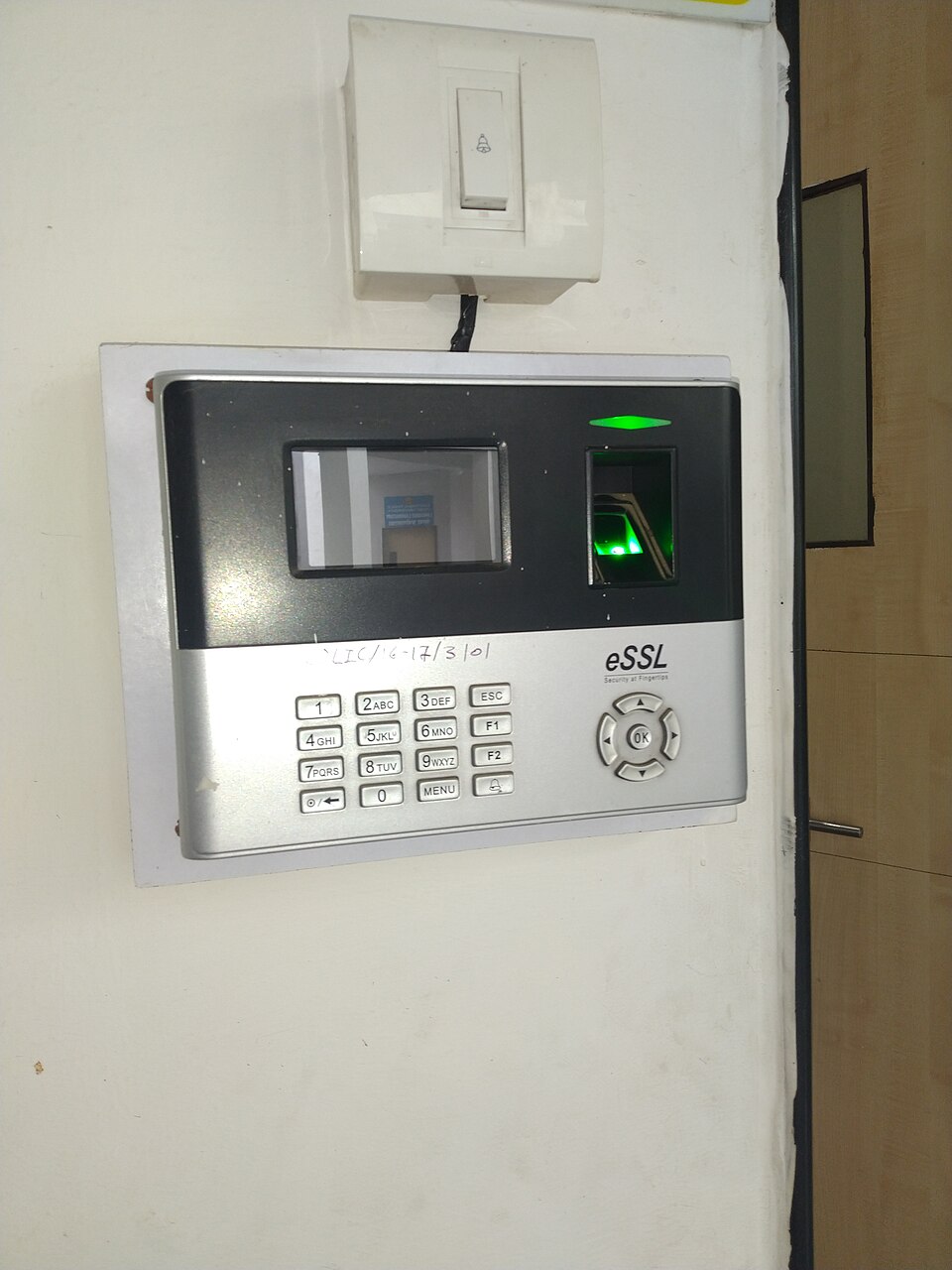 A hotel’s fingerprint scanner for room access, using biometric I/O. (Image: Sanskritibharti1398, CC BY-SA 4.0, via Wikimedia Commons)
Common Output Devices
| Device | Function | Example Use in Tourism |
|---|---|---|
| Monitor | Displays visual output | Checking flight schedules |
| Printer | Hard copies documents | Printing boarding passes |
| Speaker | Plays audio | Announcing flight delays |
| GPS | Provides location data | Guiding tourists in Kathmandu |
5. Peripheral Devices
Peripherals are external devices that enhance functionality. Examples:
- Portable Storage: USB drives, SD cards (used by travel bloggers to back up photos).
- Networking: Routers, modems (NTC uses these to connect homes to the internet).
- Multimedia: Webcams (for video calls with tour groups), projectors (for presentations).
Mermaid Diagram: Peripheral Connections
graph TD
    A["CPU"] --> B["Motherboard"]
    B --> C["USB Port"]
    B --> D["Ethernet Port"]
    C --> E["USB Drive"]
    C --> F["Keyboard"]
    D --> G["Router"]
    G --> H["Internet"]
6. Data Transfer and Communication
Data moves between devices via signals (analog/digital) and topologies (how devices are connected).
Analog vs. Digital Signals
| Feature | Analog Signal | Digital Signal |
|---|---|---|
| Representation | Continuous wave (e.g., voice) | Discrete pulses (0s and 1s) |
| Noise | Sensitive to interference | Resistant to noise |
| Example | Old telephone lines | Modern Wi-Fi, USB cables |
Serial vs. Parallel Data Transfer
| Feature | Serial | Parallel |
|---|---|---|
| Data Path | Single wire | Multiple wires |
| Speed | Slower (one bit at a time) | Faster (multiple bits at once) |
| Example | USB 3.0 (serial) | Old parallel ports (rare now) |
Worked Example: USB vs. Ethernet
- USB (Serial): Used for peripherals like keyboards (slow but flexible).
- Ethernet (Parallel-like): Used in NTC’s fiber-optic network (high-speed data transfer for multiple devices).
7. Network Topologies (How Devices Connect)
graph TD
    subgraph Star["Star Topology"]
        A["Hub"] --> B["Device 1"]
        A --> C["Device 2"]
        A --> D["Device 3"]
    end
    subgraph Bus["Bus Topology"]
        E["Main Cable"] --> F["Device 1"]
        E --> G["Device 2"]
        E --> H["Device 3"]
    end
Where to See This?
- Star: NTC’s internet routers (central hub connects all users).
- Bus: Old school networks (all devices share a single cable).
In the Real World
eSewa’s Payment Terminals
- Idea: Uses barcode scanners (input) and receipt printers (output) to process transactions.
- How: Scans QR codes, validates payment, and prints a digital receipt—all via I/O devices.
Pathao’s Ride-Hailing App
- Idea: Relies on GPS modules (input) to track driver/ride locations and touchscreen displays (output) for user interaction.
- How: The app fetches real-time location data from GPS and updates the driver’s screen instantly.
NEPSE’s Trading Terminals
- Idea: Uses high-speed RAM and low-latency network cables to execute stock trades in milliseconds.
- How: The memory hierarchy ensures quick access to market data, while wired connections reduce delay.
Exam Tip
- Focus on Definitions: Always define terms like "CPU," "RAM," "input/output devices," and "peripheral" clearly.
- Compare and Contrast: Expect questions comparing analog/digital, serial/parallel, or primary/secondary memory.
- Real-World Links: Tie concepts to Nepal’s tech (e.g., "How does NTC’s router use memory hierarchy?").
- Diagrams: Draw memory hierarchy tables, I/O device classifications, or network topologies—they score high.
- Troubleshooting: Know why a device fails (e.g., "Why does a USB drive not work?" → connection issue, corrupted data).
Sample Question Breakdown:
Q: Explain how a CPU processes an instruction. (Marks: 5) Answer:
- Fetch the instruction from memory (RAM).
- Decode it in the Control Unit.
- Execute in the ALU (e.g., add two numbers).
- Store the result back to memory. Visual: Draw the CPU execution cycle (fetch-decode-execute-store).
Q: Compare RAM and ROM. (Marks: 4) Answer:
Feature RAM (Random Access Memory) ROM (Read-Only Memory) Volatility Volatile (clears on power off) Non-volatile (persists) Speed Faster Slower Use Temporary program/data storage Permanent firmware (e.g., BIOS)
Final Note: Hardware is the foundation of computing. Mastering this unit means you can explain how a computer works—from the keyboard you type on to the cloud servers running Daraz’s inventory. Visualize everything: draw the CPU, label a memory hierarchy table, and sketch a network topology. This unit is 50% diagrams + 50% definitions. Good luck!
Based on the TU BTTM syllabus for Computer and Information Technology (ITC307), unit 2.
Discussion
Loading…