Computer and Information TechnologyUnit 114 min read
Computer Basics, Info Systems & Software Types
Unit 1 of Computer and Information Technology introduces core concepts: what computers and information systems are, their classifications, hardware-software interaction, and how they process data. Learn definitions, real-world applications, and exam-focused comparisons.
TAKEAWAYS:
- A computer is an electronic device that processes data via input, processing, storage, and output—classified by size, purpose, and architecture.
- Information systems (like financial or marketing systems) transform raw data into actionable insights using hardware, software, and networks.
- Software is categorized into system software (OS, utilities) and application software (word processors, games), each serving distinct roles.
- Data vs. information: Data is raw facts; information is processed data with context (e.g., a flight’s departure time vs. a delayed alert).
- Computer generations show evolution from vacuum tubes to AI, with each generation offering speed, efficiency, and miniaturization gains.
- Exam focus: Define terms precisely, compare types (e.g., analog vs. digital), and link concepts to real-world examples (e.g., eSewa’s payment system).
1. What is a Computer?
A computer is an electronic device that accepts data (raw facts like numbers or text), processes it using instructions (programs), stores results, and produces output (information). It follows the input-process-storage-output (IPSO) cycle.
Key Components of a Computer System
Types of Computers
Computers are classified based on size, purpose, and architecture:
| Type | Example | Use Case | Processing Power |
|---|---|---|---|
| Supercomputer | Cray XC50 (Nepal’s NTC) | Weather forecasting, nuclear research | Extremely high |
| Mainframe | IBM Z15 (banks) | Large-scale transaction processing | Very high |
| Minicomputer | DEC PDP-11 (legacy) | Small business networks | High |
| Microcomputer | Laptop/PC (your device) | Personal use, office tasks | Moderate |
| Embedded | Smartwatch, ATM machine | Dedicated tasks (time, payments) | Low to moderate |
Generations of Computers
Computers evolved through five generations, each improving speed, size, and efficiency:
| Generation | Time Period | Technology | Example | Key Feature |
|---|---|---|---|---|
| 1st | 1940–1956 | Vacuum tubes | ENIAC | Bulky, slow, heat-prone |
| 2nd | 1956–1963 | Transistors | IBM 1401 | Smaller, faster, reliable |
| 3rd | 1964–1971 | Integrated circuits | IBM System/360 | Multitasking, miniaturization |
| 4th | 1971–1990 | Microprocessors | Apple II, PCs | Personal computing revolution |
| 5th | 1990–present | AI, parallel processing | Smartphones, quantum computers | AI, IoT, cloud computing |
Worked Example: eSewa’s Payment System eSewa processes billions of transactions annually using 4th/5th-generation servers (microprocessors + AI). When you pay an electricity bill:
- Your smartphone (microcomputer) sends data to eSewa’s cloud servers (mainframe/microcomputer cluster).
- The system validates your account (data processing), deducts funds, and updates NTC’s records.
- You receive a confirmation (output) via SMS/app. *Here, eSewa uses embedded systems (POS machines), microcomputers (servers), and AI for fraud detection.*
2. Information Systems: Turning Data into Decisions
An information system (IS) is a combination of hardware, software, data, people, and networks that processes data to produce information for decision-making.
Types of Information Systems
| Type | Definition | Example in Nepal | Key Feature |
|---|---|---|---|
| Financial Information System (FIS) | Processes financial data (transactions, reports) for accounting/auditing. | Nabil Bank’s core banking system | Real-time transaction tracking |
| Marketing Information System (MKIS) | Collects and analyzes market data to guide marketing strategies. | Daraz’s customer behavior analytics | Predicts demand, personalizes ads |
| Office Automation System (OAS) | Automates office tasks (email, scheduling, document management). | Google Workspace in travel agencies | Cloud-based collaboration |
| Management Information System (MIS) | Supports managers with reports and dashboards. | NTC’s network performance monitoring | KPI tracking (e.g., uptime %) |
| Decision Support System (DSS) | Uses models/algorithms to aid complex decisions. | NEPSE’s stock trading platform | Simulates market scenarios |
How MKIS Helps in Marketing (Exam Focus)
MKIS uses data from sources like social media, sales records, and customer surveys to:
- Segment customers (e.g., Pathao divides riders by age/location).
- Analyze trends (e.g., Daraz identifies best-selling products in monsoon).
- Optimize pricing (e.g., NTC adjusts electricity tariffs based on usage data).
- Personalize campaigns (e.g., Khalti sends targeted discounts via SMS).
Worked Example: Daraz’s Monsoon Sale Strategy Daraz uses MKIS to:
- Collect data: Past sales, weather forecasts, competitor prices.
- Process data: Identify high-demand categories (e.g., umbrellas, fans).
- Generate insights: Predict which products will sell out first.
- Take action: Stock more inventory, offer flash sales. Result: 30% higher revenue during monsoon.
3. Computer Software: The Brain Behind Operations
Software is a set of instructions that tells hardware how to perform tasks. It is divided into two main types:
A. System Software
Manages hardware and provides a platform for applications. Includes:
- Operating System (OS): Acts as an interface between hardware and user/apps.
- Examples: Windows (PCs), macOS (Macs), Android (smartphones).
- Functions:
- Memory management (allocates RAM to programs).
- Process management (schedules tasks like printing).
- Device management (drivers for printers, keyboards).
- Utility Software: Performs maintenance tasks.
- Examples: Antivirus (Norton), Disk Cleanup, File Compression (WinRAR).
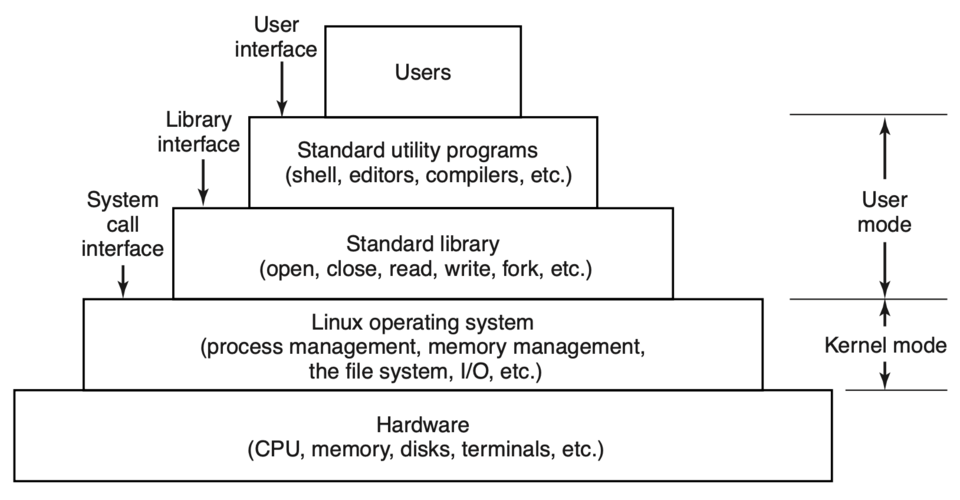 OS as a bridge between hardware and applications (CPU, RAM, storage → OS → Apps) (Image: Andrew S. Tanenbaum, Herbert Bos, Public domain, via Wikimedia Commons)
B. Application Software
Designed for end-users to perform specific tasks:
| Type | Examples | Use Case |
|---|---|---|
| Productivity | MS Office, Google Docs | Writing reports, spreadsheets |
| Entertainment | YouTube, Spotify | Streaming videos/music |
| Educational | Khan Academy, BYJU’S | Online learning |
| Specialized | Adobe Photoshop, AutoCAD | Graphic design, engineering |
Worked Example: Kathmandu Traffic Management The Kathmandu Metropolitan City (KMC) uses:
- System Software: OS on traffic cameras to process live feeds.
- Application Software: Traffic Simulation Tools (e.g., AIMSUN) to model congestion. How it works:
- Cameras capture data (vehicle counts, speed).
- Software processes data to identify bottlenecks (e.g., Thapathali junction).
- Output: Real-time alerts for police to reroute traffic.
4. Data vs. Information: The Core Difference
| Aspect | Data | Information |
|---|---|---|
| Definition | Raw, unprocessed facts | Processed data with context/meaning |
| Example | "Flight PK203 departs at 10:30" | "Flight PK203 is delayed by 1 hour" |
| Role | Input for processing | Output for decision-making |
| Format | Numbers, text, images | Reports, graphs, alerts |
Visual Trace: How Data Becomes Information
flowchart TD
    A["Raw Data: 'PK203, 10:30, Kathmandu'"] --> B["Processing: Compare with schedule"]
    B --> C["Context: 'Current time is 10:45'"]
    C --> D["Information: 'Flight delayed by 15 mins'"]
    D --> E["Action: 'Passenger checks alternative flights'"]
Real-World Link: Ncell’s Network Monitoring
- Data: Signal strength readings from cell towers.
- Processing: Software detects weak signals in Bhaktapur.
- Information: "Outage in Sector 3; reroute traffic to Sector 5."
- Action: Ncell technicians dispatch a team.
5. Computer Networks: Connecting Systems
A computer network is a group of interconnected devices (computers, servers, printers) that share resources (data, internet, printers) via communication protocols.
Types of Networks (By Size)
| Type | Size | Example | Speed | Range |
|---|---|---|---|---|
| PAN | Personal | Bluetooth headset | Low | 1–10 meters |
| LAN | Office/Building | Hotel Wi-Fi network | Medium | 10–100 meters |
| MAN | City | Kathmandu’s fiber network | High | 5–50 km |
| WAN | Country/Global | Internet, NTC backbone | Very High | Global |
Network Topologies
How devices are physically or logically connected:
Worked Example: Pathao’s Driver App Network Pathao uses a hybrid network:
- LAN: Drivers’ phones connect to Pathao’s servers via Wi-Fi/mobile data.
- WAN: Servers communicate globally to match riders/drivers in real-time.
- Topology: Star (all drivers connect to central Pathao servers).
In the Real World
eSewa’s Payment Gateway
- Concept: Information System (Financial IS) + Computer Network (WAN)
- How it works:
- Your phone (microcomputer) sends payment data via mobile network (WAN) to eSewa’s servers.
- System software (OS + database) processes the transaction.
- Application software generates a receipt and updates your balance.
- Exam link: Relates to Unit 1 (IS types) + Unit 5 (networks).
NTC’s Fiber-Optic Backbone
- Concept: WAN + Network Topology (Mesh for redundancy)
- How it works:
- NTC uses fiber-optic cables (high-speed WAN) to connect cities.
- Mesh topology ensures if one cable fails, data reroutes automatically.
- Exam link: Network types/sizes + real-world infrastructure.
Khalti’s Fraud Detection
- Concept: Application Software (AI/ML) + Data Processing
- How it works:
- When you transfer money, Khalti’s software checks:
- Is the recipient’s phone number verified?
- Is the transaction amount unusual for your profile?
- Output: Flags suspicious activity (e.g., "Login from India at 3 AM").
- When you transfer money, Khalti’s software checks:
- Exam link: Software types + information systems.
Exam Tip
Definitions Must Be Precise
- ❌ "A computer is a machine that works."
- ✅ "A computer is an electronic device that processes data via input, processing, storage, and output using stored programs."
- Marks tip: Use key terms like "stored programs," "IPSO cycle," and "binary operations."
Compare Types in Tables
- Examiners love structured comparisons (e.g., computer types, network sizes, software categories).
- Example answer for "types of networks":
Criteria LAN WAN Coverage Office/building Global Speed 10–100 Mbps 100 Mbps+ Example Hotel Wi-Fi Internet
Link to Real-World Examples
- Always tie theory to Nepal’s context. For example:
- Financial IS → Nabil Bank’s loan processing.
- Networks → NTC’s fiber expansion in Pokhara.
- Software → eSewa app on your phone.
- Always tie theory to Nepal’s context. For example:
Diagrams = Extra Marks
- Draw flowcharts (e.g., data → information), network topologies, or software layers.
- Example: For "how a computer works," sketch the IPSO cycle with arrows.
Avoid Vague Answers
- ❌ "Computers are used everywhere."
- ✅ "Computers in Nepal are used in eSewa for payments (information system), NTC for network management (WAN), and banks for transaction processing (mainframe computers)."
Based on the TU BTTM syllabus for Computer and Information Technology (ITC307), unit 1.
Discussion
Loading…