Computer ScienceUnit 710 min read
Software Process Models: Waterfall, Spiral, Agile & More
Unit 7 of Computer Science explains how software is developed systematically using different process models like Waterfall, Spiral, Agile, and Prototyping. Learn their steps, advantages, disadvantages, and when to use each.
TAKEAWAYS:
- Software process models define how software is built—from planning to maintenance.
- The Waterfall model is linear and rigid, while Agile is flexible and iterative.
- Spiral model combines risk analysis with iterative development.
- Prototyping helps clarify requirements before full development.
- Each model has pros and cons—choose based on project needs.
- NEB exams test definitions, comparisons, and real-world applications.
What is a Software Process Model?
A software process model is a structured approach to developing software. It defines:
- How tasks are organized.
- How progress is tracked.
- How changes are handled.
Think of it like a recipe for building software:
- Ingredients = Requirements, design, coding, testing.
- Steps = Process model (Waterfall, Agile, etc.).
- Final dish = Working software.
Why Do We Need Process Models?
Without a model, software development would be chaotic—like building a house without a blueprint! Process models help: ✔ Manage complexity (big projects need structure). ✔ Control costs and time (avoid delays and budget overruns). ✔ Improve quality (systematic testing and reviews). ✔ Handle changes (some models allow flexibility).
1. Waterfall Model (Sequential Model)
The oldest and simplest process model. Work flows downward like a waterfall—one phase must finish before the next starts.
Phases of Waterfall Model
flowchart TD
    A["Requirements"] --> B["Design"]
    B --> C["Implementation"]
    C --> D["Testing"]
    D --> E["Deployment"]
    E --> F["Maintenance"]
How It Works
- Requirements: Gather all needs from users/clients.
- Design: Plan system architecture (UI, database, etc.).
- Implementation: Write code.
- Testing: Fix bugs and verify functionality.
- Deployment: Release to users.
- Maintenance: Fix issues after release.
Advantages
✅ Simple and easy to understand. ✅ Works well for small, well-defined projects. ✅ Clear documentation at each phase.
Disadvantages
❌ No going back—if a phase fails, the whole project may collapse. ❌ Rigid—changes are difficult after requirements are set. ❌ Late testing—bugs found only after coding is done.
When to Use?
- Projects with clear, unchanging requirements.
- Example: Government tax software (rules rarely change).
2. Spiral Model (Risk-Driven Model)
Combines iterative development (repeating cycles) with risk analysis. Best for high-risk projects.
How It Works
The Spiral Model has 4 main steps, repeated in cycles:
flowchart LR
    A["Plan"] --> B["Risk Analysis"]
    B --> C["Engineering"]
    C --> D["Evaluate"]
D --> A- Plan: Define objectives, constraints, and alternatives.
- Risk Analysis: Identify risks (technical, schedule, budget).
- Engineering: Develop and test a prototype.
- Evaluate: Review with stakeholders and plan the next cycle.
Advantages
✅ Handles risk early (avoids surprises). ✅ Flexible—can adjust based on feedback. ✅ Good for large, complex projects.
Disadvantages
❌ Expensive (requires expert risk analysis). ❌ Complex to manage (not for small teams). ❌ Time-consuming (multiple cycles).
When to Use?
- High-risk projects (e.g., space software, medical systems).
- When requirements are unclear but need refinement.
3. Agile Model (Iterative & Incremental)
Agile is flexible and customer-focused. Work is divided into small iterations (2-4 weeks), called sprints.
Key Principles of Agile
- Customer collaboration over contracts.
- Working software over documentation.
- Responding to change over following a plan.
Agile Process (Scrum Framework)
flowchart TD
    A["Product Backlog"] --> B["Sprint Planning"]
    B --> C["Daily Standup"]
    C --> D["Sprint Review"]
    D --> E["Retrospective"]
E --> A- Product Backlog: List of features to build.
- Sprint Planning: Pick tasks for the next sprint.
- Daily Standup: Quick team meeting (15 mins) to discuss progress.
- Sprint Review: Show working software to stakeholders.
- Retrospective: Team discusses what went well and what to improve.
Advantages
✅ Flexible—changes can be made anytime. ✅ Early delivery of working software. ✅ Customer feedback is continuous.
Disadvantages
❌ Requires discipline (teams must be self-organized). ❌ Documentation can be weak. ❌ Not suitable for very small projects.
When to Use?
- Fast-changing requirements (e.g., mobile apps, startups).
- Projects needing frequent updates (e.g., social media platforms).
4. Prototyping Model
Build a basic working model (prototype) first to clarify requirements before full development.
How It Works
flowchart LR
    A["Identify Basic Requirements"] --> B["Build Prototype"]
    B --> C["Review with Users"]
    C --> D["Refine Prototype"]
D --> E["Final System"]- Identify basic needs (what the user wants).
- Build a quick prototype (may be rough but functional).
- Get feedback from users.
- Refine and build the final system.
Advantages
✅ Clarifies requirements early. ✅ Reduces risk of building the wrong thing. ✅ Users can see and interact with the system early.
Disadvantages
❌ Prototypes may mislead if not managed well. ❌ Extra effort to build and discard prototypes. ❌ Not suitable for all projects (e.g., simple scripts).
When to Use?
- Unclear requirements (e.g., new software for a unique business).
- User interfaces (e.g., designing a new app UI).
Comparison of Software Process Models
| Model | Type | Flexibility | Best For | Testing Phase |
|---|---|---|---|---|
| Waterfall | Sequential | Low | Small, fixed-requirement projects | Late (after coding) |
| Spiral | Iterative + Risk-Driven | Medium | High-risk, complex projects | Throughout cycles |
| Agile | Iterative + Incremental | High | Fast-changing, customer-focused | Continuous |
| Prototyping | Evolutionary | Medium | Unclear requirements, UI design | Early (on prototype) |
Which Model Should You Choose?
| Scenario | Recommended Model |
|---|---|
| Project with fixed requirements | Waterfall |
| High-risk project (e.g., medical software) | Spiral |
| Frequent changes, customer feedback needed | Agile |
| Unclear requirements, need user feedback early | Prototyping |
Solved Example: Choosing a Process Model
Question: A company wants to build a new e-commerce website. Requirements are changing frequently, and the client wants updates every 2 weeks. Which model is best? Why?
Solution: ✅ Agile Model is the best choice because:
- Requirements are changing frequently (Agile handles changes well).
- Fast updates (2-week sprints match client needs).
- Customer collaboration (client can see progress every sprint).
❌ Waterfall would be bad because:
- No flexibility for changes.
- Testing happens only at the end (too late for feedback).
NEB Board-Style Questions (Practice!)
Short Answer Questions
Define "Software Process Model." Give one example. Answer: A structured approach to software development. Example: Waterfall Model.
What is the main disadvantage of the Waterfall Model? Answer: No going back—once a phase is done, changes are difficult.
Name two advantages of the Agile Model. Answer:
- Flexible to changes.
- Early and continuous delivery of working software.
When would you use the Spiral Model? Answer: For high-risk projects (e.g., space software, medical systems).
Long Answer Questions
Explain the phases of the Waterfall Model with a diagram. What are its limitations? Answer:
flowchart TD
    A["Requirements"] --> B["Design"]
    B --> C["Implementation"]
    C --> D["Testing"]
    D --> E["Deployment"]
    E --> F["Maintenance"]
Limitations:
- Rigid (no flexibility for changes).
- Late testing (bugs found only after coding).
- Not suitable for dynamic projects.
Compare the Agile and Waterfall models in a table. Which one would you prefer for a mobile app development? Why? Answer:
Feature Agile Waterfall Flexibility High (changes allowed) Low (fixed phases) Testing Continuous Late (after coding) Customer Input Frequent Rare (only at start) Best For Dynamic projects Fixed-requirement projects Preference for Mobile App:
- Agile is better because:
- Mobile apps evolve quickly (new features, bug fixes).
- Users want frequent updates.
- Requirements often change (e.g., new trends in UI).
- Agile is better because:
Describe the Spiral Model. How does risk analysis help in software development? Answer: The Spiral Model combines iterative development with risk analysis in 4 steps:
- Plan → 2. Risk Analysis → 3. Engineering → 4. Evaluate. Risk Analysis Helps By:
- Identifying potential problems early (e.g., technical challenges, budget issues).
- Allowing mitigation strategies (e.g., extra testing, more resources).
- Reducing surprises later in the project.
Exam Tip: How to Score Full Marks
Understand Definitions
- NEB often asks: "Define Waterfall Model." Know exactly what each model is.
Draw Diagrams
- For Waterfall, Spiral, Agile, draw flowcharts (like above). Even if not asked, a diagram boosts marks.
Compare Models
- Questions like "Compare Agile and Waterfall" need a table (like above). Highlight key differences.
Give Real-World Examples
- "When would you use Prototyping?" Answer: "For designing a new app UI where users need to see a mockup first."
Explain Advantages & Disadvantages
- Always give at least 2 pros and 2 cons for each model.
Practice NEB-Style Questions
- Look at past papers. NEB loves:
- "Explain [Model] with a diagram."
- "Which model is best for [Scenario]? Justify."
- Look at past papers. NEB loves:
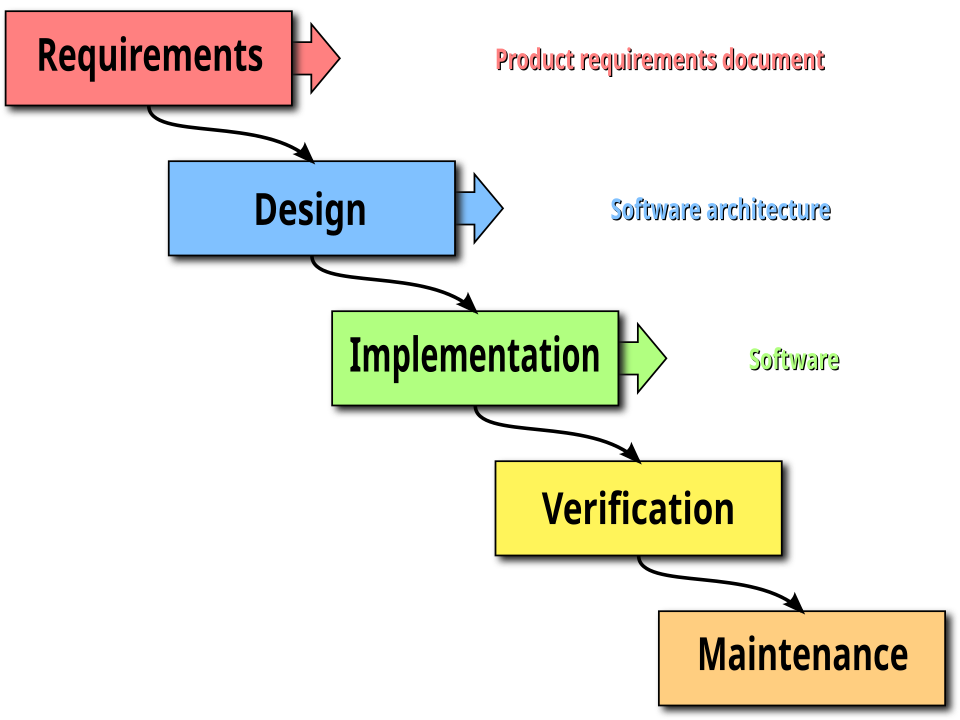 A labeled flowchart showing the 6 phases of the Waterfall Model. (Image: Peter Kemp / Paul Smith, CC BY 3.0, via Wikimedia Commons)
Based on the NEB +2 Management syllabus for Computer Science (Comp), unit 7.
Discussion
Loading…