Life Skill EducationUnit 149 min read
Digital Citizenship: Rights, Responsibilities & Safe Online Life
Unit 14 of Life Skill Education explores what it means to be a responsible digital citizen, covering online safety, ethical behavior, cyber laws, and how to protect your digital identity while using technology wisely in daily life.
TAKEAWAYS:
- Digital citizenship means using technology responsibly, respecting others online, and protecting your personal information.
- Cyberbullying, misinformation, and privacy violations are serious issues that can harm individuals and society.
- Strong passwords, two-factor authentication, and recognizing phishing scams are key to online security.
- Digital footprints can affect your future opportunities, so think before posting anything online.
- Nepali laws like the Electronic Transaction Act 2008 protect you but also require you to follow cyber ethics.
What is Digital Citizenship?
Digital citizenship refers to the responsible and appropriate use of digital technology. It includes understanding how to behave online, respecting others' rights, and protecting your own digital identity.
Key Components of Digital Citizenship
Why is Digital Citizenship Important?
- Global Connectivity: The internet connects people worldwide, making digital behavior crucial.
- Future Opportunities: Many jobs and education opportunities require digital skills.
- Social Impact: Your online actions can influence others, both positively and negatively.
Digital Literacy: Understanding Technology
Digital literacy means having the skills to use technology effectively and critically.
Essential Digital Skills
Example: Evaluating Online Information
Question: How can you tell if a website is reliable? Answer:
- Check the URL (e.g.,
.gov,.edu,.orgare usually reliable). - Look for author credentials (who wrote it?).
- Verify facts using other sources.
- Check the date (is the information up-to-date?).
Online Safety: Protecting Yourself Online
Online safety involves protecting your personal information and avoiding risks like cyberbullying and scams.
Common Online Risks
| Risk | Description | Prevention Tips |
|---|---|---|
| Cyberbullying | Harassment or threats online | Block the bully, save evidence, report |
| Phishing | Fake emails/websites to steal data | Never click suspicious links, verify sender |
| Identity Theft | Someone uses your personal info | Use strong passwords, monitor accounts |
| Misinformation | False or misleading information | Fact-check before sharing |
Example: Recognizing a Phishing Email
Question: How can you spot a phishing email? Answer:
- Suspicious sender address (e.g.,
amazon@support.cominstead ofamazon.com). - Urgent or threatening language (e.g., "Your account will be closed!").
- Requests for personal info (e.g., "Click here to verify your password").
- Poor grammar or spelling mistakes.
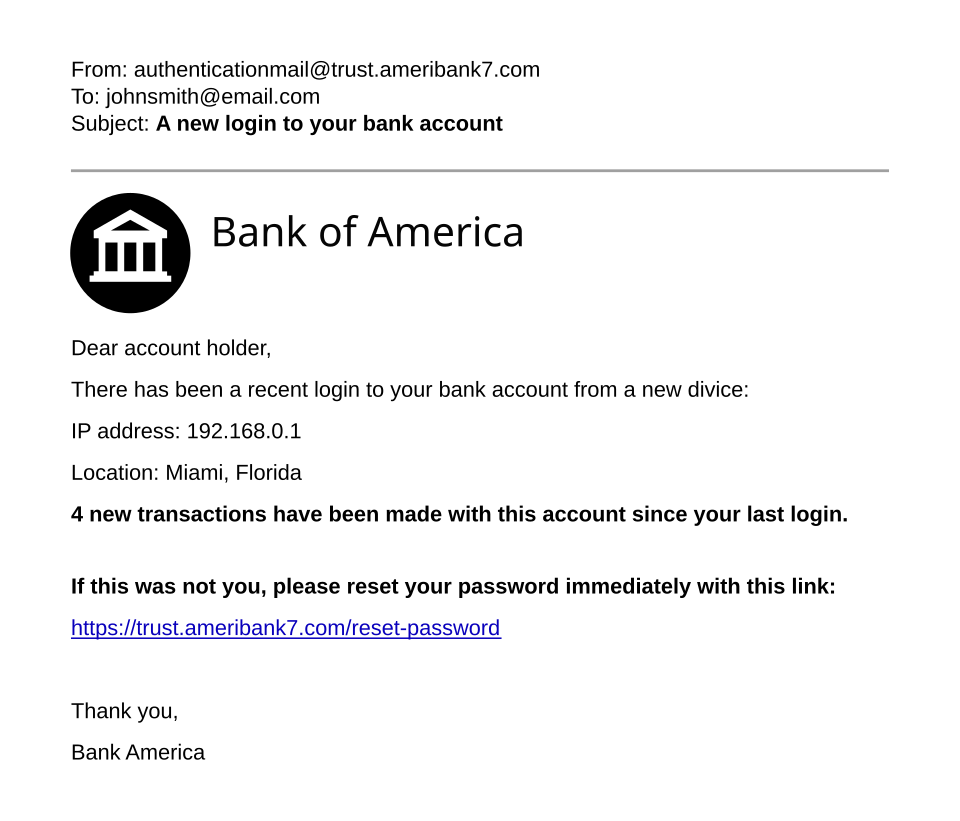 A side-by-side comparison of a real and fake email (Image: Original template by User:Isochrone, amended by User:Belbury, CC BY 4.0, via Wikimedia Commons)
Cyber Ethics: Respecting Others Online
Cyber ethics involves treating others with respect and following moral guidelines online.
Golden Rules of Cyber Ethics
- Respect others' privacy (don’t share personal info without permission).
- Be honest (don’t lie or misrepresent yourself).
- Give credit (cite sources properly).
- Think before posting (what you share can have long-term consequences).
Example: Copyright Infringement
Question: Is downloading movies from illegal websites ethical? Answer:
- No, because:
- It violates copyright laws.
- It harms creators who depend on sales.
- It may contain malware (harmful software).
 The © symbol with an explanation of its meaning (Image: 1esha 76, Public domain, via Wikimedia Commons)
Digital Footprint: Your Online Identity
A digital footprint is the trail of data you leave behind while using the internet.
Types of Digital Footprints
- Active Footprint: What you intentionally share (posts, comments, likes).
- Passive Footprint: What is automatically collected (browser history, location data).
Example: Managing Your Digital Footprint
Question: How can you control what others see about you online? Answer:
- Adjust privacy settings (e.g., on Facebook, Instagram).
- Think before posting (ask: "Would I want my teacher/employer to see this?").
- Use strong privacy controls on search engines (e.g., Google’s "My Activity").
- Regularly clean up old posts (delete unnecessary information).
Cyber Laws in Nepal
Nepal has laws to protect digital citizens and regulate online behavior.
Key Cyber Laws in Nepal
| Law | Purpose |
|---|---|
| Electronic Transaction Act 2008 | Regulates online transactions and digital signatures. |
| Cyber Security Act 2018 | Protects against cybercrimes like hacking and data theft. |
| Right to Information Act 2064 | Ensures transparency in government digital records. |
| Children’s Act 2018 | Protects children from online exploitation and cyberbullying. |
Example: Reporting Cybercrime in Nepal
Question: What should you do if you face cyberbullying? Answer:
- Save evidence (screenshots, messages).
- Block the harasser.
- Report to:
- Nepal Police Cyber Crime Unit (contact: 100 or visit nearest police station).
- Social media platforms (e.g., Facebook’s "Report" option).
- Parents/teachers for support.
Digital Well-being: Balancing Technology and Life
Digital well-being means using technology in a healthy, balanced way.
Tips for Digital Well-being
- Set screen time limits (use apps like Google’s Digital Wellbeing).
- Take regular breaks (follow the 20-20-20 rule: every 20 minutes, look 20 feet away for 20 seconds).
- Avoid multitasking (focus on one task at a time).
- Stay connected offline (spend time with family/friends without screens).
Example: Creating a Healthy Tech Schedule
Question: How can you balance study and social media? Answer:
| Time Slot | Activity |
|---|---|
| 7:00 AM - 8:00 AM | Wake up, no phone |
| 8:00 AM - 10:00 AM | Study (phone on silent) |
| 10:00 AM - 10:15 AM | Short break (social media) |
| 10:15 AM - 12:00 PM | Study |
| 12:00 PM - 1:00 PM | Lunch (no screens) |
Exam Tip: How to Score Full Marks in NEB Exams
The NEB exam on Digital Citizenship usually includes:
- Short Answer Questions (SAQ): Define terms like digital footprint, cyberbullying, or phishing.
- Long Answer Questions (LAQ): Explain concepts like online safety or digital ethics with examples.
- Case Studies: Analyze scenarios (e.g., "What should you do if you receive a suspicious email?").
- Diagrams/Charts: Label parts of a digital footprint or cyber ethics guidelines.
Common Exam Questions and Answers
Question 1: What are the three types of digital footprints? Answer:
- Active Footprint (posts, comments).
- Passive Footprint (browser history, location data).
- Hidden Footprint (data collected by apps without your knowledge).
Question 2: How can you protect your digital identity? Answer:
- Use strong passwords (mix letters, numbers, symbols).
- Enable two-factor authentication.
- Avoid sharing personal info publicly.
- Regularly update privacy settings.
Question 3: What is cyberbullying? Give an example. Answer: Cyberbullying is harassing, threatening, or embarrassing someone online. Example: Posting mean comments on someone’s social media profile or sharing private photos without consent.
Final Advice:
- Practice safe online habits daily.
- Stay updated on cyber laws and digital trends.
- Think critically before sharing or believing online content.
Based on the NEB +2 Management syllabus for Life Skill Education (LSE), unit 14.
Discussion
Loading…