Computer ScienceUnit 76 min read
C Programming Basics: Data Types, Variables, Operators & Input/Output
Unit 7 of Computer Science teaches the foundation of C programming—how to declare variables, use data types, perform operations, and handle input/output. Learn with clear examples, visuals, and NEB-style questions to master the basics for exams.
What is C Programming?
C is a procedural programming language used to write efficient programs. It was developed by Dennis Ritchie in 1972. C is the base for many modern languages like C++, Java, and Python.
Why Learn C?
- Used in system programming (OS, drivers, embedded systems).
- Teaches structured programming (clear logic, modular code).
- Fast execution and low-level memory access.
Basic Structure of a C Program
Every C program has two parts:
- Preprocessor directives (start with
#include). - Main function (
main()), where execution begins.
#include <stdio.h>  // Preprocessor directive (includes standard I/O functions)
int main()         // Main function (execution starts here)
{
    printf("Hello, World!");  // Prints text
    return 0;  // Ends program successfully
}
How it works:
#include <stdio.h>→ Includes library for input/output.int main()→ Entry point of the program.printf()→ Displays output on the screen.return 0;→ Indicates successful execution.
Data Types in C
Data types define what kind of data a variable can hold. C has basic and derived data types.
1. Basic Data Types
| Data Type | Size (bytes) | Range (Approx.) | Example Values |
|---|---|---|---|
int |
2 or 4 | -32,768 to 32,767 (2B) | -10, 0, 42 |
float |
4 | ±3.4e-38 to ±3.4e+38 | 3.14, -0.5 |
double |
8 | ±1.7e-308 to ±1.7e+308 | 3.14159, 0.0001 |
char |
1 | -128 to 127 (or 0-255) | 'A', 'a', '$' |
Example:
int age = 20;          // Integer
float temperature = 36.6;  // Floating-point
char grade = 'A';      // Character
Variables in C
A variable is a named storage location in memory that holds data.
Rules for Naming Variables:
- Must start with a letter or underscore (
_). - Can contain letters, digits, and underscores.
- No spaces or special characters (except
_). - Case-sensitive (
age≠Age).
Example:
int student_age = 18;  // Valid
int 123age = 20;      // Invalid (starts with digit)
int my-age = 25;      // Invalid (hyphen)
Constants in C
Constants are fixed values that cannot be changed during program execution.
Types of Constants:
- Literal Constants (direct values):
int x = 100; // Integer literal float pi = 3.14; // Floating-point literal - Symbolic Constants (defined using
#define):#define PI 3.14159 // PI is now a constant
Operators in C
Operators perform operations on variables and values.
1. Arithmetic Operators
| Operator | Name | Example | Result |
|---|---|---|---|
+ |
Addition | 5 + 3 |
8 |
- |
Subtraction | 10 - 4 |
6 |
* |
Multiplication | 3 * 4 |
12 |
/ |
Division | 10 / 2 |
5 |
% |
Modulus | 7 % 2 |
1 |
Example:
int a = 10, b = 3;
int sum = a + b;      // 13
int diff = a - b;     // 7
int product = a * b;  // 30
int quotient = a / b; // 3 (integer division)
int remainder = a % b;// 1
Input and Output in C
1. printf() Function
Used to display output on the screen.
printf("Hello, %s! Your age is %d.", name, age);
%s→ String (text)%d→ Integer%f→ Float
Example:
#include <stdio.h>
int main()
{
    printf("Name: %s, Age: %d\n", "Rohan", 20);
    return 0;
}
Output:
Name: Rohan, Age: 20
2. scanf() Function
Used to take input from the user.
scanf("%d", &age);  // Takes integer input
scanf("%f", &salary); // Takes float input
scanf("%c", &grade); // Takes character input
Example:
#include <stdio.h>
int main()
{
    int num;
    printf("Enter a number: ");
    scanf("%d", &num);  // Stores input in 'num'
    printf("You entered: %d", num);
    return 0;
}
Output:
Enter a number: 42
You entered: 42
Type Casting in C
Converts one data type to another.
double x = 5 / 2;  // x = 2.0 (integer division)
double y = (double)5 / 2;  // y = 2.5 (forced float division)
Solved Examples
Example 1: Basic Input/Output
#include <stdio.h>
int main()
{
    int num;
    printf("Enter a number: ");
    scanf("%d", &num);
    printf("Square of %d is %d", num, num * num);
    return 0;
}
Input:
Enter a number: 5
Output:
Square of 5 is 25
Example 2: Arithmetic Operations
#include <stdio.h>
int main()
{
    int a = 10, b = 3;
    printf("Sum: %d\n", a + b);
    printf("Difference: %d\n", a - b);
    printf("Product: %d\n", a * b);
    printf("Quotient: %d\n", a / b);
    printf("Remainder: %d\n", a % b);
    return 0;
}
Output:
Sum: 13
Difference: 7
Product: 30
Quotient: 3
Remainder: 1
NEB Board-Style Questions
Short Answer Questions
- What is the difference between
intandfloatin C? - Write a program to print your name and age using
printf(). - Explain the use of
#include <stdio.h>in a C program.
Programming Questions
- Write a C program to:
- Take two numbers as input.
- Calculate and print their sum, difference, product, and quotient.
- Write a program to convert temperature from Celsius to Fahrenheit using the formula:
F = (C × 9/5) + 32
True/False
scanf()is used for output in C. (False)- Variables must start with a digit. (False)
#define PI 3.14is a symbolic constant. (True)
Exam Tip
- Memorize basic data types (
int,float,char,double) and their sizes. - Practice
printf()andscanf()with different data types. - Understand operator precedence (e.g.,
*before+). - Always declare variables before use.
- Use comments (
//) to explain code in exams. - Check for common mistakes:
- Forgetting
&inscanf()(e.g.,scanf("%d", num)→ wrong;scanf("%d", &num)→ correct). - Mixing
=(assignment) with==(comparison).
- Forgetting
flowchart TD
A["Start"] --> B["Declare Variables"]
B --> C["Take Input<br/>scanf()"]
C --> D["Perform<br/>Calculations"]
D --> E["Display Output<br/>printf()"]
E --> F["End Program"]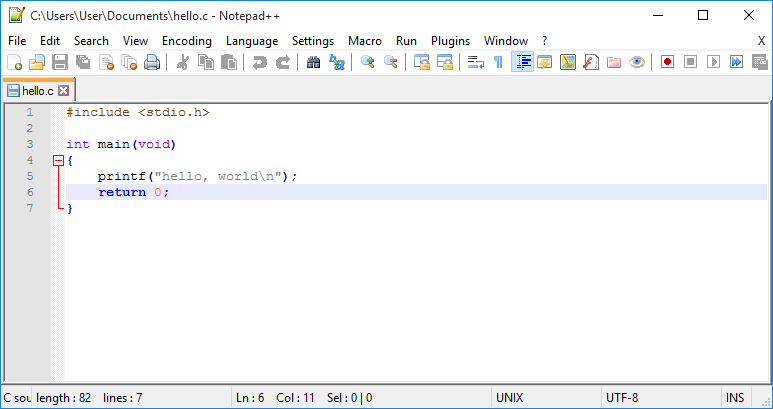 A screenshot of a C program in a code editor (e.g., Code::Blocks or VS Code). (Image: Notepad++ Original: Don Ho Screenshot Photograph: User:WubTh, Public domain, via Wikimedia Commons)
Based on the NEB +2 Science syllabus for Computer Science (Comp), unit 7.
Discussion
Loading…