Computer ScienceUnit 217 min read
Data Communication & Networking: Models, Protocols, Devices & Topologies
Unit 2 of Computer Science covers how data travels between devices, explaining OSI and TCP/IP models, network topologies, protocols, transmission media, and hardware like routers and switches—essential for NEB exams.
TAKEAWAYS:
- Data communication requires sender, receiver, medium, and protocol to transmit information reliably.
- The OSI model (7 layers) and TCP/IP model (4 layers) organize network functions for clarity and troubleshooting.
- Network topologies (star, bus, ring, mesh) determine how devices connect and share data.
- Protocols (HTTP, FTP, TCP, UDP) define rules for data exchange, while media (cable, wireless) carry the signals.
- Network devices (routers, switches, hubs) route and manage data flow efficiently.
- NEB-style questions focus on definitions, comparisons, and real-world applications of networking concepts.
What is Data Communication?
Data communication is the exchange of data between two or more devices using a communication medium. It involves:
- Sender: The device that sends data (e.g., computer, smartphone).
- Receiver: The device that receives data.
- Medium: The path through which data travels (e.g., cables, airwaves).
- Protocol: Rules that govern how data is formatted, transmitted, and received.
Key Terms:
- Data: Raw facts or figures (e.g., text, numbers, images).
- Information: Processed data that is meaningful (e.g., a report, a webpage).
- Signal: Electrical or electromagnetic representation of data (e.g., binary
1s and0s).
OSI Model: The 7-Layer Networking Framework
The Open Systems Interconnection (OSI) model is a conceptual framework that standardizes network functions into 7 layers. Each layer has a specific role and communicates only with the layer immediately above or below it.
The 7 Layers of OSI Model:
| Layer Name | Function | Example Protocols/Devices |
|---|---|---|
| Application | Provides network services to end-users (e.g., email, web browsing). | HTTP, FTP, SMTP, DNS |
| Presentation | Translates data into a readable format (e.g., encryption, compression). | SSL/TLS, JPEG, MPEG |
| Session | Manages connections between applications (e.g., opening/closing sessions). | NetBIOS, RPC |
| Transport | Ensures end-to-end communication and error recovery. | TCP, UDP |
| Network | Handles routing and addressing (e.g., IP addresses). | IP, Routers |
| Data Link | Manages framing and error detection on a single link. | Ethernet, Switches, MAC addresses |
| Physical | Transmits raw bit streams over physical media (e.g., cables, signals). | Hubs, Repeaters, Fiber Optics |
graph TD
    A["Application"] --> B["Presentation"]
    B --> C["Session"]
    C --> D["Transport"]
    D --> E["Network"]
    E --> F["Data Link"]
    F --> G["Physical"]
    G -->|"Data"| F
    F -->|"Frames"| E
    E -->|"Packets"| D
    D -->|"Segments"| C
    C -->|"Data"| B
    B -->|"Data"| A
How Data Travels Through OSI Layers:
- Application Layer: User requests a webpage (e.g., typing
google.com). - Presentation Layer: Encrypts or compresses the data (e.g., HTTPS).
- Session Layer: Establishes a connection (e.g., TCP handshake).
- Transport Layer: Breaks data into segments and ensures delivery (e.g., TCP).
- Network Layer: Adds IP addresses and routes packets (e.g., routers).
- Data Link Layer: Adds MAC addresses and creates frames (e.g., switches).
- Physical Layer: Transmits raw bits as signals (e.g., Ethernet cable).
Solved Example: Question: Which OSI layer is responsible for converting data into a format that can be transmitted over the network? Answer: The Presentation Layer (Layer 6) handles data translation, encryption, and compression before transmission.
TCP/IP Model: The Practical Alternative
The TCP/IP model is a simplified 4-layer model used in real-world networks (e.g., the Internet). It combines some OSI layers for efficiency.
| TCP/IP Layer | OSI Layers Mapped To | Function |
|---|---|---|
| Application | Application, Presentation, Session | Provides network services to users (e.g., HTTP, FTP). |
| Transport | Transport | Ensures end-to-end communication (e.g., TCP, UDP). |
| Internet | Network | Handles addressing and routing (e.g., IP, routers). |
| Network Access | Data Link, Physical | Manages framing and physical transmission (e.g., Ethernet, Wi-Fi). |
graph TD
    A["Application"] --> B["Transport"]
    B --> C["Internet"]
    C --> D["Network Access"]
    D -->|"Frames"| C
    C -->|"Packets"| B
    B -->|"Segments"| A
Comparison: OSI vs. TCP/IP
| Feature | OSI Model | TCP/IP Model |
|---|---|---|
| Number of Layers | 7 | 4 |
| Purpose | Theoretical framework | Practical implementation (Internet) |
| Complexity | More detailed, easier to teach | Simplified, used in real networks |
| Protocols | Defines all layers | Combines layers (e.g., TCP/IP stack) |
Solved Example: Question: Which TCP/IP layer is equivalent to the OSI Network Layer? Answer: The Internet Layer (Layer 3 in TCP/IP) corresponds to the OSI Network Layer (Layer 3). Both handle routing and IP addressing.
Network Topologies: How Devices Connect
Network topology refers to the physical or logical arrangement of devices in a network. Common types include:
1. Star Topology
- All devices connect to a central hub (e.g., switch or router).
- If the central device fails, the entire network goes down.
- Example: Home Wi-Fi network with a router.
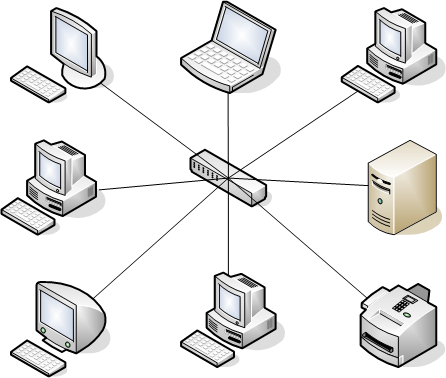 A central hub connected to multiple devices in a star shape. (Image: Umapathy, CC BY-SA 3.0, via Wikimedia Commons)
2. Bus Topology
- All devices share a single communication line (bus).
- Simple and cheap to install, but a fault in the bus can disable the entire network.
- Example: Old Ethernet networks (10BASE2).
graph LR
    A["Device 1"] --|"Data"| B["Bus Cable"]
    C["Device 2"] --|"Data"| B
    D["Device 3"] --|"Data"| B
    E["Device 4"] --|"Data"| B
3. Ring Topology
- Devices are connected in a closed loop.
- Data travels in one direction (e.g., token passing).
- If one device fails, the entire network can fail.
- Example: Token Ring networks (rare today).
graph TD
    A["Device 1"] --> B["Device 2"]
    B --> C["Device 3"]
    C --> D["Device 4"]
    D --> A
4. Mesh Topology
- Every device is connected to every other device (full mesh) or some devices (partial mesh).
- Highly reliable but expensive to implement.
- Example: Military networks, blockchain nodes.
graph TD
    A["Device 1"] --> B["Device 2"]
    A --> C["Device 3"]
    A --> D["Device 4"]
    B --> C
    B --> D
    C --> D
Comparison of Topologies
| Topology | Advantages | Disadvantages | Best For |
|---|---|---|---|
| Star | Easy to manage, scalable | Central point of failure | Homes, offices |
| Bus | Cheap, simple | Single point of failure, slow | Small networks (obsolete) |
| Ring | Equal access, no collisions | Failure in one node affects all | Token Ring networks (rare) |
| Mesh | Highly reliable, fault-tolerant | Expensive, complex | Military, blockchain |
Solved Example: Question: Which topology is most commonly used in modern home networks? Answer: Star Topology is the most common because it uses a central router/switch, making it easy to add or remove devices.
Network Protocols: Rules for Data Exchange
A protocol is a set of rules that govern how data is transmitted between devices. Key protocols include:
1. HTTP (Hypertext Transfer Protocol)
- Used for web browsing (e.g., loading webpages).
- Works over TCP/IP (port 80 for HTTP, 443 for HTTPS).
- Example: When you type
https://google.com, HTTP requests and responses are exchanged.
sequenceDiagram
    Client->>Server: GET /index.html (HTTP Request)
    Server-->>Client: HTTP/1.1 200 OK (HTML Data)
2. FTP (File Transfer Protocol)
- Used for uploading/downloading files (e.g., transferring large files).
- Works over TCP (ports 20 and 21).
- Example: Downloading software from a server.
3. TCP (Transmission Control Protocol)
- Connection-oriented: Ensures data arrives correctly and in order.
- Uses handshaking (SYN, ACK, FIN) to establish connections.
- Example: Email (SMTP), web browsing (HTTP).
sequenceDiagram
    Client->>Server: SYN (Connection Request)
    Server-->>Client: SYN-ACK (Acknowledgment)
    Client-->>Server: ACK (Connection Established)
4. UDP (User Datagram Protocol)
- Connectionless: Faster but no guarantee of delivery.
- Used for real-time applications (e.g., video streaming, online gaming).
- Example: VoIP (Voice over IP), live streaming.
Comparison: TCP vs. UDP
| Feature | TCP | UDP |
|---|---|---|
| Connection | Connection-oriented | Connectionless |
| Reliability | Guarantees delivery | No guarantee |
| Speed | Slower (handshaking, error checking) | Faster |
| Use Cases | Web, email, file transfer | Video, gaming, live streaming |
Solved Example: Question: Which protocol would you use for streaming a live video, and why? Answer: UDP is used because it is faster and does not require guaranteed delivery (some packet loss is acceptable in live streaming).
Transmission Media: How Data Travels
Data can travel through guided (wired) or unguided (wireless) media.
1. Guided Media
| Type | Description | Example |
|---|---|---|
| Twisted Pair | Insulated copper wires twisted together to reduce interference. | Ethernet cables (CAT5, CAT6) |
| Coaxial Cable | Single copper core surrounded by insulation and a metal shield. | Cable TV, old Ethernet (10BASE5) |
| Fiber Optic | Thin glass or plastic fibers that transmit data as light pulses. | Internet backbone, long-distance |
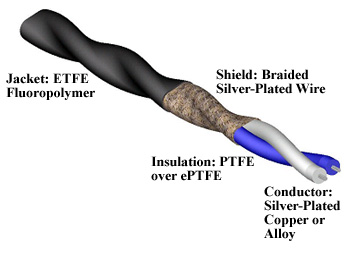 A labeled diagram showing twisted pair wires with insulation and shielding. (Image: Oyuhain, CC BY-SA 4.0, via Wikimedia Commons)
2. Unguided Media
| Type | Description | Example |
|---|---|---|
| Radio Waves | Electromagnetic waves transmitted through air. | Wi-Fi, Bluetooth, FM radio |
| Microwaves | High-frequency radio waves used for long-distance communication. | Satellite communication |
| Infrared | Light waves used for short-range communication. | TV remotes, some wireless mice |
Solved Example: Question: Which transmission medium is best for high-speed internet in a large office building? Answer: Fiber Optic Cable is best because it provides high bandwidth, low interference, and long-distance capability without signal degradation.
Network Devices: Hardware That Manages Data Flow
Network devices route, switch, or amplify data to ensure smooth communication.
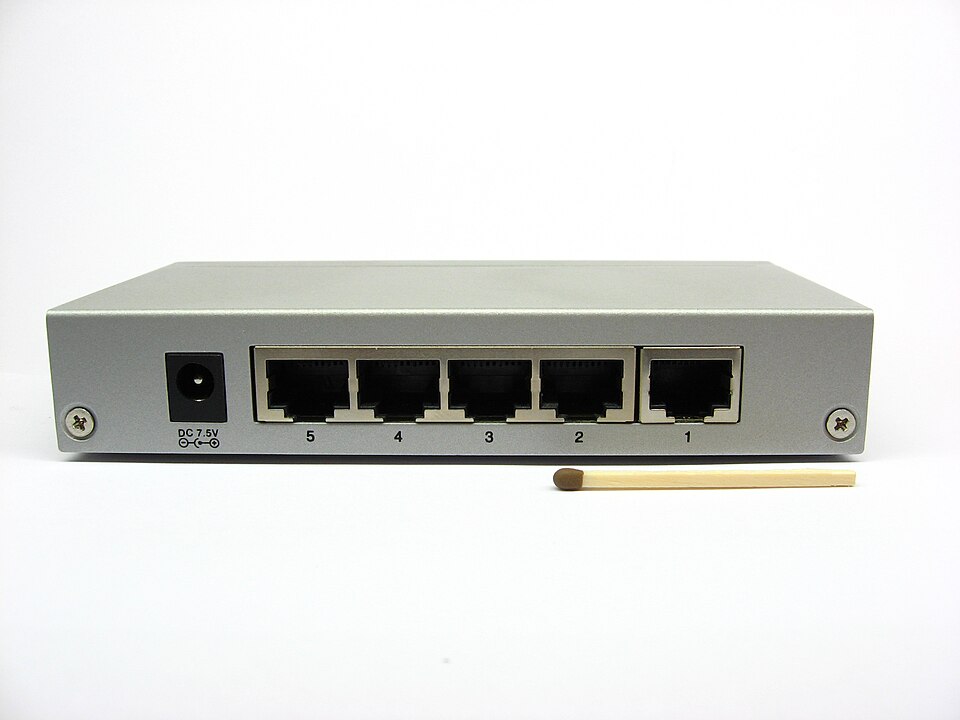 A typical Ethernet switch with port numbers. (Image: Lukasz Szymanek (filque), CC BY-SA 2.5, via Wikimedia Commons)
1. Hub
- Dumb device: Sends data to all connected devices (broadcast).
- Problem: Creates collisions and slows down the network.
- Example: Old Ethernet hubs (rarely used today).
2. Switch
- Smart device: Sends data only to the intended device using MAC addresses.
- Faster and more efficient than hubs.
- Example: Home/office switches.
3. Router
- Connects multiple networks (e.g., home LAN to the Internet).
- Uses IP addresses to route data between networks.
- Example: Home Wi-Fi router.
4. Repeater
- Amplifies signals to extend network range.
- Used in long-distance networks (e.g., fiber optic repeaters).
5. Bridge
- Connects two similar networks (e.g., two Ethernet segments).
- Filters and forwards data based on MAC addresses.
Comparison of Network Devices
| Device | Function | Intelligence Level | Example Use Case |
|---|---|---|---|
| Hub | Broadcasts data to all devices | Low | Obsolete networks |
| Switch | Forwards data only to the destination device | High | Office LANs |
| Router | Routes data between networks using IP addresses | Very High | Internet connection |
| Repeater | Amplifies signals to extend range | Low | Long-distance fiber networks |
| Bridge | Connects two similar networks and filters traffic | Medium | Segmenting a large network |
Solved Example: Question: If your home network has slow performance, which device should you replace: a hub or a switch? Answer: Replace the hub with a switch because a switch reduces collisions and improves efficiency by sending data only to the intended device.
NEB Board-Style Questions and Answers
Short Answer Questions:
What is the difference between a switch and a hub?
- A hub broadcasts data to all devices, causing collisions.
- A switch forwards data only to the intended device using MAC addresses.
Name the four layers of the TCP/IP model.
- Application, Transport, Internet, Network Access.
Which OSI layer is responsible for logical addressing?
- The Network Layer (Layer 3) handles logical addressing (e.g., IP addresses).
What is the purpose of the Physical Layer in the OSI model?
- It transmits raw bit streams over physical media (e.g., cables, signals).
Give an example of a connectionless protocol.
- UDP (User Datagram Protocol) is connectionless and used for real-time applications.
Long Answer Questions:
Explain the OSI model with its layers and functions. Include a diagram. (Answer: See the OSI model section above with the 7-layer table and Mermaid diagram.)
Compare and contrast TCP and UDP protocols. (Answer: See the TCP vs. UDP comparison table above.)
Describe the star topology and its advantages and disadvantages. (Answer: See the star topology section with pros, cons, and real-world example.)
What is the role of a router in a network? How does it differ from a switch?
- A router connects multiple networks (e.g., LAN to Internet) using IP addresses.
- A switch connects devices within a single network using MAC addresses.
Explain how data travels through the OSI layers when you load a webpage. (Answer: See the "How Data Travels Through OSI Layers" section above.)
Exam Tip: How to Score Full Marks
Understand the Models:
- Memorize the 7 OSI layers and 4 TCP/IP layers with their functions.
- Draw the OSI and TCP/IP diagrams in exams (if allowed).
Compare and Contrast:
- NEB often asks to compare TCP vs. UDP, OSI vs. TCP/IP, or topologies.
- Use tables to organize comparisons (e.g., advantages/disadvantages).
Real-World Applications:
- Relate concepts to everyday examples (e.g., Wi-Fi uses star topology, HTTP loads webpages).
Diagrams:
- Practice drawing network topologies (star, bus, ring, mesh).
- Label all components (e.g., hub, switch, devices).
Key Terms:
- Know definitions of protocol, topology, MAC address, IP address, router, switch.
- Example: "A protocol is a set of rules governing data transmission."
Problem-Solving:
- If asked about slow networks, think of hub vs. switch, collisions, or wrong topology.
- For data loss, consider UDP vs. TCP or faulty cables.
Final Note: Data communication and networking are fundamental to modern computing. Focus on models, protocols, topologies, and devices—these are the core areas NEB exams test. Practice drawing diagrams and comparing concepts to score full marks!
Based on the NEB +2 Science syllabus for Computer Science (Comp), unit 2.
Discussion
Loading…