Embedded SystemUnit 112 min read
Embedded Systems: Definitions, Types, Applications & Design Flow
Unit 1 of Embedded System introduces core concepts like embedded system definitions, classifications, key components, and design methodologies, with real-world examples from Nepalese tech (eSewa, Ncell) and global giants (Google, Tesla).
What is an Embedded System?
An embedded system is a specialized computing system designed to perform dedicated real-time tasks within a larger system. Unlike general-purpose computers (e.g., PCs or smartphones), embedded systems are hardware + software combinations optimized for efficiency, reliability, and cost-effectiveness.
Key Characteristics
mindmap
  root((Embedded System))
    Characteristics
      Dedicated Functionality
      Real-Time Operation
      Resource Constraints
      Hardware-Software Integration
      Low Power Consumption
      Ruggedness
Comparison: Embedded vs. General-Purpose Systems
| Feature | Embedded System | General-Purpose System (PC/Smartphone) |
|---|---|---|
| Purpose | Single, specific task (e.g., microwave) | Multi-tasking (web browsing, gaming) |
| OS | Often no OS or RTOS (e.g., FreeRTOS) | Full OS (Windows, Android, Linux) |
| Hardware | Customized (e.g., 8-bit/32-bit MCUs) | Standardized (x86, ARM, high-end GPUs) |
| Power | Low (battery-operated) | High (wall-powered) |
| Cost | Low (mass-produced) | High (complex components) |
| Example | Anti-lock braking system (ABS) | Laptop running Photoshop |
Types of Embedded Systems
Embedded systems are classified based on functionality, complexity, and application. Here’s a breakdown:
1. Microcontroller-Based Systems
- Definition: Use a microcontroller (MCU) as the central processing unit (CPU). MCUs integrate CPU, memory, and I/O peripherals on a single chip.
- Examples:
- Washing machines (control timers, water levels).
- Remote controls (process button presses).
- eSewa payment terminals (handle transactions securely).
- Advantages:
- Low cost, low power, small size.
- Easy to program (e.g., using Embedded C).
- Disadvantages:
- Limited processing power for complex tasks.
- Less flexible for upgrades.
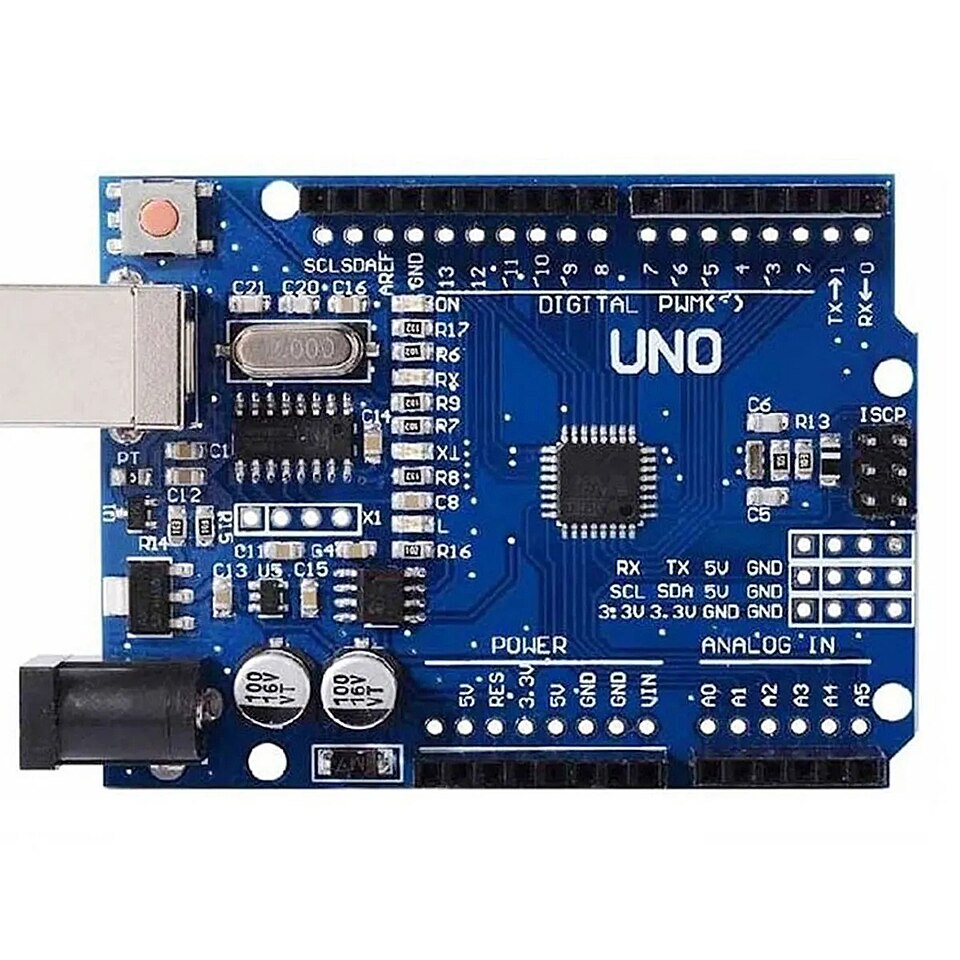 A typical 8-bit/32-bit microcontroller (Arduino Uno) used in prototyping. (Image: Arduino, CC BY-SA 2.5, via Wikimedia Commons)
2. Microprocessor-Based Systems
- Definition: Use a microprocessor (MPU) (e.g., Intel 8051, ARM Cortex) with external memory and peripherals.
- Examples:
- Smartphones (ARM-based processors).
- Google Nest thermostats (process sensor data).
- Ncell’s network routers (route data packets).
- Advantages:
- Higher processing power than MCUs.
- More flexible (can run full OS like Linux).
- Disadvantages:
- Higher cost and power consumption.
- Requires more external components.
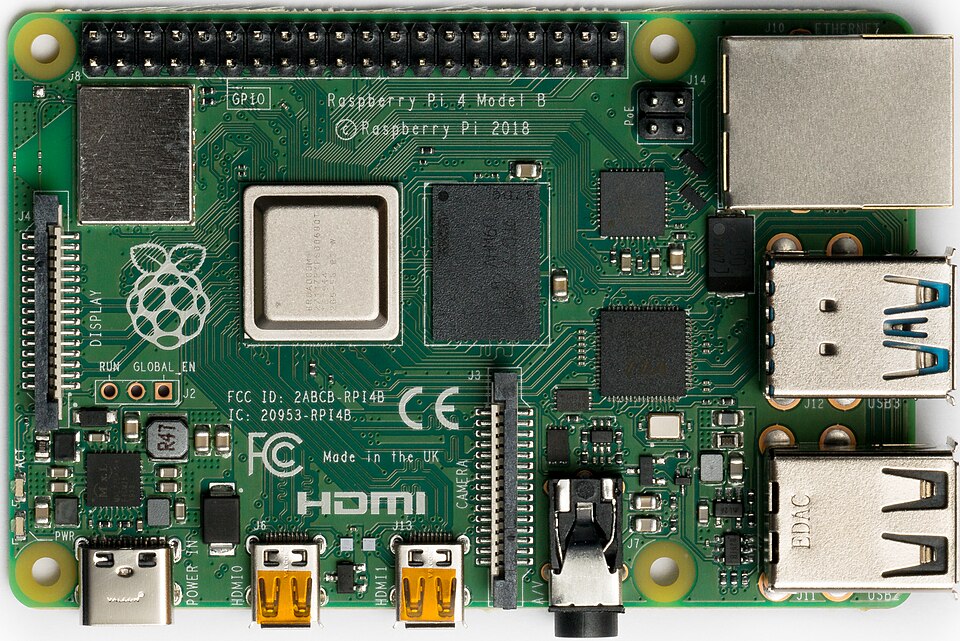 A Raspberry Pi 4 (MPU-based) used in IoT and embedded projects. (Image: Laserlicht, CC BY-SA 4.0, via Wikimedia Commons)
3. Digital Signal Processors (DSPs)
- Definition: Optimized for real-time signal processing (e.g., audio, video, radar).
- Examples:
- Voice assistants (e.g., Google Home’s speech recognition).
- Medical imaging (MRI machines).
- 5G base stations (NTC’s network equipment).
- Key Feature: Fast multiplication and accumulation (MAC) operations.
4. Hybrid Systems
- Definition: Combine multiple processors (e.g., MCU + DSP + MPU) for complex tasks.
- Example:
- Tesla’s Autopilot (MCU for sensors + MPU for AI + DSP for audio).
- Modern cars (ECUs for engine, ABS, infotainment).
Components of an Embedded System
Every embedded system consists of hardware and software components working together:
Hardware Components
graph LR
  A["Microcontroller/Microprocessor"] --> B["Memory"]
  A --> C["Input/Output Devices"]
  A --> D["Power Supply"]
  A --> E["Peripherals"]
  B --> B1["ROM: Firmware Storage"]
  B --> B2["RAM: Temporary Data"]
  C --> C1["Sensors: Temperature, Motion"]
  C --> C2["Actuators: Motors, LEDs"]
  D --> D1["Battery/Adapter"]
  E --> E1["UART, SPI, I2C for Communication"]
Central Processing Unit (CPU):
- Executes instructions (e.g., 8051, ARM Cortex-M).
- Example: The brain of a Pathao driver’s app (processes GPS, payment data).
Memory:
- ROM (Read-Only Memory): Stores firmware (e.g., bootloader).
- RAM (Random Access Memory): Temporary data storage.
- Flash Memory: Reprogrammable (e.g., in smartphones).
Input/Output (I/O) Devices:
- Sensors: Collect data (e.g., temperature sensor in a fridge).
- Actuators: Perform actions (e.g., motor in a washing machine).
- Interfaces: UART, SPI, I2C for communication.
Power Supply:
- Batteries (e.g., in wearables), adapters (e.g., in routers).
Applications of Embedded Systems
Embedded systems are ubiquitous in daily life and industry. Here’s how they’re used in Nepal and globally:
## In the Real World
eSewa (Nepal):
- Idea Used: Microcontroller-based secure transaction processing.
- How: The eSewa POS terminal uses an MCU to authenticate payments via QR codes, encrypt data, and log transactions in real-time. The system must handle interruptions (e.g., network drops) without crashing—critical for financial reliability.
Ncell’s 4G Routers:
- Idea Used: Microprocessor + DSP hybrid system.
- How: Ncell’s routers use an ARM-based MPU to manage data packets and a DSP to compress/decompress signals for faster 4G speeds. The embedded Linux OS handles multiple connections simultaneously.
Daraz’s Warehouse Automation:
- Idea Used: Sensor-actuator systems for inventory management.
- How: Daraz uses RFID sensors (embedded in tags) and motorized conveyor belts (actuators) to track and move products. A central MCU coordinates between sensors and actuators to fulfill orders efficiently.
Worked Example: Traffic Light Controller (Kathmandu)
Scenario: Design a simple embedded system to control traffic lights at a busy intersection in Kathmandu. Components:
- MCU: Arduino Uno (ATmega328P).
- Sensors: Infrared sensors to detect vehicles.
- Actuators: Traffic light LEDs (red, yellow, green).
- Power: 12V battery.
Flow:
- Initialization: MCU sets default green light for North-South traffic.
- Sensor Input: Infrared sensor detects a vehicle waiting at East-West.
- Decision Logic:
- If East-West sensor is triggered, MCU switches to green for East-West after current North-South cycle.
- Timer ensures yellow light (2 sec) before switching.
- Output: Actuators change LED colors accordingly.
sequenceDiagram
  participant MCU
  participant NorthSouthSensor
  participant EastWestSensor
  participant TrafficLights

  MCU->>NorthSouthSensor: Check for vehicles (green)
  loop Every 30 sec
    NorthSouthSensor-->>MCU: Vehicle detected
    MCU->>TrafficLights: Set North-South green
    MCU->>EastWestSensor: Monitor
    EastWestSensor-->>MCU: Vehicle detected
    MCU->>TrafficLights: Set yellow (2 sec)
    MCU->>TrafficLights: Set East-West green
    MCU->>NorthSouthSensor: Monitor
  end
Why This Matters:
- Real-Time Operation: Must respond instantly to sensor inputs (no delays).
- Reliability: Must work 24/7 in harsh weather (e.g., Kathmandu’s monsoon).
- Cost-Effective: Uses low-power MCU to save energy.
Embedded System Design Flow
Designing an embedded system follows a structured step-by-step process:
Steps Explained:
Problem Definition:
- Example: "Design a system to monitor soil moisture for farmers in Pokhara."
- Key Questions:
- What is the input? (Soil moisture sensor).
- What is the output? (Alert via SMS/LED).
Requirements Analysis:
- Functional: Must measure moisture levels.
- Non-Functional: Low power (<500mA), cost (<$20).
Hardware Selection:
- MCU: Arduino Nano (ATmega328P).
- Sensor: Capacitive soil moisture sensor.
- Communication: GSM module (SIM800L) for SMS alerts.
Software Design:
- Write Embedded C code to:
- Read sensor data.
- Compare with threshold (e.g., <30% moisture).
- Send SMS if dry.
- Write Embedded C code to:
Prototyping:
- Assemble components on a breadboard.
- Test with real soil samples.
Testing:
- Unit Testing: Check sensor accuracy.
- Integration Testing: Verify MCU + GSM module communication.
Debugging:
- Use serial monitor to log errors (e.g., "Sensor reading out of range").
Deployment:
- Encapsulate in a waterproof box for field use.
Maintenance:
- Update firmware if sensor calibration drifts.
Advantages and Disadvantages
| Advantages | Disadvantages |
|---|---|
| Cost-Effective: Mass production reduces costs. | Limited Upgradability: Fixed hardware. |
| Low Power Consumption: Battery-friendly. | Security Risks: Vulnerable to hacking (e.g., IoT devices). |
| Real-Time Processing: Critical for safety (e.g., airbags). | Complex Debugging: Hard to trace issues in hardware-software integration. |
| Reliability: Built for specific tasks (e.g., pacemakers). | Design Constraints: Trade-offs between speed, cost, and power. |
| Small Form Factor: Fits in tiny devices (e.g., smartwatches). | Lack of Standardization: No universal OS or programming language. |
Exam Tip
How This Unit is Examined (PU Pattern):
Definitions (5-10 marks):
- Expect questions like:
- "Define an embedded system and differentiate it from a general-purpose system."
- "What is the role of an RTOS in embedded systems?"
- Tip: Memorize the key characteristics (dedicated function, real-time, resource constraints) and compare it with general-purpose systems using the table above.
- Expect questions like:
Short Descriptions (5-10 marks):
- "Explain the components of a microprocessor-based embedded system."
- Tip: Use the Mermaid diagram above to structure your answer. Mention CPU, memory (ROM/RAM), I/O, and power supply with one example each.
Applications (10-15 marks):
- "Describe how embedded systems are used in smart home applications."
- Tip: Pick 2-3 real-world examples (e.g., smart thermostat, security cameras) and explain:
- Hardware used (e.g., ESP32 MCU).
- Software (e.g., firmware for Wi-Fi control).
- Sensors/Actuators (e.g., temperature sensor + relay for AC).
Design Flow (10-15 marks):
- "Outline the steps involved in designing an embedded system for a blood glucose monitor."
- Tip: Follow the Mermaid flowchart and add one real-world constraint (e.g., "must operate on a coin-cell battery for 1 year").
Worked Examples (10-20 marks):
- "Design a traffic light system using an 8051 microcontroller."
- Tip:
- Start with requirements (timing, sensors).
- Draw a simple circuit diagram (even if not in the exam, sketching helps).
- Write pseudo-code for the logic (e.g., "IF East-West sensor HIGH THEN switch lights").
Common Pitfalls:
- Vague Definitions: Avoid saying "embedded systems are small computers." Instead, emphasize dedicated functionality and real-time constraints.
- Ignoring Constraints: In design questions, always mention power, cost, or reliability constraints.
- Overcomplicating: Stick to one example per question (e.g., for applications, pick either medical or automotive, not both).
Final Checklist for Full Marks:
- Define embedded systems with all 6 key characteristics.
- Compare embedded vs. general-purpose systems in a table.
- Classify embedded systems into 4 types with one Nepalese example each.
- Explain the design flow with a Mermaid diagram.
- Relate to real-world Nepalese/global examples (eSewa, Ncell, Daraz).
- Solve a worked example (e.g., traffic light) with circuit logic and pseudo-code.
Based on the PU BE Computer (PU) syllabus for Embedded System (ELX320), unit 1.
Discussion
Loading…