Cloud Computing and VirtualizationUnit 111 min read
Cloud Computing Basics: Definitions, Models, and Real-World Impact
Unit 1 of Cloud Computing and Virtualization introduces the core concepts of cloud computing—its definition, essential characteristics, service and deployment models, and how it revolutionizes IT infrastructure. This note covers the evolution of cloud computing, its key advantages, and real-world applications in Nepal
What is Cloud Computing?
Cloud computing is the delivery of computing services—servers, storage, databases, networking, software, analytics, and intelligence—over the internet ("the cloud") to offer faster innovation, flexible resources, and economies of scale. Unlike traditional on-premise IT, cloud computing eliminates the need for physical hardware management, allowing users to access resources on-demand.
Key Characteristics of Cloud Computing
Cloud computing is defined by five essential characteristics (NIST model):
mindmap
  root((Cloud Computing Characteristics))
    On-demand Self-service
    Broad Network Access
    Resource Pooling
    Rapid Elasticity
Measured Service- On-demand Self-service: Users can provision computing resources (e.g., storage, CPU) automatically without human interaction.
- Broad Network Access: Services are accessible over the network (e.g., internet) via standard mechanisms (e.g., web browsers, APIs).
- Resource Pooling: Multi-tenant model where resources are pooled to serve multiple consumers using a model of resource sharing.
- Rapid Elasticity: Resources can be scaled up or down dynamically to meet demand.
- Measured Service: Cloud systems automatically control and optimize resource use by leveraging metering capabilities.
Evolution of Cloud Computing
Cloud computing evolved from earlier computing models:
| Era | Model | Key Feature |
|---|---|---|
| 1960s | Mainframe Computing | Centralized computing for large organizations. |
| 1980s-1990s | Client-Server Model | Workstations connected to centralized servers. |
| 2000s | Grid Computing | Distributed computing for high-performance tasks (e.g., scientific research). |
| 2006-Present | Cloud Computing | On-demand, scalable, and pay-as-you-go services. |
Why the shift to cloud?
- Cost Efficiency: No need to invest in physical infrastructure.
- Scalability: Easily handle traffic spikes (e.g., Daraz during sales).
- Reliability: High availability via redundant systems.
Cloud Service Models
Cloud services are categorized into three primary models, each offering different levels of control and management:
1. Infrastructure as a Service (IaaS)
- Definition: Provides virtualized computing resources (e.g., virtual machines, storage, networks).
- Use Case: Startups or businesses needing flexible IT infrastructure without hardware management.
- Example: Ncell uses IaaS to host its customer portal and billing systems, scaling resources during peak usage (e.g., during festive seasons).
2. Platform as a Service (PaaS)
- Definition: Offers a platform for developing, testing, and deploying applications without managing infrastructure.
- Use Case: Developers building web or mobile apps.
- Example: Pathao uses PaaS (e.g., AWS Elastic Beanstalk) to deploy its ride-hailing backend, allowing developers to focus on app logic rather than server management.
3. Software as a Service (SaaS)
- Definition: Delivers fully functional software applications over the internet.
- Use Case: End-users accessing software without installation (e.g., email, CRM).
- Example: eSewa is a SaaS platform for online payments, allowing users to pay bills (e.g., NTC, NEPSE) without installing software.
Cloud Deployment Models
Cloud environments can be deployed in four primary models, each with different trade-offs:
1. Public Cloud
- Definition: Services delivered over the public internet by third-party providers.
- Advantages:
- Cost-effective (pay-as-you-go).
- Scalable and highly available.
- Disadvantages:
- Less control over data.
- Security concerns (shared infrastructure).
- Example: Google Cloud hosts many Nepalese apps (e.g., Khalti) for payment processing.
2. Private Cloud
- Definition: Cloud infrastructure dedicated to a single organization.
- Advantages:
- Full control over security and compliance.
- Customizable for specific needs.
- Disadvantages:
- High upfront cost.
- Requires in-house expertise.
- Example: A Nepalese bank (e.g., Nabil Bank) might use a private cloud for sensitive transactions like loan processing.
3. Hybrid Cloud
- Definition: Combines public and private clouds, allowing data and applications to be shared between them.
- Advantages:
- Balances cost and control.
- Flexibility to move workloads.
- Disadvantages:
- Complexity in management.
- Higher integration costs.
- Example: Daraz might use a hybrid cloud to handle public-facing e-commerce (public cloud) while keeping customer data secure in a private cloud.
4. Community Cloud
- Definition: Shared infrastructure for a specific community with common concerns (e.g., security, compliance).
- Advantages:
- Shared costs among members.
- Tailored to specific needs.
- Disadvantages:
- Limited flexibility.
- Requires collaboration.
- Example: A group of Nepalese universities sharing a cloud for research data storage.
In the Real World
Cloud computing powers many services Nepalese students use daily:
eSewa (SaaS)
- Idea Used: Software as a Service (SaaS).
- How: eSewa provides an online platform for bill payments (e.g., NTC, NEPSE) without requiring users to install or manage any software. The backend runs on cloud servers (likely AWS or Azure) for scalability during peak hours (e.g., before exam results or festival seasons).
Khalti (Hybrid Cloud + PaaS)
- Idea Used: Hybrid cloud deployment and Platform as a Service (PaaS).
- How: Khalti uses a hybrid cloud to balance cost and security. Public cloud handles high-traffic transactions (e.g., during Dashain), while sensitive data (e.g., user KYC) is stored in a private cloud. The payment processing backend runs on a PaaS like AWS Elastic Beanstalk.
Ncell Customer Portal (IaaS)
- Idea Used: Infrastructure as a Service (IaaS).
- How: Ncell’s customer portal (for checking bills, data usage) runs on virtual machines in the cloud (e.g., Google Cloud or Azure). During festivals, Ncell dynamically scales up resources to handle millions of users checking their bills simultaneously.
Worked Example: Scaling a Nepalese E-Commerce Site (Daraz)
Scenario: Daraz experiences a 10x traffic spike during the Dashain sale. How does cloud computing help?
Step-by-Step Trace
Before Cloud (Traditional Setup):
- Daraz would need to pre-purchase and maintain physical servers.
- During sales, the system might crash due to overload.
- Recovery time would be slow (hours/days).
With Cloud (IaaS + Auto-Scaling):
- Daraz uses AWS EC2 (IaaS) to host its website.
- Auto-scaling automatically adds more virtual servers when traffic exceeds a threshold.
- Load balancers distribute traffic across servers to prevent overload.
- Result: Seamless user experience even with 10x traffic.
sequenceDiagram
    participant User
    participant LoadBalancer
    participant Server1
    participant Server2
    participant AutoScaling
    User->>LoadBalancer: Request (10x traffic)
    LoadBalancer->>Server1: Forward Request
    LoadBalancer->>Server2: Forward Request
    AutoScaling->>LoadBalancer: Add Server3 (due to high load)
    LoadBalancer->>Server3: Forward Request
    Server1/Server2/Server3-->>User: Response
Advantages and Disadvantages of Cloud Computing
| Advantages | Disadvantages |
|---|---|
| Cost Savings: No upfront hardware cost. | Security Risks: Data breaches in shared environments. |
| Scalability: Easily handle traffic spikes. | Downtime: Dependency on internet connectivity. |
| Reliability: High availability via redundancy. | Vendor Lock-in: Difficulty migrating between providers. |
| Global Reach: Deploy services worldwide. | Compliance Issues: Data sovereignty laws (e.g., GDPR). |
| Disaster Recovery: Automated backups. | Performance Issues: Latency in public clouds. |
Exam Tip
For Tribhuvan University (TU) or Pokhara University (PU) exams, focus on:
- Definitions: Know the NIST definition of cloud computing and its 5 characteristics.
- Service Models: Differentiate IaaS, PaaS, and SaaS with real-world examples (e.g., eSewa = SaaS, Khalti = PaaS).
- Deployment Models: Explain public, private, hybrid, and community clouds with Nepalese use cases (e.g., banks = private cloud).
- Diagrams: Be ready to draw:
- Cloud service model hierarchy (class diagram).
- Cloud deployment model mindmap.
- Sequence diagram for cloud-based transactions (e.g., Khalti payment flow).
- Comparison Tables: Expect questions comparing on-premise vs. cloud or IaaS vs. PaaS vs. SaaS.
- Scenario-Based Questions: Practice explaining how cloud computing solves real problems (e.g., Daraz scaling during sales).
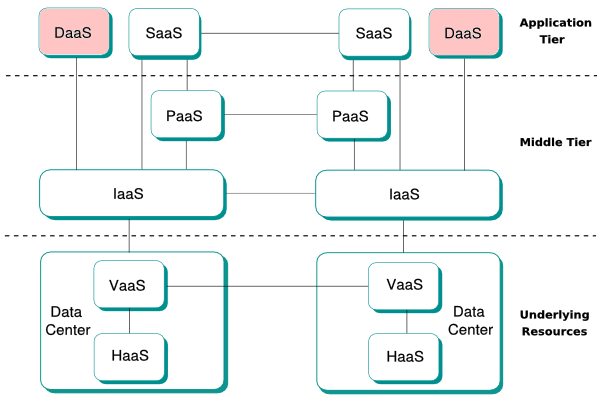 A labeled diagram showing the layers of cloud computing (front-end, back-end, delivery model, service model). (Image: Davide Lamanna, CC BY-SA 3.0, via Wikimedia Commons)
Based on the PU BE Computer (PU) syllabus for Cloud Computing and Virtualization (CMP424), unit 1.
Discussion
Loading…